
Introduction
This manual provides comprehensive instructions for the LG Gram Book 15U50T laptop. Please read this manual thoroughly before using your device to ensure proper operation and to maximize its lifespan. Keep this manual for future reference.
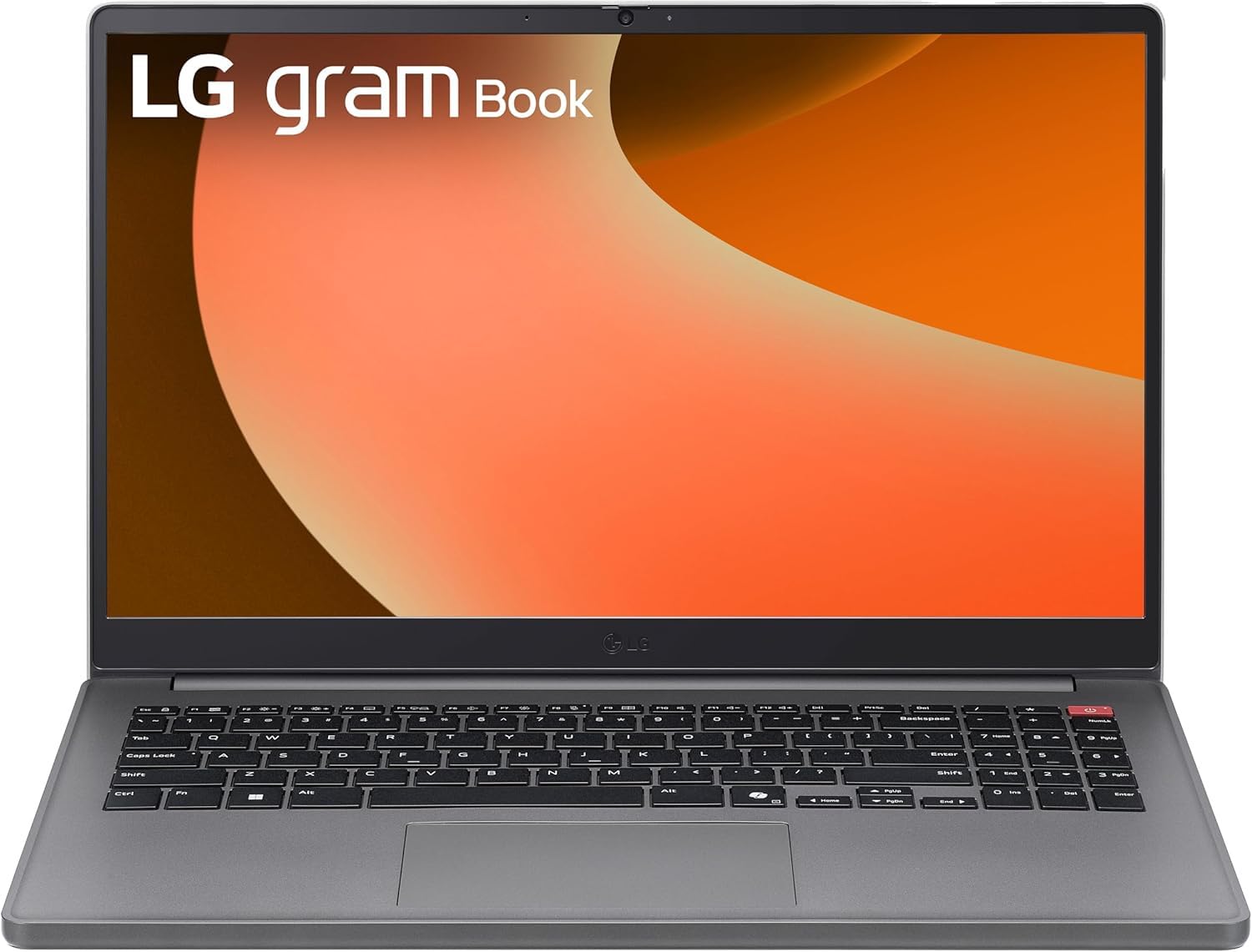
Сүрөт 1: Алдыңкы view of the LG Gram Book 15U50T Laptop.
Жайгашуу
1. Кутудан чыгаруу жана алгачкы текшерүү
Ноутбукту жана бардык аксессуарларды таңгактан этияттык менен алып чыгыңыз. Бардык компоненттердин бар экенин текшериңиз:
- LG Gram Book 15U50T Laptop
- AC адаптер жана электр шнуры
- Документтер (Ыкчам баштоо колдонмосу, Кепилдик маалыматы)
Ноутбуктун кандайдыр бир физикалык бузулууларын текшериңиз. Эгерде кандайдыр бир бузулуу табылса же компоненттери жок болсо, дароо сатуучуңузга кайрылыңыз.
2. Кубат адаптерин туташтыруу
Before initial use, connect the AC adapter to the laptop and a power outlet to fully charge the battery. The charging port is typically located on the side of the laptop.

Figure 2: Port layout of the LG Gram Book 15U50T. This diagram shows the location of the HDMI port (1), USB Type-A ports (2), USB Type-C ports (3), Headphone jack (4), and Kensington lock slot (5).
3. Баштапкы күйгүзүү жана Windows орнотуу
Press the power button, usually located on the top-right of the keyboard, to turn on the laptop. Follow the on-screen instructions to complete the Windows 11 Pro setup process. This includes selecting your region, connecting to a Wi-Fi network, and creating a user account.

Сүрөт 3: Жакын пландан view of the keyboard, highlighting the power button on the top right.
4. Перифериялык түзүлүштөрдү туташтыруу
Тышкы түзмөктөрдү туташтыруу үчүн жеткиликтүү портторду колдонуңуз:
- USB 3.2 Gen 2 Type-C (x2): Supports Power Delivery and DisplayPort for external monitors or charging compatible devices.
- USB 3.2 Gen 1 Type-A (x1): Чычкандар, баскычтоптор же тышкы дисктер сыяктуу стандарттуу USB түзмөктөрү үчүн.
- USB 2.0 Type-A (x1): Эски USB түзмөктөр үчүн.
- HDMI 2.0 (x1): Тышкы дисплейге же проекторго туташтырыңыз.
- Кулакчын / Микрофон айкалышкан уячасы (3.5 мм): Аудио киргизүү/чыгаруу үчүн.
Ноутбугуңузду иштетүү
1. Баскычтоп жана сенсордук такта
The LG Gram Book 15U50T features a full-size keyboard with a numeric keypad for efficient data entry. The integrated touchpad supports multi-touch gestures for navigation.

4-сүрөт: жогорудан ылдыйга view толук өлчөмдөгү клавиатура жана сенсордук панель.
2. Дисплей
The 15.6-inch Full HD (1920 x 1080) IPS Anti-glare display provides clear visuals. Adjust brightness and display settings through Windows settings (Right-click on desktop > Display settings).
3. Зымсыз байланыш
- Wi-Fi 6 (Intel AX203): Connect to wireless networks for internet access. Manage Wi-Fi connections via the network icon in the Windows taskbar.
- Bluetooth 5.2: Pair with Bluetooth-enabled devices such as headphones, speakers, or mice. Access Bluetooth settings via Windows Settings > Devices > Bluetooth & devices.
4. Камера жана аудио
The laptop includes a 720p HD Camera with a privacy shutter for video calls and conferences. The 3.5mm combo jack supports both headphones and external microphones.
Техникалык тейлөө
1. Ноутбукту тазалоо
- Экран: Жумшак, түксүз кездемени жеңил колдонуңуз dampсуу же экран тазалоочу менен бүттү. Тазалоочу каражатты түз экранга чачпаңыз.
- Баскычтоп жана шасси: Жумшак, кургак чүпүрөктү колдонуңуз. өжөр кир үчүн, бир аз гamp кездемени колдонсо болот, суюктуктун тешиктерге кирбешин камсыз кылыңыз. Кысылган аба баскычтардын ортосундагы чаңды кетире алат.
2. Батареяга кам көрүү
The 51Wh Lithium-Ion battery provides portable power. To prolong battery life:
- Ашыкча температурадан сактаныңыз.
- Батареяны бат-баттан толук зарядсыздандырбаңыз.
- Эгерде ноутбукту көпкө сактасаңыз, аны өчүрүүдөн мурун батарейканы 50-60% га чейин заряддаңыз.
3. Программалык камсыздоону жаңыртуу
Regularly update your Windows 11 Pro operating system and device drivers to ensure optimal performance and security. Access updates via Windows Settings > Windows Update.
4. Сактагычты башкаруу
The 2TB NVMe M.2 SSD provides fast storage. Periodically clean up unnecessary files and applications to maintain performance. Use Windows Disk Cleanup or Storage Sense features.
Проблемаларды чечүү
Бул бөлүм сиз кабылышы мүмкүн болгон жалпы көйгөйлөрдү карайт.
No Power / Laptop Not Turning On
- AC адаптери ноутбукка да, иштеген электр розеткасына да бекем туташып турганын текшериңиз.
- Башка аспапка сайып, розетка иштеп жатканын текшериңиз.
- Батарея толугу менен түгөнүп калса, ноутбук күйгүчө кубаттоого бир нече мүнөт талап кылынышы мүмкүн.
Маселелерди көрсөтүү
- If the screen is blank, try adjusting the brightness using the function keys (Fn + F2/F3, or similar, refer to keyboard icons).
- If an external monitor is not displaying, ensure the cable is connected correctly and try pressing Windows key + P to cycle through display modes.
Wi-Fi or Bluetooth Connectivity Problems
- Ensure Wi-Fi or Bluetooth is enabled in Windows settings.
- Wi-Fi көйгөйлөрү үчүн роутериңизди/модемиңизди өчүрүп күйгүзүңүз.
- For Bluetooth, try unpairing and re-pairing the device.
- Update wireless drivers via Device Manager.
Жай аткаруу
- Фондо иштеп жаткан керексиз тиркемелерди жабыңыз.
- Күтүүдөгү Windows жаңыртууларынын бардыгын текшерип, орнотуңуз.
- Сактоо ордун бошотуу үчүн дискти тазалоону иштетиңиз.
- Кесепеттүү программаларды же вирустарды издеңиз.
Техникалык шарттар
| Өзгөчөлүк | Деталь |
|---|---|
| Бренд | LG |
| Модель аты | Gram Book 15U50T |
| Screen Size | 15.6 дюйм |
| Display Resolution | 1920 x 1080 пиксел (FHD) |
| Дисплей түрү | IPS Anti-glare LED |
| Процессор | 13th Generation Intel Core i5-1334U (10-Core) |
| Графика | Intel Iris Xe графикасы (интегралдык) |
| RAM эс тутуму | 16GB DDR4 SDRAM 3200 MHz (Up to 64GB Max) |
| Сактагыч | 2TB NVMe M.2 SSD |
| Операция системасы | Windows 11 Pro |
| Зымсыз байланыш | Intel Wi-Fi 6 AX203 (2x2), Bluetooth 5.2 |
| Порттар | 2x USB 3.2 Gen 2 Type-C (PD/DP), 1x USB 3.2 Gen 1 Type-A, 1x USB 2.0 Type-A, 1x HDMI 2.0, 1x Headphone/Mic Combo Jack |
| Камера | Купуялык жапкычы бар 720p HD камера |
| Батарея | 51Wh Lithium-Ion (Up to 12 hours battery life) |
| Өлчөмдөрү (L x W x Y) | 14.16" x 9.37" x 0.76" дюйм |
| Салмагы | 3.74 фунт |
| Түс | Titan Silver |
Кепилдик жана колдоо
Кепилдик маалымат
Your LG Gram Book 15U50T laptop comes with a standard manufacturer's warranty. Please refer to the warranty card included in your product packaging for specific terms, conditions, and duration. Keep your proof of purchase for warranty claims.
Техникалык колдоо
For technical assistance, troubleshooting beyond this manual, or warranty service, please contact LG customer support. You can typically find contact information on the official LG webсайтында же продукт документациясында.
- Расмий LG сайтына барыңыз webколдоо булактары жана байланыш маалыматы үчүн сайт.
- Have your laptop's model number (15U50T) and serial number ready when contacting support.