
WLIVE ADSJ619
WLIVE Handle-Operated Height Adjustable TV Stand (Model: ADSJ619)
Instruction Manual
Introduction
This manual provides comprehensive instructions for the assembly, operation, and maintenance of your WLIVE Handle-Operated Height Adjustable TV Stand, Model ADSJ619. Please read this manual carefully before use to ensure safe and efficient operation. Keep this manual for future reference.
Коопсуздук маалыматы
- Абайлаңыз: When assembling, be careful with small parts and sharp edges.
- When mounting the TV, ensure the total weight does not exceed the specified load capacity (Max 50KG for TV, Max 5KG for upper shelf, Max 30KG for base shelf).
- Колдонуудан мурун бардык бурамалар бекем бекемделгенин текшериңиз.
- Балдардын телевизордун стендине чыгуусуна жол бербеңиз.
- Тирөөчтү оодарылып кетпеши үчүн туруктуу, тегиз жерге коюңуз.
- Бардык туташуулардын жана бекиткичтердин бекемдигин үзгүлтүксүз текшерип туруңуз.
Пакеттин мазмуну
Please verify that all components are present and undamaged before beginning assembly. Refer to the assembly diagram for part identification.

Сүрөт: деталдуу view пакетке кирген бардык компоненттердин ичинен.
Орнотуу нускамалары
Follow these steps to assemble your WLIVE TV Stand. It is recommended to have two people for assembly, especially when mounting the TV.
Видеону чогултуу боюнча колдонмо
For a visual guide on the assembly process, please watch the video below. It demonstrates each step in detail.
Video: Step-by-step assembly instructions for the WLIVE TV Stand.
Кадамдык Ассамблея
- Step 1: Attach Base Feet. Secure the five feet (Part 8) to the bottom of the base plate (Part 2) using the provided screws. Ensure they are tightly fastened for stability.
- Step 2: Assemble Main Support Pole. Connect the main support pole (Part 1) to the base plate (Part 2) using the specified hardware (Parts B, J, G, L). Refer to the assembly diagram for correct orientation and screw placement.
- Step 3: Attach Brackets to Support Pole. Attach the TV mounting brackets (Parts 6 and 7) to the main support pole using the provided screws (Parts N, C, D). Ensure the brackets are facing the correct direction as indicated in the diagram.
- 4-кадам: Текчелерди орнотуу. Attach the shelves (Part 3) to the main support pole using screws (Parts A, M). The height of the shelves can be adjusted later. Ensure they are securely fastened.
- Step 5: Attach Handle. Attach the handle (Part K) to the designated slot on the main support pole using the provided screws (Parts L, E, K, F). This handle is used for height adjustment.
- Step 6: Prepare TV Mounting Plate. Attach the TV mounting plate (Part 4) to the back of your TV using the appropriate VESA screws and washers (refer to the VESA compatibility table in the assembly video for correct screw selection). Ensure the arrow mark on the bracket is pointing upwards.
- Step 7: Mount TV to Stand. Carefully lift your TV (with the mounting plate attached) and hook it onto the brackets (Parts 6 and 7) on the main support pole. Ensure the TV is centered and securely seated.
- Step 8-9: Secure TV. Once the TV is hooked onto the brackets, use the safety screws (Part H) to secure the TV to the stand, preventing accidental dislodgement.
- Step 10: Cable Management. Utilize the provided cable clips (Part I) to organize and secure cables along the back of the stand. Attach them to parts that do not move during height adjustment.
- Step 11: Store Handle. After adjusting the height, the handle (Part K) can be stored in the dedicated slot at the top rear of the stand to prevent loss and maintain a clean look.
Иштөө нускамалары
Бийиктигин тууралоо
The TV stand features a handle-operated stepless height adjustment mechanism. To adjust the TV height:
- Locate the adjustment handle on the side of the main support pole.
- Rotate the handle to raise or lower the TV to your desired viewing height. The adjustment range is approximately 95.5cm to 165.5cm.
- Once the desired height is reached, ensure the handle is securely in place.
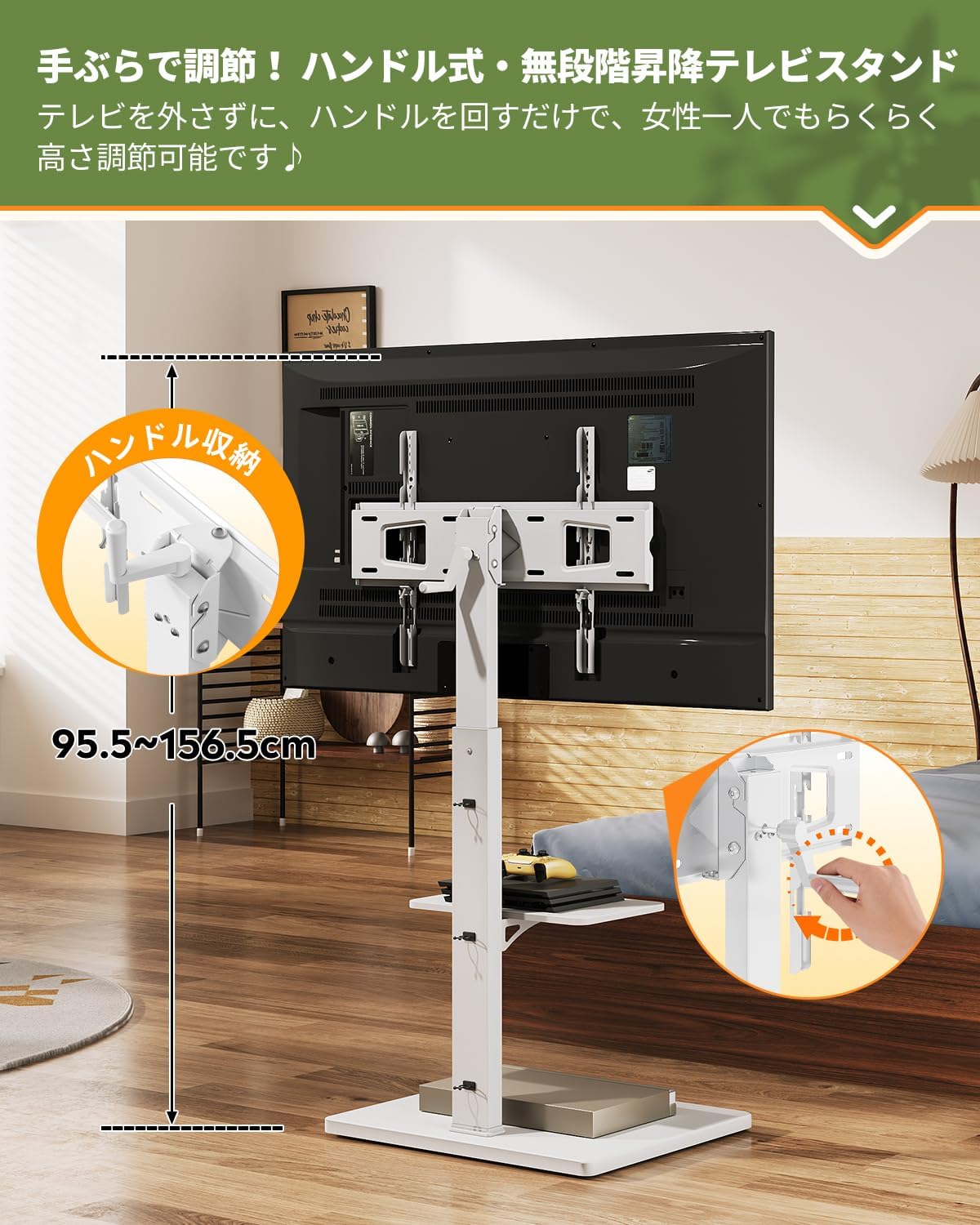
Image: Demonstrating the handle-operated stepless height adjustment.
бурчу тегеретүү
The TV mount allows for angle adjustments to optimize your viewтажрыйбасы:
- Горизонталдык айлануу: The TV can be rotated left and right by ±28 degrees. Gently push the TV to the desired angle.
- Вертикалдуу кыйшаюу: The TV can be tilted up and down by ±4 degrees. Adjust the tilt by loosening the tilt mechanism, setting the angle, and re-tightening.

Image: Visual guide for adjusting TV viewбурчтар.
Текче бийиктигин жөндөө
The accessory shelf can be adjusted to 6 different height levels:
- Текчедеги бардык буюмдарды алып салыңыз.
- Loosen the screws securing the shelf to the main support pole.
- Move the shelf to one of the six available positions.
- Re-tighten the screws to secure the shelf at the new height.

Image: Demonstrating the 6-level adjustable shelf.
Mobility with Hidden Casters
The stand is equipped with hidden casters for easy movement. To move the stand:
- Ensure the TV is securely mounted and all cables are managed to prevent snagging.
- Gently push or pull the stand to its desired location.
- The hidden casters allow for smooth movement across various floor types.

Image: The TV stand with hidden casters for easy mobility.
Техникалык тейлөө
- Тазалоо: Трибунаны жумшак, кургак чүпүрөк менен сүртүңүз. Өжөр тактар үчүн бир аз сүртүңүзamp жумшак самын менен кездемени сүртүп, андан кийин жакшылап кургатыңыз. Катуу химиялык заттардан же абразивдүү тазалоочу каражаттардан алыс болуңуз.
- Текшерүү: Мезгил-мезгили менен бардык бурамалар менен байланыштарды текшерип туруңуз, алар бекем бойдон калууда. Керек болсо кайра тартыңыз.
- Жүктөө жөндөмдүүлүгү: Do not exceed the specified weight limits for the TV or shelves.
- Сактагыч: If storing the handle, ensure it is placed in its designated slot to prevent loss.
Проблемаларды чечүү
| Көйгөй | Мүмкүн себеп | Чечим |
|---|---|---|
| TV stand is wobbly. | Бурамалар бошоп калган; пол тегиз эмес. | Check and tighten all assembly screws. Ensure the stand is on a flat, stable surface. |
| Телевизордун бийиктигин тууралоо кыйынчылыгы. | Mechanism might be stiff; handle not properly engaged. | Ensure the handle is fully engaged. Apply gentle, consistent force. Do not force the mechanism. |
| Дөңгөлөктөр жылмакай тоголонбойт. | Debris in casters; casters damaged. | Clean any debris from the casters. If damaged, contact customer support for replacements. |
| TV not level after mounting. | Mounting brackets uneven; TV not centered. | Re-check TV mounting bracket installation. Adjust TV position on the brackets to ensure it is level. |
Техникалык шарттар
- Модел: ADSJ619
- Бренд: WLIVE
- Түсү: Ак
- Шайкеш сыналгы өлчөмдөрү: 32-75 дюйм
- Продукциянын өлчөмдөрү (L x W x Y): 40 x 60 x 111 cm (initial height)
- Продукт Салмагы: 12.78 кг
- TV Load Capacity: 50 кг
- Жогорку текче жүктөө сыйымдуулугу: 5 кг
- Base Shelf Load Capacity: 30 кг
- Бийиктикти жөндөө диапазону: 95.5 cm to 165.5 cm (stepless, handle-operated)
- Горизонталдык айлануу: ±28 градус
- Вертикалдуу кыйшаюу: ±4 градус
- VESA шайкештиги: Horizontal 10-60cm, Vertical 10-40cm (mounting screws included)
- Материалдар: Synthetic resin laminated fiberboard (front panel, base, shelf), Steel (support pole)
- Өзгөчөлүктөрү: Hidden casters, 6-level adjustable shelf, cable management.

Image: Technical drawing with dimensions and load capacities.
Кепилдик жана колдоо
WLIVE provides a one-year warranty for this product. For any questions, concerns, or warranty claims, please contact WLIVE customer support through your purchase platform or visit the official WLIVE store.
WLIVE Official Store: Visit WLIVE Store on Amazon
Ask a question about this manual
Ask about setup, troubleshooting, compatibility, parts, safety, or missing instructions. Manuals+ will review the question and use this page’s manual context to help answer it.