
1. Киришүү
Thank you for choosing the Baseus FC41 145W 25000mAh Power Bank. This high-capacity portable charger is designed to provide ultra-fast charging for a wide range of devices, including laptops, smartphones, and tablets. Featuring a powerful 145W output and two integrated USB-C cables, it offers convenience and reliability for users on the go. This manual provides essential information for safe and efficient use of your power bank.
2. Коопсуздук маалыматы
- Электр банкын экстремалдык температурага (60°C/140°F жогору же 0°C/32°F төмөн), тике күн нуруна же отко чыгарбаңыз.
- Аппаратты түшүрүп алуудан, ажыратуудан же өзүңүз оңдоого аракет кылуудан качыңыз.
- Keep away from water, moisture, and corrosive materials.
- Тастыкталган заряддоо кабелдерин жана адаптерлерин гана колдонуңуз.
- Балдар жетпеген жерде сактаңыз.
- Электр банкын жергиликтүү эрежелерге ылайык жок кылыңыз. Аны тиричилик таштандылары менен таштабаңыз.
- Эгерде Power Bank шишип кетсе, жыт чыгарса же өтө ысып кетсе, колдонууну дароо токтотуңуз.
3. Продукт бүтүп калдыview
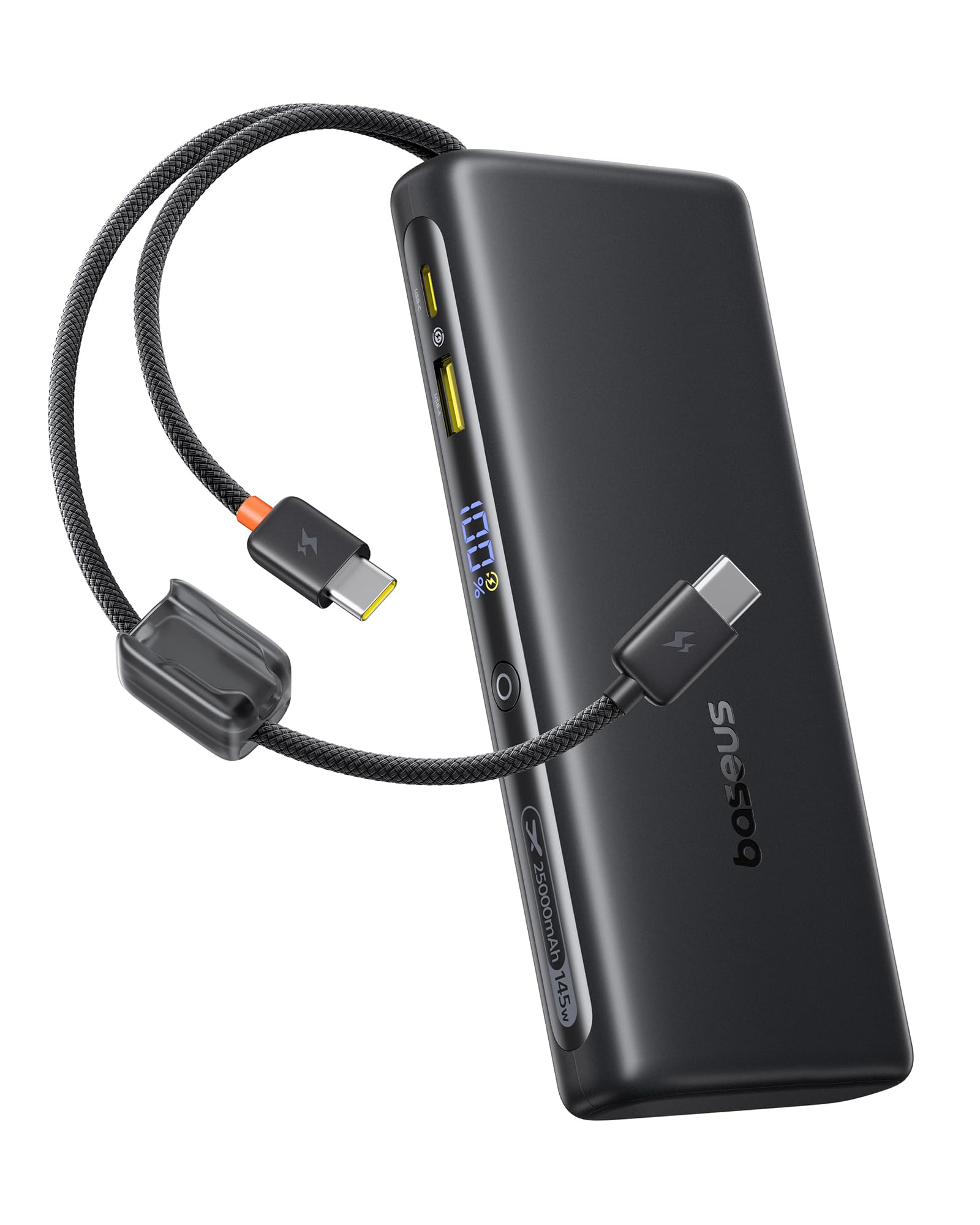
The Baseus FC41 Power Bank features a sleek design with multiple ports and integrated cables for maximum versatility.
Пакеттин мазмуну
- Baseus FC41 145W 25000mAh Power Bank
- User Manual
Компоненттер
The power bank includes the following key components:
- Санариптик дисплей: Батареяны реалдуу убакытта көрсөтөтtage жана заряддоо абалы.
- Integrated USB-C1 Cable: Supports up to 140W output/65W input.
- Integrated USB-C2 Cable: Supports up to 100W output/65W input.
- USB-C порту: Supports up to 100W output/65W input.
- USB-A порту: 22.5 Вт чейинки кубаттуулуктагы чыгарууну колдойт.
- Кубат баскычы: Activates the display, initiates charging, and toggles low-power mode.

4. Орнотуу
4.1 Power банктын алгачкы заряддоосу
Before first use, fully charge your Baseus FC41 Power Bank. This ensures optimal battery performance and longevity.
- Connect a USB-C power adapter (not included) to either of the integrated USB-C cables or the external USB-C port on the power bank.
- Кубат адаптерин розеткага сайыңыз.
- The digital display will show the charging progress. A full charge from 0% to 100% typically takes approximately 4 hours with a 65W input.
- Once fully charged, the display will show 100%. Disconnect the power bank from the charger.

5. Иштөө нускамалары
5.1 Түзмөктөрдү заряддоо
The Baseus FC41 Power Bank can charge various devices using its multiple output options.
Using Integrated USB-C Cables
- The integrated USB-C1 cable provides up to 140W output, ideal for laptops like MacBook Pro/Air.
- The integrated USB-C2 cable provides up to 100W output, suitable for laptops, tablets, and smartphones.
- Simply pull out the desired integrated USB-C cable and connect it to your device's USB-C charging port. The power bank will automatically begin charging.
Using External Ports
- USB-C порту: Connect your device using a compatible USB-C to USB-C cable. This port supports up to 100W output.
- USB-A порту: Connect your device using a compatible USB-A to USB-C/Lightning cable. This port supports up to 22.5W output.
Бир эле учурда кубаттоо
The power bank can charge up to four devices simultaneously. The BPS 2.0 technology intelligently distributes power for maximum efficiency.
- When charging a single device via USB-C1, it can reach up to 140W.
- When charging a laptop (e.g., 100W) and a smartphone (e.g., 45W) simultaneously, the total output can reach 145W.


5.2 Батареянын деңгээлин текшерүү
Press the power button once to activate the digital display, which will show the remaining battery percentage.
5.3 Low-Power Mode
For charging low-current devices such as Bluetooth earbuds or smartwatches, double-press the power button to activate low-power mode. This prevents the power bank from automatically shutting off due to low power draw.
5.4 Integrated Cables as Lanyard
The integrated USB-C cables are designed to also function as a durable lanyard, allowing for convenient carrying or attachment to a backpack.

6. Техникалык тейлөө
6.1 Тазалоо
Power bankты жумшак, кургак чүпүрөк менен сүртүңүз. Суюк тазалоочу каражаттарды же абразивдүү материалдарды колдонбоңуз.
6.2 Сактоо
Power банкты күн тийбеген жана экстремалдык температурадан алыс, салкын, кургак жерде сактаңыз. Узак мөөнөткө сактоо үчүн, батареяны 50-70% га чейин заряддоо сунушталат.
6.3 Батареяга кам көрүү
Батареянын иштөө мөөнөтүн узартуу үчүн, кубат банкын тез-тез толук зарядсыздандырбаңыз. Батареянын деңгээли төмөн болгондо аны кубаттаңыз.
7. Кыйынчылыктарды
- Power банк кубатталбай жатат: Кубаттоочу кабель жана адаптер туура туташтырылганын жана иштеп турганын текшериңиз. Башка кабель же адаптерди колдонуп көрүңүз.
- Түзмөк кубат банкынан кубатталбай жатат: Ensure the power bank has sufficient charge. Check if the cable connecting the device to the power bank is securely connected and compatible. Press the power button to activate charging.
- Жай кубаттоо: Ensure your device and cable support fast charging protocols. If charging multiple devices, the total output power is shared, which may reduce individual charging speeds.
- Санарип дисплей иштебейт: Press the power button to activate the display. If it remains unresponsive, contact customer support.
- Powerbank колдонуу учурунда ысып кетет: It is normal for the power bank to generate some heat during high-power charging. If it becomes excessively hot, discontinue use and contact customer support.
8. Техникалык шарттар
| Өзгөчөлүк | Деталь |
|---|---|
| Модель номери | E0028H |
| Батарея сыйымдуулугу | 25000mAh |
| Чыгуу Wattage | 145 Вт (макс.) |
| Киргизүү Wattage | 65 Вт (макс.) |
| Батарея түрү | Литий ион |
| Батарея клеткаларынын саны | 5 |
| Продукциянын өлчөмдөрү | 16.5 x 7.4 x 2.5 см |
| Продукт Салмагы | 506 г |
| Түс | Кара |
| Өзгөчө өзгөчөлүк | CCC Certification |
| Шайкеш түзмөктөр | Google Pixel 10 Pro XL/10 Pro/9 Pro/8 Series, MacBook Pro/Air; HP/Dell/Asus/Lenovo Laptops, Samsung Galaxy S25/S24/S23/S22 Series, iPhone 17/16/15 Pro/Pro Max Series |
| Power Source | Электр зымдары |
| UPC | 810196184848 |
| GTIN | 810196184848 |
9. Кепилдик жана колдоо
9.1 Кепилдик маалыматы
This Baseus product comes with a 24 айлык кепилдик. We also offer lifetime customer service and a 45-day money-back guarantee. Please retain your proof of purchase for warranty claims.
9.2 Кардарларды колдоо
For any questions, technical support, or warranty claims, please contact Baseus customer service through the retailer where you purchased the product or visit the official Baseus webбайланыш маалыматы үчүн сайт.