
Introduction
This manual provides essential information for setting up, operating, maintaining, and troubleshooting your new OPPO A6 5G smartphone. Please read this guide thoroughly to ensure optimal performance and longevity of your device.
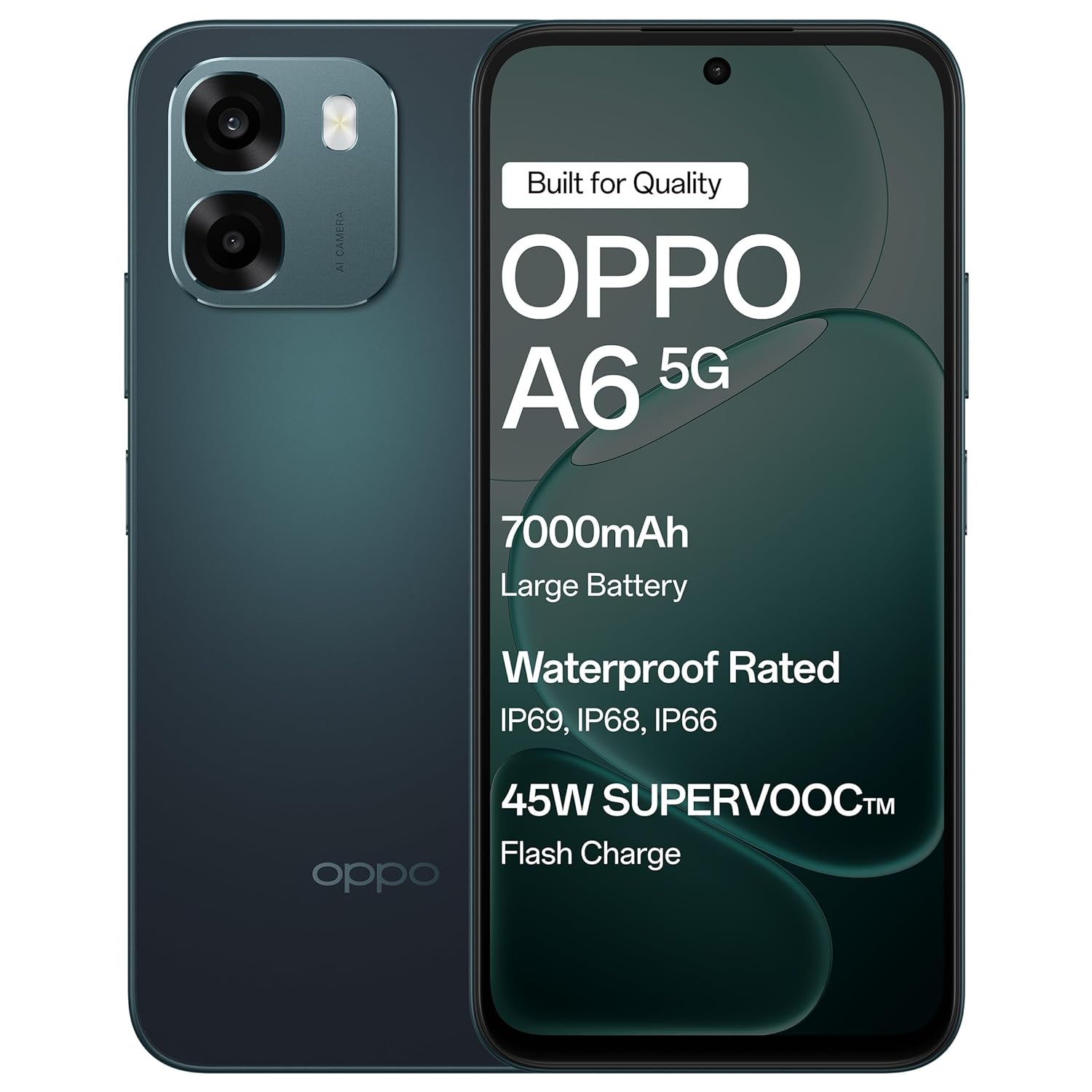
The OPPO A6 5G smartphone in Sapphire Blue, featuring its sleek design.
Жайгашуу
1. Кутудан чыгаруу жана алгачкы текшерүү
Carefully remove all items from the packaging. Verify that all components are present and undamaged.
кутучанын мазмуну:
- OPPO A6 5G смартфону
- Телефон корпусу
- Кубаттуу адаптер
- USB кабели
- SIM лоток чыгаруучу
- Экран коргоочу (алдын ала колдонулган же кутуда)
2. SIM картаны салуу
- Аппараттын капталындагы SIM карта салгычын табыңыз.
- SIM лоток чыгаруучу куралды лотоктун жанындагы кичинекей тешикке салып, лоток чыгып кеткенче акырын басыңыз.
- Place your Nano-SIM card(s) into the designated slots on the tray. Ensure the gold contacts face downwards. This device supports Dual SIM.
- SIM лотокту кылдаттык менен телефонго кайра кыстарыңыз.
3. Алгачкы заряддоо жана күйгүзүү
- Connect the USB cable to the power adapter and then to the phone's USB Type-C port. Plug the power adapter into a wall outlet.
- Телефонду биринчи жолу колдонуудан мурун, же батареянын индикатору жетиштүү зарядды көрсөткөнгө чейин, жок дегенде 30 мүнөт кубаттаңыз.
- OPPO логотиби пайда болгонго чейин Кубат баскычын (көбүнчө оң жакта) басып, кармап туруңуз.
- Тил тандоо, Wi-Fi туташуусу жана Google каттоо эсебин орнотуу сыяктуу баштапкы орнотууну аяктоо үчүн экрандагы нускамаларды аткарыңыз.

The OPPO A6 5G supports 45W SUPERVOOC Flash Charge, allowing for rapid battery replenishment.
Түзмөгүңүздү иштетүү
1. Негизги навигация
- Сенсордук экран жаңсоолор: Тандоо үчүн таптаңыз, сыдыруу үчүн серпиңиз, чоңойтуу үчүн чымчыңыз.
- Кубат баскычы: Press to lock/unlock the screen. Press and hold to power off or restart.
- Үн баскычтары: Медиа үнүн, чалуунун үнүн же эскертме үнүн тууралаңыз.
2. Дисплей өзгөчөлүктөрү
The OPPO A6 5G features a large 6.75-inch LCD display with a 120Hz adaptive refresh rate, providing smooth visuals and enhanced readability even in sunlight.

The 120Hz Ultra Bright Display ensures smooth and vibrant visuals.
3. Камераны колдонуу
Your device is equipped with a 50MP AI Dual Camera system for capturing high-quality photos and videos.
- Негизги камера: 50MP sensor for detailed everyday photos.
- Тереңдик сенсору: 2MP for enhanced portrait shots.
- Алдыңкы камера: Тунук селфи үчүн 8 МП.
- Режимдер: Utilize Night mode for low-light conditions, Portrait mode for artistic depth effects, and Dual-View Video for simultaneous front and rear camera recording.

The 50MP Ultra-Clear Camera captures every detail effortlessly.

Explore various camera modes such as Underwater Photography, AI Night Mode, and Portrait Mode.
4. Audio and Speakers
Experience enhanced audio with dual stereo speakers and an Ultra Volume Mode, providing louder and clearer sound for media consumption and calls.

Dual Stereo Speakers with Ultra Volume Mode deliver immersive sound.
5. Аткаруу жана оюн
The MediaTek Dimensity 6300 5G processor ensures smooth performance for daily tasks, streaming, and gaming. AI GameBoost 2.0 optimizes your gaming experience.

AI GameBoost 2.0 provides a smooth and confident gaming experience.

The MediaTek Dimensity 6300 Mobile Platform ensures better and smoother performance.
6. Батареяны башкаруу
The device is equipped with a massive 7000mAh battery for extended usage. Utilize 45W SUPERVOOC charging for quick power-ups. The phone also supports reverse wired charging to share power with other devices.

The 7000mAh large battery provides power throughout your day.

Reverse Wired Charging allows you to share power with other devices when needed.
7. Network Connectivity
The OPPO A6 5G supports 5G cellular technology, Wi-Fi, and Bluetooth. AI LinkBoost 3.0 enhances network stability and reduces lag.

AI LinkBoost 3.0 provides a levelled-up network with zero lag.
Техникалык тейлөө
1. Аппаратыңызды тазалоо
- Экранды жана арткы панелди сүртүү үчүн жумшак, түксүз чүпүрөктү колдонуңуз.
- Катуу химиялык заттарды же абразивдүү материалдарды колдонуудан алыс болуңуз.
- өжөр тактар үчүн, бир аз гampчүпүрөккө суу же электроника үчүн арналган экран тазалагыч.
2. Программалык камсыздоону жаңыртуу
Түзмөгүңүздө эң акыркы функциялар, коопсуздук жаңыртуулары жана иштеши жакшыртылганын текшерүү үчүн программалык камсыздоо жаңыртууларын дайыма текшерип, орнотуп алыңыз. барыңыз Орнотуулар > Түзмөк жөнүндө > Акыркы жаңыртууларды текшерүү үчүн.
3. Батареяга кам көрүү
- Ашыкча температурадан качыңыз, алар батареянын иштөө мөөнөтүн начарлатышы мүмкүн.
- Телефон 100% га жеткенден кийин, аны өтө көпкө чейин заряддап койбоңуз.
- Оптималдуу кубаттоо иштеши жана коопсуздугу үчүн берилген кубаттагычты жана кабелди гана колдонуңуз.
4. Сактагычты башкаруу
Мезгил-мезгили менен ачык-айкын керексиз files, apps, and media to maintain optimal performance. Your device has 128GB of internal storage, with support for external flash memory up to 128GB.
5. Суу жана чаңга туруктуулук
The OPPO A6 5G features IP69 water and dust resistance. This means it is protected against high-pressure, high-temperature water jets and can withstand immersion in water at 1.5 meters for 30 minutes. While resistant, it is not waterproof. Avoid intentional submersion and exposure to saltwater or other liquids.
The OPPO A6 5G offers IP69 Water and Dust Resistance, making it a durable device.
6. Fluency Protection
The device is designed with 60-Month Fluency Protection, ensuring sustained smooth performance over an extended period.

Enjoy 5 years of flawless flow with 60-Month Fluency Protection.
Проблемаларды чечүү
Жалпы маселелер жана чечимдер
- Түзмөк күйбөй жатат: Ensure the battery is charged. Connect to the charger and wait a few minutes before attempting to power on again. If unresponsive, press and hold the Power button and Volume Up button simultaneously for about 10-15 seconds to force a restart.
- Заряддоо көйгөйлөрү: Check if the charger and USB cable are securely connected. Try a different power outlet. Inspect the charging port for any debris.
- Тармакка туташуу маселелери: Verify that your SIM card is correctly inserted and active. Check if Airplane Mode is off. Restart the device. If issues persist, contact your mobile network provider.
- Колдонмолор бузулуп же тоңуп жатат: Close and reopen the app. Clear the app's cache (Settings > Apps > [App Name] > Storage > Clear cache). If the problem continues, uninstall and reinstall the app.
- Жай аткаруу: Колдонулбаган фондук колдонмолорду жабыңыз. Кэшти жана убактылууну тазалаңыз files. Restart the device regularly. Ensure sufficient storage space is available.
Заводдук баштапкы абалга кайтаруу (Акыркы чара)
If severe software issues persist, a factory reset may be necessary. This will erase all data on your phone. Улантуудан мурун бардык маанилүү маалыматтардын камдык көчүрмөсүн сактаңыз.
- барыңыз Settings > System settings > Backup and reset > Reset phone.
- Тандоо Бардык дайындарды өчүрүү.
- Чечимиңизди ырастап, суралса, экранды кулпулоо сырсөзүн киргизиңиз.
Техникалык шарттар
| Өзгөчөлүк | Деталь |
|---|---|
| Бренд | OPPO |
| Модел | A6 5G |
| Операция системасы | Android 15 |
| RAM | 6 ГБ |
| Ички сактагыч | 128 ГБ |
| Expandable Memory | Up to 128 GB (Flash Memory Supported Size Maximum) |
| Screen Size | 6.75 дюйм |
| Дисплей түрү | LCD |
| Жаңыртуу ылдамдыгы | 120 Гц |
| Арткы камера | 50 МП (Негизги) + 2 МП (Тереңдик) |
| Алдыңкы камера | 8 депутат |
| Батарея сыйымдуулугу | 7000 мАч |
| Заряддоо | 45W SUPERVOOC Fast Charging, Reverse Wired Charging |
| SIM карта уячасы | Кош SIM |
| Туташтыргыч түрү | USB түрү C |
| Наушник уясы | 3.5 мм |
| Сууга туруктуулук деңгээли | IP69 сууга туруктуу |
| Уюлдук технология | 5G |
| Зымсыз байланыш | Bluetooth, WiFi |
| Элемент Салмагы | 216 грамм |
| Элементтин өлчөмдөрү | 16.7 x 7.9 x 0.9 сантиметр |
| Модель жылы | 2026 |
| Келип чыккан өлкө | Индия |
Кепилдик маалымат
Your OPPO A6 5G smartphone comes with a limited warranty:
- Телефон: Сатып алган күндөн тартып 12 ай.
- Adapter & Cable: Сатып алган күндөн тартып 6 ай.
Please retain your proof of purchase for warranty claims. The warranty covers manufacturing defects and does not cover damage caused by misuse, accidents, unauthorized repairs, or normal wear and tear.
Колдоо
Кошумча жардам, техникалык колдоо же кызмат суроо үчүн OPPO кардарларды тейлөө бөлүмүнө кайрылыңыз:
- Өндүрүүчү: OPPO MOBILES INDIA PVT LTD.
- Дарек: 5th FLOOR, Tower B, BUILDING, N-8, DLF Cyber City, DLF Phase 2, Gurugram, Haryana 122002, India.
- Кардарларды тейлөө Тел: 18001032777
- Онлайн колдоо: Расмий OPPO сайтына кириңиз website for FAQs, support articles, and service center locations.