
1. Киришүү
This manual provides essential information for setting up, operating, maintaining, and troubleshooting your Xiaomi Redmi Note 15 Pro 5G smartphone. Please read this manual carefully before using your device to ensure optimal performance and longevity.
The Xiaomi Redmi Note 15 Pro 5G features a 200MP main camera with optical stabilization, a 6580mAh battery, a 1.5K CrystalRes AMOLED display with 120Hz refresh rate, and is powered by the Mediatek Dimensity 7400-Ultra processor. It also boasts advanced water and dust resistance (IP66, IP68, IP69, and IP69K ratings).
2. Түзмөк бүттүview
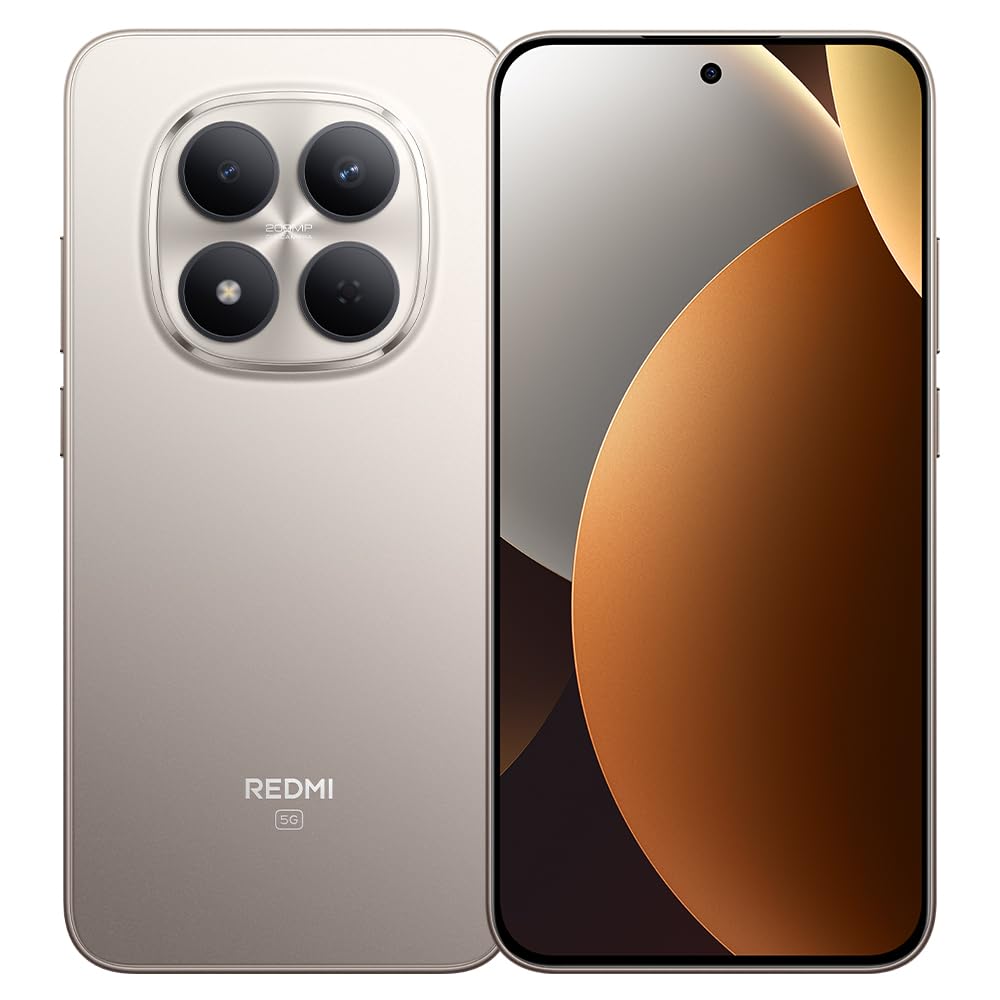
1-сүрөт: Xiaomi Redmi Note 15 Pro 5G Smartphone. This image displays the front and back of the device, highlighting its sleek design and camera module.
Пакеттин мазмуну
- Xiaomi Redmi Note 15 Pro 5G смартфону
- Кубаттуу адаптер
- USB Type-C кабели
- SIM чыгаруучу курал (аймакка жараша өзгөрүшү мүмкүн)
- Ыкчам баштоо колдонмосу (бул колдонмо)
3. Орнотуу
3.1. SIM картаны салуу
- Түзмөгүңүздүн капталындагы SIM карта салгычын табыңыз.
- SIM чыгаруучу куралды лотоктун жанындагы кичинекей тешикке киргизип, лоток чыгып кеткенче бекем басыңыз.
- Place your Nano-SIM card(s) into the tray with the gold contacts facing down. Ensure proper orientation. This device supports Dual SIM functionality.
- Телефонго лотокту кылдаттык менен кайра салыңыз.
3.2. Баштапкы күйгүзүү жана орнотуу
- Xiaomi логотиби пайда болгонго чейин Кубат баскычын басып, кармап туруңуз.
- Тилди, аймакты тандоо, Wi-Fi'га туташуу жана Google аккаунтуңузду орнотуу үчүн экрандагы көрсөтмөлөрдү аткарыңыз.
- Configure biometric security features such as facial recognition for enhanced security.
3.3. Аппаратты заряддоо
Connect the USB Type-C cable to the phone's charging port and the other end to the provided power adapter. Plug the adapter into a power outlet. The device supports fast charging. Ensure the power adapter is suitable for your region.
4. Иштөө нускамалары
4.1. Дисплей жана навигация
- The device features a 6.83-inch CrystalRes AMOLED display with a 120Hz refresh rate for smooth visuals.
- Navigate using gestures or on-screen navigation buttons (configurable in settings).
- Adjust display brightness and color settings in the 'Display' section of the Settings app.
4.2. Камераны колдонуу
Your Redmi Note 15 Pro 5G is equipped with a 200MP main rear camera with optical stabilization and a 20MP front camera.
- Камера колдонмосун ачыңыз.
- Каалаган режимиңизди тандаңыз (фото, портрет, видео, Pro ж.б.).
- Сүрөткө тартуу же видео жазууну баштоо/токтоо үчүн жапкыч баскычын таптаңыз.
- Utilize the 200MP mode for high-resolution images and 4K video recording for detailed videos.
4.3. Аткаруучулук жана туташуу
- The Mediatek Dimensity 7400-Ultra processor and 8GB RAM ensure smooth multitasking and gaming.
- Connect to 5G networks for high-speed internet access.
- Manage Wi-Fi, Bluetooth, and mobile data connections through the Quick Settings panel or the 'Network & Internet' section in Settings.
5. Техникалык тейлөө
5.1. Батареяга кам көрүү
- The 6580mAh battery provides extended usage. For optimal battery life, avoid extreme temperatures.
- Use the provided charger for efficient and safe charging.
- Regularly check battery usage in Settings to identify and manage power-consuming apps.
5.2. Суу жана чаңга туруктуулук
Your device is rated IP66, IP68, IP69, and IP69K for water and dust resistance. This means it is protected against strong jets of water, immersion up to certain depths, and high-pressure/high-temperature water jets. However, resistance is not permanent and may decrease over time with normal wear. Avoid exposing the device to seawater, chlorinated water, or liquids other than fresh water. If the device gets wet, dry it thoroughly before charging or using the USB port.
5.3. Программалык камсыздоону жаңыртуу
Regularly check for and install software updates to ensure your device has the latest features, security patches, and performance improvements. Go to 'Settings' > 'About phone' > 'MIUI version' to check for updates.
6. Кыйынчылыктарды
6.1. Жалпы маселелер жана чечүү жолдору
- Түзмөк күйбөй жатат: Батарея заряддалганын текшериңиз. Кубаттоочу түзүлүшкө жок дегенде 15 мүнөт туташтырып, андан кийин күйгүзүп көрүңүз.
- Батареянын иштөө мөөнөтү начар: Reduce screen brightness, disable unnecessary background apps, turn off GPS/Bluetooth when not in use. Check 'Battery' settings for detailed usage.
- Байланыш көйгөйлөрү (Wi-Fi/5G): Restart your device. Toggle Wi-Fi/Mobile Data off and on. Reset network settings if the issue persists.
- Колдонмолор бузулуп жатат: Clear the cache of the problematic app (Settings > Apps > [App Name] > Storage > Clear cache). If the issue continues, reinstall the app.
- Түзмөк жооп бербей жатат: Кайра күйгүзүүгө мажбурлоо үчүн кубат баскычын 10-15 секунд басып туруңуз.
7. Техникалык шарттар
| Өзгөчөлүк | Спецификация |
|---|---|
| Бренд | XIAOMI |
| Модел | Redmi Note 15 Pro 5G |
| Операция системасы | Android |
| CPU модели | Mediatek Dimensity 7400-Ultra |
| Сактоо сыйымдуулугу | 256 ГБ |
| RAM | 8 ГБ |
| Screen Size | 6.83 дюйм |
| Дисплей түрү | AMOLED |
| Max Screen Resolution | 2772 x 1280 пиксель |
| Жаңыртуу ылдамдыгы | 120 Гц |
| Арткы камеранын чечилиши | 200 депутат |
| Алдыңкы камеранын чечилиши | 20 депутат |
| Видео тартуунун резолюциясы | 4K (4096 пиксел) |
| Батарея сыйымдуулугу | 6580 мАч |
| Батареянын узактыгы | 24 Hours (typical usage) |
| Байланыш технологиясы | 5G, 2G |
| Зымсыз тармак технологиясы | GSM |
| Туташтыргыч түрү | USB Type-C |
| SIM карта түрү | Nano-SIM (Dual SIM) |
| Биометрикалык коопсуздук | Жүздү таануу |
| Сууга туруктуулук деңгээли | IP66, IP68, IP69, IP69K |
| Наушник уясы | Жок |
| Камтылган компоненттер | Кубаттуу адаптер |
| Тышкы тест сертификациясы | Anatel: 062732509185 / Model: 25080RABDG |
8. Кепилдик жана колдоо
8.1. Кепилдик маалыматы
Бул продукт менен келет 90 күндүк кепилдик against manufacturing defects. Please retain your proof of purchase for warranty claims. The warranty does not cover damage caused by misuse, accidents, unauthorized repairs, or normal wear and tear.
8.2. Кардарларды колдоо кызматы
For further assistance, technical support, or warranty inquiries, please refer to the official Xiaomi support website or contact their customer service. You can find contact details on the official Xiaomi webсайтында же түзмөгүңүз менен берилген документтерде.
For product homologation details, please visit: sistemas.anatel.gov.br/sch