
Introduction
The NORTH EDGE Fortress is a robust analog-digital watch designed for men seeking functionality and durability. This manual provides detailed instructions for setting up, operating, and maintaining your watch, ensuring optimal performance for daily use, travel, and outdoor activities.
Негизги өзгөчөлүктөрү
- Кош дисплей: Combines classic analog hands with a clear digital screen for versatile timekeeping.
- Дүйнөлүк убакыт функциясы: Easily track time across multiple time zones.
- Essential Sports Functions: Includes 1/100 second stopwatch, countdown timer, and alarm.
- LED арткы жарык: Жарык аз шарттарда окулушун камсыз кылат.
- 5ATM сууга туруктуулугу: Suitable for daily water exposure like rain, splashes, and hand washing.
- Туруктуу дизайн: Lightweight 46mm case with a comfortable resin strap.

Image: The watch dial highlighting its various functions including 12/24-hour time, alarm, snooze, hourly chime, stopwatch, countdown, LED backlight, and world time capabilities.
Компоненттерди көрүү
Your NORTH EDGE Fortress watch features four primary buttons for navigation and setting:
- ЖАРЫК (жогорку сол): LED арткы жарыгын иштетет.
- MODE (Төмөнкү сол): Cycles through different modes (Time, Stopwatch, Countdown, Alarm, World Time).
- ADJUST (Top Right): Used to enter/exit setting modes and confirm selections.
- ИЗДӨӨ (Төмөнкү оң жакта): Used to start/stop functions or change values during setting.
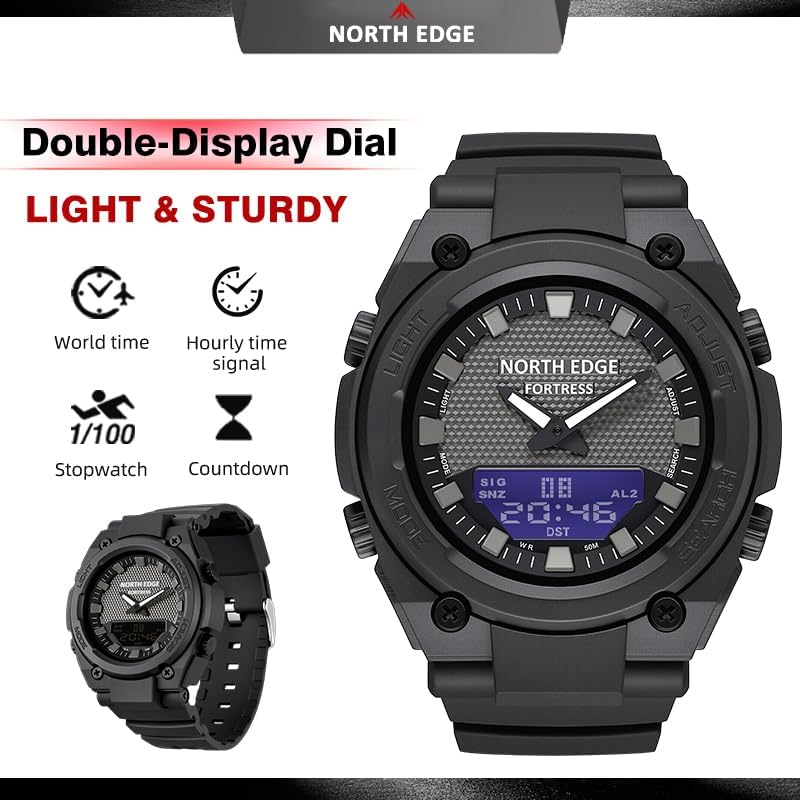
Image: The watch face displaying the analog and digital elements, with labels indicating the functions of the four control buttons.
Орнотуу жана баштапкы конфигурация
Убакыт жана дата орнотуу
- Убакытты эсепке алуу режиминде басып, кармап туруңуз ЖӨНДӨӨ button until the digital display starts flashing, indicating setting mode.
- басыңыз РЕЖИМ баскычын басыңыз: Секунд → Саат → Мүнөт → Жыл → Ай → Күн.
- колдонуу ИЗДӨӨ жаркылдаган маанини көбөйтүү үчүн баскычын басыңыз. ИЗДӨӨ тездик менен алдыга жылууга.
- Бардык орнотуулар туура болгондон кийин, басыңыз ЖӨНДӨӨ button to exit the setting mode. The analog hands will automatically synchronize with the digital time.
12/24 сааттык формат
Убакытты эсепке алуу режиминде басып туруңуз ИЗДӨӨ 12 сааттык жана 24 сааттык (аскердик) убакыт форматтарынын ортосунда которулуу үчүн баскыч.
World Time Setting
- басыңыз РЕЖИМ button repeatedly until you reach the World Time mode.
- басыңыз ЖӨНДӨӨ button to enter setting mode. The city code will flash.
- колдонуу ИЗДӨӨ button to select your desired world time zone/city.
- Басыңыз ЖӨНДӨӨ ырастоо жана чыгуу.
Иштөө режимдери
Секундомер функциясы
- басыңыз РЕЖИМ button until 'STW' or 'STOP' appears on the digital display.
- Басыңыз ИЗДӨӨ секундомерди баштоо.
- Басыңыз ИЗДӨӨ кайра токтотуу үчүн.
- Басыңыз ЖӨНДӨӨ секундомерди нөлгө коюу үчүн.
Артка эсептөө таймери
- басыңыз РЕЖИМ button until 'TMR' or 'TIMER' appears.
- Басып кармап туруңуз ЖӨНДӨӨ to enter setting mode. The hour/minute will flash.
- Колдонуу РЕЖИМ сааттарды же мүнөттөрдү тандоо үчүн, жана ИЗДӨӨ маанисин тууралоо үчүн.
- Басыңыз ЖӨНДӨӨ орнотууну ырастоо үчүн.
- Басыңыз ИЗДӨӨ Таймер нөлгө жеткенде ойготкуч иштейт.
Сигнал жана Хоurly Chime
- басыңыз РЕЖИМ баскычын 'ALM' же 'ALARM' пайда болгонго чейин басыңыз.
- Басып кармап туруңуз ЖӨНДӨӨ to enter alarm setting mode. The hour will flash.
- Колдонуу РЕЖИМ сааттарды же мүнөттөрдү тандоо үчүн, жана ИЗДӨӨ маанисин тууралоо үчүн.
- Басыңыз ЖӨНДӨӨ ойготкуч убактысын ырастоо үчүн.
- Ойготкуч режиминде басыңыз ИЗДӨӨ to toggle the alarm ON/OFF. A small alarm icon will appear when active.
- Хоны иштетүү/өчүрүү үчүнurly chime (SIG), press РЕЖИМ to cycle to the alarm screen, then press ЖӨНДӨӨ жана ИЗДӨӨ бир эле убакта.
LED жарыгы
басыңыз ЖАРЫК караңгы чөйрөдө көрүнүүнү жакшыртуу үчүн санариптик дисплейди бир нече секундага жарыктандыруу баскычын (жогорку сол жакта) басыңыз.

Image: The watch face demonstrating the LED backlight feature, illuminating the digital display for clear reading in low light.
Сууга туруктуулугу (5ATM)
The NORTH EDGE Fortress watch is rated for 5ATM (50 meters / 164 feet) water resistance. This means it is suitable for:
- Daily use and exposure to water splashes.
- Жамгыр.
- Колдорду жуу.
Бул жок recommended for showering, swimming, diving, or any activities involving prolonged submersion or high-pressure water exposure. Do not operate buttons while the watch is wet or submerged.
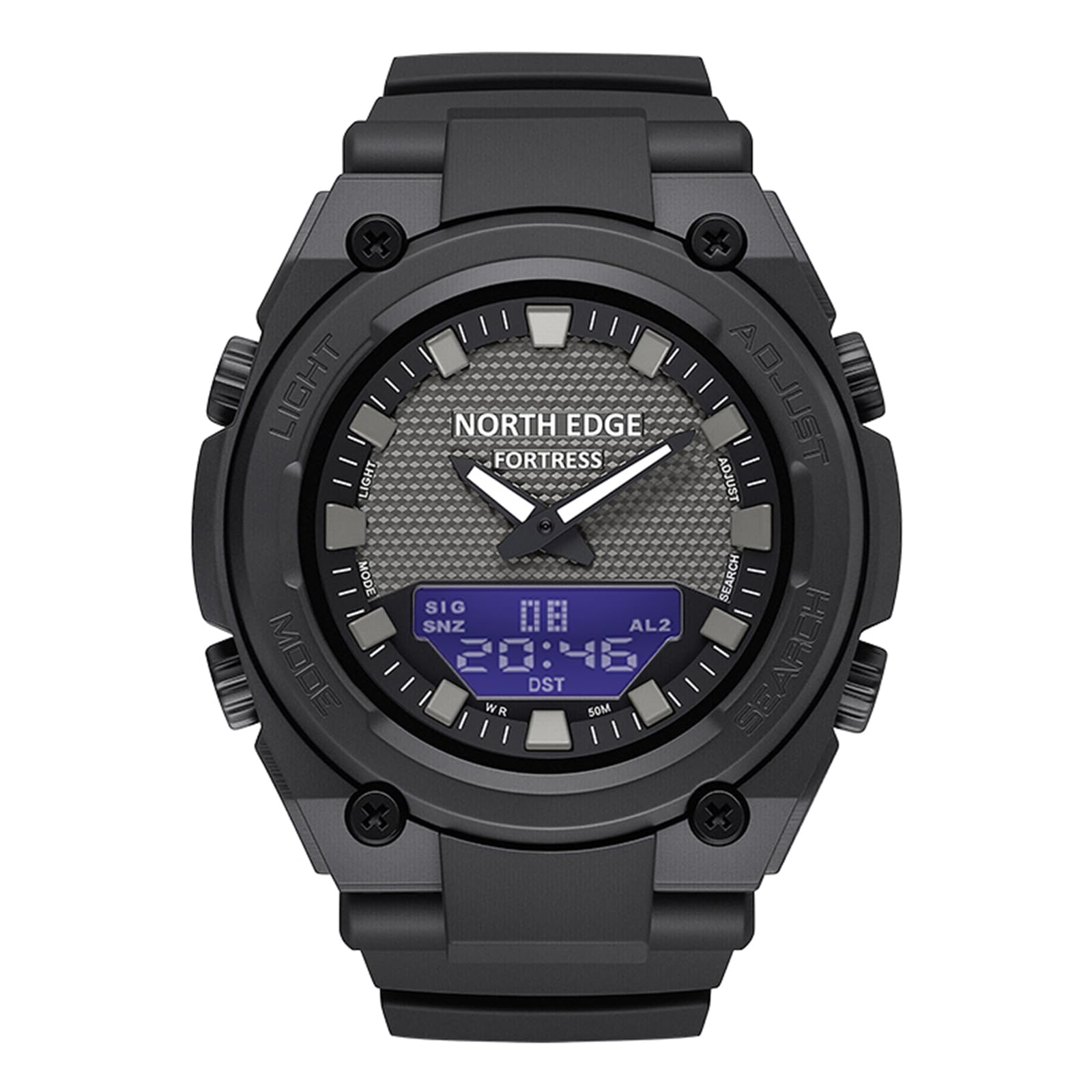
Image: The back casing of the watch, clearly marked with 'WR 164FT 50M', confirming its water resistance rating.
Батарея маалыматы
The NORTH EDGE Fortress watch uses a CR2016 battery. The battery is included and pre-installed. Battery life can vary depending on usage, especially frequent use of the backlight and alarm functions.
When the digital display becomes dim or functions become erratic, it may be time to replace the battery. Battery replacement should ideally be performed by a qualified watch technician to ensure proper sealing and maintain water resistance.
Image: The back casing of the watch, indicating the battery type 'CR 2016' required for operation.
Техникалык тейлөө жана кам көрүү
- Тазалоо: Саатты жумшак, кургак чүпүрөк менен үзгүлтүксүз сүртүңүз. Өтө кир болсо, бир аз сүртүңүз.amp кездеме жана жумшак самын, андан кийин жакшылап жууп, кургатуу.
- Химиялык заттардан алыс болуңуз: Do not expose the watch to solvents, detergents, perfumes, or cosmetics, as these can damage the case, strap, or seals.
- Температуранын кескин чеги: Сааттын тактыгына жана суу өткөрбөөчүлүгүнө таасир этиши мүмкүн болгон өтө жогорку температурага (ысык же суук) же температуранын кескин өзгөрүшүнө жол бербеңиз.
- Таасири: Бышык болгону менен, сааттын катуу соккуларынан же түшүп кетишинен алыс болуңуз.
Проблемаларды чечүү
Analog Hands Not Matching Digital Time
If the analog hands do not align with the digital time after setting, ensure you have completed the digital time setting process correctly. The analog hands should automatically synchronize. If not, try resetting the watch (refer to the full manual if available for specific reset procedures, or remove and reinsert the battery if comfortable doing so, which will require re-setting all functions).
Digital Display Not Visible or Dim
Бул, адатта, батареянын заряды аз экенин билдирет. CR2016 батареясын алмаштырыңыз. Эгерде батареяны алмаштыргандан кийин көйгөй чечилбесе, кардарларды тейлөө кызматына кайрылыңыз.
Арткы жарык иштебейт
Check the battery. If the battery is low, the backlight may not function or may be very dim. If the battery is new and the backlight still doesn't work, there may be an internal issue requiring professional service.
Техникалык шарттар
| Өзгөчөлүк | Спецификация |
|---|---|
| Модель номери | чеп |
| Дисплей түрү | Analog-Digital |
| Иштин диаметри | 46.1 мм (1.81 дюйм) |
| Case Thickness | 15.4 мм (0.61 дюйм) |
| Band Width | 26.5 мм (1.04 дюйм) |
| Band Length | 220 мм (8.7 дюйм) |
| Салмагы | 51г (0.11 фунт) |
| Суу каршылык | 5 банкомат (50 метр / 164 фут) |
| Кыймыл түрү | Кварц |
| Батарея түрү | CR2016 |
| Топтун материалы | чайыр |

Image: A detailed diagram illustrating the key dimensions of the watch, such as case diameter, strap width, and overall length.
Кепилдик жана колдоо
The NORTH EDGE Fortress watch comes with a 1 жылдык өндүрүүчүнүн кепилдиги covering defects in materials and workmanship from the date of purchase. This warranty does not cover damage caused by improper use, accidents, unauthorized repairs, or normal wear and tear.
For warranty claims, technical support, or further assistance, please contact NORTH EDGE customer service through your original point of purchase or visit the official NORTH EDGE webбайланыш маалыматы үчүн сайт.