
1. Орнотуу
1.1 Кутудан чыгаруу жана Пакеттин мазмуну
Пакетти ачканда, бардык компоненттер бар экенин текшериңиз:
- Magene C706 Bike Computer
- USB заряддоо кабели
- User Manual
- Replacement Quarter-Turn Adapter
- Allen Hex Wrench

Image: The Magene C706 Smart GPS Bike Computer and its included accessories, such as the charging cable, mounts, and user manual, are neatly arranged on a flat surface.
1.2 Велосипед компьютерин орнотуу
The C706 offers two primary mounting methods:
- Рулду орнотуу: Secure the rubber band around your handlebar, then attach the bike computer mount using the provided rubber bands. Ensure the mount is firm and stable.
- Out-Front Mount: For a more integrated setup, install the included stem mount onto your bike's stem. Press the bike computer onto the mount and rotate it to lock it in place. Ensure the computer faces upwards for optimal GPS signal reception.
Video: This video demonstrates the installation process for the Magene C706 Smart GPS Bike Computer, showing how to securely attach it to a bicycle handlebar using the provided mounts.
1.3 Баштапкы орнотуу жана колдонмону жупташтыруу
To begin, download and install the "OneLapFit" app from your mobile app store or by scanning the QR code in the user manual. After logging in, complete your personal profile.
- Long press the bike computer's power button to turn it on.
- Open the OneLapFit app, tap the "+" icon (bike computer) in the top right corner, and select the corresponding model.
- Scan the QR code displayed on the bike computer's screen to pair the devices.
- Follow the app's prompts to complete the setup, including Wi-Fi configuration and map downloads.
Image: The Magene C706 bike computer screen showing a QR code for pairing with the OneLapFit mobile application.
1.4 GPS позициялоо
For accurate tracking, ensure the bike computer acquires a GPS signal before starting your ride. Operate the device in an open outdoor area, away from tall buildings, dense trees, or overpasses that might obstruct the signal.
- When acquiring a GPS signal, the positioning icon in the top-left corner of the screen will flash.
- Once positioning is successful, the icon will remain steadily lit.

Image: The Magene C706 bike computer screen showing the GPS signal acquisition process with a flashing icon, indicating it is searching for satellites.
2. Иштөө нускамалары
2.1 Basic Functions (Buttons and Touchscreen)
The C706 features a vibrant color touchscreen and physical buttons for intuitive control:
- Кубат баскычы (узак басуу): When not riding, long press to power off, turn off the screen, or enter sleep mode.
- Power Button (Short Press): During a ride, a short press can return to the previous page, turn off the home screen, or record laps.
- Side Buttons (Up/Down): Allow page flipping on the riding dashboard. Outside the dashboard, they act as focus up/down toggle buttons.
- Bottom-Right Button (Short Press): During a ride, short press to activate the E-Bell.
- Bottom-Right Button (Long Press): During a ride, long press to pause or resume the ride. From other interfaces, long press to quickly start riding.

Image: The Magene C706 bike computer screen showing multiple data fields, including speed, distance, and heart rate, during an active ride.
2.2 Riding Modes (Outdoor/Indoor)
The C706 supports various riding scenarios:
- Outdoor Riding: Includes Road and Commute modes by default. More modes and dashboard pages can be customized via the OneLapFit app.
- Жабык машыгуу: Supports three training modes: Target Power, Resistance Mode, and Gradient Level, as well as Workouts training and simulated routes.
2.3 Навигация
The C706 offers comprehensive navigation features:
- Map Navigation + Voice Guidance: Full map-based turn-by-turn navigation with voice prompts in 13 languages.
- Оффлайн навигация: Add commonly used location points in OneLapFit and sync them to the bike computer. During a ride, enter the navigation page and select a target point to immediately generate route guidance. If you are more than 300 meters away from the start point when departing, the bike computer will ask you to navigate to the start point. If you get lost midway, swipe up the menu and select "Return to Start" to generate a return route.
- Маршруттан тышкары кайра эсептөө: If you deviate from the route, the bike computer will issue an "Off Route" alert. If you continue to deviate, it will automatically generate a new route and sync it to the bike computer.
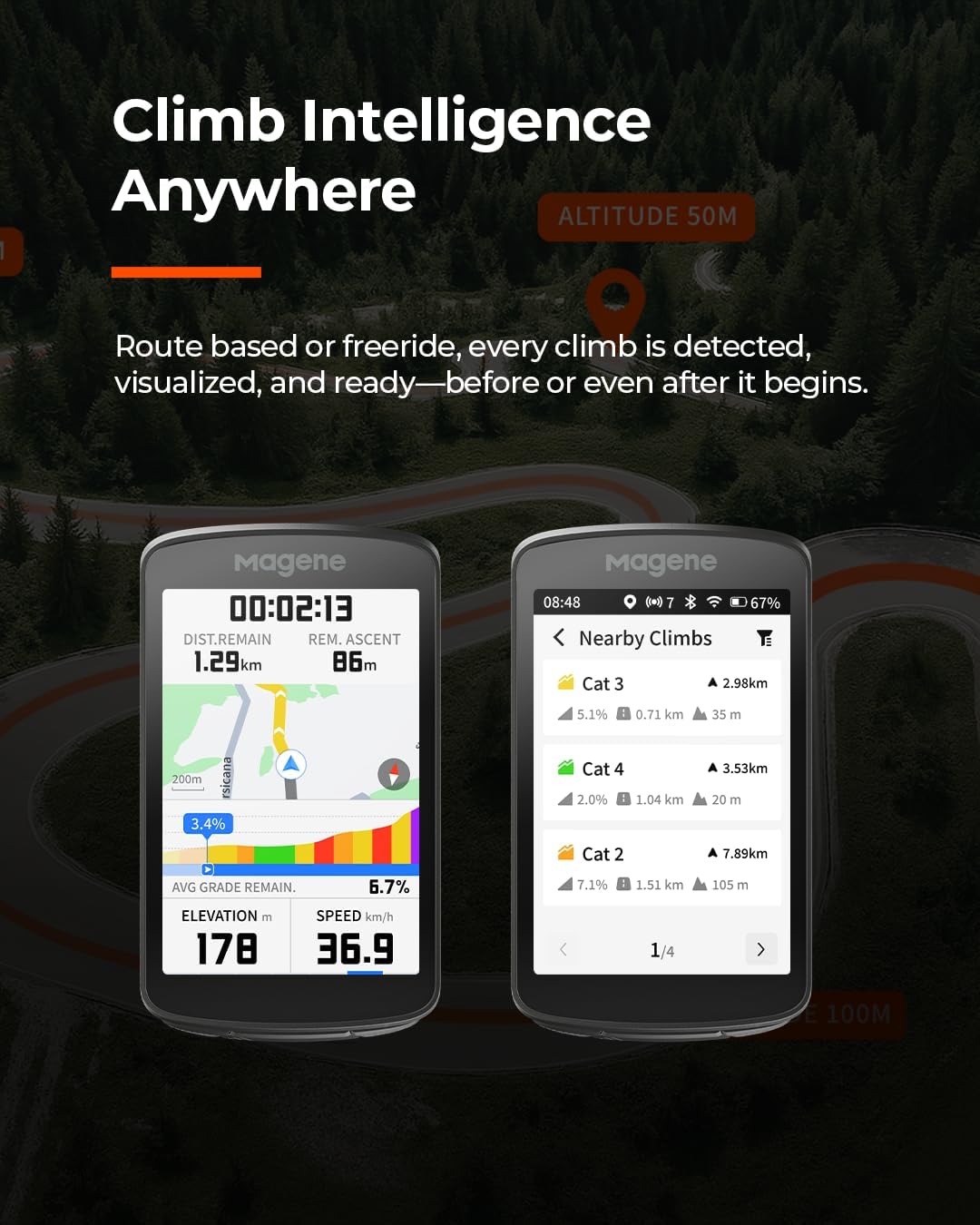
Image: The Magene C706 bike computer screen showing a detailed map with turn-by-turn navigation instructions, including distance to the next turn.
2.4 Freeride ClimbPro
The C706 features intelligent ClimbPro functionality:
- Automatically identifies climbs longer than 400 meters with a gradient ≥2.5%, categorizing them into five levels (Gentle Climb Cat4 to Steep Climb HC).
- Activate climb planning anytime based on your current location; filter by HC/Cat 1-4 and navigate instantly to any nearby climb.
- Provides a 100-meter early warning for upcoming climbs.
Video: This video demonstrates the Magene C706's Freeride ClimbPro feature, showing how it detects and displays climb information during a ride, even without a pre-loaded route.
2.5 Strava түз эфир сегменттери
Enhance your competitive edge with Strava Live Segments:
- Real-time list and map display of saved segments.
- Wi-Fi auto-sync of saved segments.
- Live PK battles and custom dashboard for instant competition.

Image: The Magene C706 bike computer screen showing a list of Strava Live Segments with distance and gradient information.
2.6 Cycling Dynamics
Unlock advanced metrics with compatible power meters (Magene P715, Garmin Rally, Favero Assioma):
- Күч фазасы: Tracks peak torque and positive drive-torque angles for each leg.
- Seated/Standing Time: Automatically detects whether you're seated or standing and analyzes time and power in each position.
- Platform Center Offset: Displays the offset between your actual pedal-stroke center and the pedal's mechanical center.

Image: The Magene C706 bike computer screen showing detailed cycling dynamics data, including power phase, seated/standing time, and platform center offset.
2.7 Smart Camera & Light Control
Integrate with your smart devices for enhanced control:
- Action Cameras: One-tap DJI & Insta360 control for recording, pausing, and mode switching. View real-time status, battery, and storage.
- Акылдуу чырактар: Intelligent linkage with L508 radar tail lights and Shimano Di2/SRAM eTap shifting.
Video: This video demonstrates the e-bell function of the Magene C706 Smart GPS Bike Computer, showing how it can be triggered during a ride.
2.8 Smart Assistant
The Smart Assistant helps you easily manage smart devices during your ride. You can set trigger conditions and corresponding actions:
- Trigger conditions can be based on bike computer data (timer, riding data, status) or peripheral data (battery level, heart rate).
- Actions include heart rate band vibration alerts, light on/off, bike computer sound/display alerts, etc.
- Example: When speed is greater than 10km/h, the L508 radar taillight automatically turns on.
- Example: When heart rate is greater than 180bpm, the H803 armband vibrates to alert.
- Example: At 6:00 PM, the AT series front light turns on.
- You can also use Shimano Di2 electronic shifting's custom buttons to control light on/off, page flipping, and front/rear light mode switching.
2.9 E-Bell
Leveraging the C706's built-in speaker, you can ring the E-Bell via the drop-down quick settings menu or by short-pressing the bottom-right button during a ride to alert pedestrians.
3. Техникалык тейлөө
3.1 Батареянын иштөө мөөнөтү жана заряддоо
The Magene C706 features a Lithium Ion battery with an average life of 25 hours. Charge the device using the provided USB Charging Cable.
3.2 Сууга туруктуулук
The device has an International Protection Rating of IPX7, meaning it is protected against temporary immersion in water. It is suitable for use in rainy conditions but should not be submerged for extended periods.
3.3 Микропрограмма жаңыртуулары
Ensure your device's firmware is up-to-date for optimal performance and access to the latest features. Firmware updates can be performed via the OneLapFit app when connected to Wi-Fi.
4. Кыйынчылыктарды
If you encounter issues with your Magene C706, consider the following:
- GPS сигналынын көйгөйлөрү: Ensure you are in an open area. If the icon is still flashing, try restarting the device.
- Жупташуу көйгөйлөрү: Verify Bluetooth is enabled on both devices. Ensure the OneLapFit app is updated and try re-pairing.
- Data Sync Errors: Check your Wi-Fi connection and ensure the bike computer has sufficient battery. Try re-uploading data via the app.
- Түзмөк жооп бербейт: Perform a soft reset by long-pressing the power button. If the issue persists, a factory reset may be necessary (note: this will erase data).
- Off-Route Recalculation Not Working: Ensure the device has a strong GPS signal and that map data is downloaded for the area.
5. Техникалык шарттар
| Өзгөчөлүк | Деталь |
|---|---|
| Бренд | Магене |
| Модель номери | Magene C706 |
| Screen Size | 3.3 дюйм |
| Батареянын иштөө мөөнөтү | 25 саат |
| Батарея түрү | Литий ион |
| Байланыш технологиясы | ANT, Bluetooth, Wi-Fi |
| Адам интерфейсинин киргизүү | Сенсордук экран |
| Эл аралык коргоо рейтинги | IPX7 |
6. Кепилдик
The Magene C706 Smart GPS Bike Computer comes with a 2 жылдык Өндүрүүчүнүн Кепилдиги. Please retain your proof of purchase for warranty claims. For detailed terms and conditions, refer to the official Magene webсайтка же кардарларды колдоо менен байланышыңыз.
7. Колдоо
For further assistance, technical support, or to access the latest user manuals and FAQs, please visit the official Magene website or contact their customer service department. Regular firmware updates are recommended to ensure optimal device performance.
Онлайн ресурстар: www.magene.com