
Introduction
The Wooask A9 AI Translator Earbuds are designed to provide seamless global communication and connectivity. This device integrates instant translation, 4G calling, mobile hotspot capabilities, and an AI assistant into a single, portable unit. It supports both online and offline translation across numerous languages, making it an essential tool for international travel, business, and daily interactions.
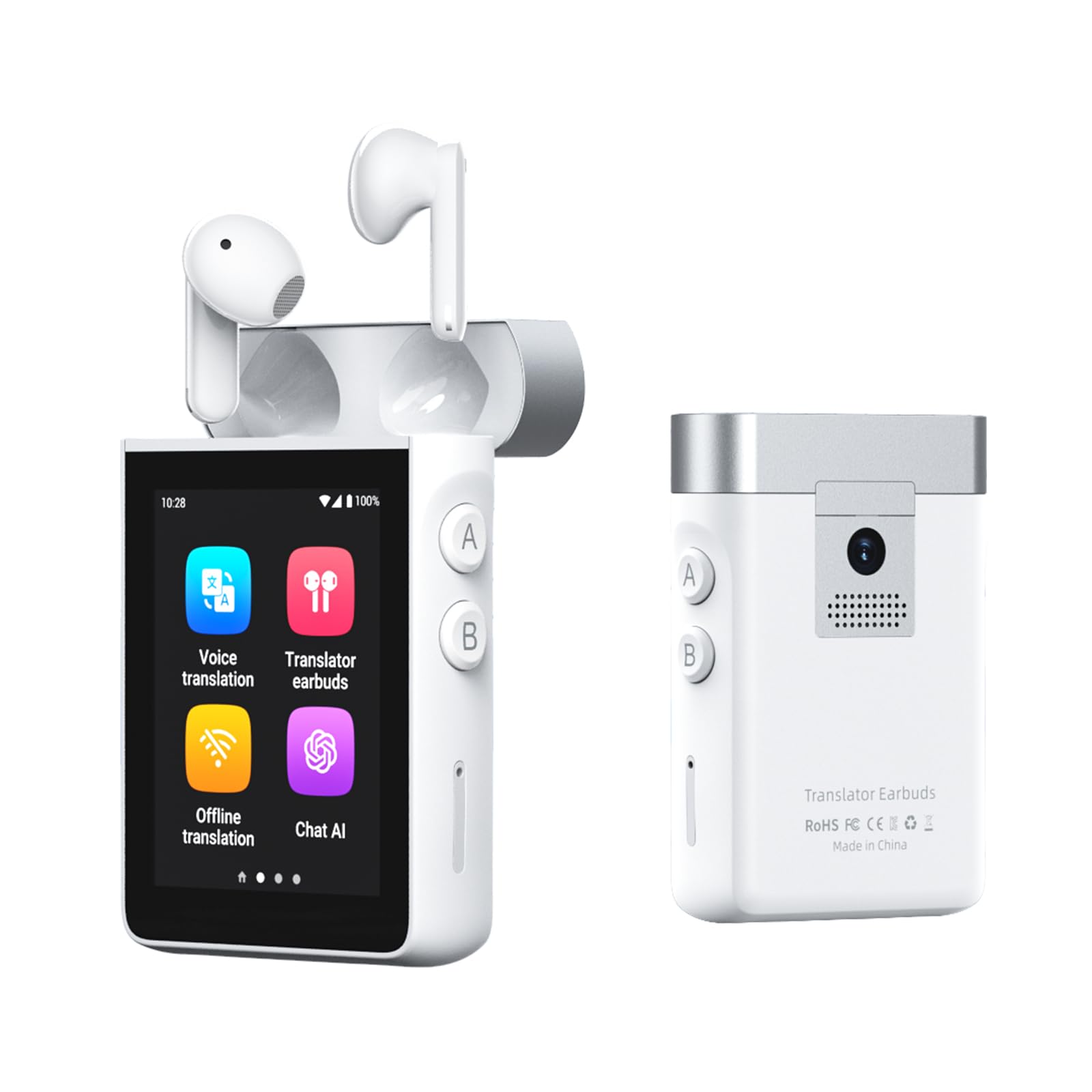
Image: The Wooask A9 AI Translator Earbuds device with its charging case, showcasing анын компакттуу дизайны.
Кутуда эмне бар
- 2 x A9 Translation Earbuds (Left & Right)
- 1 x A9 Charging Case (Supports 4G + WiFi)
- 1 х USB-C кубаттоо кабели
- 1 x SIM карта чыгаруучу курал
- 1 x User Manual

Image: A visual representation of all items included in the Wooask A9 product package.
Жайгашуу
Баштапкы күйгүзүү
- Press and hold the power button on the side of the A9 device until the screen illuminates.
- Follow the on-screen prompts to select your preferred system language and initial settings.
Кулакчын жупташтыруу
- Кулакчындардын кубаттоочу кутучанын ичине салынганын текшериңиз.
- Open the charging case. The earbuds will automatically connect to the A9 device. A confirmation message will appear on the screen.
- For first-time use, navigate to the 'Translator Earbuds' application on the A9 screen and confirm pairing.

Image: The Wooask A9 device displaying a 'Connected' status for the earbuds, illustrating the instant pairing feature.
SIM Card Insertion (Optional for 4G/Hotspot/Calls)
- Locate the SIM card slot on the side of the A9 device.
- Use the provided SIM card ejector tool to open the SIM tray.
- Place a local Nano-SIM card into the tray, ensuring correct orientation.
- Аспапты акырын ордунан чыккыча кайра түртүңүз.
- The device will detect the SIM card and enable 4G connectivity, calling, and hotspot features.

Image: A step-by-step visual guide on inserting a SIM card into the Wooask A9 to unlock advanced features.
Иштөө режимдери
1. Voice Translation Mode
For direct, real-time spoken translation using the device's built-in microphone and speaker.
- Негизги менюдан "Үн менен которууну" тандаңыз.
- Choose your native language (e.g., English) and the target language (e.g., Spanish).
- Press and hold the corresponding language button (A or B) on the side of the device while speaking. Release the button to hear the translation.

Image: The Wooask A9 device showing a real-time translation of spoken words, highlighting its speed and accuracy.
2. Translator Earbuds Mode
Enables discreet, two-way communication through the included earbuds, ideal for private conversations or noisy environments.
- Select 'Translator Earbuds' from the main menu.
- Ensure earbuds are paired and worn by both participants.
- Speak naturally. The device will translate and deliver audio to each person's earbud in their native language.

Image: Two people engaged in a conversation, each wearing a Wooask A9 earbud for private, real-time translation.
3. Offline Translation Mode
Translate without an internet connection. Supports 16 widely spoken languages.
- Select 'Offline Translation' from the main menu.
- Choose from the available offline language pairs.
- Proceed with voice translation as described above.

Image: A man and a flight attendant communicating using the Wooask A9 for offline translation during a flight.
4. Сүрөттөрдү которуу режими
Translate text from images using the built-in 8MP camera.
- Select 'Photo Translation' from the main menu.
- Point the camera at the text you wish to translate (e.g., menu, sign, document).
- Tap the screen to capture the image. The translated text will appear instantly.

Image: The Wooask A9 device using its integrated 8MP camera to translate text from a sign in a foreign language.
5. 4G Calling & Hotspot (with SIM card)
With a SIM card inserted, the A9 can function as a standalone phone and a mobile hotspot.
- Чалууларды жасоо: Select 'Telephone' from the main menu, dial the number, and make calls directly from the device.
- Sharing Hotspot: Go to 'Settings' > 'Hotspot and network sharing' to activate the 4G mobile hotspot.

Image: The Wooask A9 device acting as a mobile hotspot, providing internet connectivity to a laptop, phone, and tablet.
6. ChatGPT AI Assistant
Access lifetime-free ChatGPT for intelligent queries, travel planning, and more.
- Select 'Chat AI' from the main menu.
- Speak your questions or commands into the device. ChatGPT will provide real-time responses.

Image: The Wooask A9 screen showing an interaction with the built-in ChatGPT AI assistant, providing information about the Eiffel Tower.
7. Media Playback & Recorder
Enjoy online music and video playback, or use the 16GB voice recorder.
- Музыка/Видео: Select 'Music' or 'Video' from the main menu to access media fileс же агымдык кызматтар.
- жаздыргыч: Select 'Recorder' to start, pause, and save voice recordings. The device has 16GB of internal storage.

Image: The Wooask A9 device displaying its recording function during a business meeting, highlighting its 16GB storage.
Техникалык тейлөө
Тазалоо
- Wipe the device and earbuds with a soft, dry, lint-free cloth.
- Абразивдүү тазалагычтарды, спиртти же химиялык эриткичтерди колдонбоңуз.
Батареяга кам көрүү
- Батареянын ден соолугун сактоо үчүн, колдонбосо дагы, аппаратты дайыма заряддап туруңуз.
- Батареянын иштешин начарлатышы мүмкүн болгон өтө жогорку температуралардан алыс болуңуз.

Image: Visual representation of the Wooask A9's long-lasting battery life, including single charge, total with case, and standby times.
Проблемаларды чечүү
Түзмөк күйбөй жатат
- Түзмөктүн толук заряддалганын текшериңиз. Аны берилген USB-C кабелин колдонуп, кубат булагына туташтырыңыз.
- Press and hold the power button for at least 10 seconds to attempt a forced restart.
Translation Inaccuracy
- Speak clearly and at a moderate pace. Avoid speaking too quickly or with heavy accents.
- Ensure you have selected the correct source and target languages.
- For online translation, check your Wi-Fi or 4G connection strength.
- Микрофондун тоскоол болбогонун текшериңиз.
Кулакчындар туташпай жатат
- Place both earbuds back into the charging case and close it for a few seconds, then reopen.
- Check the Bluetooth settings on the A9 device to ensure Bluetooth is enabled and the earbuds are listed as a paired device.
- Кулакчындардын кубатталганын текшериңиз.
Техникалык шарттар
| Өзгөчөлүк | Деталь |
|---|---|
| Бренд | Wooask |
| Модель номери | Wooask-A9 |
| Түс | Ак |
| Кулак жайгаштыруу | Кулакта |
| Форма фактору | Кулакта |
| Импеданс | 60 Ом |
| Noise Control | Ыңгайлаштырылган ызы-чууну жокко чыгаруу |
| Камера | 8MP for Photo Translation |
| Байланыш | 4G, Wi-Fi, Bluetooth |
| Оффлайн тилдер | 16 (English, Spanish, Simplified Chinese, Traditional Chinese, French, German, Japanese, Arabic, Portuguese, Russian, Korean, Thai, Hindi, Vietnamese, Italian, Indonesian) |
| Онлайн тилдер | 144 |
| Батареянын иштөө мөөнөтү (үзгүлтүксүз) | 5 саатка чейин |
| Батареянын иштөө мөөнөтү (бардыгы куту менен) | 36 саатка чейин |
| Күтүү убактысы | 30 күн |
| Салмагы | 118g (device) |
Кепилдик жана колдоо
Кепилдик
The Wooask A9 AI Translator Earbuds come with a 2 жылдык глобалдык кепилдик, сиздин сатып алуу үчүн тынчтыкты камсыз кылуу.
Кардарларды колдоо
Wooask provides 24/7 Кардарларды колдоо for any inquiries or assistance you may need.
Кайра берет
A 30-Day Refund policy is available for eligible returns.
Программалык камсыздоо жаңыртуулары
Пайда алуу Өмүр бою акысыз жаңыртуулар (OTA updates) to ensure your device always has the latest features and language improvements.

Image: The Wooask A9 device highlighting its comprehensive support features: Lifetime Free Updates, 2-Year Global Warranty, 24/7 Support, and 30-Day Refund.