
1. Киришүү
Thank you for choosing the Audizio Arco Active Tower Speaker. This manual provides essential information for the safe and correct operation of your new audio system. Please read it thoroughly before use and retain it for future reference.
2. Коопсуздук нускамалары
- Электр камсыздоо: электр менен жабдууну камсыз кылуу voltage matches the requirements specified on the speaker.
- Вентиляция: Эч кандай желдетүүчү тешиктерди жаап албаңыз. Өндүрүүчүнүн көрсөтмөлөрүнө ылайык орнотуу.
- Суу жана ным: Бул шайманды жамгырга же нымга тийгизбеңиз. Ваза сыяктуу суюктуктар толтурулган нерселерди аппараттын үстүнө койбоңуз.
- Жылуулук булактары: Радиаторлор, жылуулук регистрлери, мештер же башка аппараттар (анын ичинде) сыяктуу жылуулук булактарынын жанына орнотпоңуз ampкөтөргүчтөр) жылуулукту пайда кылуучу.
- Тазалоо: Кургак чүпүрөк менен гана тазалаңыз.
- Тейлөө: Бардык тейлөөнү квалификациялуу тейлөө кызматкерлерине тапшырыңыз. Аппарат кандайдыр бир жол менен бузулганда тейлөө талап кылынат.
3. Пакеттин мазмуну
Carefully unpack the box and ensure all items are present and in good condition. If any item is missing or damaged, contact your retailer immediately.
- Audizio Arco Active Speaker
- Front Panel (Speaker Grille)
- Спикердин орду
- Алыстан башкаруу
- Электр кабели
- Көрсөтмө (бул документ)
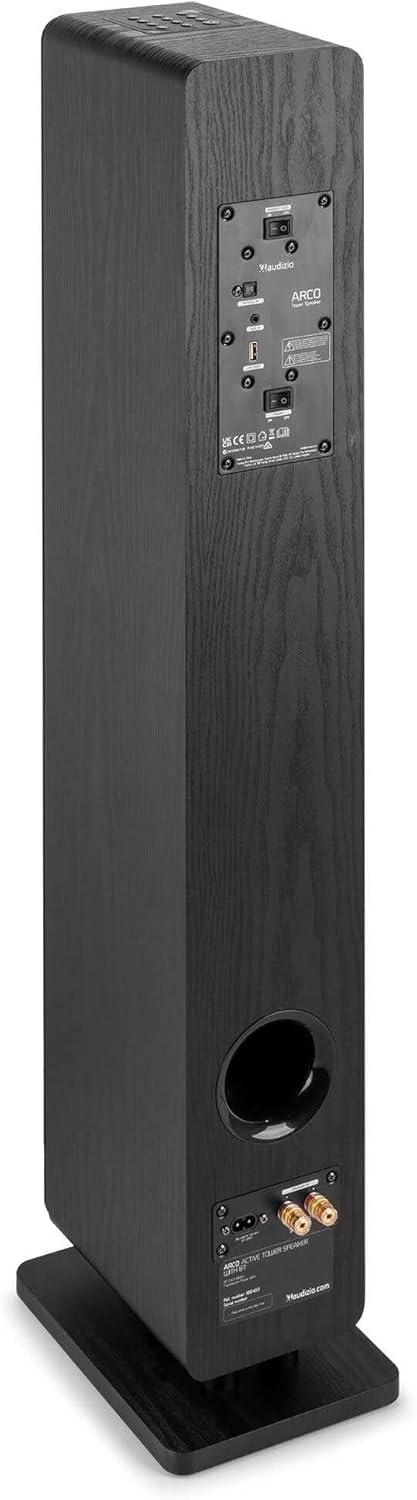
Image: All components included in the Audizio Arco package, including the speaker, remote control, and various connection cables.
4. Продукт бүтүп калдыview
Фронт View (with Grille)

Image: The Audizio Arco speaker from the front, with the black fabric grille covering the drivers. The top panel shows control buttons, and the base features subtle LED lighting.
Фронт View (without Grille)

Image: The Audizio Arco speaker with the front grille removed, showcasing the tweeter and three 4-inch woofer/subwoofer drivers. The top panel controls and LED-lit base are also visible.
Арткы View (Connections and Controls)

Image: The back panel of the Audizio Arco speaker, featuring the power input, optical input, AUX input, USB port, and speaker output terminals for passive speakers. Control switches are also visible.
Алыстан башкаруу

Сүрөт: деталдуу view of the Audizio Arco remote control, showing buttons for power, mute, Bluetooth, link (TWS), input selection, playback controls, volume adjustment, and bass/treble settings.
Base LED Lighting

Image: A close-up of the speaker's base, illustrating the integrated ambient LED lighting feature that illuminates the area beneath the speaker.
5. Орнотуу
5.1 Assembling the Speaker
- Carefully remove the speaker and its stand from the packaging.
- Attach the speaker stand to the base of the speaker using the provided screws. Ensure it is securely fastened.
- If desired, attach the front panel (grille) to the front of the speaker. It is held in place magnetically.
5.2 Кубат туташтыруу
- Connect the power cable to the AC IN port on the rear of the speaker.
- Электр кабелинин экинчи учуна ылайыктуу розеткага сайыңыз.
5.3 Алгачкы жайгаштыруу
Place the speaker on a stable, flat surface. For optimal sound, position it in a location where sound can propagate freely without obstruction. Avoid placing it directly against a wall if possible, to allow for better bass response.
6. Иштөө нускамалары
6.1 Күйгүзүү/өчүрүү
басыңыз Күч button on the top panel of the speaker or on the remote control to turn the speaker on or off.
6.2 Киргизүүнү тандоо
басыңыз Киргизүү button on the top panel or the remote control to cycle through available input sources: Bluetooth, USB, AUX, Optical.
6.3 Bluetooth байланышы
- Тандоо Bluetooth as the input source. The speaker will enter pairing mode, indicated by a flashing LED.
- Мобилдик түзмөгүңүздө (смартфон, планшет ж.б.) Bluetooth иштетип, жеткиликтүү түзмөктөрдү издеңиз.
- Select "Audizio ARCO" from the list of devices.
- Once paired, the LED indicator will stop flashing and remain solid. You can now stream audio from your device.
6.4 USB ойнотуу
- Аудио камтыган USB флэш-дискти салыңыз fileс ичине USB динамиктин арткы жагындагы порт.
- Тандоо USB киргизүү булагы катары.
- Динамик автоматтык түрдө аудио ойнотууну баштайт files from the USB drive. Use the remote control for playback functions (play/pause, skip track).
6.5 AUX киргизүү
- Тышкы аудио түзмөгүн (мисалы, MP3 ойноткуч, CD ойноткуч) туташтырыңыз AUX IN (3.5mm) port on the rear of the speaker using an appropriate audio cable.
- Тандоо AUX киргизүү булагы катары.
- Audio from your connected device will now play through the speaker.
6.6 Оптикалык киргизүү
- Connect your TV or other audio source with an optical output to the OPTICAL IN (Toslink) port on the rear of the speaker using an optical cable.
- Тандоо Оптикалык киргизүү булагы катары.
- Ensure your TV's audio output settings are configured for PCM stereo output if you experience no sound.
6.7 Чыныгы зымсыз стерео (TWS) жупташтыруу
The Audizio Arco speaker supports TWS functionality, allowing you to pair two Arco speakers wirelessly for a stereo sound experience.
- Ensure both Audizio Arco speakers are powered on and not connected to any Bluetooth device.
- Бир динамикте (бул негизги спикер болот) басып, кармап туруңуз LINK button on the remote control or the TWS button on the top panel until you hear a pairing tone.
- The primary speaker will search for the secondary speaker. Once connected, you will hear a confirmation tone, and the LED indicators on both speakers will synchronize.
- Эми, Bluetooth түзмөгүңүздү 6.3-бөлүмдө сүрөттөлгөндөй негизги динамикке туташтырыңыз. Аудио эки динамик аркылуу тең стерео режиминде ойнотулат.
6.8 LED жарыгын башкаруу
The ambient LED light at the base of the speaker can be controlled via the remote control. Refer to the remote control diagram for the specific button.
6.9 Tone Control (Remote Control)
колдонуу BASS+ / BASS- жана TBL+ / TBL- buttons on the remote control to adjust the bass and treble levels to your preference. The FLAT button resets the tone settings to default.
7. Техникалык тейлөө
7.1 Тазалоо
- Тазалоодон мурун динамикти ар дайым розеткадан сууруп алыңыз.
- Динамиктин сырткы беттерин сүртүү үчүн жумшак, кургак чүпүрөктү колдонуңуз.
- Do not use liquid cleaners, aerosols, or abrasive chemicals, as these may damage the finish.
- For the speaker grille, use a soft brush or vacuum cleaner with a brush attachment to gently remove dust.
7.2 Сактоо
If storing the speaker for an extended period, unplug it from the power source and store it in a cool, dry place, away from direct sunlight and extreme temperatures.
8. Кыйынчылыктарды
| Көйгөй | Мүмкүн себеп | Чечим |
|---|---|---|
| Күч жок | Электр кабели туташкан эмес; Электр розеткалары активдүү эмес. | Ensure power cable is securely connected to speaker and outlet. Test outlet with another device. |
| Үн жок | Incorrect input selected; Volume too low; Mute activated; Source device issue. | Select correct input. Increase volume. Deactivate mute. Check audio output of source device. |
| Bluetooth жупташтыруу ишке ашпай калды | Speaker not in pairing mode; Device too far; Already paired to another device. | Ensure speaker is in Bluetooth pairing mode. Move device closer. Disconnect from other devices. |
| No sound from Optical input | TV audio output settings incorrect; Optical cable damaged. | Set TV audio output to PCM stereo. Check optical cable for damage and ensure secure connection. |
| TWS жупташтыруу ишке ашпай калды | Динамиктер TWS жупташтыруу режиминде эмес; Өтө алыс. | Ensure both speakers are in TWS pairing mode (not connected to Bluetooth). Move speakers closer. |
9. Техникалык шарттар
| Өзгөчөлүк | Спецификация |
|---|---|
| Бренд | Аудизио |
| Модель аты | ARCO Active Tower |
| Динамик түрү | Active Hi-Fi Speaker (Floor-standing) |
| Максималдуу чыгаруу күчү | 160 Ватт |
| Байланыш технологиясы | Bluetooth 5.4, Optical (Toslink), USB, AUX (3.5mm) |
| Аудио чыгаруу режими | Стерео |
| Frequency Response | 20000 Hz (Upper limit, typical for full-range speakers) |
| Woofer Driver Size | 3 x 4 дюйм |
| Киргизүү көлөмүtage | 230 вольт |
| Башкаруу ыкмасы | Алыстан башкаруу, Түзмөктөгү баскычтар |
| Өзгөчөлүктөр | Ambient LED light, TWS (True Wireless Stereo) function |
| Өлчөмдөр (D x W x H) | 24 см х 17 см х 95.5 см |
| Элемент Салмагы | 9.85 килограмм |
| Шайкеш түзмөктөр | Smartphones, Televisions, Tablets |
10. Кепилдик жана колдоо
10.1 Кепилдик маалыматы
Audizio products are manufactured to high quality standards. This product is covered by a manufacturer's warranty, the terms of which may vary by region. Please refer to your purchase documentation or contact your local retailer for specific warranty details.
10.2 Кардарларды колдоо
Should you require technical assistance or have questions regarding your Audizio Arco speaker, please contact your retailer or visit the official Audizio webколдоо булактары жана байланыш маалыматы үчүн сайт.