
Yunseity Yunseitya4c56fmjlt
Yunseity 1080P WiFi Security Camera User Manual
Model: Yunseitya4c56fmjlt
Introduction
Thank you for choosing the Yunseity 1080P WiFi Security Camera. This manual provides detailed instructions for setting up, operating, and maintaining your security camera. Please read this manual thoroughly before use to ensure proper functionality and safety.
This camera features 1080P resolution, 360-degree rotation, AI motion detection, infrared night vision, and remote monitoring capabilities for both indoor and outdoor use.
Пакеттин мазмуну
Пакетте бардык буюмдар бар экенин текшериңиз:
- 1 x Yunseity 1080P Rotatable Camera
- 1 х Картаны окугуч
- 1 х Инструкция (бул документ)
- 1 x заряддоо кабели
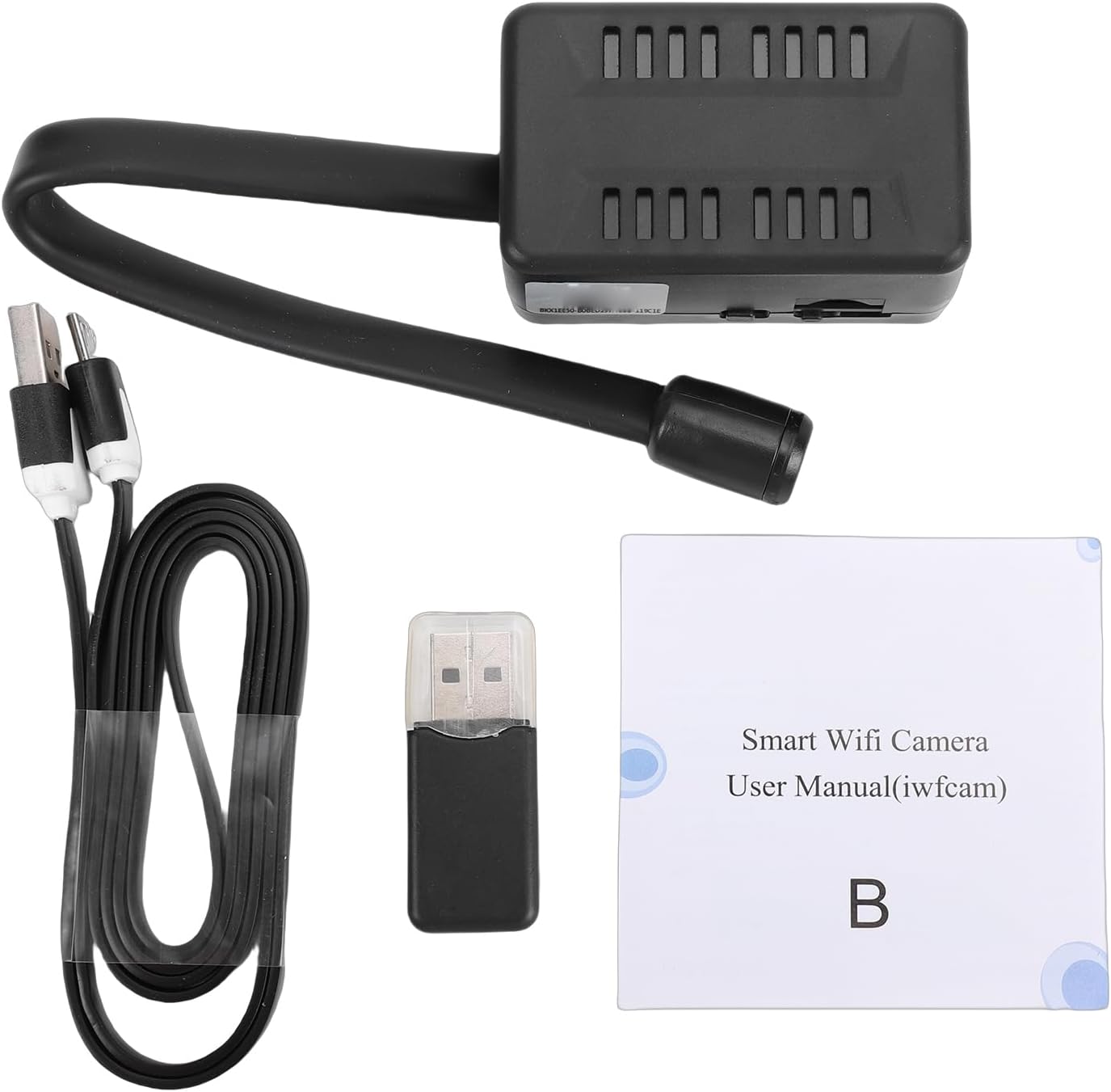
Image: Contents of the Yunseity 1080P WiFi Security Camera package.
Жайгашуу
1. Камераны заряддоо
Before initial use, fully charge the camera using the provided charging cable. The camera has a built-in 2000mAh Lithium-ion battery, offering up to 8 hours of backup during power outages.
2. Эстутум картасын салуу (милдеттүү эмес)
For continuous loop recording, insert a small memory card (up to 32GB, not included) into the designated slot on the camera. The camera supports recording in 10-minute segments.
3. App Installation and WiFi Connection
жүктөп алып, орнотуңуз iWFCam application on your smartphone. The camera utilizes an AP hotspot module for initial connection. To enable remote control and monitoring, connect the camera to your home WiFi network through the iWFCam app.

Image: Remote monitoring via the iWFCam app, showing multiple locations.
Ensure your router is turned on during installation. Once connected to your home WiFi, real-time monitoring can be achieved from different places and unlimited distances.

Image: Real-time monitoring of an indoor space through the camera app.
4. Камераны жайгаштыруу
The camera features a 360-degree adjustable joint for flexible positioning. Choose a location that provides optimal viewing coverage for your desired monitoring area. The camera is suitable for both indoor and outdoor use.
The camera can be wall-mounted. Ensure the mounting surface is stable and secure.
Иштөө нускамалары
1. Түз эфир View жана Жаздыруу
Open the iWFCam app on your smartphone to access the live video feed from your camera. You can initiate manual recordings or rely on the continuous loop recording feature if a memory card is installed.
2. Адамды аныктоо жана эскертүүчү жасалма интеллект
The camera's AI recognition system detects human movement. When motion is detected, the camera automatically records video clips (20 seconds to 2 minutes in length) and sends real-time alerts to your phone.

Image: AI Human Detection triggering an alert on a smartphone.
You can customize specific arming areas within the app to focus on critical zones, ensuring alerts are only triggered for areas you care about most.

Image: Customizing the arming area within the camera app.

Image: AI Humanoid Recognition Alarm Push notification on a smartphone.
3. Инфракызыл түнкү көрүнүш
The camera is equipped with infrared technology for clear black and white footage in low-light conditions. The night vision function is automatically sensed and activated by the camera.

Image: Night vision capability providing clear images in dark conditions.

Image: Demonstration of the camera's automatic night vision function in an office setting.
4. Synchronized Audio
Enable the audio recording feature within the iWFCam app to capture synchronized audio alongside video footage, even during nighttime surveillance.
Техникалык тейлөө
- Тазалоо: Камера линзасын жана корпусун тазалоо үчүн жумшак, кургак чүпүрөктү колдонуңуз. Катуу химиялык заттарды же абразивдүү материалдарды колдонуудан алыс болуңуз.
- Батареяга кам көрүү: To prolong battery life, avoid extreme temperatures and fully charge the camera periodically if not in continuous use.
- Программалык камсыздоонун жаңыртуулары: Check the iWFCam app regularly for any available firmware updates to ensure optimal performance and security.
Проблемаларды чечүү
- Камера WiFi'га туташпай жатат:
- Камеранын Wi-Fi роутериңиздин диапазонунда экенин текшериңиз.
- Verify that your WiFi password is entered correctly in the iWFCam app.
- Restart your router and the camera, then attempt to reconnect.
- Confirm that the camera is connected to a 2.4GHz WiFi network, as 5GHz networks may not be supported.
- No video recording to memory card:
- Ensure a memory card (up to 32GB) is properly inserted.
- Check if the memory card is full; format it if necessary (this will erase all data).
- Verify that recording settings are enabled in the iWFCam app.
- Түнкү көрүү сапатынын начардыгы:
- Камера объективинин таза жана тоскоолдуктар жок экенин текшериңиз.
- Check for any reflective surfaces close to the camera that might interfere with infrared light.
Техникалык шарттар
| Өзгөчөлүк | Деталь |
|---|---|
| Модель аты | Yunseitya4c56fmjlt |
| Резолюция | 1920x1080P (Maximum) |
| Камеранын айлануу бурчу | 360° (Adjustable Joint) |
| Сактагыч | Supports up to 32G small memory Card (Not Included) |
| Батарея | Lithium ion 2000mAh (Built-in) |
| Батареянын камдык көчүрмөсү | Approx. 8 hours during power outages |
| Байланыш технологиясы | WiFi (AP hotspot module for initial setup, then home WiFi) |
| Программанын аталышы | iWFCam |
| AI өзгөчөлүктөрү | AI Human Detection, AI Humanoid Recognition Alarm Push |
| Түнкү режим | Infrared Night Vision (Black and White) |
| Ички/тышкы колдонуу | Ооба |
| Power Source | AC/DC |
| Элементтин өлчөмдөрү | 7.08 x 2.75 x 1.96 дюйм |
Кепилдик жана колдоо
For warranty information and technical support, please refer to the official Yunseity webсайтка же түздөн-түз кардарларды тейлөөгө кайрылыңыз. Сатып алганыңыздын далили катары сатып алуу дүмүрчөгүңүздү сактаңыз.
Эскертүү: Кепилдиктин конкреттүү шарттары аймакка жана сатуучуга жараша өзгөрүшү мүмкүн.
Ask a question about this manual
Ask about setup, troubleshooting, compatibility, parts, safety, or missing instructions. Manuals+ will review the question and use this page’s manual context to help answer it.