
Introduction
Welcome to your new Yamaha YDP105 Digital Piano. This manual provides essential information for setting up, operating, maintaining, and troubleshooting your instrument. Please read it thoroughly to ensure proper use and to maximize your playing experience.
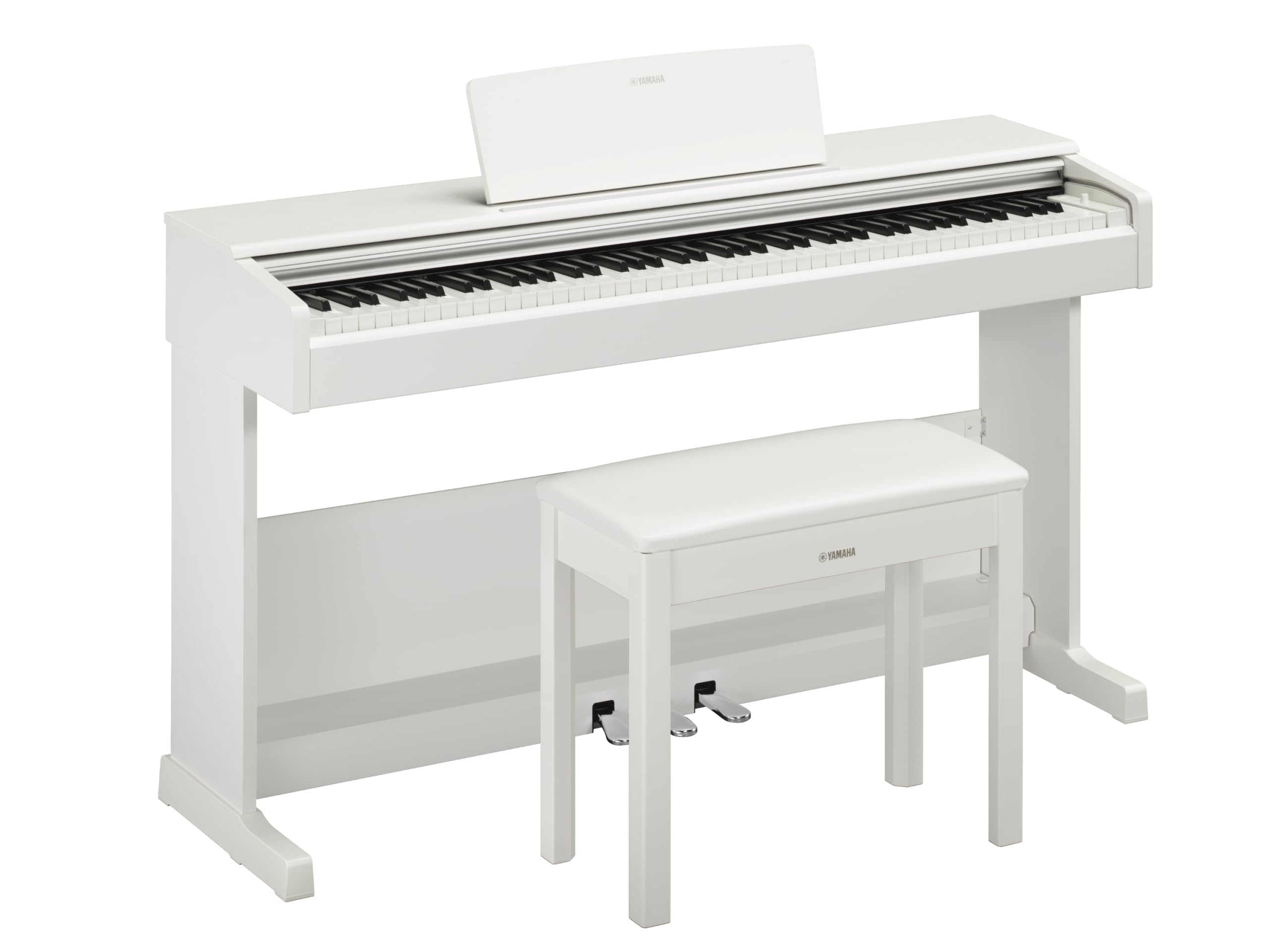
This image shows the Yamaha YDP105 digital piano in a white finish, positioned in a modern living room environment, highlighting its elegant design.
Маанилүү коопсуздук нускамалары
- Электр камсыздоо: Белгиленген кубат адаптерин гана колдонуңуз. Voltage сиздин жергиликтүү электр камсыздооңузга дал келет.
- Суу жана ным: Do not expose the instrument to rain, moisture, or excessive humidity. Keep liquids away from the piano.
- Вентиляция: Ensure adequate ventilation around the instrument. Do not block ventilation openings.
- Жайгашкан жери: Place the piano on a stable, level surface. Avoid direct sunlight, heat sources, and areas with excessive dust or vibrations.
- Колдонуу: Handle the instrument with care. Avoid dropping or subjecting it to strong impacts.
- Тейлөө: Аспапты өз алдынча тейлөөгө аракет кылбаңыз. Бардык тейлөө иштерин квалификациялуу адистерге тапшырыңыз.
Жайгашуу
Пакеттен чыгаруу
Carefully remove all components from the packaging. Ensure all included items are present: the piano unit, bench, 3-pedal unit, power adapter, and music rest.
Ассамблея
The Yamaha YDP105 requires some assembly. Follow these steps:
- Attach the side panels to the main keyboard unit using the provided screws.
- Secure the pedal unit to the assembled frame.
- Attach the backboard.
- Place the music rest into its slot on the keyboard unit.
- Assemble the bench according to its separate instructions.

This image shows the fully assembled Yamaha YDP105 digital piano in white, complete with its matching bench and music rest.
Power Connection
Connect the supplied power adapter to the DC IN jack on the rear of the piano and then to a standard AC outlet.
Pedal Unit Connection
Ensure the 3-pedal unit cable is securely connected to the corresponding jack on the piano.

This image displays a close-up of the three-pedal unit, showing the sustain, sostenuto, and soft pedals.
Иштөө нускамалары
Күйгүзүү/өчүрүү
басыңыз КҮЧ аспапты күйгүзүү же өчүрүү үчүн баскычты басыңыз.
Үндү көзөмөлдөө
колдонуу МАСТЕР ТОМУ жалпы үн деңгээлин тууралоо үчүн баскычты басыңыз.
Selecting Voices (Instrument Sounds)
The YDP105 features 10 instrument voices. To select a voice:
- басыңыз VOICE баскычы.
- Use the keyboard keys to select the desired voice as indicated in the manual's voice list.

This image shows a close-up of the control panel on the left side of the keyboard, highlighting the "GRAND PIANO" and "FUNCTION" buttons.
Наушниктерди колдонуу
The piano includes dual headphone jacks for private practice or duets. Connect standard 3.5mm headphones to either jack.

This image shows a pair of headphones resting on the top surface of the digital piano, near the keys.
Smart Pianist тиркемесинин интеграциясы
Enhance your experience by connecting the YDP105 to the Yamaha Smart Pianist app. This app allows for intuitive control of piano functions, access to scores, and learning tools. Refer to the Smart Pianist app's documentation for detailed connection and usage instructions.

This image displays the icon for the Yamaha Smart Pianist App, featuring a stylized piano keyboard and musical notes.
Техникалык тейлөө
Тазалоо
Куралды жумшак, кургак чүпүрөк менен сүртүңүз. өжөр кир үчүн, бир аз d колдонууamp cloth and then wipe dry. Avoid abrasive cleaners, solvents, or polishes.
Сактагыч
Пианинону туруктуу чөйрөдө, тике күн нурунан, экстремалдык температурадан жана жогорку нымдуулуктан алыс сактаңыз.
Moving the Instrument
When moving the piano, ensure it is powered off and disconnected from the power source. Handle with care to prevent damage.
Проблемаларды чечүү
Үн жок
- Кубат күйгүзүлгөнүн текшериңиз.
- Үндүн көтөрүлгөндүгүн текшериңиз.
- Эгер гарнитуралар туташтырылган болсо, динамиктин чыгышын текшерүү үчүн аларды ажыратыңыз.
- Бардык кабелдердин бекем туташтырылганын текшериңиз.
Ачкычтар жооп бербейт
- Power cycle the instrument (turn off, then on again).
- Ачкычтарды эч кандай буюмдар тосуп калбаганын текшериңиз.
Pedals Not Working
- Check the pedal unit cable connection.
- Ensure the pedal unit is correctly assembled and positioned.
Техникалык шарттар
| Өзгөчөлүк | Деталь |
|---|---|
| Модель аты | YDP-105 |
| Ачкычтардын саны | 88 |
| Ачкыч түрү | Graded Hammer Standard (GHS) keyboard with matte black keytops |
| Тийиштүү жооп | Hard/Medium/Soft/Fixed |
| Үндөр | 10 (including Grand Piano) |
| Полифония | 64 эскертүү |
| Педаалдар | 3 (Дamper with half pedal effect, Sostenuto, Soft) |
| Байланыш | USB to Host, Headphone Jacks (2 x Standard Stereo Phone Jack) |
| Баяндамачылар | 12 см x 2 |
| Ampөмүрлүү | 8 В x 2 |
| Өлчөмдөрү (W x D x H) | 1357 мм x 422 мм x 815 мм (53.44" x 16.63" x 32.09") |
| Салмагы | 37.5 кг (82.7 фунт) |
| Электр камсыздоо | PA-150B or an equivalent recommended by Yamaha |
Кепилдик маалымат
The Yamaha YDP105 Digital Piano comes with a 1-year manufacturer warranty. Yamaha Corporation of America is committed to the quality and craftsmanship of its products. This limited warranty applies only to products purchased from an authorized Yamaha retailer in the fifty United States (including the District of Columbia) and used within this area. For complete warranty details and terms, please refer to the official Yamaha webсайтына кириңиз же Yamaha кардарларды колдоо кызматына кайрылыңыз.
Кардарларды колдоо
Кошумча жардам, техникалык колдоо же тейлөө сурамдары үчүн расмий Yamahaга баш багыңыз webсайтка же кардарларды тейлөө бөлүмүнө кайрылыңыз.