
1. Киришүү
The THINKCAR THINKSCAN 689BT TPMS Combo is a comprehensive automotive diagnostic and tire pressure monitoring system (TPMS) service tool designed for professional mechanics and DIY enthusiasts. This kit combines the powerful THINKSCAN 689BT OBD2 diagnostic scanner with the VENU iPro TPMS tool and four VENU5 universal TPMS sensors. It provides extensive vehicle coverage and advanced functionalities for both vehicle diagnostics and complete TPMS management.
The THINKSCAN 689BT scanner offers full system diagnostics, bi-directional control, and over 34 maintenance reset functions. The VENU iPro TPMS tool is capable of activating, reading, relearning, and programming 315MHz and 433MHz TPMS sensors, including the included VENU5 sensors. This manual will guide you through the setup, operation, and maintenance of your THINKSCAN 689BT TPMS Combo.
2. Продукт бүтүп калдыview
The THINKSCAN 689BT TPMS Combo includes the following main components:
- THINKSCAN 689BT Bidirectional Scan Tool: An 8-inch touchscreen tablet running Android 10, offering advanced vehicle diagnostics.
- VENU iPro TPMS Tool: A handheld device for activating, reading, and programming TPMS sensors.
- VENU5 Universal TPMS Sensors (x4): Dual-frequency (315MHz/433MHz) sensors designed to replace factory sensors.
- Gateway Accessory Kit: For specific vehicle connections.
- F-Chassis Adaptor (FCA SGW 12+8 Bypass Cable): For diagnosing FCA vehicles (2018+).

Image 2.1: The THINKSCAN 689BT diagnostic tablet, VENU iPro TPMS tool, and four VENU5 TPMS sensors included in the package.
3. Орнотуу
3.1 Түзмөктү баштапкы орнотуу
- Заряддоо түзмөктөрү: Ensure both the THINKSCAN 689BT tablet and the VENU iPro TPMS tool are fully charged before first use.
- Күйгүзүү: Press and hold the power button on both devices to turn them on.
- Wi-Fi'га туташуу: On the THINKSCAN 689BT tablet, navigate to Settings and connect to a stable Wi-Fi network for software updates and online functions.
- Download Thinkdiag APP: If connecting the VENU iPro to a smartphone, download the Thinkdiag APP and create a user account to activate the VENU iPro. For use with the diagnostic tool, direct pairing is recommended.
3.2 Унаага туташуу
- OBD2 портун табыңыз: The OBD2 port is typically located under the dashboard on the driver's side.
- VCI туташтырыңыз: Plug the OBD2 VCI (Vehicle Communication Interface) adapter into the vehicle's OBD2 port.
- Bluetooth аркылуу жупташуу: On the THINKSCAN 689BT tablet, select the Bluetooth module. When the VENU iPro and THINKSCAN 689BT are connected, switch to the VENU tool in the 689BT Bluetooth module to perform TPMS functions. For OBD2 diagnostics, switch to the OBD2 VCI Bluetooth adapter.
- FCA унаалары: For 2018+ FCA vehicles, use the provided FCA SGW 12+8 Bypass Cable to access the vehicle's security gateway.
4. Иштөө нускамалары
4.1 General Vehicle Diagnostics (THINKSCAN 689BT)
The THINKSCAN 689BT performs comprehensive diagnostic scans across all vehicle systems, including Engine (ECM), Transmission (TCM), Anti-lock Braking System (ABS), Supplemental Restraint System (SRS/Airbag), Body Control Module (BCM), and more. It supports over 100 car brands and modern protocols like CAN-FD and DoIP.
- Select Diagnosis: From the main menu, select the 'Diagnosis' option.
- Унаанын идентификациясы: The tool can automatically identify the vehicle via VIN scan or you can manually select the vehicle make, model, and year.
- Системаны сканерлөө: Perform a full system scan to read and clear Diagnostic Trouble Codes (DTCs), view live data streams, and retrieve ECU information.
- Эки багыттуу башкаруу: This feature allows you to send commands to the vehicle's ECU to test specific components. Examples include activating fuel pumps, cycling the ABS pump, testing cooling fans, or operating windows to verify component functionality.
- Maintenance Resets: Access over 34 common service tasks such as Oil Reset, Electronic Parking Brake (EPB) Release, Diesel Particulate Filter (DPF) Regeneration, Steering Angle Sensor (SAS) Calibration, and Battery Matching.

Image 4.1: The THINKSCAN 689BT performing bi-directional controls, sending commands to the vehicle's system.
4.2 TPMS Functions (VENU iPro & VENU5 Sensors)
The VENU iPro TPMS tool, in conjunction with the THINKSCAN 689BT, provides a complete solution for TPMS service. It supports activation, reading, relearning, and programming of 315MHz and 433MHz sensors.
Video 4.2.1: Official video demonstrating how to use the THINKCAR VENU TPMS Programming Tool for sensor activation, reading, and programming.
4.2.1 Sensor Activation and Reading
The VENU iPro can activate 98% of known OE and aftermarket sensors, instantly reading data such as sensor ID, tire pressure, tire temperature, and battery status.
- Select TPMS Function: On the THINKSCAN 689BT tablet, navigate to the TPMS module.
- Сенсорду иштетүү: Hold the VENU iPro near the valve stem of each tire. Press the activation button on the VENU iPro. The tool will trigger the sensor and display its data on both the VENU iPro and the THINKSCAN 689BT tablet.
- Маалыматтарды жаздыруу: The displayed data includes sensor ID, pressure (in KPa), temperature, and battery status.
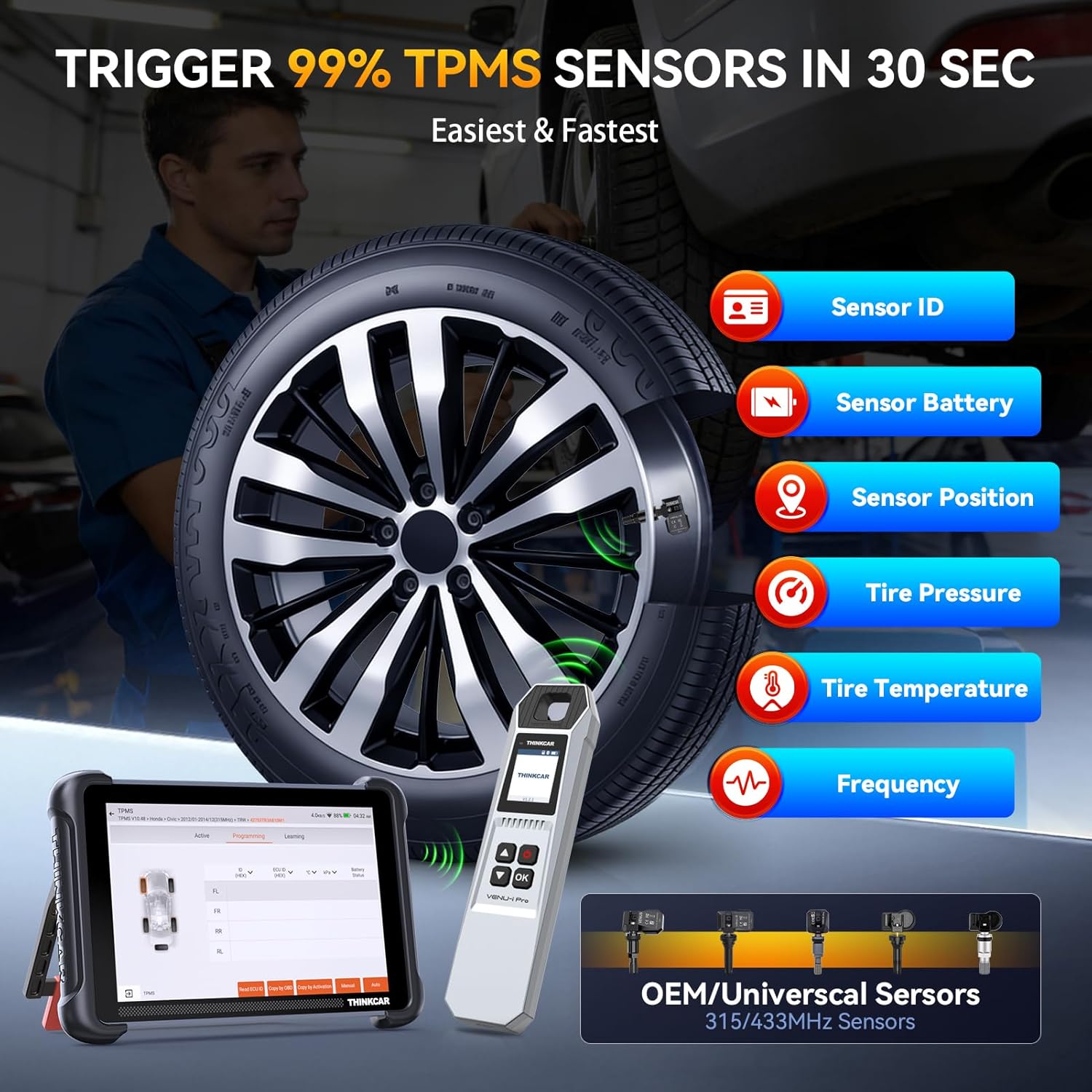
Image 4.2.1: The VENU iPro tool being used to trigger a TPMS sensor, displaying sensor ID, battery, position, pressure, temperature, and frequency.
4.2.2 Сенсордук программалоо
The VENU iPro supports programming THINKCAR sensors like VENU5, 5Pro, and S3. It does not program sensors from other brands.
Four programming methods are available:
- OBD Cloning: Copies the sensor ID from the vehicle's ECU via the OBD port.
- Auto Creation: Generates a new, unique sensor ID.
- Manual Creation: Allows you to manually input a sensor ID.
- Activation Cloning: Copies the ID from an existing, activated sensor.

Image 4.2.2: Illustration of the five programming methods for THINKCAR and MUCAR VENU sensors.
4.2.3 TPMS кайра үйрөнүү процедуралары
After replacing or programming TPMS sensors, a relearn procedure is necessary to introduce the new sensor IDs to the vehicle's computer. The tool provides on-screen, step-by-step instructions for various relearn types.
Common relearn methods include:
- Стационардык кайра үйрөнүү: Requires the vehicle to be stationary and often involves specific steps like inflating/deflating tires.
- OBD кайра үйрөнүү: Connects the tool to the OBD port to write sensor IDs directly to the vehicle's ECU.
- Автоматтык түрдө кайра үйрөнүү: Some vehicles can automatically recognize new sensors after driving for a certain period at a specific speed.
- Copy ID by OBD / Copy ID by Activate: These methods involve copying existing sensor IDs to new sensors, simplifying the relearn process.

Image 4.2.3: Visual representation of four TPMS relearn methods: Stationary Relearn, OBD Relearn, Copy ID by OBD, and Copy ID by Activate.
5. Техникалык тейлөө
5.1 Программалык камсыздоо жаңыртуулары
The THINKSCAN 689BT scan tool offers free lifetime updates with no subscription fees. Regular software updates ensure compatibility with new vehicle models and provide enhanced features.
- Wi-Fi'га туташуу: Ensure the THINKSCAN 689BT tablet is connected to a stable internet connection.
- Жаңыртууларды текшерүү: Navigate to the 'Upgrade' section on the tablet's main menu to check for available updates.
- Жаңыртууларды орнотуу: Follow the on-screen prompts to download and install any new software versions.
5.2 Тазалоо жана сактоо
- Тазалоо: жумшак колдонуу, damp cloth to clean the device screens and bodies. Avoid abrasive cleaners or solvents.
- Сактагыч: Store the devices in a cool, dry place away from direct sunlight and extreme temperatures. Use the provided carrying case for protection during transport and storage.
- Батареяга кам көрүү: For optimal battery life, avoid fully discharging the devices frequently. Charge them periodically if not in use for extended periods.
5.3 VENU5 Sensor Durability
The VENU5 tire sensors are designed for durability, featuring automotive-grade batteries with a 4-6 year lifespan. They withstand extreme temperatures from -40°C to +125°C, have metal construction for corrosion resistance, and are IP67 waterproof.
6. Кыйынчылыктарды
- VENU iPro Cannot Operate Independently: The VENU iPro TPMS tool requires connection to the THINKSCAN 689BT diagnostic tool or a smartphone with the Thinkdiag APP for full functionality.
- Pressure Display in KPa Only: The VENU iPro currently supports displaying tire pressure only in KPa units, not PSI.
- TPMS Fault Light Remains On: The TPMS fault light can only be cleared after the underlying TPMS issue in the vehicle has been repaired and the sensors are correctly relearned.
- Унаа шайкештиги: Supported vehicle models for diagnostic and TPMS functions vary. Always check the official THINKCAR coverage list before performing specific operations.
- Programming Other Brand Sensors: The VENU iPro programming tool cannot program sensors from other brands; it only supports THINKCAR/MUCAR branded sensors.
- Туташуу маселелери: Ensure Bluetooth is enabled on both the THINKSCAN 689BT and the VCI/VENU iPro. Check that devices are within range and fully charged.
7. Техникалык шарттар
| Өзгөчөлүк | Спецификация |
|---|---|
| Бренд | ойлонуучу машина |
| Модел | THINKSCAN 689BT |
| Power Source | OBD II Interface 12-Volts, Plug&Play |
| Операция системасы | Жылмакай Android 10 негизиндеги төрт ядролуу процессор |
| Screen Size | 8 Inches Touchscreen |
| Сактагыч | 4 ГБ RAM + 64 ГБ сактагыч |
| Тил | English (Multi-language support available) |
| Камтылган компоненттер | 1* THINKSCAN 689BT Scan Tool, 1* VENU iPro, 4* VENU5 Sensor, 1* Gateway Accessory Kit, 1* F-Chassis Adaptor (FCA SGW 12+8 Bypass Cable) |
| TPMS Sensor Frequency | 315MHz / 433MHz (Dual-frequency) |
| TPMS Sensor Battery Life | 4-6 жаш |
| TPMS Sensor Operating Temp | -40°Cден +125°Cге чейин |
| TPMS Sensor Waterproof Rating | IP67 |
| UPC | 730093411949 |
8. Кепилдик жана колдоо
8.1 Өндүрүүчүнүн Кепилдиги
The THINKSCAN 689BT TPMS Combo comes with a 12 ай өндүрүүчү кепилдик сатып алынган күндөн тартып. Бул кепилдик нормалдуу колдонуудагы материалдардагы жана жасалгадагы кемчиликтерди камтыйт. Кепилдик дооматтары үчүн сатып алганыңыздын далилин сактап коюңуз.
8.2 Техникалык колдоо
For any inquiries, technical assistance, or troubleshooting not covered in this manual, please contact THINKCAR customer support. You can reach us via Amazon's “Messages” feature, and we will endeavor to provide a solution within 24 hours. Please provide your product model and a detailed description of the issue for faster service.