
1. Киришүү
This manual provides comprehensive instructions for the installation, operation, and maintenance of the Generic M8400T IS7XM V1.0 LGA 1155 DDR3 Desktop Motherboard. Designed for optimal performance and reliability, this motherboard is compatible with a wide range of processors and components, making it suitable for various computing needs. Please read this manual thoroughly before proceeding with installation or operation to ensure proper setup and to prevent damage to the components.
2. Коопсуздук маалыматы
Компьютердин компоненттери менен иштөөдө ар дайым төмөнкү коопсуздук чараларын сактаңыз:
- Электростатикалык разряддын (ESD) алдын алуу: Always wear an anti-static wrist strap or frequently touch a grounded metal object (like the computer case) before handling the motherboard or other components. ESD can severely damage electronic parts.
- Электр энергиясын өчүрүү: Кандайдыр бир компоненттерди орнотуудан же алып салуудан мурун, кубат булагынын розеткадан суурулганын текшериңиз.
- Туура желдетүү: Компьютериңиздин корпусунун ысып кетишине жол бербөө үчүн жетиштүү аба айланышын камсыз кылыңыз.
- Этияттык менен мамиле кылуу: Hold the motherboard by its edges to avoid touching sensitive components or circuits.
- Кесиптик жардам: Орнотуу кадамдарына ишенбесеңиз, квалификациялуу техникке кайрылыңыз.
3. Продукт бүтүп калдыview
The Generic M8400T IS7XM V1.0 motherboard is designed for desktop computing, offering a stable and efficient platform. Key features include:
- High-performance design for optimal and efficient computing.
- Durable and reliable construction using high-quality materials.
- Easy installation and broad compatibility with various processors and components.
- LGA 1155 CPU socket support.
- DDR3 RAM technology support.
3.1 Motherboard Layout
Below is an image illustrating the main components and layout of the motherboard.
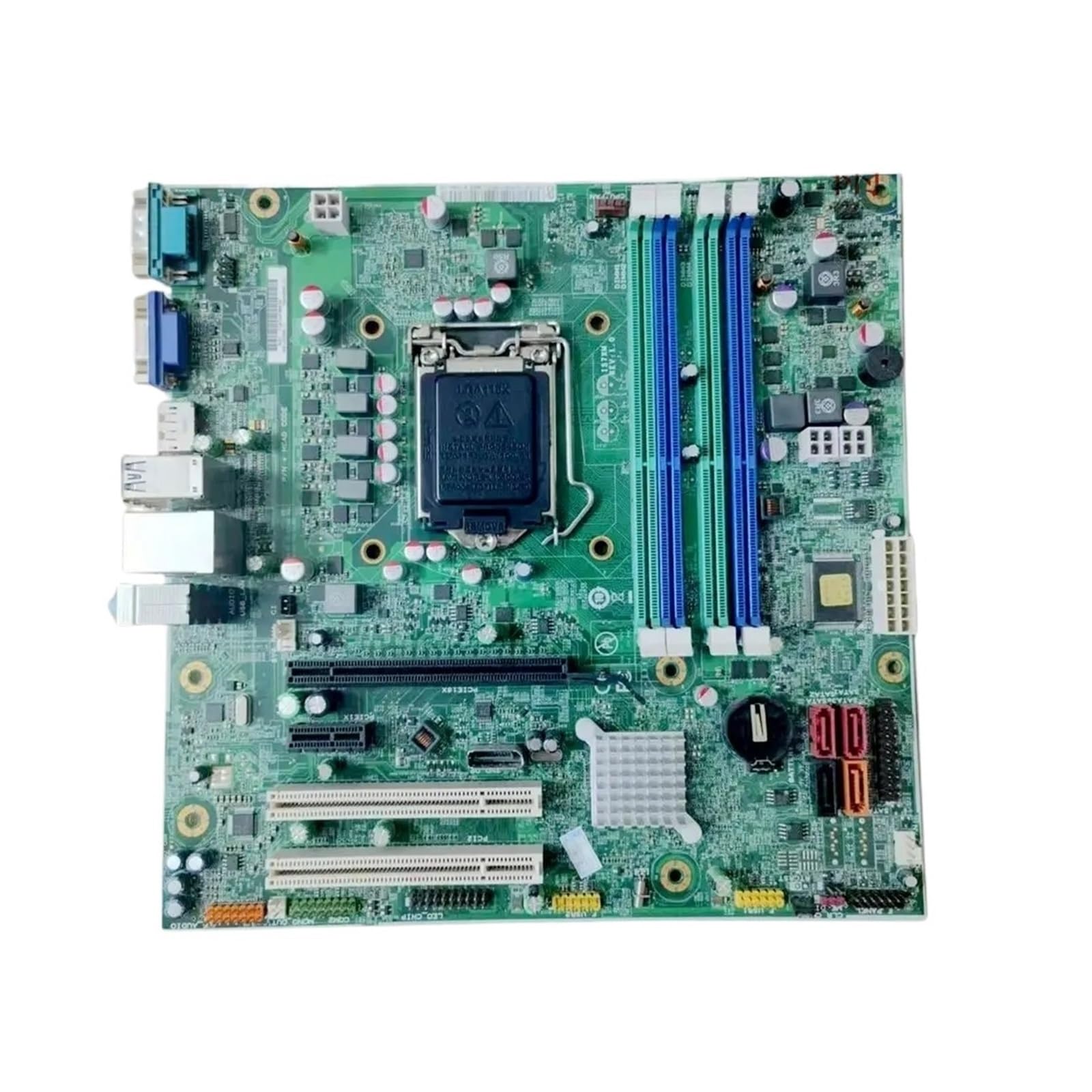
1-сүрөт: Бүттүview of the Generic M8400T IS7XM V1.0 Motherboard. This image displays the full motherboard, highlighting the central LGA 1155 CPU socket, two blue and green DDR3 RAM slots, various expansion slots (PCIe x16, PCIe x1), SATA ports, and I/O connectors such as USB, Ethernet, and audio ports on the left edge.
Негизги компоненттерге төмөнкүлөр кирет:
- CPU розетка (LGA 1155): Located centrally, this is where the processor is installed.
- DDR3 DIMM Slots: Two slots (blue and green) for installing DDR3 memory modules.
- PCIe кеңейтүү слоттору: Includes a PCIe x16 slot for graphics cards and PCIe x1 slots for other expansion cards.
- SATA порттору: Катуу дисктер жана SSD сыяктуу сактагычтар үчүн туташтыргычтар.
- I/O панели: Rear connectors for peripherals such as USB devices, display outputs (VGA), Ethernet, and audio.
- Кубат туташтыргычтары: Main ATX power connector and CPU power connector.
4. Орнотуу жана орнотуу
Motherboard жана компоненттерди орнотуу үчүн бул кадамдарды кылдаттык менен аткарыңыз.
4.1 Алдын ала орнотуу текшерүү тизмеси
- Ensure you have all necessary components: CPU, RAM, CPU cooler, power supply, storage devices, and a compatible computer case.
- Prepare your workspace: a clean, well-lit, and static-free environment.
- Gather tools: Phillips head screwdriver, anti-static wrist strap.
4.2 Motherboard орнотуу
- Компьютериңиздин корпусунун арткы тешигине I/O калкан орнотуңуз.
- Carefully align the motherboard with the standoffs inside the case.
- Secure the motherboard with screws, ensuring it is firmly seated and not touching any metal parts of the case directly.
4.3 CPU орнотуу (LGA 1155)
- CPU розеткасынын рычагын ачып, металл жүктөөчү пластинаны көтөрүңүз.
- Carefully place the CPU into the socket, aligning the golden triangle on the CPU with the triangle on the socket. Do not force it.
- Жүк ташуучу пластинаны түшүрүп, рычагды кайра ордуна түртүп бекитиңиз.
- Apply thermal paste to the CPU (if not pre-applied on the cooler) and install the CPU cooler according to its manufacturer's instructions.
4.4 RAM орнотуу (DDR3)
- DDR3 DIMM уячаларынын эки учундагы клиптерди ачыңыз.
- RAM модулундагы оюкту DIMM уячасындагы оюк менен тегиздеңиз.
- RAM модулунун эки учуна клиптер орнотулганга чейин катуу басыңыз.
4.5 Перифериялык түзүлүштөрдү жана кубаттуулукту туташтыруу
- 24-пиндүү ATX кубат туташтыргычын жана 4-пиндүү же 8-пиндүү CPU кубат туташтыргычын кубат булагыңыздан энелик платага туташтырыңыз.
- Connect SATA data cables from your storage devices to the SATA ports on the motherboard.
- Install your graphics card into the PCIe x16 slot and secure it. Connect any necessary PCIe power cables from the power supply to the graphics card.
- Connect front panel headers (power button, reset button, USB ports, audio jacks) to their respective pins on the motherboard. Refer to your case manual for specific pin assignments.
5. Иштөө нускамалары
5.1 Биринчи жүктөө
- After connecting all components and power, plug in your monitor, keyboard, and mouse.
- Turn on the power supply and then press the power button on your computer case.
- Система күйүп, BIOS/UEFI баштапкы экранын көрсөтүшү керек.
5.2 BIOS/UEFI мүмкүндүк алуу
To enter the BIOS/UEFI setup utility, press the designated key (commonly Del, F2, же F10) repeatedly during the initial boot sequence. The exact key may vary; check the on-screen prompts during startup.
5.3 Драйверди орнотуу
After installing your operating system, install the necessary drivers for the motherboard's chipset, audio, network, and any other integrated components. These drivers are typically provided on a support CD/DVD or can be downloaded from the manufacturer's webсайт.
6. Техникалык тейлөө
- Чаңды тазалоо: Кысылган абаны колдонуп, компьютериңиздин ичиндеги чаңды, айрыкча желдеткичтер менен радиаторлордун чаңын дайыма тазалаңыз. Тазалоодон мурун системанын өчүрүлгөнүн жана розеткадан ажыратылганын текшериңиз.
- BIOS/UEFI жаңыртуулары: Мезгил-мезгили менен өндүрүүчүнүн текшерүү webBIOS/UEFI жаңыртуулары үчүн сайт. Жаңыртуулар туруктуулукту, шайкештикти жана иштин натыйжалуулугун жакшырта алат. Энелик платага зыян келтирбөө үчүн жаңыртуу боюнча көрсөтмөлөрдү кылдаттык менен аткарыңыз.
- Кабелдик башкаруу: Аба агымын жакшыртуу жана тоскоолдуктарды болтурбоо үчүн ички кабелдердин тыкан өткөрүлүшүн текшериңиз.
7. Кыйынчылыктарды
Көйгөйгө туш болсоңуз, төмөнкү жалпы көйгөйлөрдү чечүү кадамдарын караңыз:
- Кубат жок:
- Check if the power supply is properly connected to the wall outlet and the motherboard (24-pin ATX and CPU power).
- Кубат булагынын которгучу "ON" абалында экенин текшериңиз.
- Алдыңкы панелдин кубат баскычы менен энелик платага туташуусун текшериңиз.
- Дисплей жок:
- Ensure the monitor is connected to the correct display output (either integrated graphics or dedicated graphics card).
- Графикалык картаны жана RAM модулдарын кайра орнотуңуз.
- Бир гана RAM таякчасы менен жүктөөгө аракет кылыңыз.
- Системанын туруксуздугу/бузуулар:
- CPU жана GPU температурасын текшерүү.
- Verify RAM is properly seated and functioning.
- Бардык айдоочулар жаңыртылганын текшериңиз.
- Эстутум диагностикалык куралдарын иштетиңиз.
- Компонент аныкталган жок:
- Check power and data cable connections for the component.
- Ensure the component is properly seated in its slot.
- BIOS/UEFI акыркы версиясына жаңыртыңыз.
8. Техникалык шарттар
The following table lists the technical specifications for the Generic M8400T IS7XM V1.0 Motherboard:
| Өзгөчөлүк | Спецификация |
|---|---|
| Бренд | Жалпы |
| Модель аты | QLAEWRHEE |
| CPU розетка | BGA 1023 (Note: Product description mentions LGA 1155, please verify compatibility with your CPU) |
| RAM технологиясы | DDR3 |
| Memory Clock Speed | 1 ГГц |
| Max RAM Size | 1 GB (Note: This value seems unusually low for a DDR3 motherboard, please verify with seller or manufacturer) |
| Available Memory Slots | 1 (Note: Image shows 2 slots, please verify with seller or manufacturer) |
| CPU модели | Альфа |
| Платформа | 3DO |
| Өндүрүүчү бөлүгүнүн номери | QLAEWRHEE |
| Келип чыккан өлкө | Кытай |
Спецификациялар боюнча эскертүү: Some specifications provided (e.g., CPU Socket, Max RAM Size, Available Memory Slots, Platform) appear inconsistent with typical LGA 1155 DDR3 motherboards or the product image. Users are advised to verify these details with the seller or manufacturer before purchase or installation to ensure compatibility with their intended components. The product description mentions LGA 1155 and DDR3, which is generally associated with higher RAM capacities and multiple slots. The "BGA 1023" socket and "1 GB" max RAM are typically for embedded or older systems.
9. Кепилдик жана колдоо
Кепилдик маалыматы жана техникалык колдоо үчүн, сатып алууда берилген документтерди караңыз же сатуучу менен түз байланышыңыз. Ар кандай кепилдик дооматтары үчүн сатып алганыңыздын далилин сактаңыз.