
1. Киришүү
The EPOMAKER TH108 V2 PRO is a full-size mechanical keyboard designed for versatility and performance. It features multi-mode connectivity (Bluetooth, 2.4GHz wireless, and wired USB-C), a customizable screen and knob, hot-swappable switches, RGB lighting, and a gasket-mounted design for a comfortable typing experience. This manual provides instructions for setting up, operating, maintaining, and troubleshooting your keyboard.
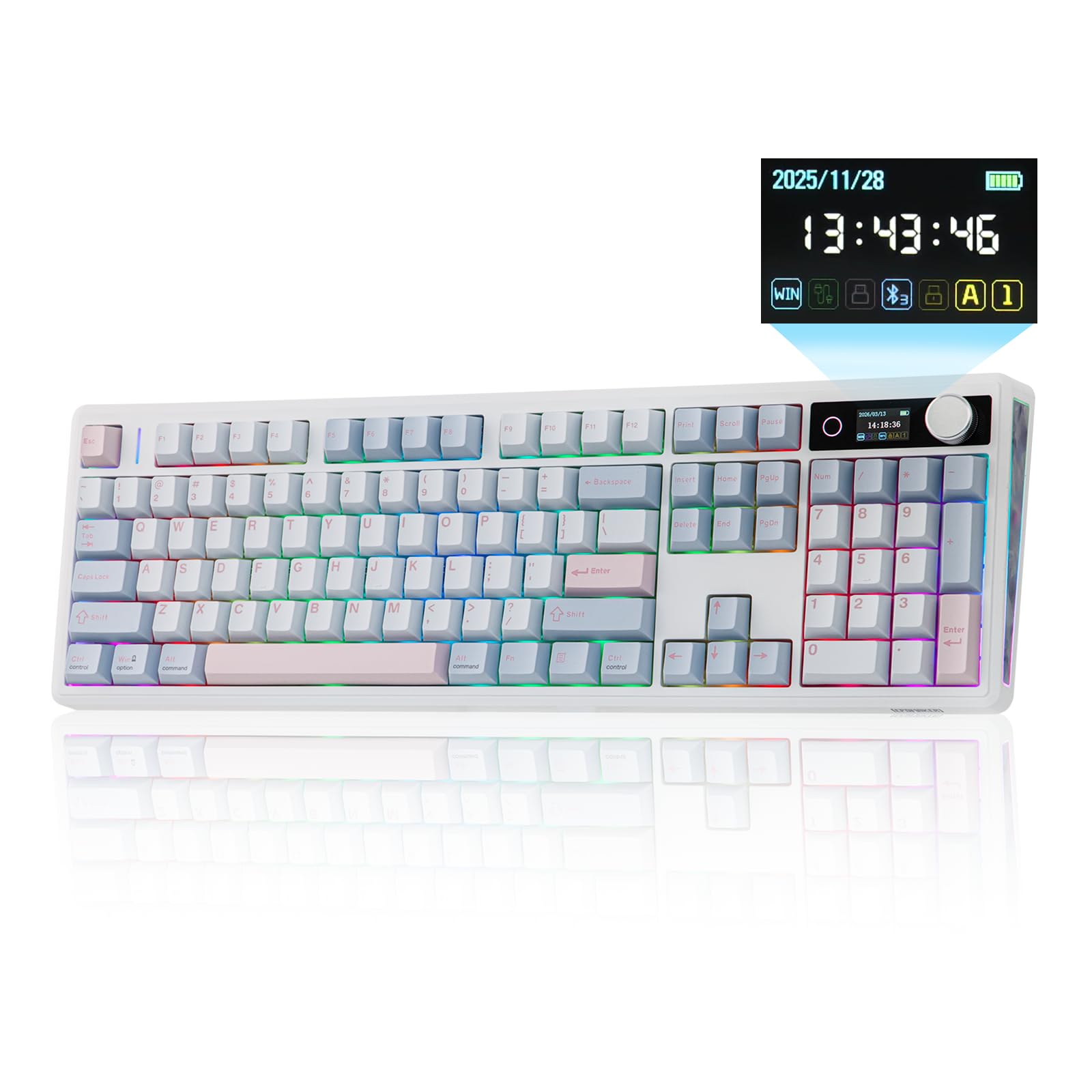
Figure 1.1: EPOMAKER TH108 V2 PRO Mechanical Keyboard
2. Кутуда эмне бар
- EPOMAKER TH108 V2 PRO Full-Sized Gaming Keyboard
- Detachable USB A-to-C Cable
- Wireless 2.4Ghz Receiver (stored under the left kick-stand)
- Extra Switch
- 2-in-1 Switch-and-Keycap Puller
- Summarized Multilingual Manual and Product Card

Figure 2.1: Location of the 2.4Ghz Wireless Receiver
3. Продукт бүтүп калдыview
The TH108 V2 PRO keyboard integrates several features for enhanced user experience:
- Көп режимдүү байланыш: Bluetooth, 2.4 ГГц зымсыз жана зымдуу USB-C байланыштарын колдойт.
- Customizable Screen & Knob: A 1.06-inch functional glass screen displays real-time keyboard information, backlight settings, and supports custom GIFs or images. The rotary knob controls volume and screen pages, and is customizable.
- Ыкчам алмаштыруучу которгучтар: Механикалык өчүргүчтөрдү ширетүүсүз оңой алмаштырууга мүмкүндүк берет.
- Прокладканы орнотуунун дизайны: Multiple layers of sound-dampening materials (PORON, latex, IXPE, silicone, foams) provide a soft, bouncy typing feel and a deep acoustic profile.
- RGB жарыктандыруу: Features per-key adjustable south-facing LEDs, an integrated light bar, and a custom decor panel for vibrant lighting effects.
- Батареянын узак иштөө мөөнөтү: 10000 мАч батарея менен жабдылган, ал 200 саатка чейин үзгүлтүксүз иштөөнү камсыз кылат.
- Mac/Windows Compatibility: Includes dedicated Mac modifier keycaps for seamless switching between operating systems.

Figure 3.1: Cushioned Gasket Structure

Figure 3.2: Pre-Lubed Linear Switches

Figure 3.3: Mac Modifier PBT Keycaps

Figure 3.4: Vibrant RGB Lighting
Продукт видеолору
Video 3.1: Comparison between TH108 PRO and TH108 V2 PRO, highlighting key differences and improvements.
Video 3.2: Demonstrates the typing sound and feel of Creamy Jade and Sea Salt Silent V2 switches on the TH108 V2 PRO.
Video 3.3: Provides close-up views of various components and design elements of the TH108 V2 PRO keyboard.
4. Орнотуу
4.1 Байланыш параметрлери
The TH108 V2 PRO supports three connection modes:
- Зымдуу режим: Connect the keyboard to your device using the provided USB A-to-C cable.
- 2.4 ГГц зымсыз режими: Insert the 2.4GHz USB receiver (found under the left kick-stand) into your device's USB port. Switch the keyboard's mode selector to 2.4G.
- Bluetooth режими: Switch the keyboard's mode selector to BT. Press FN + Q/W/E Bluetooth каналын тандоо үчүн. Индикатор жарыгы күйүп-өчөт, бул жупташуу режимин көрсөтөт. Издөө "TH108 V2 PRO" on your device and connect.
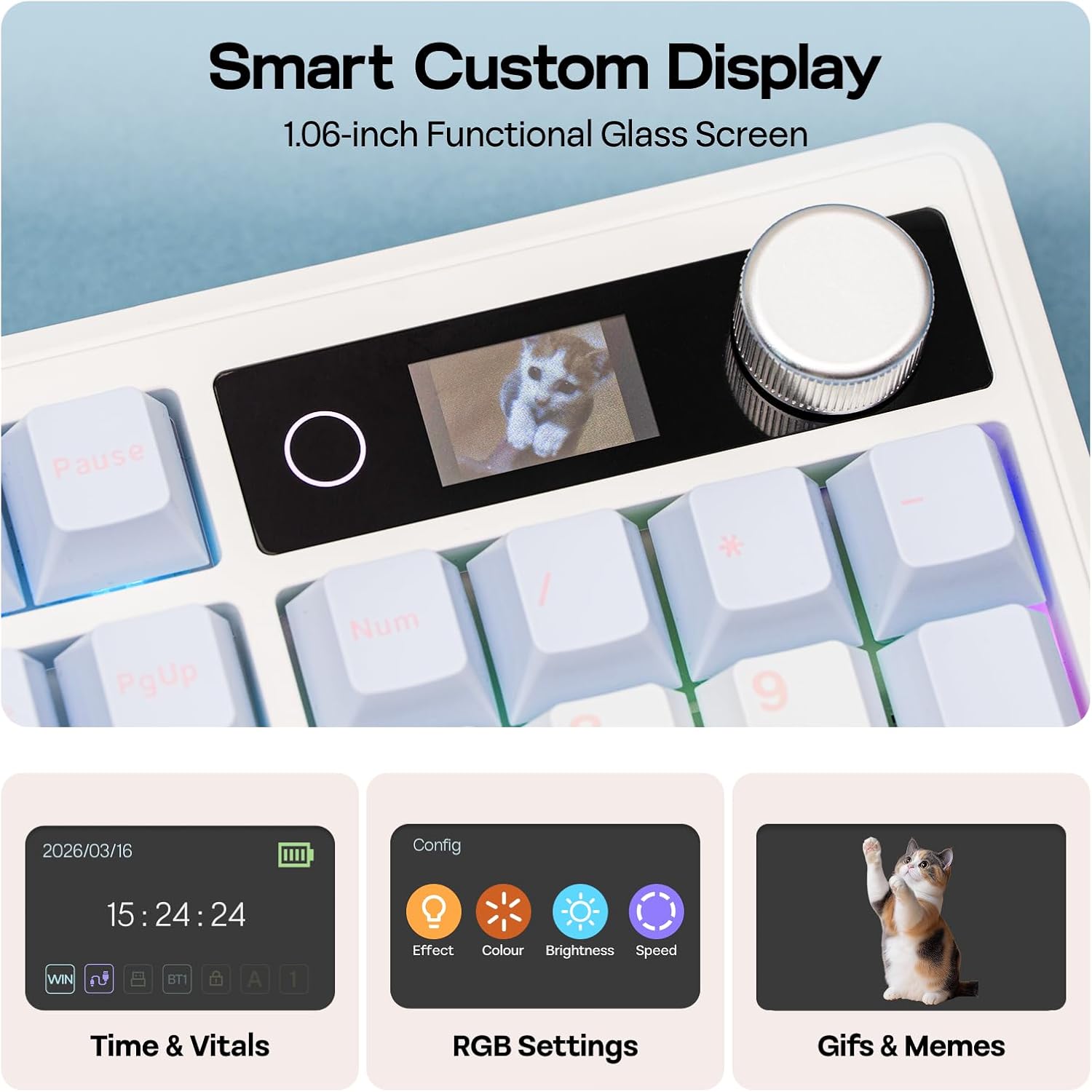
Figure 4.1: Connection Hub and Mode Switches
4.2 Операциялык системанын которгучу
Use the dedicated switch on the keyboard to toggle between Windows (WIN) and Mac operating system layouts. This ensures correct key mapping for your system.
4.3 Баштапкы төлөм
Before first use, it is recommended to fully charge the keyboard using the provided USB-C cable. The screen will indicate charging status.
Video 4.2: An unboxing video of the TH108 V2 PRO, showing initial setup components.
5. Иштөө нускамалары
5.1 Screen and Knob Functions
The 1.06-inch screen displays various information and settings. The rotary knob allows for quick adjustments:
- Default Knob Function: Үндү тууралоо үчүн буруңуз. Үнсүз/чыгаруу үчүн басыңыз.
- FN + Knob: Toggles between screen pages (e.g., time, battery, connection status, RGB settings).
- Ыңгайлаштыруу: The screen can display custom GIFs, drawings, or photos. This is managed via the web-compatible software.

Figure 5.1: Smart Custom Display and Knob
5.2 RGB жарыкты башкаруу
The keyboard features customizable RGB backlighting. You can adjust effects, colors, brightness, and speed using:
- Integrated Knob and Screen: Use FN + Knob to navigate to RGB settings on the screen, then use the knob to adjust.
- Ыкчам баскычтар: Refer to the included quick guide for specific FN key combinations to change RGB modes.
- Web-Based Software: For advanced customization, including per-key lighting and custom effects.
5.3 Программалануучу программалык камсыздоо
The TH108 V2 PRO utilizes a web-compatible software for advanced customization. This software allows you to:
- Ачкычтарды кайра иштетүү
- Record macros
- Customize RGB lighting
- Adjust keyboard settings
- Upload GIFs or images to the screen
Access the software via the official EPOMAKER website. It is compatible across various devices and operating systems.
Video 5.2: A guide on how to customize your TH108 V2 PRO using the available software and features.
6. Техникалык тейлөө
6.1 Тазалоо
- Тазалоодон мурун клавиатураны бардык кубат булактарынан ажыратыңыз.
- Бир аз жумшак, түксүз кездемени колдонуңуз dampачкыч капкактарын жана шассиди сүртүү үчүн суу же жумшак тазалоо эритмеси менен жабыңыз.
- Баскыч капкактарынын ортосундагы чаң жана таштанды үчүн кысылган абаны же кичинекей щетканы колдонуңуз.
- Avoid harsh chemicals, abrasives, or excessive moisture.
6.2 Баскычтын капкагын жана которгучту алмаштыруу
The TH108 V2 PRO features hot-swappable switches, allowing for easy replacement without soldering.
- Use the provided 2-in-1 switch-and-keycap puller.
- To remove a keycap, gently pull it upwards with the keycap puller.
- To remove a switch, use the switch puller to grasp the top and bottom clips of the switch and pull straight upwards.
- When inserting a new switch, ensure the pins are straight and align with the PCB sockets. Press firmly until it clicks into place.
- When replacing keycaps, align them with the switch stem and press down gently.
7. Кыйынчылыктарды
- Баскычтоп жооп бербей жатат:
- Баскычтоп кубатталганын текшериңиз.
- Check the connection mode switch (wired, 2.4GHz, Bluetooth) matches your setup.
- For 2.4GHz, ensure the receiver is properly inserted.
- Bluetooth үчүн, түзмөктү кайра жупташтырыңыз.
- Зымсыз көйгөйлөрдү болтурбоо үчүн USB-C кабели аркылуу туташтырып көрүңүз.
- RGB жарык иштебейт/туура эмес:
- Check RGB settings via the screen or software.
- Ensure brightness is not set to zero.
- Update keyboard firmware if available.
- Катталбай жаткан ачкычтар:
- If a specific key is not working, try removing and re-inserting its switch.
- Ensure the switch pins are not bent.
- Мүмкүн болсо, башка которгуч менен текшериңиз.
- Программалык камсыздоо маселелери:
- Ensure you are using a compatible browser (e.g., Chrome) for the web-негизделген программалык камсыздоо.
- Браузердин кэшин тазалаңыз же башка браузерди колдонуп көрүңүз.
- Refer to the EPOMAKER support website for software-specific FAQs.
8. Техникалык шарттар
| Бренд | EPOMAKER |
| Модель аты | TH108 V2 PRO |
| Байланыш технологиясы | 2.4Ghz Wireless, Bluetooth, USB Cable |
| Keyboard Description | Механикалык |
| Ачкычтардын саны | 104 |
| Баскычтоптун жайгашуусу | QWERTY |
| Которуу түрү | Linear, Linear Silent (depending on variant) |
| Өзгөчөлүктөр | Backlit, Ergonomic, Hot-Swappable, Programmable Keys, Volume Roller, Screen |
| Баскычтоптун арткы жарыгы | RGB |
| Power Source | Батарея менен иштейт (10000mAh) |
| Материал | Plastic (Enclosure), Polycarbonate (Plate) |
| Шайкеш түзмөктөр | Оюн консолу, ноутбук, компьютер, смартфон, планшет |
| Шайкеш OS | Android, Windows, Mac OS 11 Big Sur and above |
| Добуш берүү көрсөткүчү (зымдуу) | 1000Hz |
| Latency (Wired) | 2ms |
9. Кепилдик жана колдоо
The EPOMAKER TH108 V2 PRO Mechanical Keyboard comes with a 1 жылдык кепилдик сатып алынган күндөн тартып.
For technical support, warranty claims, or additional information, please visit the official EPOMAKER website or contact their customer service directly. You can also find more resources and product information on the Amazon'догу EPOMAKER дүкөнү.