
1. Киришүү
This manual provides comprehensive instructions for the Rimoody 7-inch portable display designed for motorcycles. This device offers wireless CarPlay and Android Auto functionality, enhancing your riding experience with navigation, communication, and entertainment features. It is built with an IP68 waterproof rating and supports various connectivity options including Bluetooth and voice control.

Image: The Rimoody 7-inch HD large screen display mounted on a motorcycle, showcasing its clear interface and robust design.
2. Пакеттин мазмуну
Орнотуудан мурун, пакетте бардык компоненттер бар экенин текшериңиз:
- Rimoody 7-inch Motorcycle Display
- Электр кабели (190 см)
- Bracket (Clamp)
- Bracket (Arm)
- Bracket (Base)
- Bracket (Tool)
- User Manual

Image: An illustration showing all included components: the 7-inch display, power cable, various mounting brackets (clamp, arm, base, tool), and the user manual. Dimensions are also indicated.
3. Орнотуу жана орнотуу
3.1 Дисплейди орнотуу
The display features a quick-release bracket system for easy installation and removal. Multiple mounting options are available to suit various motorcycle models, allowing installation on handlebars or in the center of the motorcycle. The bracket angle can be adjusted for optimal viewing.
3.2 Баштапкы күйгүзүү
Connect the provided power cable to your motorcycle's 12V power source. Ensure a secure connection. The device will power on automatically or require a press of the power button.
3.3 Wireless Connectivity Setup
To utilize wireless CarPlay or Android Auto, ensure your smartphone's Bluetooth and Wi-Fi are enabled. The display will automatically connect to your device after the initial pairing.
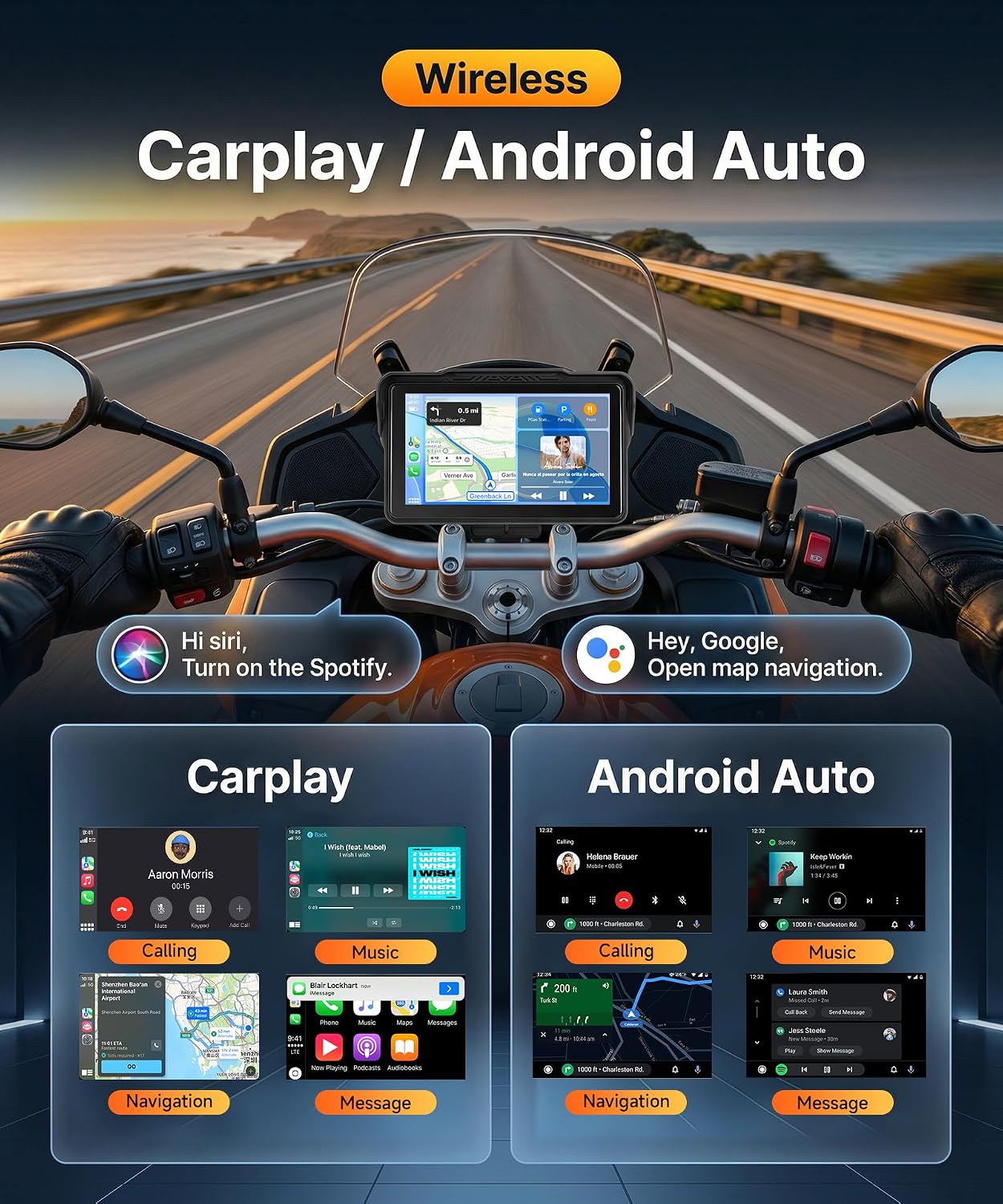
Image: A rider's perspective showing the display mounted on a motorcycle, demonstrating the wireless CarPlay and Android Auto interfaces with navigation, music, and calling functions.
4. Иштөө нускамалары
4.1 Wireless CarPlay жана Android Auto
Once connected, the display mirrors your smartphone's CarPlay or Android Auto interface. You can access applications, maps, music, and other functions directly from the display. Voice control via Google Assistant or Siri is supported for hands-free operation.
4.2 Bluetooth Helmet and Headset Connection
The display supports audio output to Bluetooth helmets and headsets via your connected mobile phone. Follow these steps:
- Pair your phone via Bluetooth to the display, activating CarPlay or Android Auto.
- On the display, select the 'Sortie audio' option and choose 'Iplay/Auto' mode.
- Connect your Bluetooth helmet or headset to your mobile phone's Bluetooth settings to transmit audio.
- If the helmet was previously used in 'BT Trans' mode, delete it from the display's Bluetooth list before re-pairing.

Image: A diagram illustrating the seamless Bluetooth connectivity process: 7-inch display connects to phone via Bluetooth/Wi-Fi, then the phone connects to a Bluetooth headset or helmet for audio.
4.3 Online Navigation and Voice Assistant
When connected to CarPlay or Android Auto, the display provides online navigation and voice assistant capabilities. Use voice commands to navigate, adjust maps, or control functions without taking your hands off the handlebars, ensuring maximum safety. Supported apps include Maps, Phone, Music, Weather, and more.
Image: The display showing online map navigation with various app icons (Maps, Phone, Music, Weather, Tyre Pressure, Settings, Apps) and voice assistant prompts for Siri and Google Assistant.
4.4 Жарыктыкты жөндөө
The screen brightness can be adjusted to suit different lighting conditions, including automatic brightness adjustment based on preset times. This ensures optimal visibility during day and night riding.

Image: A visual representation of the brightness adjustment interface on the display, showing how the screen adapts to different light levels from dim to maximum brightness.
4.5 Tyre Pressure Monitoring System (TPMS) Support
The display supports TPMS functionality, allowing real-time monitoring of front and rear tire pressure and temperature. In case of abnormal readings, the system provides immediate warnings. Note: Required TPMS sensors and accessories are not included and must be purchased separately.

Image: A close-up of a motorcycle tire with an overlay showing the TPMS interface on the display, detailing tire pressure, temperature, and setting options for alerts.
4.6 TF Card Support
The motorcycle display supports inserting a TF card (not included) to play pictures, audio, and video files.
5. Техникалык тейлөө
The Rimoody display is designed with an IP68 суу өткөрбөйт рейтинги, ensuring protection against dust and immersion in water. This allows for safe use in various weather conditions, including rain and snow.

Image: The display being splashed with water, demonstrating its IP68 waterproof capability, with icons indicating resistance to snowy, rainy, and dusty conditions.
To maintain the device, regularly wipe the screen with a soft, damp кездеме. Экранга зыян келтирүүчү катаал химиялык заттарды же абразивдүү материалдарды колдонуудан качыңыз же вasing. Ensure all ports are securely closed to maintain the waterproof seal.
6. Кыйынчылыктарды
- Кубат жок: Ensure the power cable is securely connected to both the display and the motorcycle's 12V power source. Check the motorcycle's fuse if necessary.
- CarPlay/Android Auto'го туташуу мүмкүн эмес: Verify that Bluetooth and Wi-Fi are enabled on your smartphone. Ensure the display is in the correct pairing mode. Try restarting both the display and your phone.
- No Audio from Helmet/Headset: Confirm that your helmet/headset is paired to your мобилдүү телефон, not directly to the display. Check the audio output settings on the display and your phone.
- Экран жооп бербейт: Perform a soft reset by holding down the power button (if applicable) or disconnecting and reconnecting power.
- TPMS Not Displaying Data: Ensure TPMS sensors (if installed) are correctly paired and functioning. Remember that sensors are sold separately.
7. Техникалык шарттар
| Өзгөчөлүк | Спецификация |
|---|---|
| Screen Size | 7 дюйм |
| Screen Resolution | 1024 x 600 |
| Иштөө температурасы | -10…65°С |
| Сууну коргоо классы | IP68 |
| Байланыш | Wireless iOS CarPlay, Wireless Android Auto, Bluetooth |
| Тtage | 12V |
| Муздатуу | Пассивдүү муздатуу |
| Эстутум картасын колдоо | Expandable (TF card slot) |
| Өзгөчөлүктөр | Touchscreen, Voice Control, Automatic Brightness, TPMS Support (accessories required) |
| Колдоого алынган тилдер | Chinese, English, Japanese, Korean, French, German, Italian, Spanish, Russian, Turkish, Polish, Hungarian, Czech, Dutch, Lithuanian, Portuguese, Vietnamese, Thai, Malay, Ukrainian, Arabic, Hebrew |
8. Кепилдик
Warranty information for this product is not explicitly detailed within the provided specifications. For specific warranty terms and conditions, please refer to your purchase documentation, the product packaging, or contact Rimoody customer support directly.
9. Колдоо
For further assistance, product updates, or to explore other Rimoody products, please visit the official Rimoody store: