
1. Киришүү
Thank you for choosing the Sharp 40HF2265E Full HD Google TV. This manual provides essential information for setting up, operating, and maintaining your television. Featuring integrated Google TV, HDR10 support, Dolby Digital audio, and Bluetooth connectivity, your new TV offers a rich entertainment experience. Please read this manual thoroughly before use to ensure proper operation and to maximize your viewырахат алуу.

Сүрөт 1.1: Алдыңкы view of the Sharp 40HF2265E Full HD Google TV.
2. Кутуда эмне бар
Телевизоруңузду кылдаттык менен таңгактан чыгарып, төмөнкү нерселердин бардыгы камтылганын текшериңиз:
- Sharp 40HF2265E телевизору
- Электр кабели
- Алыстан башкаруу пульту (2 AAA батарейка талап кылынат, дайыма эле кошула бербейт)
- Колдонуучунун Колдонмосу (бул документ)
- Кепилдик картасы
If any items are missing or damaged, please contact your retailer or Sharp customer support immediately.
3. Орнотуу
3.1 Стендди орнотуу
To install the TV stand, place the TV screen-down on a soft, flat surface to prevent scratches. Align the stand feet with the corresponding slots on the bottom of the TV and secure them with the provided screws. Ensure the stand is firmly attached before placing the TV upright.

Сүрөт 3.1: Алдыңкы view of the TV with stand feet attached.
3.2 Дубалга орнотуу
If you prefer to wall-mount your TV, you will need a VESA-compatible wall mount (not included). The Sharp 40HF2265E supports a VESA mounting standard of 200 x 200 mm. Refer to the wall mount's instructions for installation. Always ensure the wall can support the weight of the TV and the mount.

Сүрөт 3.2: Арткы view of the TV, highlighting VESA mounting points and ports.
3.3 Перифериялык түзүлүштөрдү туташтыруу
Connect your external devices to the appropriate ports on the back and side of the TV. The TV features multiple HDMI, USB, and other connectivity options.
- HDMI порттору: Blu-ray ойноткучтарын, оюн консолдорун, приставкаларды ж.б. туташтыруу үчүн.
- USB порттору: USB сактагыч түзмөктөрүн медиа ойнотуу же программалык камсыздоону жаңыртуу үчүн туташтыруу үчүн.
- Ethernet порту: Зымдуу интернет байланышы үчүн.
- Антенна/кабель киргизүү: Антеннаны же кабелдик ТВ сигналын туташтыруу үчүн.
- Аудио чыгаруу: Тышкы аудио системаларды туташтыруу үчүн.
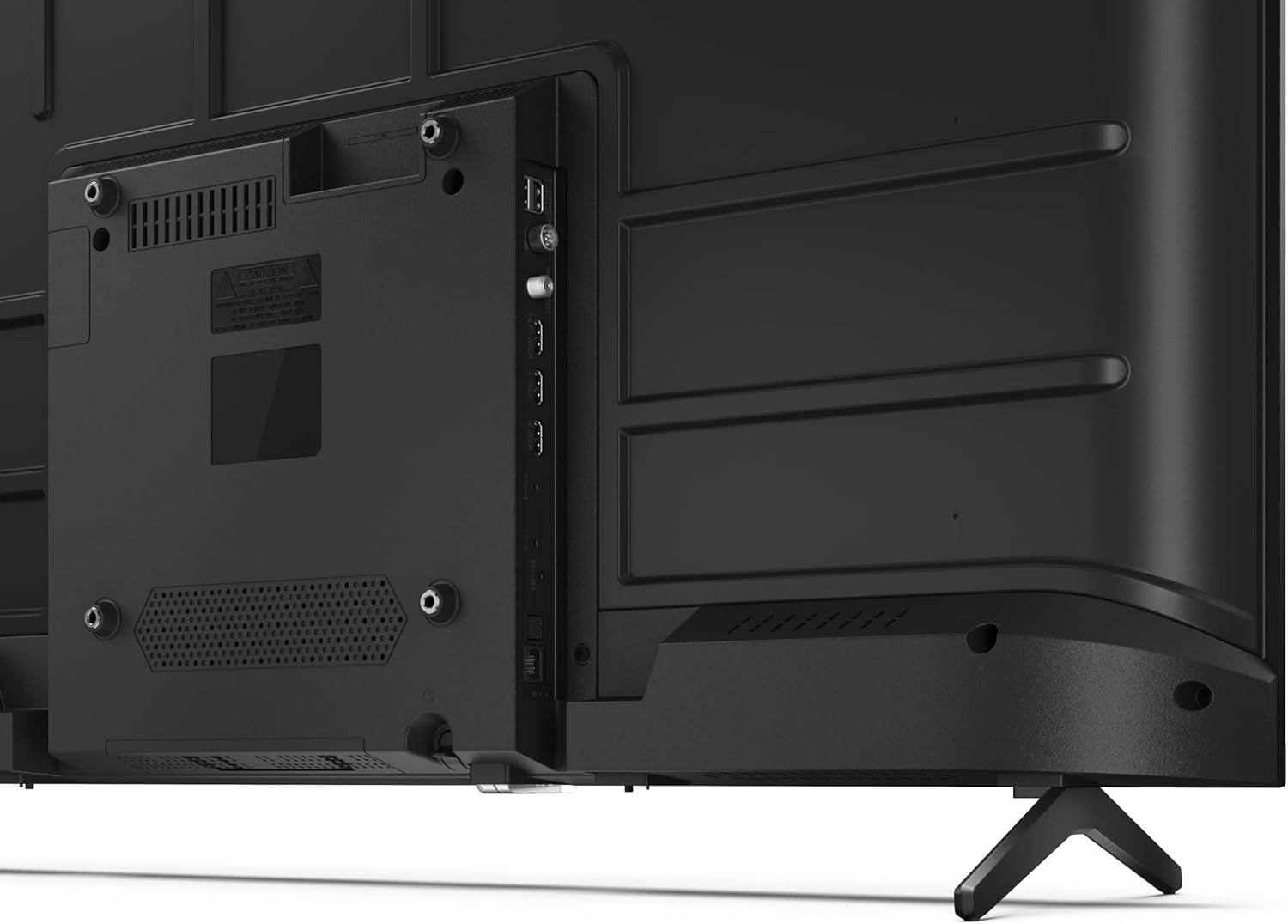
Сүрөт 3.3: Детальдуу view телевизордун туташуу портторунун.
3.4 Баштапкы күйгүзүү жана Google TV орнотуу
After connecting all necessary cables, plug the power cable into an electrical outlet. Press the power button on the remote control or on the TV. Follow the on-screen instructions to complete the initial setup, including network connection, Google account login, and channel scanning.
4. Иштөө
4.1 Алыстан башкаруу функциялары
The remote control allows you to navigate the TV's features. Common buttons include Power, Volume Up/Down, Channel Up/Down, Input Source, Home (Google TV), Navigation (directional arrows, OK), Back, and Google Assistant.
4.2 Google TV интерфейси
Your Sharp TV runs on Google TV, providing a personalized home screen with content recommendations from your subscriptions. Use the remote's navigation buttons to browse movies, shows, apps, and your library.

Image 4.1: The Google TV home screen on the Sharp 40HF2265E.
4.3 Киргизүүнү тандоо
To switch between connected devices (e.g., HDMI 1, HDMI 2, TV tuner), press the 'Input' or 'Source' button on your remote control and select the desired input from the on-screen menu.
4.4 Сүрөт жана үн орнотуулары
Access the TV's settings menu to adjust picture modes (Standard, Vivid, Cinema, Game), brightness, contrast, color, and sound modes (Standard, Music, Movie, Speech). The TV supports HDR10 for enhanced contrast and color, and Dolby Digital for rich audio.

Image 4.2: Visual representation of HDR (High Dynamic Range) technology.
4.5 Google Жардамчысы жана Chromecast
Use the built-in Google Assistant for voice control. Press the Google Assistant button on your remote and speak your commands, such as searching for content, controlling smart home devices, or getting information. Chromecast allows you to cast content directly from compatible devices like smartphones or tablets to your TV.

Image 4.3: Google Assistant integration for voice commands.
4.6 Bluetooth байланышы
Pair Bluetooth-enabled devices such as headphones or soundbars with your TV for a wireless audio experience. Navigate to the TV's settings menu, select 'Remotes & Accessories', and then 'Pair new device' to connect.
5. Техникалык тейлөө
5.1 Телевизорду тазалоо
Тазалоодон мурун телевизорду ар дайым розеткадан сууруп коюңуз. Экранды жана телевизордун корпусун жумшак, кургак чүпүрөк менен сүртүңүз. Эгерде өжөр тактар болсо, аларды бир аз сүртүңүз.ampкездемени суу же атайын экран тазалагыч менен сүртүңүз. Абразивдүү тазалоочу каражаттарды, момдорду же эриткичтерди эч качан колдонбоңуз.
5.2 Программалык камсыздоо жаңыртуулары
Your Google TV may receive automatic software updates. Ensure your TV is connected to the internet to receive these updates, which can improve performance and add new features. You can also manually check for updates in the settings menu.
6. Кыйынчылыктарды
Телевизоруңузда көйгөйлөргө туш болсоңуз, төмөнкү жалпы чечимдерди караңыз:
- Кубат жок: Кубат кабелинин телевизорго да, дубалдагы розеткага да бекем сайылганын текшериңиз. Розетканын иштеп турганын текшериңиз.
- Сүрөт/үн жок: Verify that the correct input source is selected. Check all cable connections (HDMI, antenna). Try restarting the TV.
- Алыстан башкаруу иштебейт: Батареяларды алмаштырыңыз (2 AAA). Пульт менен сыналгынын IR сенсорунун ортосунда эч кандай тоскоолдуктар жок экенин текшериңиз.
- Тармакка туташуу маселелери: For Wi-Fi, check your router and ensure the TV is within range. For wired connections, check the Ethernet cable. Try restarting your router and the TV.
- Сүрөттүн сапаты маселелери: Сүрөт жөндөөлөрүн тууралаңыз (жарыктык, контраст, тактык). Киргизүү булагы жогорку сапаттагы сигнал берип жатканын текшериңиз.
For more complex issues, consult the comprehensive troubleshooting section in the full digital manual or contact Sharp customer support.
7. Техникалык шарттар
Below are the technical specifications for the Sharp 40HF2265E Full HD Google TV:

Image 7.1: Dimensions of the Sharp 40HF2265E TV.
| Өзгөчөлүк | Спецификация |
|---|---|
| Бренд | Sharp |
| Модель номери | 40HF2265E |
| Модель аты | HF сериясы |
| Модель жылы | 2025 |
| Screen Size | 40 дюйм (81 сантиметр) |
| Дисплей технологиясы | LED |
| Резолюция | 1080p (Full HD) |
| Жаңыртуу ылдамдыгы | 60 Гц |
| Аспект катышы | 16:9 |
| Контраст катышы | 100000:1 |
| Screen Finish | Мт |
| Жооп убактысы | 8 Миллисекунд |
| Арткы жарык технологиясы | LED |
| Supported HDR Format | HDR10, HLG |
| Сүрөттүн сапатын жогорулатуу | Dynamic Contrast, HDR10, HLG |
| Motion Enhancement Technology | Motion Interpolation |
| Операция системасы | Google TV |
| Internet Applications | Apple TV, Google TV, Hulu, Prime Video, YouTube |
| Өзгөчөлүктөр | Bluetooth, Chromecast, Dolby Digital, HD Tuner |
| Байланыш технологиясы | Ethernet, USB, Wi-Fi |
| Зымсыз технология | Bluetooth |
| Bluetooth версиясы | 5.0 |
| Screen Mirroring Technology | Chromecast, Google Cast |
| Жалпы HDMI порттору | 3 |
| Total USB 2.0 Ports | 2 |
| Number of Composite Video Inputs | 1 |
| Аудио киргизүү | Mini composite/CVBS + audio input |
| Total Audio Output Ports | 2 |
| Аудио чыгаруу режими | Стерео |
| Аудио коддоо | DD |
| Integrated Surround Sound Format | Dolby AC-4, Dolby Digital, Dolby Digital Plus |
| Спикердин максималдуу чыгаруу күчү | 16 Watts (2x8W) |
| Аудио каналдардын саны | 2.0 |
| Берүү системасы | DVB-T2/C/S/S2 |
| Видеону коддоо | MKV |
| Продукциянын өлчөмдөрү (DxWxH) | 8.4P x 89.2l x 50.9H см |
| Элемент Салмагы | 5.4 килограмм |
| Стендсиз салмак | 5.4 килограмм |
| Негизги Width | 765 миллиметр |
| VESA орнотуу стандарты | 200 x 200 мм |
| Энергияны керектөө | 37 Ватт |
| Тtage | 230 вольт |
| Remote Control Battery Size | AAA |
| Remote Control Battery Quantity | 2 |
| Parental Control Technology | Kindersicherung Über Google Tv |
| ЕБнын запастык бөлүктөрүнүн болушу | 7 жыл |
8. Кепилдик жана колдоо
8.1 Продукциянын кепилдиги
The Sharp 40HF2265E television comes with a 2-year manufacturer's warranty. Please refer to the included Warranty Card for detailed terms and conditions regarding coverage and service. Keep your proof of purchase for warranty claims.
8.2 Кардарларды колдоо
If you require further assistance, have questions not covered in this manual, or need technical support, please contact Sharp customer service. Contact information can typically be found on the Warranty Card or the official Sharp webсайт.