
Introduction
This manual provides instructions for the RadioShack Mechanical Gaming Keyboard, Model 2607135. This keyboard features a 98-key layout, mechanical switches designed for durability, adjustable rainbow backlighting, 25-key anti-ghosting, and an integrated rotary knob for volume control. It is designed for plug-and-play operation via USB and is compatible with Windows operating systems.
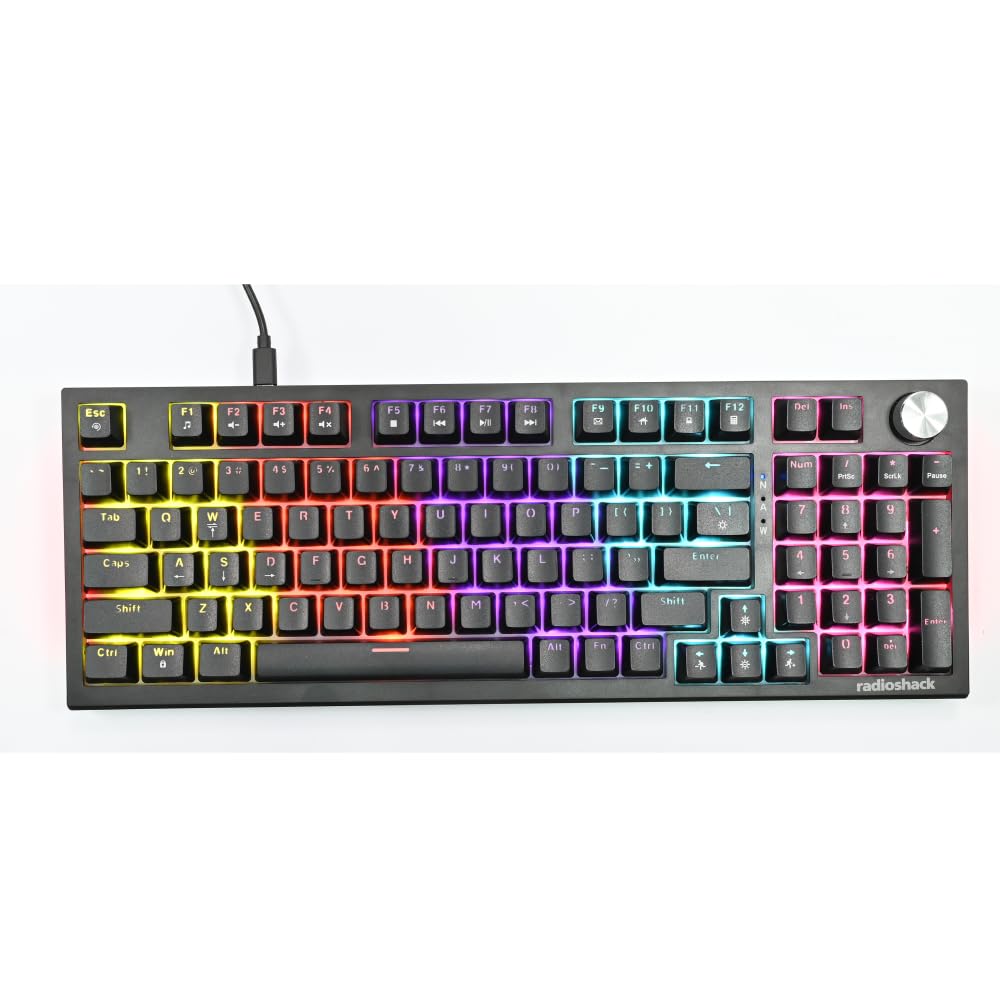
Image: The RadioShack Mechanical Gaming Keyboard, showcasing its 98-key layout and vibrant rainbow backlighting.
Пакеттин мазмуну
Сураныч, пакеттин мазмунун текшерип, бардык буюмдар бар экенин текшериңиз:
- 1x RadioShack Mechanical Gaming Keyboard
- 1x USB кабели
- 1x Колдонуучунун колдонмосу (бул документ)

Image: A graphic illustrating the contents of the product package, including the gaming keyboard and user manual.
Жайгашуу
- Баскычтопту таңгактан чыгаруу: Carefully remove the keyboard and USB cable from its packaging.
- Компьютерге туташуу: Insert the USB-A connector of the provided USB cable into an available USB port on your computer.
- Драйверди орнотуу: The keyboard is plug-and-play. Your operating system (Windows XP-10 compatible) will automatically detect and install the necessary drivers. No additional software installation is required.
- Жайгашкан жери: Баскычтопту туруктуу, жалпак бетке коюңуз. Арткы буттарды өзүңүзгө жаккан терүү бурчуна тууралаңыз.

Image: An illustration highlighting key features such as the 1.5m USB cable length and compatibility with Windows XP through 10.
Иштөө нускамалары
Баскычтоптун жайгашуусу жана функциялары
The keyboard features a 98-key layout, providing a compact design while retaining essential keys, including a numeric keypad.
Айлануучу баскычтын функциялары
The dedicated rotary knob located on the top right of the keyboard controls audio volume.
- Саат жебеси боюнча айлантуу: Үнүн көбөйтөт.
- Сааттын жебесине каршы айландыруу: Үн көлөмүн азайтат.
- Төмөн басыңыз: Аудионун үнүн басуу/ачуу.

Image: A close-up of a hand interacting with the rotary knob, demonstrating its use for volume adjustment.
Арткы жарыкты башкаруу
The keyboard features adjustable rainbow backlighting with multiple modes and side-light effects. Specific key combinations (often Fn + a function key) are used to cycle through lighting modes, adjust brightness, or change speed. Refer to the keycap legends for specific lighting control functions.
- Которуу режими: Typically Fn + Ins, Home, PgUp, Del, End, PgDn.
- Жарыктыкты жөндөө: Адатта, Fn + Өйдө/Төмөн жебе баскычтары.
- Ылдамдыкты жөндөө: Адатта, Fn + сол/оң жебе баскычтары.

Image: A collage showing the keyboard with various backlighting patterns and side-light effects, illustrating the 17 available lighting modes.
Anti-Ghosting
The keyboard supports 25-key anti-ghosting, ensuring that multiple simultaneous key presses are registered accurately, which is crucial for gaming and fast typing.

Image: A user actively typing on the keyboard during a gaming session, emphasizing the accuracy provided by 25 anti-ghosting keys.
Техникалык тейлөө
- Тазалоо: Use a soft, dry cloth to wipe the surface of the keyboard. For deeper cleaning, use compressed air to remove dust and debris from between the keycaps. Avoid using liquid cleaners directly on the keyboard.
- Сактагыч: Узак мөөнөткө колдонулбаганда, клавиатураны таза, кургак чөйрөдө күн нурунан жана экстремалдык температурадан алыс сактаңыз.
- Төгүлгөндөн сактаныңыз: Liquids can damage the internal components. Exercise caution to prevent spills on the keyboard.
Проблемаларды чечүү
Баскычтоп жооп бербейт
- USB кабели клавиатурага жана компьютерге бекем туташып турганын текшериңиз.
- Баскычтопту компьютериңиздин башка USB портуна туташтырууга аракет кылыңыз.
- Компьютериңизди өчүрүп күйгүзүңүз.
- Көйгөй клавиатурада же компьютердин USB портунда/драйверлеринде экенин аныктоо үчүн баскычтопту башка компьютерде сынап көрүңүз.
Арткы жарык иштебейт
- Check if the backlighting has been turned off using the keyboard's function keys (e.g., Fn + brightness down key).
- Cycle through the lighting modes to see if it reactivates.
Ачкычтар катталбай жатат / арбактар көрүнүп жатат
- Ensure the keyboard is clean and free of debris that might be obstructing key switches.
- The keyboard features 25-key anti-ghosting. If more than 25 keys are pressed simultaneously, some inputs may not register.
Техникалык шарттар
| Модель номери | 2607135 |
| Бренд | RadioShack |
| Баскычтоптун түрү | Механикалык оюн баскычтобу |
| Ачкычтын жайгашуусу | 98-ачкыч |
| Байланыш | USB-A (Corded Electric) |
| Коммутатордун бышыктыгы | 50 миллионго чейин баскычтарды басуу |
| Арткы жарыктандыруу | Rainbow (Adjustable modes, brightness, speed) |
| Anti-Ghosting | 25-ачкыч |
| Өзгөчөлүктөр | Rotary Volume Knob, Ergonomic Design |
| Шайкеш түзмөктөр | Laptop, PC (Windows XP-10) |
| Камтылган компоненттер | USB кабели |

Сүрөт: деталдуу view of a mechanical switch, illustrating the 50-million keystroke life for long-term reliability.
Колдоо
For further assistance or inquiries, please refer to the official RadioShack support channels or webсайт.