PowerA Advantage Wireless Controller for Nintendo Switch 2 - Mario & Yoshi
Model: NSGP0569-01V
Introduction
Бул колдонмо PowerA Advan үчүн кеңири көрсөтмөлөрдү беретtage Wireless Controller, designed for use with the Nintendo Switch family of devices. It covers setup, operation, maintenance, and troubleshooting to ensure optimal performance and longevity of your controller.
Негизги өзгөчөлүктөрү
Hall Effect Modules: Equipped with contact-free magnetic sensors in the thumbsticks to prevent stick drift, offering smoother control, enhanced precision, and increased longevity.
Өркүндөтүлгөн оюн баскычтары: Two mappable buttons can be programmed on the fly during gameplay without needing to access system settings.
Intuitive Motion Controls: Experience fluid and responsive motion controls for aiming, steering, flying, and other in-game actions.
C баскычы: Provides quick access to GameChat features.
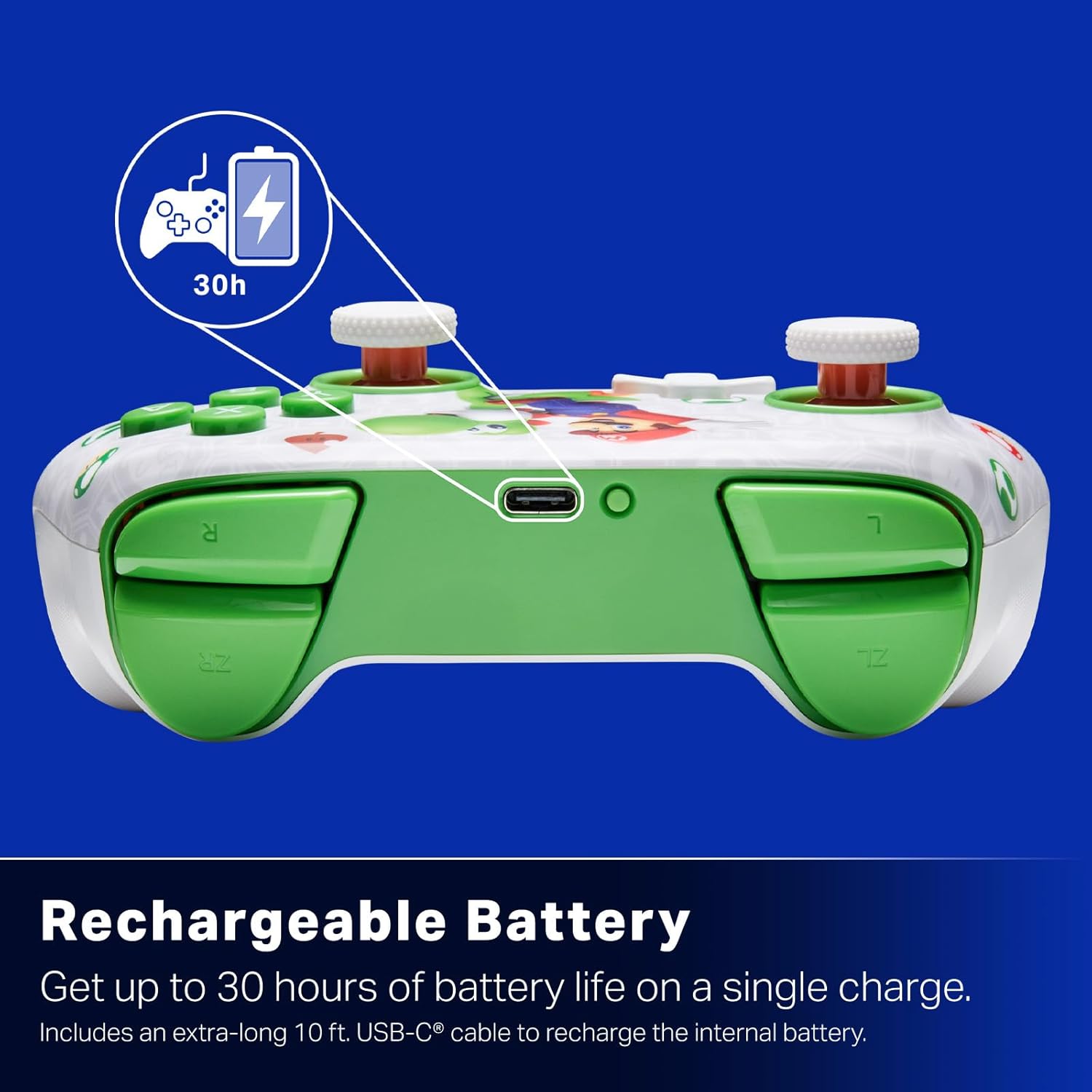
Кайра заряддалуучу батарея: Offers up to 30 hours of gameplay on a single charge. Includes a 10 ft. (3m) USB-C cable for recharging.
Эргономикалык дизайн: Crafted for comfort during extended gaming sessions, utilizing cutting-edge ergonomics and high-quality materials.
Nintendo Family Compatibility: Compatible with Nintendo Switch 2, Nintendo Switch, Nintendo Switch – OLED Model, and Nintendo Switch Lite.
Расмий лицензияланган: PowerA products undergo rigorous testing by Nintendo to ensure compatibility and quality.
Орнотуу нускамалары
1. Баштапкы заряддоо
Before first use, fully charge your PowerA Advantage Wireless Controller. Connect the included 10 ft. (3m) USB-C cable to the controller's USB-C port and the other end to a powered USB port on your Nintendo Switch dock or a USB wall adapter.
Figure 1: Controller connected via USB-C for charging, highlighting the rechargeable battery feature.
2. Nintendo Switch менен жупташуу
Nintendo Switch консолуңуз күйгүзүлүп, системанын эң акыркы программалык камсыздоосуна жаңыртылганын текшериңиз.
HOME Менюсунан тандаңыз Контроллер, анда Катуу/Тартипти өзгөртүү.
On the PowerA Advantage Wireless Controller, press and hold the SYNC баскычы located on the top edge of the controller for at least three seconds. The player indicator LEDs on the bottom of the controller will begin to flash.
Once the controller successfully pairs, the player indicator LED(s) corresponding to the controller number will remain lit.
басыңыз Баскыч to confirm and exit the pairing screen.
For subsequent uses, simply press the HOME button on the controller to wake it up and automatically reconnect to your Switch console.
Иштөө нускамалары
Негизги башкаруу элементтери
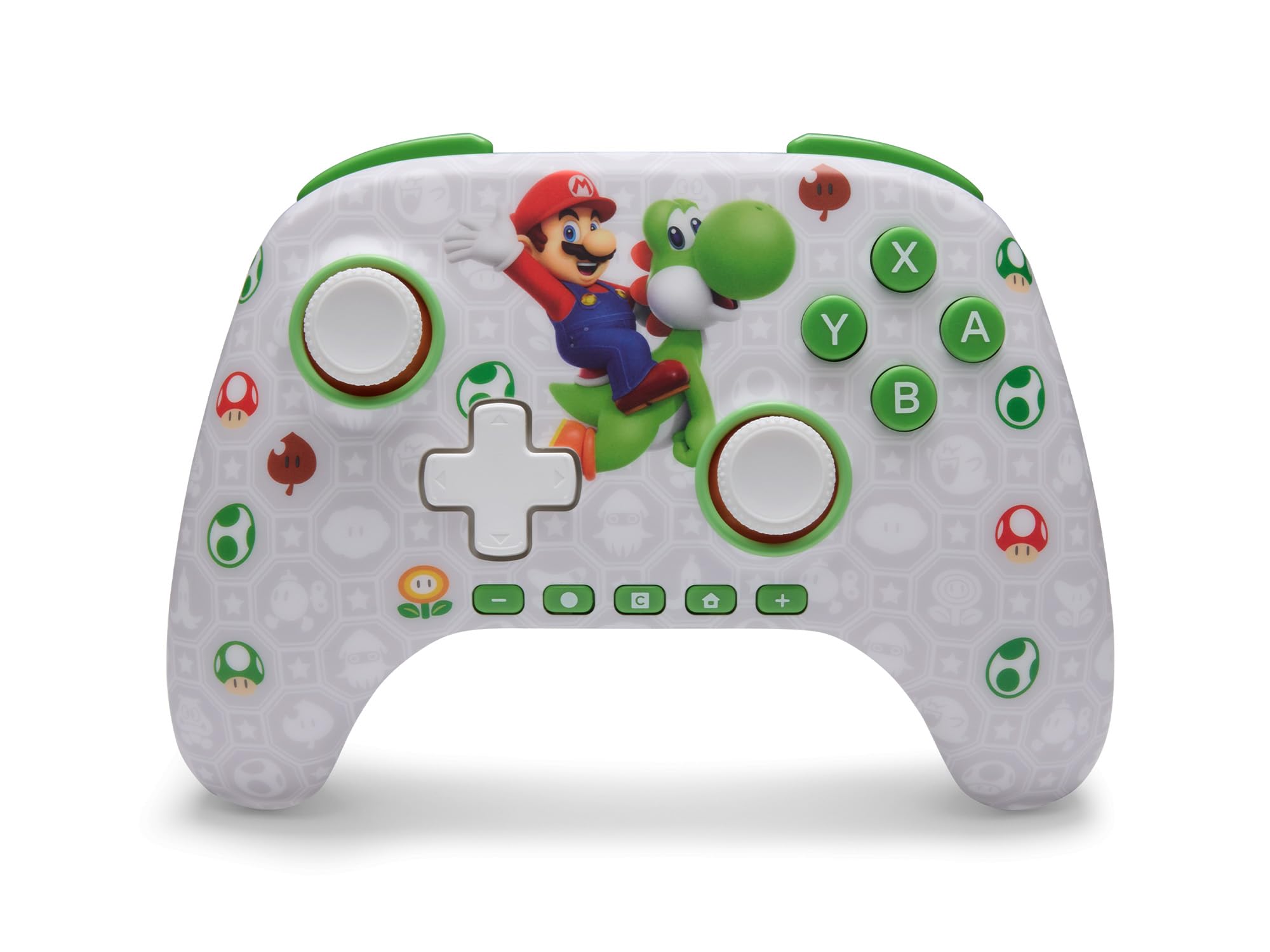
PowerA Advantage Wireless Controller features standard Nintendo Switch button layouts, including A, B, X, Y buttons, L/R and ZL/ZR shoulder buttons, a D-pad, and dual analog sticks. Familiarize yourself with these controls for general gameplay.
Сүрөт 2: Алдыңкы view of the PowerA Advantage Wireless Controller, highlighting the Mario and Yoshi design and button layout.
Өркүндөтүлгөн оюн баскычтары (AGB)
The controller includes two mappable Advanced Gaming Buttons (AGR and AGL) on the back. These buttons can be assigned to replicate any other button on the controller for quick access during gameplay.
басыңыз Program Button (PRGM) on the back of the controller. The Program LED will flash.
басыңыз Өркүндөтүлгөн оюн баскычы (AGR or AGL) you wish to map. The Program LED will flash rapidly.
басыңыз баскычы you want to assign to the Advanced Gaming Button (e.g., A, B, X, Y, L, R, ZL, ZR, D-pad directions). The Program LED will stop flashing, indicating successful mapping.
To clear a mapped button, repeat steps 1-2, then press the Программа баскычы кайра.
Figure 3: Advanced Gaming Buttons (AGB) on the back of the controller, with an illustration of mappable functions.
Motion Controls
The controller supports motion controls, allowing for intuitive interaction in compatible games. These controls are automatically enabled when supported by the game.
Figure 4: Controller demonstrating motion control capabilities through tilting.
C Button (GameChat)
The dedicated C Button provides quick access to GameChat features in supported titles, enhancing your multiplayer experience.
Figure 5: The 'C' button, used for GameChat features.
Техникалык тейлөө
Тазалоо: Контроллерди тазалоо үчүн жумшак, кургак чүпүрөктү колдонуңуз. Катуу химиялык заттарды же абразивдүү материалдарды колдонуудан алыс болуңуз.
Сактагыч: Контроллерди түз күн нурунан жана экстремалдык температурадан алыс салкын, кургак жерде сактаңыз.
Батареяга кам көрүү: Батареянын иштөө мөөнөтүн узартуу үчүн, контроллерди тез-тез толук зарядсыздандырбаңыз. Аны үзгүлтүксүз колдонбосоңуз да, үзгүлтүксүз кубаттап туруңуз.
Кабельге кам көрүү: Handle the USB-C charging cable with care. Avoid bending or twisting it excessively.
Проблемаларды чечүү
Контроллер туташпай/жупташпай жатат
Контроллердин толук заряддалганын текшериңиз.
Nintendo Switch консолу эң акыркы тутумдук программалык камсыздоого жаңыртылганын текшериңиз.
Repeat the pairing process (see "Pairing with Nintendo Switch" in Setup Instructions).
If issues persist, try restarting both the controller and the Nintendo Switch console.
Stick Drift
PowerA Advantage Controller features Hall Effect modules designed to prevent stick drift. If you experience any unintended input, ensure the controller's firmware is up to date (check PowerA's official webжаңыртуулар үчүн сайт).
Recalibrate the joysticks through the Nintendo Switch system settings if necessary (System Settings > Controllers and Sensors > Calibrate Control Sticks).
Кыска батареянын иштөө мөөнөтү
Ensure the controller is fully charged before each use.
Battery life can vary based on game usage and features enabled.
Оптималдуу кубаттоо үчүн берилген USB-C кабелин колдонуңуз.
Техникалык шарттар
Өзгөчөлүк
Деталь
Модель номери
NSGP0569-01V
Байланыш
Wireless (Bluetooth), USB-C (for charging)
Шайкеш түзмөктөр
Nintendo Switch 2, Nintendo Switch, Nintendo Switch – OLED Model, Nintendo Switch Lite
Батареянын иштөө мөөнөтү
30 саатка чейин (колдонууга жараша өзгөрөт)
Кабелдин узундугу
10 ft. (3m) USB-C
Өлчөмдөр
5.88 x 4.21 x 2.36 дюйм
Салмагы
0.66 фунт
Өзгөчөлүктөр
Hall Effect Thumbsticks, Mappable Advanced Gaming Buttons, Motion Controls, C Button
Кепилдик жана колдоо
PowerA Advantage Wireless Controller comes with a Эки жылдык чектелген кепилдикКепилдик, продуктуну колдоо боюнча толук маалымат алуу же продуктуңузду каттоо үчүн, расмий PowerA сайтына кириңиз. webсайтында PowerA.com/Support.
Figure 6: Official Nintendo Licensed Product badge, ensuring quality and compatibility.
Ask a question about this manual
Ask about setup, troubleshooting, compatibility, parts, safety, or missing instructions. Manuals+ will review the question and use this page’s manual context to help answer it.