
Motorola XT2601-3
Motorola Moto Edge 70 5G Ai User Manual
Модел: XT2601-3
1. Киришүү
The Motorola Moto Edge 70 5G Ai is a powerful and slim smartphone designed for enhanced performance and photography. It features a 50MP triple camera system, a vibrant 6.67-inch Super HD pOLED display, and a long-lasting 4800mAh silicon-carbon battery with 68W TurboPower charging.
2. Кутуда эмне бар
Upon unboxing your Motorola Moto Edge 70 5G Ai, you should find the following items:
- Motorola Moto Edge 70 5G Ai Smartphone
- 68W TurboPower Charger
- USB Type-C кабели
- SIM чыгаруучу курал
- Телефон корпусу
Маанилүү эскертүү: If you receive a Euro charger instead of a US Specs Charger, please return the phone immediately and contact Amazon customer service.
3. Физикалык бүтүрүүview
3.1 Дизайн жана бышыктыгы
The Moto Edge 70 5G Ai features an ultra-thin design, measuring just 5.99mm. It boasts a rubberized, nylon-inspired silicone textured back for a comfortable grip. The device is lightweight at 159.6 grams.
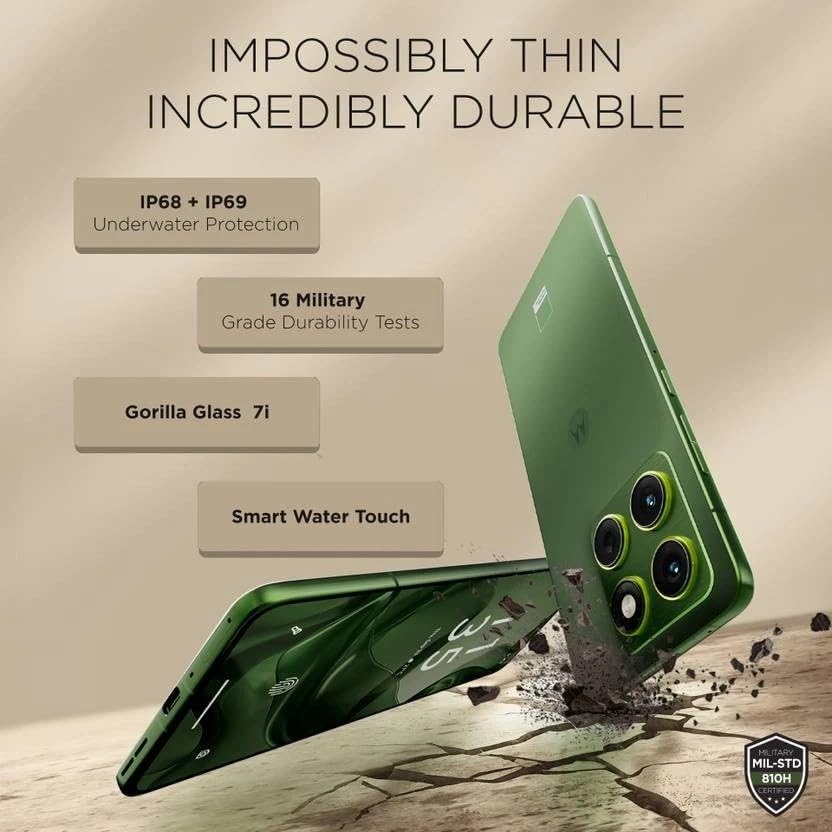
Image: Motorola Moto Edge 70 5G Ai showcasinанын жука проfile and durability features like IP68+IP69 underwater protection, 16 military-grade durability tests, Gorilla Glass 7i, and Smart Water Touch.
The phone is built with MIL-STD 810H military-grade durability, Corning Gorilla Glass 7i protection on the display, and IP68/IP69 water and dust resistance, ensuring robust protection against environmental elements.
3.2 Баскычтар жана порттор
The device includes a volume rocker and power button on the side. It also features a dedicated AI key. At the bottom, you will find the speaker grille, a USB Type-C 2.0 port, and the SIM card tray. The earpiece doubles as a stereo speaker.
4. Дисплей
The Motorola Moto Edge 70 5G Ai is equipped with a 6.67-inch Super HD pOLED display (2712 x 1220 resolution, 446ppi) with a 120Hz refresh rate. It offers a peak brightness of 4500 nits for excellent visibility, even in bright conditions. The display is Pantone Validated for authentic color and skin tones, and supports HDR10+ for infinite contrast. It is a flat panel design with a tiny punch-hole camera.
While the panel supports HDR10+, HDR video playback on platforms like Netflix may not be available due to certification requirements.
An optical in-display fingerprint scanner is integrated for secure and fast unlocking.
5. Performance
Powered by the Qualcomm Snapdragon 7 Gen 4 (4nm) Octa-core processor, the Moto Edge 70 5G Ai delivers a stable and smooth user experience. It comes with 12GB of LPDDR5x RAM and 512GB of UFS 3.1 storage.
Benchmark scores indicate strong performance for everyday tasks and casual gaming, with an AnTuTu score of approximately 1.4 million and good CPU/GPU stability.
For gaming, the device supports up to 120 FPS in BGMI and 90 FPS in Call of Duty, providing a fluid experience for short gaming sessions.
6. Камера
The Moto Edge 70 5G Ai features a versatile triple camera system: a 50MP primary camera with Optical Image Stabilization (OIS), a 50MP ultrawide camera with autofocus (allowing for macro shots), and a 3-in-1 dedicated light sensor for accurate color reproduction. The front-facing camera is also 50MP, capable of high-resolution selfies and 4K video recording.
The camera excels in HDR tuning, providing excellent control over highlights and detailed retrieval from shadows across all lenses. While primary shots offer natural colors, some noise may be visible in shadows at 100% zoom due to less aggressive noise processing. Color consistency between lenses may vary slightly.
7. Программалык камсыздоо
The device runs on Hello UI based on Android 15, offering a clean and feature-rich experience. Motorola promises 3 years of software updates and 4 years of security updates.
It includes Moto features like Moto Gestures, Smart Connect 2.0, Moto Secure, and Family Spaces. The phone also integrates AI features such as Google Gemini, Circle to Search, 'Remember This', Image Studio, and Playlist Studio.
During initial setup, users should be mindful to deselect any unwanted third-party apps (bloatware) or Glance integration to maintain a cleaner user experience.
8. Battery and Connectivity
Equipped with a 4800mAh silicon-carbon battery, the Moto Edge 70 5G Ai supports 68W TurboPower fast charging, capable of reaching 0-100% charge in approximately 40 minutes. It also supports 15W wireless charging.

Image: Motorola Moto Edge 70 5G Ai showing its 4800mAh silicon-carbon battery, 68W TurboPower charger, and 15W wireless charger.
Connectivity options include 16 5G bands, 4G VoLTE, Wi-Fi 6E, Bluetooth 5.4, and NFC.
9. Орнотуу
- Кутудан чыгаруу: Carefully remove all items from the box: Motorola Moto Edge 70 5G Ai smartphone, 68W TurboPower charger, USB Type-C cable, and SIM ejector tool. A phone case is also included.
- SIM картаны салуу: Use the SIM ejector tool to open the SIM card tray. Insert your Nano SIM card (and eSIM if applicable). This device supports Dual SIM (1 Nano SIM + eSIM) and does not have a MicroSD slot.
- Баштапкы күйгүзүү: Press and hold the power button until the Motorola logo appears. Follow the on-screen prompts to select your language, region, and connect to a Wi-Fi network.
- Каттоо эсебин орнотуу: Google аккаунтуңуз менен кириңиз же жаңысын түзүңүз. Бул Google Play Дүкөнүнө жана башка Google кызматтарына кирүү үчүн зарыл.
- Маалыматтарды өткөрүү (кошумча): If you are upgrading from another device, follow the prompts to transfer your data. You can use Google's backup and restore features or Motorola's migration tools.
- Коопсуздукту орнотуу: Set up your preferred security methods, including PIN, pattern, password, fingerprint recognition (in-display sensor), and face unlock.
- App Installation & Bloatware: During the setup process, you may be prompted to install additional apps or enable features like Glance. Review these options carefully and deselect any unwanted applications or services to optimize your phone's performance and privacy.
- Программалык камсыздоо жаңыртуулары: Алгачкы орноткондон кийин, Wi-Fi тармагына туташыңыз жана түзмөгүңүздө эң акыркы функциялар жана коопсуздук тактары бар экенин текшерүү үчүн жеткиликтүү программалык камсыздоо жаңыртууларын текшериңиз.
10. Аппаратыңызды иштетүү
- Навигация: The Moto Edge 70 5G Ai uses gesture navigation by default. Swipe up from the bottom to go home, swipe up and hold for recent apps, and swipe from the left or right edge to go back.
- Мото жаңсоолор: Access quick actions with intuitive gestures. For example, a chop-chop motion to turn on the flashlight or a twist motion to open the camera.
- Жасалма интеллект ачкычы: Utilize the dedicated AI key for quick access to AI features like Google Gemini or 'Remember This'.
- Дисплейдин жөндөөлөрү: Adjust display settings such as refresh rate (up to 120Hz), color mode (Natural, Radiant, Vivid), and brightness for optimal viewing.
- Аудио: The device features stereo speakers (earpiece and bottom speaker). Adjust volume using the volume rocker. Be aware of potential channel imbalance due to the earpiece acting as one speaker.
- Камераны колдонуу:
- Primary Camera: Open the camera app and select 'Photo' mode for standard shots.
- Ultrawide/Macro: Switch to 'Ultrawide' mode for wider scenes or use the macro feature for close-up shots.
- Селфи камерасы: Switch to the front camera for selfies. Use 'High-Res' mode for 50MP output.
- Видео жаздыруу: Record videos in up to 4K UHD at 30fps, or FHD at 30fps. Slow motion is available at FHD (240fps/120fps).
11. Техникалык тейлөө
- Тазалоо: Телефондун экранын жана корпусун тазалоо үчүн жумшак, түксүз чүпүрөктү колдонуңуз. Катуу химиялык заттардан же абразивдүү материалдардан алыс болуңуз.
- Суу жана чаңга туруктуулугу: The device has an IP68/IP69 rating, meaning it is protected against dust ingress and can withstand immersion in water up to 1.5 meters for 30 minutes. However, it is not waterproof. Avoid intentional submersion and exposure to pressurized water.
- Программалык камсыздоо жаңыртуулары: Оптималдуу иштөөнү жана алсыздыктардан коргоону камсыз кылуу үчүн программалык камсыздоону жана коопсуздук жаңыртууларын үзгүлтүксүз орнотуп туруңуз.
- Батареяга кам көрүү: To prolong battery life, avoid extreme temperatures. Use the provided 68W TurboPower charger for fast and efficient charging. Wireless charging is also supported.
- Сактагычты башкаруу: Мезгил-мезгили менен ачык-айкын керексиз files and apps to maintain optimal storage performance. The device comes with 512GB internal storage.
12. Кыйынчылыктарды
- Тармакка туташуу маселелери:
- SIM картаңыз туура салынганын жана иштетилгенин текшериңиз.
- Check if your carrier (T-Mobile, Mint, Tello, Ultra, or any T-Mobile network in the USA; any carrier worldwide outside the USA) is compatible with the phone's GSM unlocked status.
- Аппаратты кайра иштетиңиз.
- Reset network settings if problems persist.
- Иштин артта калуулары:
- Фондук колдонмолорду жабуу.
- Колдонмо кэштерин тазалоо.
- жетиштүү бош орун камсыз кылуу.
- Телефонду кайра күйгүзүңүз.
- Дисплей маселелери:
- Жарыктык жөндөөлөрүн тууралаңыз.
- Check for software updates that might address display anomalies.
- Камеранын сапаты:
- Ensure lenses are clean.
- For optimal detail, especially in low light or zoomed shots, ensure good lighting conditions.
- Check for software updates that may improve camera processing.
- Unwanted Apps/Bloatware: If you accidentally installed unwanted apps during setup, you can uninstall them from the 'Apps' section in Settings. For Glance integration, disable it during setup or from the lock screen settings.
13. Техникалык шарттар
| Өзгөчөлүк | Деталь |
|---|---|
| Бренд | Motorola |
| Модель аты | EDGE 70 5G (XT2601-3) |
| Операция системасы | Android 15 |
| Процессор | Qualcomm SM7750-AB Snapdragon 7 Gen 4 (4 nm) Octa-core (1x2.8 GHz Cortex-720 & 4x2.4 GHz Cortex-720 & 3x1.8 GHz Cortex-520) |
| RAM | 12 ГБ LPDDR5x |
| Сактагыч | 512 ГБ UFS 3.1 |
| Screen Size | 6.67 дюйм |
| Дисплей түрү | pOLED, HDR10+, Pantone Validated Colors, 100% DCI-P3 |
| Резолюция | 2712 x 1220 pixels (Super HD), 446 PPI |
| Жаңыртуу ылдамдыгы | 120 Гц чейин |
| Жогорку жарыктык | 4500 нит |
| Арткы камера | 50MP (OIS) Primary, 50MP Ultrawide (with AF/Macro), 3-in-1 Light Sensor |
| Алдыңкы камера | 50MP |
| Видео тартуунун резолюциясы | 4K UHD (30fps), FHD (30fps), Slow motion: FHD (240fps/120fps) |
| Батарея сыйымдуулугу | 4800 миллионamp Hours (Silicon-Carbon) |
| Заряддоо | 68W TurboPower (зымдуу), 15W зымсыз заряддоо |
| SIM карта | Dual SIM (1 Nano SIM + eSIM) |
| Байланыш | 5G (16 bands), 4G VoLTE, Wi-Fi 802.11 a/b/g/n/ac/ax (2.4 GHz | 5 GHz | 6 GHz / Wi-Fi 6E), Bluetooth 5.4, NFC |
| Коопсуздук | On-screen fingerprint reader, Face Unlock, ThinkShield |
| Туруктуу | IP69/IP68 underwater protection, MIL-STD 810H |
| Түс | Pantone Lily Pad (Olivo) |
| UPC | 840493607603 |
14. Кепилдик жана колдоо
14.1 Кепилдик маалыматы
The Motorola Moto Edge 70 5G Ai comes with a 30-day Amazon warranty and a 1-year Latin America warranty.
14.2 Кардарларды колдоо
For further assistance, troubleshooting, or warranty claims, please refer to the official Motorola support webсайтына кириңиз же Amazon кардарларды тейлөө кызматына кайрылыңыз.
Тектеш документтер - XT2601-3
 |
Motorola Signature Smartphone: Technical Specifications & Features Detailed technical specifications for the Motorola Signature smartphone, featuring advanced hardware, camera, display, connectivity, and software. Crafted for visionaries. |
 |
Motorola мобилдик телефонунун укуктук, коопсуздук жана жөнгө салуу маалыматы Essential legal, safety, regulatory, and warranty information for Motorola mobile phone models XT2601-2 and XT2601-3. |
 |
Motorola Edge 70 User Manual: Charging, Battery, and Troubleshooting Guide Comprehensive user manual for the Motorola Edge 70 smartphone, covering charging, battery life, durability, safety, Moto AI, and troubleshooting common issues. Learn how to care for your device and optimize performance. |
 |
Motorola Чектелген Кепилдик жана Тейлөө маалыматы Motorola Чектелген Кепилдиги боюнча толук маалымат, анын ичинде камтуу, алып салуулар, доо процедуралары жана Motorola өнүмдөрү жана Moto Mods аксессуарлары үчүн тейлөө параметрлери. |
 |
Motorola moto g24: Ылдамдык, стиль жана аткаруу Моторола moto g24 смартфонун, күчтүү аткаруу менен премиум дизайнын айкалыштырган смартфонду табыңыз. 50 МП камера системасы, жандуу 6.6 дюймдук 90 Гц дисплей, TurboPower™ 15 кубаттоосу менен узак мөөнөттүү 5000 мАч батарея жана эң акыркы Android 14 функциялары менен moto g24 күнүмдүк жашооңуз үчүн иштелип чыккан. |
 |
motorola edge 70 Användarhandbok Denna guide ger en introduction till din motorola edge 70 смартфону, inklusive grundläggande маалымат, säkerhetsanvisningar och techniska specifikationer. Ләр диг хур ду сәттер упп дин енхет оч коммер иганг. |
Ask a question about this manual
Ask about setup, troubleshooting, compatibility, parts, safety, or missing instructions. Manuals+ will review the question and use this page’s manual context to help answer it.