
1. Киришүү
The GEEVON-LINK GL-250T13-1-WH-WUS WiFi Thermometer Hygrometer provides real-time temperature and humidity monitoring for various environments. This device features dual Wi-Fi and Bluetooth connectivity, an external probe for precise measurements in liquids or confined spaces, and integration with smart home platforms like Alexa and Google Home. It offers app-based monitoring, smart alerts, and data export capabilities for comprehensive environmental control.

Figure 1: GEEVON-LINK WiFi Thermometer Hygrometer main unit with external probe.
The device is designed for versatile placement and can be used in refrigerators, freezers, fish tanks, basements, wine cellars, and other areas requiring accurate temperature and humidity tracking.

2-сүрөт: Мисamples of device placement in a refrigerator, freezer, fish tank, and bathtub.
2. Орнотуу
2.1 Пакеттин мазмуну
- GEEVON-LINK WiFi Thermometer Hygrometer Main Unit
- Тышкы иликтөө
- 2 x AAA батареялары
- Жабышкак соргуч
- Эки тараптуу лента
- Self-adhesive Cable Tie
2.2 Батареяны орнотуу
- Негизги блоктун артындагы батарея бөлүкчөсүн табыңыз.
- Батарея уясынын капкагын ачыңыз.
- Туура полярдуулукту (+/-) камсыз кылуу менен 2 AAA батарейкасын салыңыз.
- Батарея уясынын капкагын жабыңыз.
2.3 Колдонмону орнотуу жана түзмөктү жупташтыруу
To utilize the full features of your thermometer hygrometer, install the Smart Life app on your smartphone.
- Smart Life тиркемесин орнотуңуз: App Store (iOS) же Google Play дүкөнүнөн (Android) "Smart Life" колдонмосун жүктөп алыңыз.
- Каттоо эсебин каттоо: Колдонмону ачып, жаңы аккаунтка катталыңыз же сизде мурунтан эле бар болсо кириңиз.
- Connect to 2.4G Wi-Fi: Ensure your smartphone is connected to a 2.4GHz Wi-Fi network. The device does not support 5G Wi-Fi.
- Түзмөк кошуу: In the Smart Life app, tap the "+" icon or "Add Device". Select "Temperature and Humidity Sensor (BLE+Wi-Fi)" from the sensor list.
- Жупташтыруу режими: Ensure the Wi-Fi symbol on the device's LCD is blinking slowly. If not, press and hold the reset button (usually inside the battery compartment) for approximately 5 seconds until it blinks slowly.
- Толук жупташтыруу: Follow the on-screen instructions in the app to complete the pairing process. The app will guide you through connecting to the device's hotspot (e.g., "SmartLife-XXXX") and then returning to the app interface for final connection.

Figure 3: Step-by-step guide for initial setup and app pairing.
2.4 Физикалык жайгаштыруу
The device offers multiple placement options:
- Клей монтаждоо: Use the included adhesive suction cup or double-sided tape for smooth surfaces like windows or tiles.
- Асылып: Utilize the integrated lanyard to hang the unit.
- Probe Management: Use the self-adhesive cable tie to neatly manage the external probe wire.

Figure 4: The external probe can be placed in liquids or enclosed spaces like a refrigerator.

Figure 5: The external probe provides precise readings in various challenging environments.
3. Иштөө нускамалары
3.1 Real-time Monitoring via Smart Life App
Once connected, the Smart Life app allows you to monitor temperature and humidity in real-time from any location. The app displays current readings for both the main unit and the external probe.

Figure 6: Remote monitoring of environmental conditions via the Smart Life app.
3.2 Smart Alerts and Automated Device Control
The device supports intelligent automation and hands-free monitoring through integration with Alexa or Google Home. You can receive instant app alerts for high/low temperature, humidity, and low battery conditions.
- Custom Ranges: Set custom temperature and humidity ranges within the app.
- Автоматташтырылган көрүнүштөр: Create automated scenes, such as turning an AC or dehumidifier on/off when preset conditions are met.
- Үн буйруктары: Use voice commands with Alexa or Google Home to inquire about current readings (e.g., "Alexa, what's the temperature in the living room?").

Figure 7: App interface for real-time notifications and smart home automation.

Figure 8: Device compatibility with Alexa and Google Home for voice control.
3.3 Маалыматтарды сактоо жана экспорттоо
The Smart Life app provides long-term data storage, allowing you to view temperature and humidity trends by hour, day, month, or year. Data from the past year can be exported for analysis.

Figure 9: Data visualization and export options within the Smart Life app.
3.4 Temperature Unit Switching
The device supports switching between Celsius (℃) and Fahrenheit (°F). This option is typically available within the Smart Life app settings for the device.
3.5 Окуу видеосу
Video 1: A demonstration of how to use the GEEVON-LINK WiFi thermometer hygrometer.
4. Техникалык тейлөө
4.1 Батареяны алмаштыруу
The device operates on 2 AAA batteries. A low-battery alert will be sent to the Smart Life app when replacement is needed. Replace batteries promptly to ensure continuous monitoring and accurate data.
4.2 Probe Care
The external probe is waterproof and designed for demanding environments. Regularly inspect the probe and its cable for any signs of damage. Ensure the cable is not pinched or excessively bent, which could affect its durability and accuracy.
4.3 Тазалоо
Wipe the main unit and probe with a soft, dry cloth. Do not use abrasive cleaners or immerse the main unit in water.
5. Кыйынчылыктарды
5.1 Түзмөк Wi-Fi'га туташпай жатат
- Ensure your Wi-Fi network is 2.4GHz. The device does not support 5G Wi-Fi.
- Орнотуу учурунда смартфонуңуздун 2.4 ГГц тармагына туташкандыгын текшериңиз.
- Check that the Wi-Fi symbol on the device's LCD is blinking slowly. If not, press and hold the reset button for 5 seconds.
- Түзмөк Wi-Fi роутериңиздин диапазонунда экенин текшериңиз.
- Restart your router and the device, then attempt pairing again.
5.2 Температуранын/нымдуулуктун так эмес көрсөткүчтөрү
- Ensure the external probe is correctly positioned and fully submerged if measuring liquids.
- Verify that the main unit and probe are not exposed to direct sunlight, heat sources, or strong drafts, which can affect readings.
- Compare readings with another calibrated thermometer/hygrometer if available.
- Эгер көйгөй чечилбесе, кардарларды колдоо менен байланышыңыз.
5.3 Батареянын иштөө мөөнөтү кыска
- Жаңы, жогорку сапаттагы AAA батарейкаларын колдонуп жатканыңызды текшериңиз.
- Frequent Wi-Fi disconnections and reconnections can consume more power. Ensure a stable Wi-Fi connection.
- Экстремалдуу температуралар батареянын иштешине таасир этиши мүмкүн.
5.4 App Notifications Not Received
- Check your smartphone's notification settings for the Smart Life app to ensure they are enabled.
- Verify that the alert thresholds are correctly set within the app.
- Түзмөгүңүздө туруктуу интернет байланышы бар экенин текшериңиз.
6. Техникалык шарттар
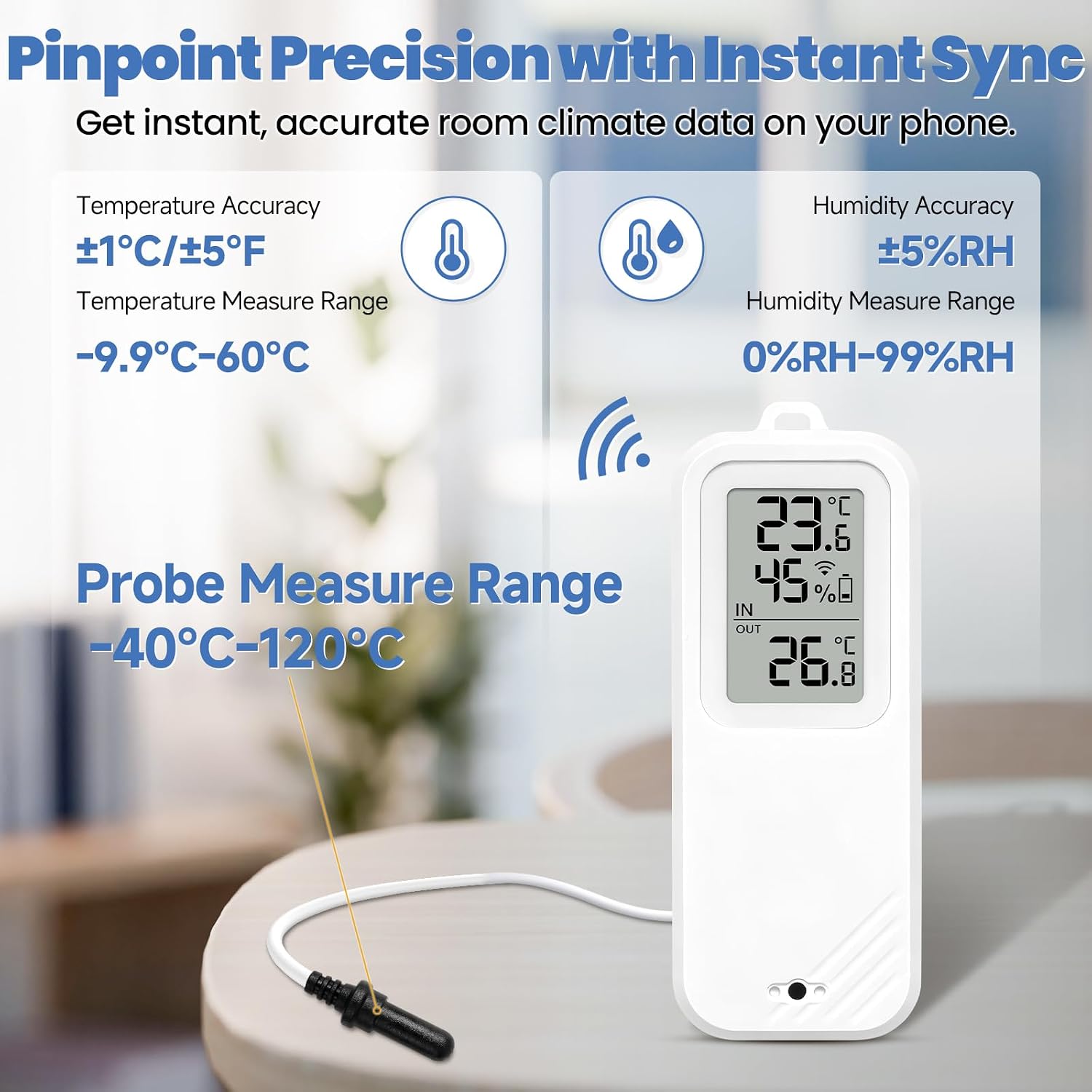
Figure 10: Key accuracy and measurement ranges for the device and probe.
| Өзгөчөлүк | Деталь |
|---|---|
| Бренд | GEEVON-LINK |
| Модель аты | GL-250T13-1-WH-WUS |
| Байланыш технологиясы | Wi-Fi (2.4 ГГц гана), Bluetooth |
| Дисплей түрү | LCD |
| Power Source | 2 x AAA Батареялар (кошулган) |
| Main Unit Temperature Range | -9.9℃ден 60℃ге чейин (14.2°F менен 140°F) |
| External Probe Temperature Range | -40℃ден 120℃ге чейин (-40°F менен 248°F) |
| нымдуулук колому | 0% - 99% RH |
| Температуранын тактыгы | ±1℃ / ±1.8°F (Main Unit); ±0.25°C (-10°C to 50°C) / ±1°C (outside range) (Probe) |
| Нымдуулуктун тактыгы | ±5% RH |
| Ички/тышкы колдонуу | Indoor |
| Smart Home шайкештиги | Alexa, Google Home |
| Сертификаттар | CE, FCC, ISO 9000, RoHS |
7. Кепилдик жана колдоо
For warranty information and technical support, please refer to the contact details provided with your product packaging or visit the official GEEVON-LINK webсайт. Кепилдик дооматтары үчүн сатып алуу дүмүрчөгүңүздү сактаңыз.