
Продукт бүттүview
The AT&T EL2131-11 is a DECT 6.0 cordless landline phone designed for reliable communication. It features a powerful call blocker, caller ID, a full-duplex speakerphone, and a backlit display and keypad for enhanced visibility. This model includes one handset.
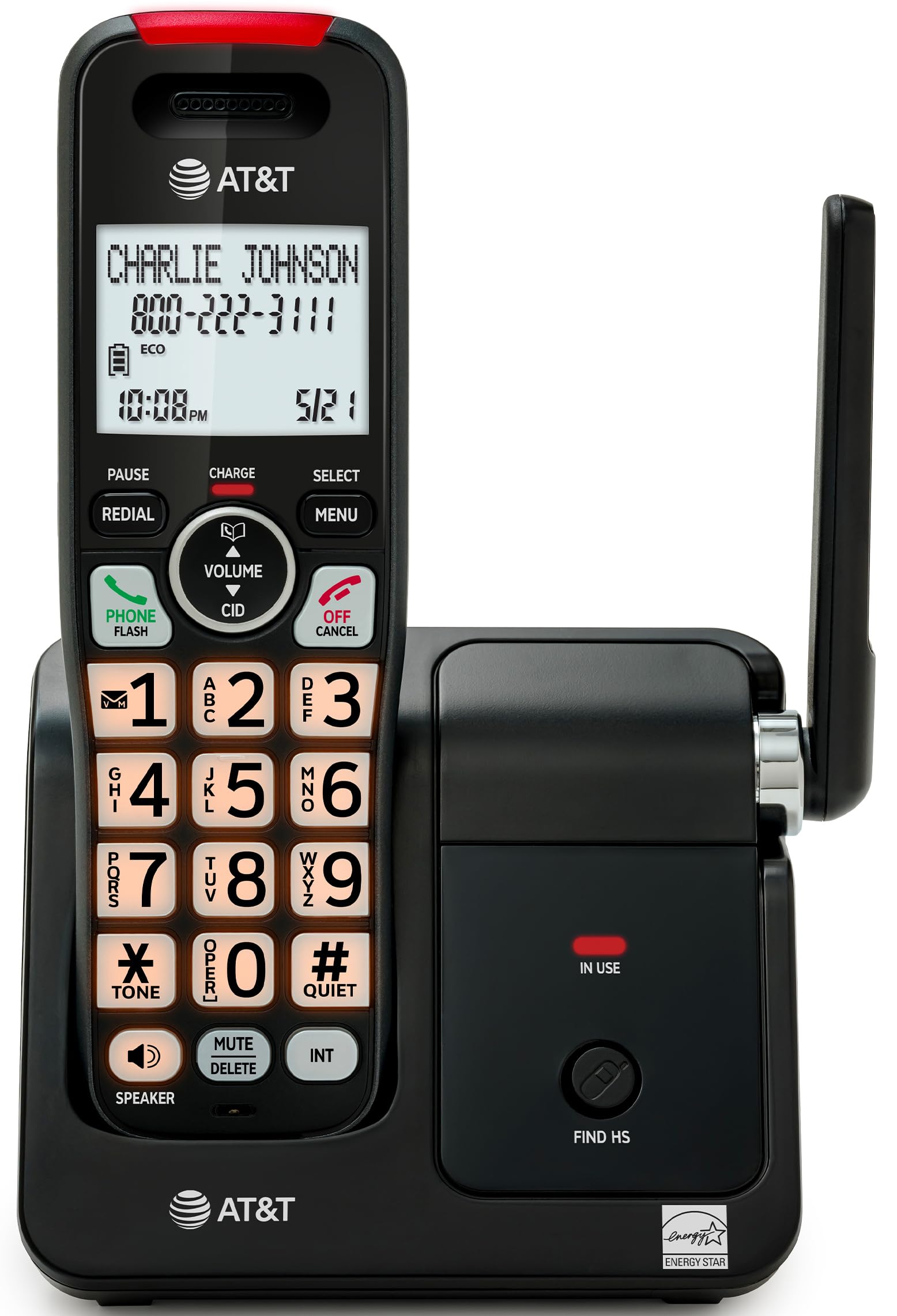
Image: The AT&T EL2131-11 cordless phone, showing the handset docked in its base unit.
Негизги өзгөчөлүктөрү:
- Чалууларды бөгөттөөчү: Blocks up to 50 unwanted numbers.
- Чалуучунун ID: Stores up to 50 calls, displaying name, number, time, and date.
- Толук дуплекстүү динамик: Allows both parties to speak and listen simultaneously.
- Арткы жарык дисплей жана баскычтоп: Жарык аз шарттарда даана көрүнүүнү камсыз кылат.
- Тынч режим: Silences the ringer instantly.
- ЭКО режими: Reduces power consumption and extends battery life.
- DECT 6.0 технологиясы: Ensures interference-free communication and extended range.
Жайгашуу
Кутуда эмне бар:
- Негизги бирдиги
- 1 Зымсыз телефон
- 1 Кубаттуу адаптер
- Телефон линиясы
- 2 Батарея клеткалары
- Quick Start Guide
- Дубалга орнотулган кашаа
1. Батареяны орнотуу
- Телефондун артындагы батарея отсегин табыңыз.
- Insert the two supplied battery cells, ensuring correct polarity (+ and -).
- Батарея уясынын капкагын бекем жабыңыз.
2. Негизги блокту туташтыруу
- Кубат адаптеринин кичинекей учун негизги блоктун арткы жагындагы кубат уячасына туташтырыңыз.
- Кубат адаптеринин чоң учун стандарттуу электр розеткасына сайыңыз.
- Телефон линиясынын шнурунун бир учун негизги блоктун арткы жагындагы TEL LINE уячасына туташтырыңыз.
- Телефон линиясынын экинчи учуна телефон уячасына сайыңыз.
3. Баштапкы заряддоо
Place the handset in the base unit with the display facing forward. The handset will begin charging. Allow the handset to charge for at least 16 hours before initial use to ensure optimal battery performance.

Image: The handset charging in its base, with an overlay indicating a 5-day battery life on a single charge.
Иштөө нускамалары
Чалууларды кабыл алуу жана кабыл алуу
- Чалуу үчүн: Басыңыз ТЕЛЕФОН / ФЛЕШ, андан кийин номерди териңиз.
- Чалууга жооп берүү үчүн: Телефон шыңгыраганда, басыңыз ТЕЛЕФОН / ФЛЕШ же каалаган терүү баскычын (0-9, * же #) басыңыз.
- Чалууну аяктоо үчүн: Басыңыз ӨЧҮРҮҮ/ЖОК КЫЛУУ or place the handset back in the base unit.
Динамикти колдонуу
Чалуу учурунда, басыңыз СПИКЕР button to activate the full-duplex speakerphone. Press it again to switch back to the handset earpiece.

Image: A man holding a small dog, speaking hands-free using the phone's speakerphone function. The phone's base unit is visible on a table.
Чалуучунун ID
When a call comes in, the caller's information (name and number) will appear on the handset display if you subscribe to Caller ID service. The phone stores up to 50 caller ID records.

Image: A close-up of the phone's display showing a caller's name and number, along with the time and date.
Чалуу бөгөттөөчү
The call blocker feature allows you to block up to 50 unwanted numbers. To block a number:
- During a call or from the Caller ID log, press МЕНЮ.
- Scroll to 'Call Blocker' and press ТАНДОО.
- Номерди бөгөттөө тизмесине кошуу үчүн экрандагы көрсөтмөлөрдү аткарыңыз.

Image: A visual representation of the call blocker feature, showing a list of blocked numbers on the phone's display.
Тынч режим
To temporarily silence the ringer, press and hold the #ТЫНЧ button on the handset. The ringer will be silenced for a set period, typically 1 to 12 hours, which can be adjusted in the settings.

Image: A close-up of the phone's display indicating that 'Quiet mode' is active.
ЭКО режими
The ECO mode automatically adjusts power consumption to conserve battery life. This mode is typically active by default and indicated by an 'ECO' icon on the display.

Image: The phone's display showing the 'ECO' icon, indicating power-saving mode is active.
Кайра терүү
Акыркы чалган номерди кайра терүү үчүн, басыңыз РЕДИАЛ баскычы.

Image: The phone's display showing the 'Redial' function with a previously dialed number.
Арткы жарык дисплей жана баскычтоп
The handset features a backlit LCD display and illuminated keypad for easy readability and operation in various lighting conditions.

Image: A hand holding the phone, demonstrating its bright backlit screen and illuminated keypad in a low-light environment.
Техникалык тейлөө
Телефонду тазалоо
- жумшак, бир аз колдонуу damp cloth to clean the surfaces of the phone and base unit.
- Do not use cleaning sprays or harsh chemicals, as they may damage the finish or electronic components.
- Ensure the phone is unplugged from the power outlet before cleaning.
Батареяга кам көрүү
- For optimal battery life, keep the handset in the base unit when not in use.
- Эгер телефон көпкө чейин колдонулбай турган болсо, агып кетпеши үчүн батарейкаларды алып салыңыз.
- Replace batteries when they no longer hold a charge effectively. Use only the specified battery type.
Проблемаларды чечүү
If you experience issues with your AT&T EL2131-11 phone, refer to the following common troubleshooting steps:
| Көйгөй | Чечим |
|---|---|
| Терүү үнү жок |
|
| Телефон заряддалбай жатат |
|
| Чалууларды жасоо/кабыл алуу мүмкүн эмес |
|
| Үн сапаты начар/статикалык |
|
Техникалык шарттар
| Өзгөчөлүк | Деталь |
|---|---|
| Бренд | AT&T |
| Модель номери | EL2131-11 |
| Телефон түрү | Зымсыз |
| Технология | DECT 6.0 |
| Түс | Black & Silver |
| Материал | Пластик |
| Power Source | Батарея менен иштейт |
| Элементтин өлчөмдөрү (L x W x Y) | 5.06 x 4.65 x 7.23 дюйм (Негизги бирдик) |
| Телефон менен сүйлөшүү убактысы | 10 саат |
| Телефон күтүү убактысы | 5 күн |
| Чалуучунун идентификациясы | Ооба |
| Көп линия операциясы | Бир линиялык операция |
| Жооп берүү системасынын түрү | Жок |
| UPC | 650530034510 |

Image: The AT&T EL2131-11 base unit with handset, showing its height (7.23 inches), length (5.06 inches), and width (4.65 inches).
Кепилдик маалымат
This AT&T EL2131-11 Cordless Landline Phone comes with a 1 жылдык чектелген кепилдик from the manufacturer. Please retain your proof of purchase for warranty claims. For specific terms and conditions, refer to the warranty card included in your product packaging or visit the official AT&T support webсайт.
Кардарларды колдоо
For further assistance, technical support, or to inquire about replacement parts, please contact AT&T customer service. You can typically find contact information on the official AT&T website or in the quick start guide provided with your phone.
Online resources may include FAQs, detailed user manuals, and support forums.