
Introduction
This manual provides detailed instructions for the setup, operation, and maintenance of your EPOMAKER AJAZZ AK820 V2 Tri-Mode Mechanical Gaming Keyboard. Please read this guide thoroughly before using the product to ensure optimal performance and longevity.
Кутуда эмне бар
- EPOMAKER AJAZZ AK820 V2 Mechanical Gaming Keyboard
- USB кабели
- Баскыч капкагын тарткыч
- Two Mechanical Switches (spare)
- Колдонуучунун Колдонмосу (бул документ)
Жайгашуу
1. Баскычтопту заряддоо
Before initial use, fully charge the keyboard using the provided USB-C cable. Connect the USB-C end to the keyboard's port and the USB-A end to a power source (e.g., computer USB port, wall adapter).
The keyboard features a 10000mAh battery. Charging status may be indicated by the backlight or a dedicated LED.

Image: The keyboard connected via USB-C cable, demonstrating the charging setup.
2. Байланыш режимдери
The AK820 V2 supports three connectivity modes: 2.4GHz wireless, Bluetooth, and USB-C wired. A switch on the underside of the keyboard allows selection between these modes.

Image: Diagram illustrating the three connectivity modes: USB-C, 2.4GHz, and Bluetooth.
2.1. USB-C зымдуу режими
Connect the keyboard directly to your computer using the provided USB-C cable. This mode offers a stable connection and charges the keyboard simultaneously. The polling rate in wired mode is 1000Hz.
2.2. 2.4 ГГц зымсыз режим
Insert the 2.4GHz USB dongle into an available USB port on your computer. Switch the keyboard to 2.4GHz mode. The keyboard should automatically connect. This mode provides a 1000Hz polling rate for low-latency gaming.
2.3. Bluetooth Wireless Mode
Switch the keyboard to Bluetooth mode. On your device (PC, laptop, tablet, phone), search for Bluetooth devices and select "AK820 V2" to pair. The keyboard supports Bluetooth 5.0 and has a polling rate of 125Hz. It can remember up to 5 paired devices.

Image: The keyboard shown connected wirelessly to a laptop, tablet, and smartphone, demonstrating wide compatibility.
3. Эргономикалык жөнгө салуу
Клавиатурада эки баскычтуу баскыч барtage adjustable kickstand on the underside, allowing you to set the typing angle for personalized comfort and to reduce hand fatigue during extended use.

Image: Close-up of the keyboard's underside, highlighting the two-stage adjustable kickstand.
Иштөө нускамалары
1. Айланма тутканын функционалдуулугу
The large rotary metal knob provides quick control over audio and other functions:
- Айлантуу баскычы: Adjusts volume (clockwise for volume up, counter-clockwise for volume down).
- Баскыч баскычы: Аудионун үнүн өчүрөт же ачат.
- Fn + Knob Click: Enters menu mode for adjusting lighting, language, and other settings (if applicable via software).

Image: The keyboard's rotary knob with visual cues for volume adjustment and mute/unmute functions.
2. Dynamic RGB Backlight Control
The AK820 V2 features 16 million color RGB backlighting with south-facing LEDs for vibrant illumination. You can customize lighting effects using keyboard shortcuts or the dedicated software.
- Fn + Жебе баскычтары (өйдө/төмөн): Adjusts backlight brightness/speed.
- Fn + Жебе баскычтары (Сол/Оң): Changes backlight effect direction.
- Fn + \|: Cycles through different backlight effects.
- Fn + Enter: Cycles through side light effects.
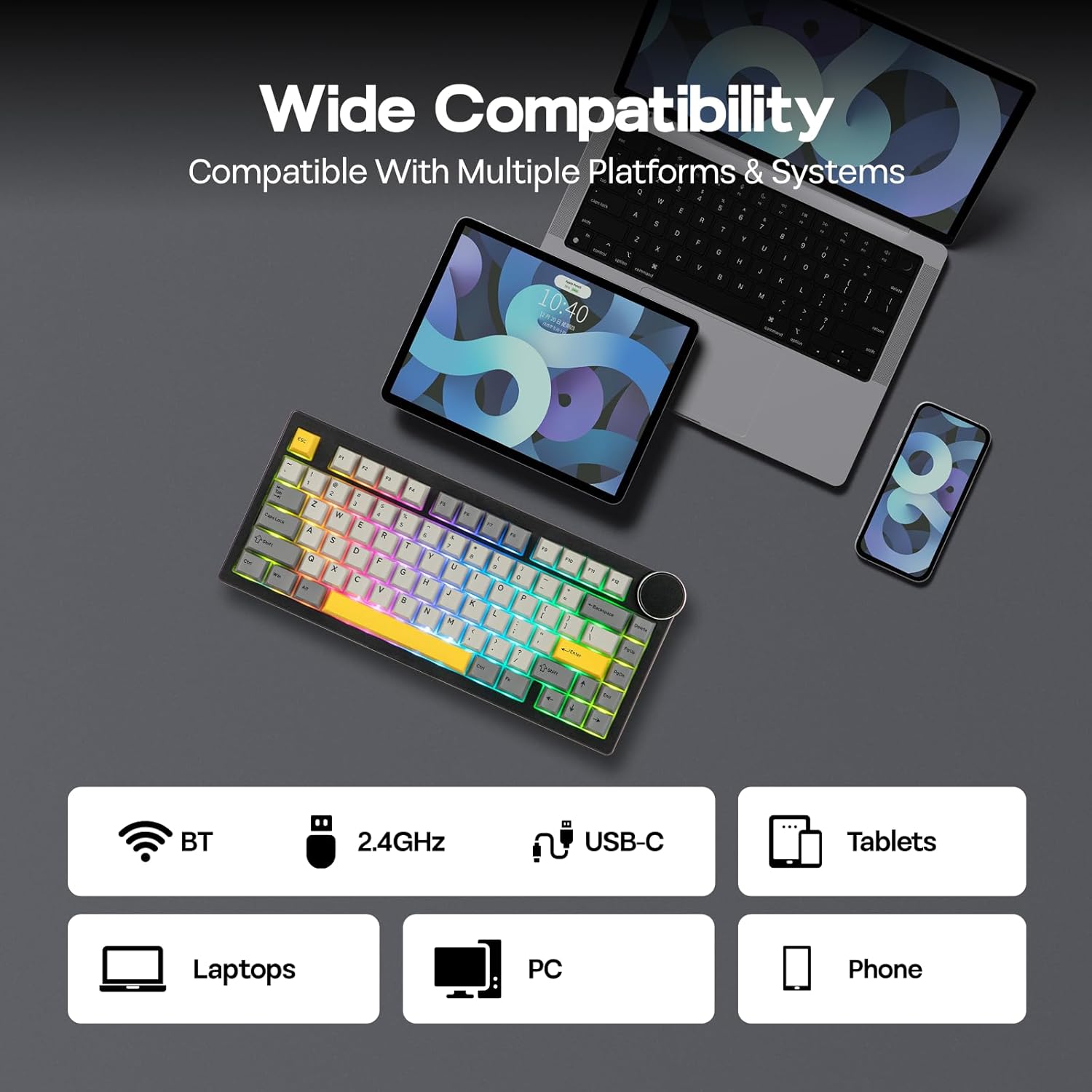
Image: The keyboard illuminated with dynamic RGB backlighting, showcasing both key and side panel lights.
3. Программалануучу программалык камсыздоо
Utilize the dedicated software for advanced customization, including:
- Key Remapping
- Макро жаздыруу
- Layer Definition
- Detailed Backlight Settings
- Системалык орнотуулар
Refer to the official EPOMAKER website for software download and specific instructions.

Image: A computer display showing the graphical user interface of the keyboard's programmable software.
4. Battery Life Check (Wireless Mode Only)
To check the remaining battery life in wireless mode, press Fn + Backspace. The keyboard's lighting or a dedicated indicator will show the current battery level.

Image: Visual representation of battery life: 21 hours with backlight, 214 hours without backlight, and the Fn + Backspace key combination for checking battery status.
Техникалык тейлөө
1. Баскычтын капкагын жана которгучту алмаштыруу (Ысык алмаштырууга болот)
The AK820 V2 features a hot-swappable PCB, allowing you to change mechanical switches without soldering. It is compatible with 3-pin and 5-pin mechanical switches.
- Баскыч капкактарын алып салуу: Use the provided keycap puller to gently remove keycaps. Hook the puller onto the keycap and pull upwards evenly.
- Которгучтарды алып салуу: After removing the keycap, use the switch puller (often integrated with the keycap puller) to grip the top and bottom clips of the switch. Gently pull the switch upwards until it detaches from the PCB.
- Которгучтарды орнотуу: Жаңы өчүргүчтүн төөнөгүчтөрүн платадагы тешиктер менен тегиздеңиз. Өчүргүч ордуна чыкылдаганча бекем басыңыз. Төөнөгүчтөрдүн ийилбегенин текшериңиз.
- Баскыч капкактарын орнотуу: Place the keycap onto the switch stem and press down gently until it is secure.

Image: A keycap and switch being removed from the keyboard, demonstrating the hot-swappable design.

Image: Detailed specifications of the Coconut Cream switch, including trigger force, bottom-out force, pre-travel, and total travel.
2. Тазалоо
To clean your keyboard, first disconnect it from all power sources. Use a soft, lint-free cloth to wipe the surface. For deeper cleaning, remove keycaps and use compressed air to clear debris from between switches. Avoid using harsh chemicals or abrasive materials.
Проблемаларды чечүү
- Баскычтоп жооп бербей жатат:
- Баскычтоп кубатталганын текшериңиз.
- Check the connectivity mode switch (USB-C, 2.4GHz, BT) and ensure it matches your connection method.
- For 2.4GHz, ensure the USB dongle is properly inserted.
- For Bluetooth, ensure the keyboard is paired and selected on your device. Try re-pairing.
- Зымсыз көйгөйлөрдү болтурбоо үчүн USB-C кабели аркылуу туташтырып көрүңүз.
- Катталбай жаткан ачкычтар:
- Ensure the switches are fully seated in the PCB.
- If a specific key is not working, try replacing its switch with one of the spare switches or a known working switch from another key.
- Жабыркаган өчүргүчтүн айланасындагы бардык таштандыларды тазалаңыз.
- Арткы жарык маселелери:
- Adjust brightness using Fn + Arrow Up.
- Cycle through effects using Fn + \|.
- Ensure the keyboard is not in a low-power mode.
- Check software settings for backlight configuration.
- Программа клавиатураны аныктабай жатат:
- Ensure the keyboard is connected via USB-C wired mode when using the software.
- Download the latest version of the software from the official EPOMAKER webсайт.
- Тоскоолдук келтириши мүмкүн болгон ар кандай антивирустук же брандмауэр программаларын убактылуу өчүрүңүз.
Техникалык шарттар
| Өзгөчөлүк | Деталь |
|---|---|
| Бренд | EPOMAKER |
| Модель номери | AK820 V2 |
| Байланыш технологиясы | 2.4GHz Wireless, Bluetooth (BT 5.0), USB-C Wired |
| Баскычтоптун жайгашуусу | 75% компакттуу (80 баскыч + тутка) |
| Которуу түрү | Linear (Coconut Cream) |
| Ыкчам алмаштырылуучу | Yes (3/5-pin mechanical switches) |
| Клавиатура материалы | PBT (кош атуу) |
| Арткы жарыктандыруу | RGB (16M colors, South-facing LEDs) |
| Батарея сыйымдуулугу | 10000mAh |
| Polling Rate (USB-C/2.4GHz) | 1000Hz |
| Сурамжылоо көрсөткүчү (Bluetooth) | 125Hz |
| Шайкеш түзмөктөр | Gaming Console, Laptop, PC, Smart TV, Tablet |
| Шайкеш OS | Windows 7+, Mac OS 11 Big Sur+ |
| Продукциянын өлчөмдөрү (L x W x Y) | 12.91" x 5.71" x 1.61" (32.8cm x 14.5cm x 4.1cm/2.1cm) |
| Салмагы | 0.95кг |
| Өзгөчөлүктөр | Big Rotary Knob, 5-Layered Gasket Structure, Programmable Keys, Ergonomic Design |

Image: The keyboard with an overlay detailing its technical specifications, including dimensions, weight, and keycap type.
Кепилдик маалымат
The EPOMAKER AJAZZ AK820 V2 Mechanical Gaming Keyboard comes with a 1 жылдык кепилдик сатып алынган күндөн тартып. Бул кепилдик өндүрүштүк кемчиликтерди жана нормалдуу колдонуудагы бузулууларды камтыйт. Бул туура эмес колдонуудан, кырсыктардан, уруксатсыз өзгөртүүлөрдөн же кадимки эскирүүдөн келип чыккан зыянды камтыбайт.
For warranty claims, please retain your proof of purchase and contact EPOMAKER customer support.
Колдоо
For further assistance, technical support, or to download the latest software and drivers, please visit the official EPOMAKER webсайт:
You may also contact EPOMAKER customer service directly through their webконкреттүү суроолор үчүн сайт.


