
1. Киришүү
This manual provides essential information for the safe and efficient operation of your PowMr 4000W Hybrid Solar Inverter. This device is designed to convert 24VDC battery power into 110/120VAC pure sine wave electricity, integrating a 140A MPPT charge controller for optimal solar energy utilization. It supports various battery types and off-grid system configurations. Please read this manual thoroughly before installation and use, and retain it for future reference.
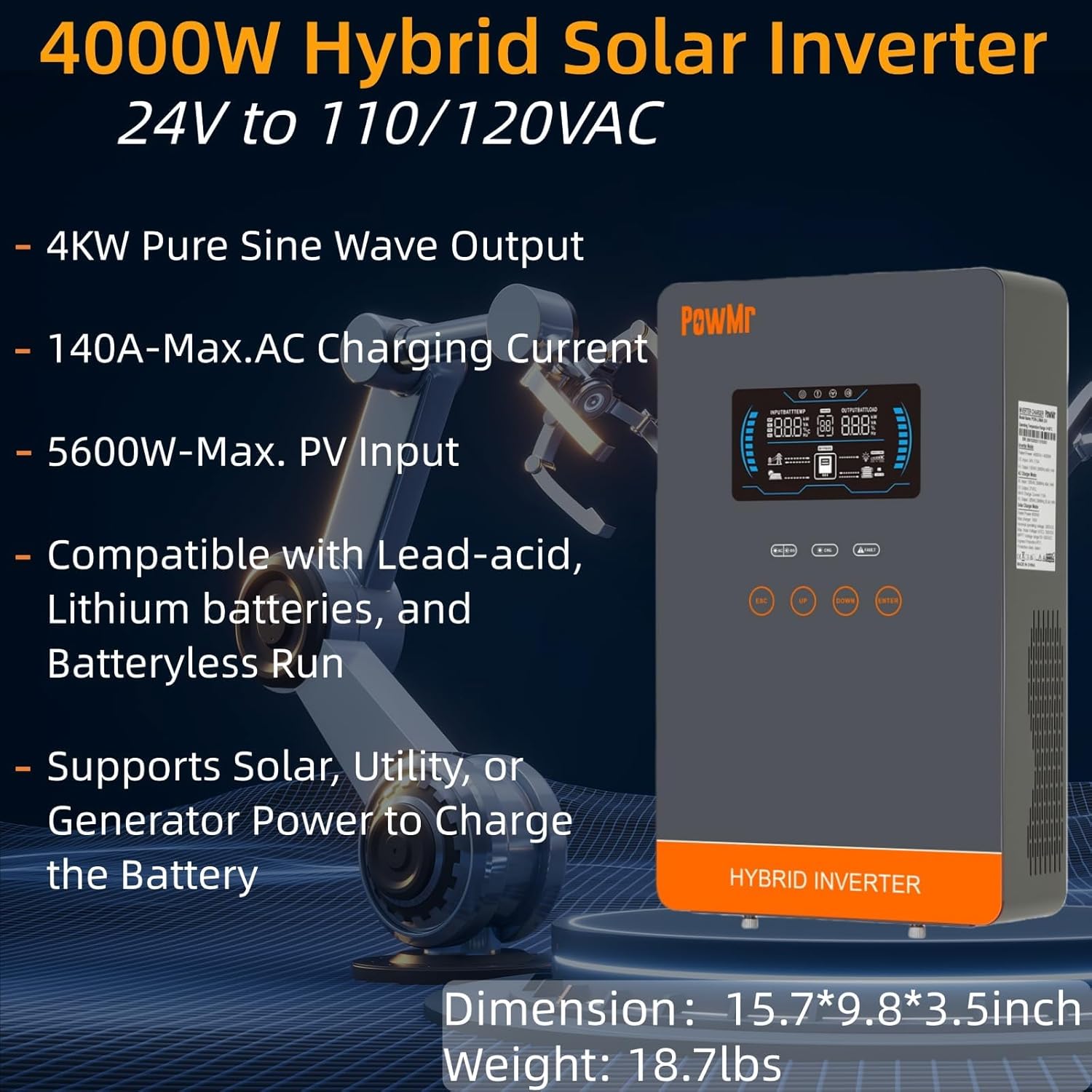
Image: The PowMr 4000W Hybrid Solar Inverter, highlighting its 4KW pure sine wave output, 140A max AC charging current, 5600W max PV input, compatibility with various batteries, and support for solar, utility, or generator power to charge the battery. Dimensions are 15.7"L x 9.8"W x 3.5"H and weight is 18.7lbs.
2. Коопсуздук нускамалары
Электр шок, өрт же жаракат алуу коркунучун азайтуу үчүн ар дайым төмөнкү коопсуздук чараларын сактаңыз:
- Орнотуу квалификациялуу кызматкерлер тарабынан аткарылышы керек.
- Бардык зымдар туура өлчөмдө жана туура жылуулангандыгын текшериңиз.
- Инверторду ажыратпаңыз. Ичинде колдонуучу тейлей турган тетиктер жок.
- Инверторду күйүүчү материалдардан, нымдуулуктан жана түз күн нурунан алыс кармаңыз.
- Ашыкча ысып кетүүнүн алдын алуу үчүн инвертордун айланасында жетиштүү желдетүүнү камсыз кылыңыз.
- Техникалык тейлөө иштерин жүргүзүүдөн же зымдарды туташтыруудан мурун ар дайым бардык кубат булактарын (ФТ, батарея, AC киргизүү) ажыратыңыз.
- Орнотуу жана тейлөө учурунда тиешелүү жеке коргонуу шаймандарын (ЖКК) кийиңиз.
3. Продукт бүтүп калдыview
3.1. Өзгөчөлүктөрү
- Таза синус толкунунун чыгышы: Provides stable and clean power suitable for sensitive electronics.
- Интеграцияланган MPPT кубаттоо контроллери: 140A MPPT for efficient solar charging.
- Батареянын кең шайкештиги: Supports AGM, Gel, Lead-acid, Lithium-ion, and LiFePO4 batteries.
- Batteryless Mode: Can power loads directly from PV/AC grid without a connected battery.
- Бир нече заряддоо режимдери: Solar Only, Mains Only, Mains & Solar Hybrid.
- Multiple Load Output Modes: Utility Priority, Solar Priority, Solar and SBU Priority.
- Өркүндөтүлгөн коргоо: Кыска туташуу, ашык томtage, томдун астындаtage, overload, reverse polarity, over-temperature, and backfill protection.
- Колдонуучуга ыңгайлуу интерфейс: 6.25-inch LCD screen with touch controls for real-time data display.
- Байланыш порттору: RS485 and RS232 for monitoring and control.
3.2. Компонентти идентификациялоо

Image: A detailed diagram of the PowMr Hybrid Solar Inverter, showing its front panel and connection ports. Key components labeled include: 1. LCD display, 2. Status indicator, 3. Charging indicator, 4. Fault indicator, 5. Function touch buttons, 6. On/off switch, 7. AC input, 8. AC output, 9. PV input, 10. Battery input, 11. RS485/RS232 communication port.
3.3. Коргоо өзгөчөлүктөрү

Image: An illustration detailing the comprehensive protection features of the inverter, including Short Circuit Protection, Over-Load Protection, Over Current Protection, Backfill Protection, Over Voltage Protection, Over-Temperature Protection, Under Voltage Protection, and Over Charge Protection.
4. Пакеттин мазмуну
Таңгактан чыгаргандан кийин, бардык буюмдардын бар экенин жана бузулбаганын текшериңиз:
- PowMr 4000W Hybrid Solar Inverter
- Көрсөтмө (бул документ)
- Communication Cables (if applicable, check packaging)
- Монтаждоочу жабдык (эгер бар болсо, таңгагын текшериңиз)
5. Орнотуу жана орнотуу
5.1. Инверторду монтаждоо
Инверторду орнотуу үчүн ылайыктуу жерди тандаңыз. Ал төмөнкүдөй болушу керек:
- Үйдүн ичинде, түз тийген күн нурунан, жамгырдан жана чаңдан корголгон.
- Жылуулуктун таркашына мүмкүндүк берүү үчүн жакшы желдетилген.
- Close to the battery bank to minimize cable length and voltagд тамчы.
- On a solid, non-flammable surface.
5.2. Электр схемасы
Follow the wiring diagram carefully. Incorrect wiring can cause damage to the inverter, batteries, or connected loads, and may pose a safety hazard.

Image: A comprehensive wiring diagram illustrating connections for PV input, Mains/Generator input, AC output, and Battery input. It specifies voltage ranges, current ratings, and recommended wire gauges for each connection point.
5.3. Батареяны туташтыруу
The inverter is compatible with various 24V battery types. Ensure your battery bank matches the inverter's voltagд талаптар.

Image: An illustration showing the inverter's compatibility with various battery types including AGM, GEL, FLD (Flooded), LI (Lithium-ion), SLD (Sealed Lead-Acid), and USER-defined settings. It also indicates a maximum battery charging current of 140A (utility charging + solar charging).
- Connect the battery cables to the inverter's battery terminals, ensuring correct polarity (positive to positive, negative to negative).
- Бардык байланыштарды бекем бекемдеңиз.
5.4. PV Array Connection
- Connect the solar panel array to the PV input terminals, observing correct polarity.
- Ensure the PV array's open circuit voltage and power are within the inverter's specifications.
5.5. AC киргизүү/чыгаруу туташуусу
- AC коммуналдык тармагын же генераторду AC киргизүү терминалдарына туташтырыңыз.
- Connect your AC loads to the AC output terminals.
- Ensure all AC connections are properly grounded.
6. Иштөө нускамалары
6.1. Күйгүзүү / Өчүрүү
- Күйгүзүү үчүн: Ensure all connections are secure. First, connect the battery, then the PV array, and finally the AC input. Press the On/Off switch.
- Өчүрүү үчүн: Disconnect the AC input, then the PV array, and finally the battery. Press the On/Off switch.
6.2. LCD дисплей жана башкаруу
The LCD screen displays real-time system data. Use the touch buttons to navigate menus and adjust settings.
6.3. Setting Charging and Output Modes
The inverter offers flexible charging and output modes to suit various energy management needs.

Image: An illustration detailing the three charging modes (1. Only Solar, 2. Only Utility, 3. Solar+Utility) and three output modes (1. Utility First, 2. Solar First (default), 3. SBU priority). Steps to set programs are also provided: 1. Long press and hold ENTER button for 3s, 2. Press UP and DOWN to select setting programs, 3. Press ENTER to confirm or ESC to exit.
6.3.1. Заряддоо режимдери
- Күн гана: Charges batteries exclusively from solar panels.
- Mains Only: Charges batteries exclusively from the AC utility grid or generator.
- Электр жана күн энергиясынын гибриди: Prioritizes solar charging, supplementing with AC utility/generator if solar power is insufficient.
6.3.2. Load Output Modes
- Коммуналдык кызмат көрсөтүүлөрдүн артыкчылыгы: Loads are primarily powered by the AC utility grid. Inverter switches to battery/solar if utility fails.
- Күн энергиясынын артыкчылыгы: Loads are primarily powered by solar and battery. Inverter switches to utility if solar/battery power is insufficient.
- SBU Priority (Solar-Battery-Utility): Loads are primarily powered by solar, then battery, and finally by utility as a last resort.
7. Техникалык тейлөө
Үзгүлтүксүз тейлөө сиздин инверторуңуздун оптималдуу иштешин жана узак иштөөсүн камсыздайт.
- Тазалоо: Periodically clean the inverter's exterior with a dry cloth. Do not use liquid cleaners.
- Вентиляция: Ensure cooling fan vents are clear of dust and obstructions. The triple cooling fan design helps dissipate heat efficiently.
- Байланыштары: Жыл сайын бардык электр туташууларынын бекемдигин жана дат басуу белгилерин текшерип туруңуз.
- Курчап турган чөйрө: Maintain a clean, dry, and well-ventilated environment around the inverter. The dust-proof design helps prevent dust ingress.
8. Кыйынчылыктарды
If you encounter issues, refer to the following common problems and solutions. For persistent issues, contact customer support.
| Көйгөй | Мүмкүн себеп | Чечим |
|---|---|---|
| Инвертор күйбөй жатат | No battery connection; Low battery voltage; On/Off switch off | Check battery connections; Charge battery; Turn on switch |
| AC чыгышы жок | Ашыкча жүктөлүш; Кыска туташуу; Инвертордун бузулушу | Reduce load; Check for short circuits; Restart inverter |
| Фотоэлектрдик кубаттоо иштебей жатат | Фотоэлектрдик массив ажыратылган; Күн нуру жетишсиз; Фотоэлектрдик көлөмtage өтө төмөн/жогорку | Check PV connections; Ensure adequate sunlight; Verify PV array specifications |
| Ашыкча жүктөм жөнүндө эскертүү | Connected loads exceed inverter capacity | Disconnect some loads; Ensure total load is within 4000W |
| Жогорку температура эскертүү | Poor ventilation; Ambient temperature too high | Clear vents; Improve airflow; Relocate inverter if necessary |
9. Техникалык шарттар
Technical specifications for the PowMr 4000W Hybrid Solar Inverter:
| Параметр | Нарк |
|---|---|
| Модель номери | POW-LVM4K-24V-FBA2 |
| Чыгуучу кубаттуулук | 4000 Вт |
| Киргизүү көлөмүtage (DC) | 24VDC |
| Output Voltage (AC) | 110/120VAC |
| Output Waveform | Таза синус толкуну |
| Макс. PV Open Circuit Voltage | 350VDC |
| PV Array MPPT Voltage Диапазон | 55-350VDC |
| Макс. PV киргизүү күчү | 5600 Вт |
| Rated Grid Input Voltage | 110/120VAC |
| Max. Hybrid Charging Current (AC+PV) | 140A |
| Байланыш | RS485, RS232 |
| Дисплей түрү | LCD |
| Өлчөмдөрү (L x W x Y) | 15.7"L x 9.8"W x 3.5"H |
| Салмагы | 18.7 lbs (approximate, derived from image) |
10. Кепилдик жана колдоо
10.1. Кепилдик маалыматы
The PowMr 4000W Hybrid Solar Inverter comes with an 18 айлык кепилдик from the date of purchase. This warranty covers defects in materials and workmanship under normal use. It does not cover damage caused by improper installation, misuse, accidents, unauthorized modifications, or natural disasters.
10.2. Кардарларды колдоо кызматы
For technical assistance, warranty claims, or any questions regarding your PowMr inverter, please contact PowMr customer support through the retailer's platform or the official PowMr website. Please have your model number (POW-LVM4K-24V-FBA2) and purchase date available when contacting support.