
1. Киришүү
Thank you for choosing the Renoj Vibration Plate Exercise Machine. This manual provides essential information for the safe and effective use of your new fitness equipment. Please read it thoroughly before operation and retain it for future reference.
The Renoj VP02 Vibration Plate is designed to provide a low-impact, full-body workout experience, engaging muscles through whole-body vibration technology. It features adjustable speed settings, a built-in speaker, and comes with resistance bands to enhance your fitness routine.
2. Маанилүү коопсуздук чаралары
- Consult a physician before starting any new exercise program, especially if you have pre-existing health conditions, are pregnant, or have recently undergone surgery.
- Always place the machine on a flat, stable surface. Ensure the four anti-slip suction cups are securely attached to the floor before use.
- Do not use the machine if you weigh over 330 lbs (150 kg).
- Иш учурунда балдарды жана үй жаныбарларын машинадан алыс кармаңыз.
- Ensure the power cord is not damaged or tangled. Do not operate the machine with a damaged cord or plug.
- Do not immerse the machine in water or use it in excessively humid environments.
- Stop using the machine immediately if you feel dizzy, nauseous, or experience any pain.
- Машинаны колдонбогондо жана тазалоодон же тейлөөдөн мурун электр розеткасынан сууруп алыңыз.
- Use only the provided accessories and attachments.
3. Таңгактын курамы жана продуктунун үстүнөнview
Your Renoj Vibration Plate package includes the following items:
- Renoj Vibration Plate (Model VP02)
- Алыстан башкаруу (2 AAA батарейка талап кылынат, камтылган эмес)
- Электр кабели
- 2x Resistance Bands with handles
- User Manual
Продукт диаграммасы
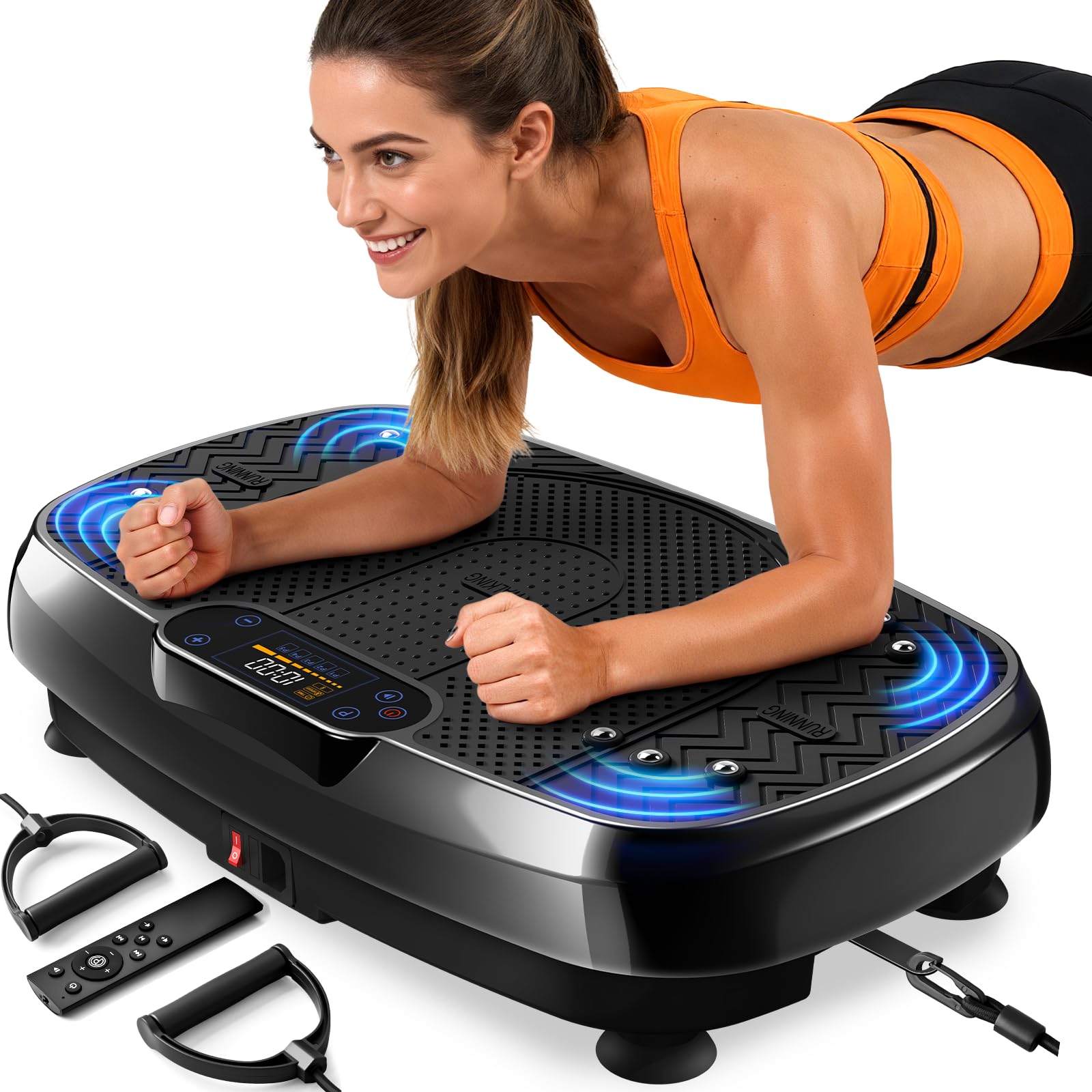
The vibration plate features a large, textured footpad for secure standing, an integrated control panel with an LED display, and a built-in USB speaker. The compact design allows for easy storage under furniture.

4. Орнотуу
- Таңылганын ачуу: Бардык компоненттерди таңгактан кылдаттык менен алып салыңыз.
- Жайгашкан жери: Вибрациялык пластинаны бекем, тегиз жерге коюңуз. Коопсуз иштөө үчүн машинанын айланасында жетиштүү бош орун бар экенин текшериңиз.
- Базаны коргоо: Press down firmly on the machine to engage the four anti-slip suction cups on the bottom, ensuring maximum stability during use.
- Туташуу кубаты: Insert the power cord into the machine's power input port and then plug it into a standard 110V-120V AC power outlet.
- Алыстан башкаруу батареялары: Open the battery compartment on the back of the remote control and insert two AAA batteries (not included), observing the correct polarity.
- Каршылык тилкелерин тиркөө (милдеттүү эмес): If you plan to use the resistance bands, locate the metal attachment points on each side of the vibration plate. Clip the carabiners of the resistance bands onto these points.

5. Иштөө нускамалары
5.1. Күйгүзүү / Өчүрүү
- Locate the red power switch on the side of the machine. Flip it to the 'ON' position to power on the device. The LED display will illuminate.
- To power off, flip the red power switch to the 'OFF' position.
5.2. Башкаруу панели жана пульт
The machine can be operated using either the integrated digital LED touch panel or the included remote control. The remote control offers convenient adjustment during your workout.

Башкаруу функциялары:
- БАШТОО / ТОКТОТУУ: Press to begin or end a workout session.
- PROGRAM (P): Cycles through 5 pre-set automatic programs (P1-P5). In auto programs, time and speed are pre-adjusted.
- SPEED +/-: Adjusts the vibration speed level (1-120) in manual mode.
- УБАКЫТ +/-: Adjusts the workout duration in manual mode.
- МУЗЫКА БАШКАРУУ: Play/Pause, Next/Previous Track, Volume Up/Down (for Bluetooth/USB speaker).
5.3. Bluetooth and USB Speaker
The Renoj Vibration Plate features a built-in USB speaker and Bluetooth connectivity, allowing you to enjoy music during your workout.
- USB Speaker: Plug a USB device containing music files into the USB port on the side of the machine. Use the music controls on the panel or remote to manage playback.
- Bluetooth орнотуу:
- Түзмөктү күйгүзүңүз.
- Open the Bluetooth settings on your phone or other smart device.
- Select the Bluetooth name (e.g., "Renoj VP02") to connect.
- Once connected, you can play music through the machine's speaker and control it via your device or the machine's controls.

6. Whole Body Exercise Reference
The Renoj Vibration Plate can be used for a variety of exercises to target different muscle groups. Here are some reference exercises:
6.1. Standing Stances
- Standing Stance: Stand on the pad with feet shoulder-width apart.
- Squatting Stance: Stand on the pad, feet shoulder-width apart, while performing squats.
- Calf Raise: Stand on the balls of your feet on the plate. Lift both heels slowly and simultaneously. Hold the position for a short time.
6.2. Upper Body Workouts
- Push-up: Place your hands shoulder-width apart on the pad, with legs bent or extended. Get up with your upper body, then lower it.
- Triceps Dip: Turn away from the device, place your hands firmly on the plate and support yourself. Bend your elbows slightly, lowering your upper body.
- Arm Workout (with bands): With your feet shoulder-width apart, bend at the waist and stretch your arms straight to rest on the pad. Alternatively, use resistance bands for bicep curls or shoulder presses.
6.3. Lower Body Workouts
- Lower Leg Work Out: Төмөнкү буттарыңызды төшөккө таянып, колдоруңузду аркаңызга таянып, колдоо көрсөтүү үчүн.
- Lunge (with bands): Put your foot in the middle of the device. Extend the other leg backward. Keep your back straight and push the foot firmly on the plate. Flex your leg muscles and pull the band alternately firmly upwards and back.
- Bridge on One Leg: Lie on your back on a mat in front of the device with one foot on the plate. During the vibration, one leg is lifted up and extended.
6.4. Core Workouts
- Sit-ups: Put your legs on the vibration plate, with legs bent and hands behind your head. Get up with your upper body, but not completely, and lower it again.
- Sitting Stance I: Бутуңузду кайчылаштырып, аянтка бекем отуруңуз.
- Sitting Stance II: табуреткага отурганда бутуңузду педалга коюңуз.


7. Тазалоо жана тейлөө
- Always ensure the machine is powered off and unplugged before cleaning.
- Машинаны жумшак менен сүртүңүз, гamp cloth and mild detergent. Do not use abrasive cleaners, solvents (like benzene, thinner, ethanol), or corrosive chemicals, as these may damage the surface.
- Store the machine in a dry, dust-free, and well-ventilated place, away from direct sunlight.
- Regularly check the machine for any potential safety risks or damage.
8. Кыйынчылыктарды
| Симптом | Мүмкүн себеп | Чечим |
|---|---|---|
| Жарыктар өчүк | No power supply / Power switch off | Check power connection, turn on power switch. |
| No vibration / Weak vibration | Low speed setting / Overload | Increase speed level / Reduce weight on platform. |
| Пульт иштебейт | Batteries dead / Too far from receiver | Replace AAA batteries / Ensure remote is within 2.5 meters of the infrared receiver window. |
| Машина колдонуу учурунда токтойт | Overheating / Exceeded time limit | Turn off, let cool for 10 minutes, then restart. |
| Иш учурунда адаттан тыш ызы-чуу | Loose components / Uneven surface | Check for loose parts, ensure machine is on a level surface. |
Эгерде бул чечимдер көйгөйдү чечпесе, кардарларды колдоо кызматына кайрылыңыз.
9. Техникалык шарттар
- Бренд: Renoj
- Модел: VP02
- Түсү: Кара
- Материал: Акрилонитрил бутадиен стирол (ABS)
- Продукциянын өлчөмдөрү (D x W x Y): 21" x 13.2" x 4.4" (53.34 см x 33.53 см x 11.18 см)
- Maximum Салмагы сунуш: 330 фунт (150 кг)
- Мотор күчү: 200 Вт
- Башкаруу түрлөрү: Remote & Digital LED Touch Panel
- Дисплей: Digital LED
- Ылдамдык диапазону: 1-120 деңгээл
- Ampжарыктык: 0.5-5мм
- Иштөө режими: Автоматтык жана кол менен
- Кубат булагы: Corded Electric 110V Voltage
- UPC: 199874262963
10. Кепилдик жана Кардарларды колдоо
Renoj products are manufactured to high-quality standards. This product comes with a standard limited warranty against defects in materials and workmanship. Please refer to the warranty card included in your package for specific terms and conditions.
For any questions, technical assistance, or warranty claims, please contact Renoj Customer Support through the retailer where you purchased the product or visit the official Renoj webсайт.
Онлайн колдоо: Visit the Renoj Store on Amazon