
Продукт бүттүview
The Bestier 55-inch Computer Desk is designed for home office, gaming, and study environments, offering a blend of functionality and modern aesthetics. Key features include an integrated power station, lockable file drawer, LED lighting, an ergonomic monitor stand, and a dedicated printer shelf.
Негизги өзгөчөлүктөрү:
- All-in-One Charging Hub: Includes 2 AC outlets, 1 USB-A port, and 1 Type-C port for convenient device charging.
- Кулпуланган File тартма: Secure storage for sensitive documents with a lock and key system, accommodating Letter, Legal, and A4 size files.
- Интегралдык LED жарыктандыруу: RGB LED light strip with multiple colors and dynamic modes, controlled by a user-friendly switch for customizable ambiance.
- Эргономикалык Монитор Стенди: Elevates screens to eye level to improve posture and reduce neck strain, also providing additional storage space.
- Dedicated Printer Shelf: Maximizes vertical storage for printers, scanners, or large gaming towers, keeping the main desktop clear.
- Туруктуу курулуш: Crafted from thick P2-grade MDF board and a reinforced heavy-duty metal frame for stability and durability.
- Кең жумушчу бети: 55"L x 21.7"W desktop accommodates multiple monitors and peripherals.
- Reversible Дизайн: Storage shelves and CPU stand can be configured to fit various room layouts.
Коопсуздук маалыматы
Сураныч, чогултуу жана колдонуу алдында бардык коопсуздук нускамаларын окуп жана түшүнүү. Бул нускамаларды аткарбоо жаракатка же продуктунун бузулушуна алып келиши мүмкүн.
- Assemble strictly according to the instruction manual.
- Do not exceed the specified weight capacity of the desk.
- Keep children under supervision during use to avoid injury.
- Ensure all connections for the power outlets and LED lights are secure before use.
- Үстөлдүн солкулдабашы үчүн аны тегиз жерге коюңуз.
Монтаждоо көрсөтмөлөрү
This desk requires assembly. All necessary tools and illustrated step-by-step instructions are provided. Each part is individually labeled for easy identification. It is recommended to have two people for assembly.
Жалпы Ассамблеянын кадамдары:
- Attach legs with screws and tighten using the provided tool.
- Connect the desktop to the frame using bolts.
- Insert drawer slides into side panels.
- Assemble the drawer boxes.
- Attach the power station and LED light strip.
- камсыз кылуу file drawer with the lock and key system.
- Install adjustable footpads to level the desk.
Видеону чогултуу боюнча колдонмо:
This video provides a detailed, step-by-step guide on how to assemble the Bestier 55-inch Computer Desk. It covers all components and tools required for a smooth assembly process.
Visual Assembly Aids:

Image showing the fully assembled Bestier 55-inch Computer Desk, highlighting its overall design and functionality in a typical use environment.

Diagram illustrating the precise dimensions of the desk, including the main desktop, monitor stand, and drawer unit, crucial for planning placement and ensuring fit.
Иштөө нускамалары
LED жарык системасы:
The desk features an integrated RGB LED light strip with multiple color and dynamic mode options. The lighting is controlled via a user-friendly switch located on the underside of the monitor stand.
- Кубат баскычы: LED чырактарын күйгүзүү же өчүрүү үчүн басыңыз.
- Түс баскычы: Cycle through 16 different colors.
- Режим баскычы: 22 динамикалык жарыктандыруу режимдеринен тандаңыз.
- Adjustable Speed/Brightness: Adjust the speed of dynamic modes and the brightness of static colors using the controls.

This image details the LED light strip and its control panel, illustrating how to operate the lighting features of the desk.
Интегралдык электр розеткалары:
The desk includes a recessed power strip for convenient charging of electronic devices.
- 2 AC розеткалары (125V/12A): Стандарттуу электрондук түзүлүштөр үчүн.
- 1 USB-A Port (5V/2.1A): For charging USB-compatible devices.
- 1 Type-C порту (5V/2.1A): For fast-charging compatible devices.
- Connect the desk's power cord (4.6 feet) to a wall outlet to activate the charging hub.
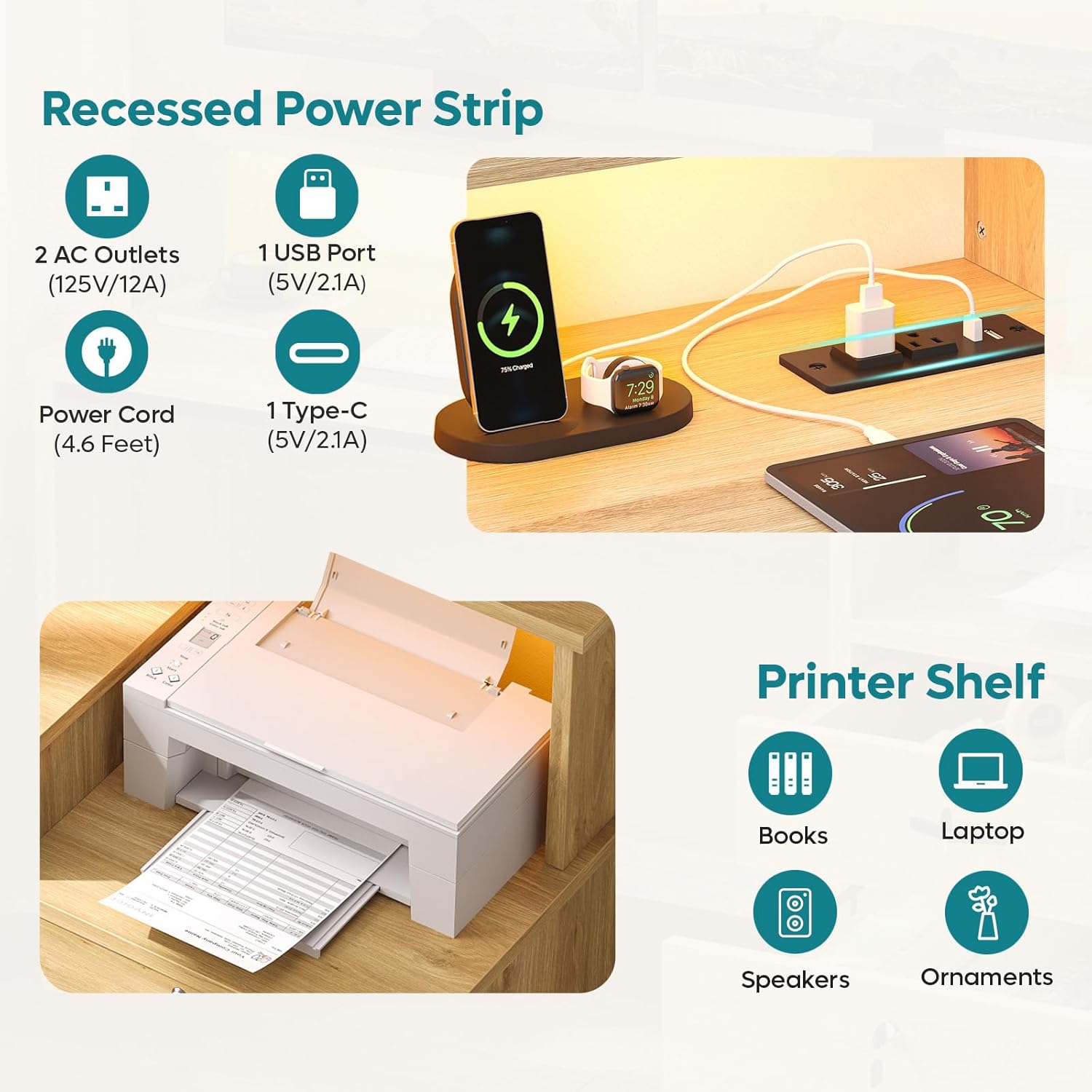
This image highlights the integrated power strip with its various ports, demonstrating how to connect and charge devices directly from the desk.
Кулпуланган File тартма:
The desk features a lockable file drawer for secure storage.
- Use the provided key to lock and unlock the drawer.
- The drawer includes hanging bars suitable for Letter, Legal, and A4 size files.

This image highlights the lockable file drawer, demonstrating its capacity for organized document storage and the security feature.
Эргономикалык Монитор Стенди:
The full-length raised monitor shelf helps maintain an ergonomic posture.
- Place your monitor(s) on the elevated shelf to align with eye level.
- Utilize the space underneath for keyboard, mouse, or notebooks.

This image visually explains the ergonomic benefits of the monitor stand, showing how it helps improve sitting posture and reduce strain.
Техникалык тейлөө жана кам көрүү
To ensure the longevity and appearance of your Bestier Computer Desk, follow these maintenance guidelines:
- Тазалоо: The desk features a scratch-resistant and waterproof walnut finish. Wipe surfaces with a soft, damp кездеме. Катуу химиялык заттардан же абразивдүү тазалагычтардан алыс болуңуз.
- Төгүлүүлөр: Promptly clean up any spills to prevent water damage, especially around the power outlets.
- Жылуулук: Ысык буюмдарды столдун бетине коргоочу каражатсыз түз коюудан алыс болуңуз.
- бекиткичтер: Мезгил-мезгили менен текшерип, туруктуулукту сактоо үчүн бардык бурамалар менен болтторду бекемдеп туруңуз.
- Салмак сыйымдуулугу: Do not overload the desktop or shelves beyond their intended weight capacity to prevent structural damage.
Проблемаларды чечүү
If you encounter any issues with your Bestier Computer Desk, please refer to the following common solutions:
- Тербелүүчү стол: Ensure all assembly screws are securely tightened. Check that the desk is on a level surface; use the adjustable footpads to stabilize if necessary.
- LED жарыктары иштебейт: Verify the power cord for the desk's integrated power station is securely plugged into a wall outlet. Check the connection of the LED light strip to the power source. Ensure the power button on the LED control panel is pressed.
- Электр розеткалары иштебейт: Confirm the desk's main power cord is plugged in. Test the wall outlet with another device to ensure it is functional.
- Drawer Sticking/Not Closing Properly: Check that the drawer slides are correctly installed and free of obstructions. Ensure the drawer box is assembled squarely.
Кошумча жардам алуу үчүн кардарларды колдоо бөлүмүнө кайрылыңыз.
Техникалык шарттар
| Өзгөчөлүк | Деталь |
|---|---|
| Бренд | Bestier |
| Модель номери | H107014AUS |
| Продукциянын өлчөмдөрү | Overall: 55"L x 21.7"W x 36.1"H (Main desktop depth: 19.7", Side unit depth: 19.4") |
| Иш столунун материалы | P2-grade MDF board with Oak Wood finish |
| Frame Material | Металл |
| Түс | Табигый жыгач бүтүрүү |
| Элемент Салмагы | 37 фунт |
| Тартмалардын саны | 1 (File Тартма) |
| Текчелердин саны | 3 (including monitor stand and printer shelf) |
| Электр розеткалары | 2 AC (125V/12A), 1 USB-A (5V/2.1A), 1 Type-C (5V/2.1A) |
| Электр шнурунун узундугу | 4.6 Фут |
| LED жарыктары | RGB, 16 Colors, 22 Modes, Adjustable Speed & Brightness |
| Ассамблея талап кылынат | Yes, all tools included |
Кепилдик жана колдоо
Bestier offers customer support for any inquiries or issues you may have with your product. Please refer to the contact information below:
| Регион | Байланыш маалыматы |
|---|---|
| Түндүк Америка | Phone: 888-666-1086, Email: Service.US@bestier.net |
| Европа (Улуу Британия) | Email: Service.UK@bestier.net |
| Europe (FR) | Email: Service.FR@bestier.net |
| Europe (DE) | Email: Service.DE@bestier.net |
| Europe (IT) | Email: Service.IT@bestier.net |
| Europe (ES) | Email: Service.ES@bestier.net |
| Asia (JP) | Phone: 04-8888-0283, Email: Service.JP@bestier.net |
| Глобалдык колдоо | Email: Service@bestier.net |
For return policy details, please refer to your purchase platform or contact customer support. The product typically includes a 30-day easy return policy.