
SmallRig RF20C
SmallRig RF20C RGB Portable LED Photo Torch User Manual
Model: RF20C (5335)
Бренд: SmallRig
1. Киришүү
The SmallRig RF20C RGB Portable LED Photo Torch is a versatile and powerful lighting tool designed for photographers, videographers, and content creators. It features 5-color LED beads, adjustable beam angle, and supports creative lighting effects with included gobos. This manual provides essential information for the safe and effective use of your device.
2. Коопсуздук маалыматы
- Аппаратты сууга же ашыкча нымдуулукка дуушар кылбаңыз.
- Көздүн LED жарыгынын түздөн-түз таасиринен алыс болуңуз.
- Түзмөктү бөлүктөргө бөлбөңүз же өзгөртпөңүз. Оңдоо иштерин ыйгарым укуктуу кызматкерлер гана жүргүзүшү керек.
- Балдар жетпеген жерде сактаңыз.
- Ensure proper ventilation during extended use, as the device may become warm.
- Белгиленген кубаттоо кабелин жана кубат адаптерин гана колдонуңуз.
3. Пакеттин мазмуну
Пакетиңизде бардык буюмдар бар экенин текшериңиз:
- RF20C Portable Focusable LED Video Light x 1
- Gobos x 20
- Silicone Gobo Holder x 1
- Сактагыч x 1
- Колдонуучунун колдонмосу x 1 (Бул документ)
- Заряддоо кабели x 1
4. Орнотуу
4.1 Алгачкы заряддоо
Before first use, fully charge the RF20C. Connect the provided USB-C charging cable to the device's charging port and to a compatible USB power adapter (PD 36W recommended). The device can be used while charging.

Figure 4.1: Internal battery illustration and runtime information.

Figure 4.2: Portable design, mounting options, cooling fan, and charging capability.
4.2 Attaching Gobos
To use the creative pattern gobos, first remove the plano-convex lens from the front of the light. Then, attach the silicone gobo holder and insert the desired gobo. This ensures optimal projection effects.

Figure 4.3: Gobo projection examples and installation tip.
5. Иштөө нускамалары
5.1 Күйгүзүү/өчүрүү жана негизги башкаруу каражаттары
The RF20C features a single multi-function button for control. To prevent accidental activation during transport, the device requires a specific action to turn on.
- Күйгүзүү: Rotate the control button to turn on the device.
- Өчүрүү: Башкаруу баскычын 3 секунд басып, кармап туруңуз.
- Түсү өзгөртүү: Short press the control button to cycle through the available colors (Red, 5600K White, Purple, Orange, Cyan).
- Жарыктыкты жөндөө: Rotate the control button to increase or decrease the light brightness.
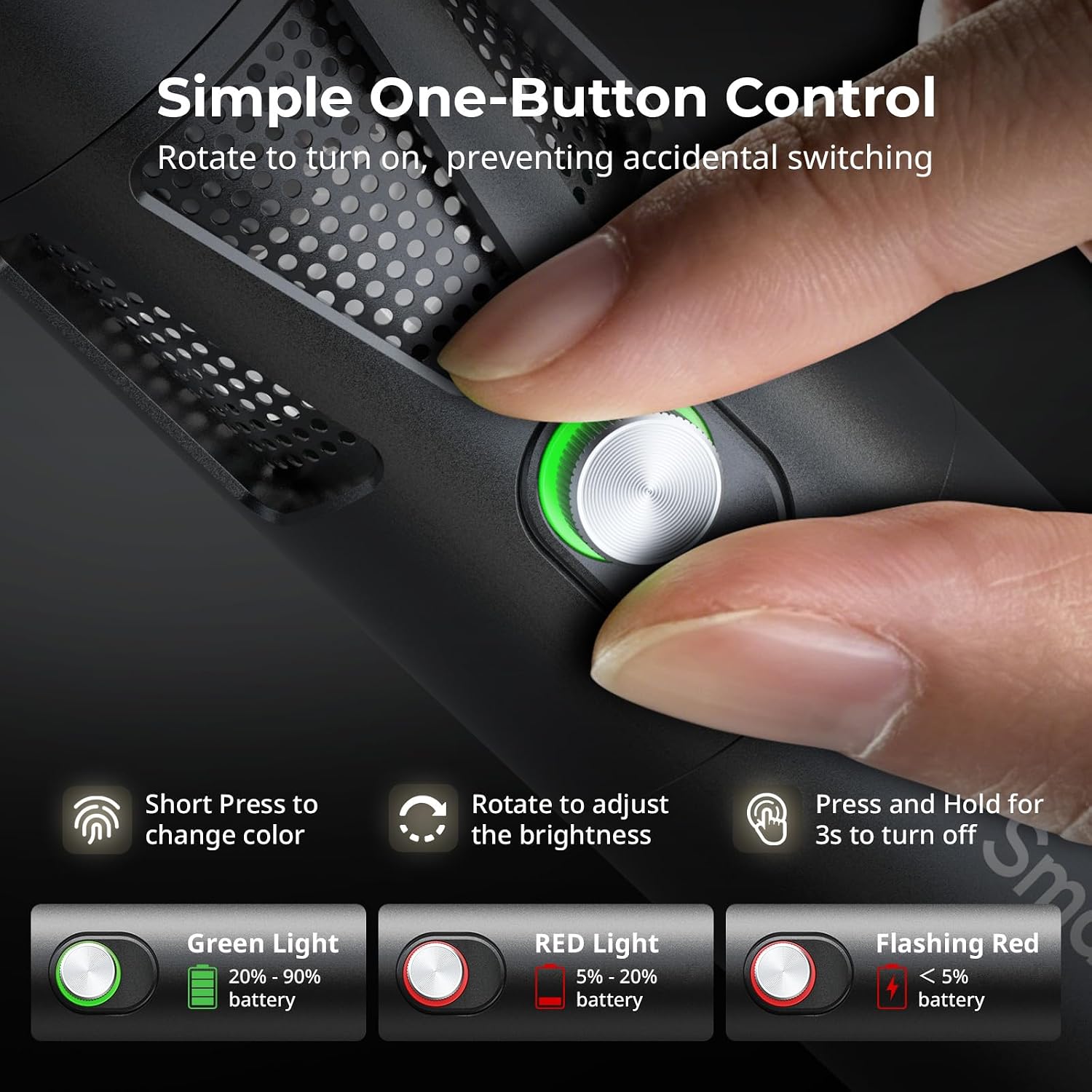
Figure 5.1: One-button control and battery indicator.

Figure 5.2: Available LED colors.
5.2 Adjusting Beam Angle
The front plano-convex lens allows for adjustment of the beam angle. Push or pull the lens to change the focus of the light from a narrow 24° beam to a wider 60° diffusion.
- Extend the lens: Narrows the beam (e.g., 24°).
- Retract the lens: Diffuses the beam (e.g., 60°).

Figure 5.3: Beam angle adjustment mechanism.
5.3 Батарея көрсөткүчү
The control button's LED indicates the battery status:
- Жашыл жарык: 20% - 90% батарея калды.
- Кызыл жарык: 5% - 20% батарея калды.
- Жаркылдаган кызыл жарык: Батареянын 5% дан азы калды.

Figure 5.4: Brightness comparison of RF20C.
6. Техникалык тейлөө
- Clean the device regularly with a soft, dry cloth. Do not use harsh chemicals or abrasive materials.
- Аппаратты салкын, кургак жерде, тике күн нурунан жана экстремалдык температурадан алыс сактаңыз.
- When not in use for extended periods, charge the battery to approximately 50% every three months to prolong battery life.
- Keep the lens and LED surface free from dust and fingerprints for optimal light output.
7. Кыйынчылыктарды
| Көйгөй | Мүмкүн себеп | Чечим |
|---|---|---|
| Түзмөк күйбөй жатат. | Батареянын заряды аз; туура эмес күйгүзүү процедурасы. | Charge the device. Ensure you rotate the control button to power on. |
| Жарыктын чыгышы күңүрт. | Low battery; brightness set too low; dirty lens. | Charge the device. Rotate the control button to increase brightness. Clean the lens. |
| Gobo projection is blurry. | Plano-convex lens not removed; gobo not seated correctly. | Remove the plano-convex lens before attaching the silicone gobo holder. Ensure gobo is properly inserted. |
| Device becomes warm during use. | Normal operation, especially at high power; fan obstruction. | This is normal. Ensure the fan vents are not obstructed for proper heat dissipation. If excessively hot, reduce brightness or allow to cool. |
| Вентилятордун үнү байкалат. | Муздатуу үчүн нормалдуу иштөө. | The device uses a high-speed fan for efficient heat dissipation. This noise is part of normal operation. Consider distance from audio recording equipment. |
8. Техникалык шарттар
| Өзгөчөлүк | Деталь |
|---|---|
| Модел | RF20C (5335) |
| Күч | 20 Вт |
| Киргизүү | 20 V / 1.8 A (max. 36 W) |
| LED Түстөр | Red, 5600K White, Purple, Orange, Cyan |
| Түстөрдү көрсөтүү индекси (CRI) | ≥ 97 |
| Телекөрсөтүү жарыктандыруунун ырааттуулугу индекси (TLCI) | ≥ 99 (at 5600 K) |
| Жарыктык | 5400 Lux @ 1m / 5600K |
| Батарея сыйымдуулугу | 10000mAh (2 x 5000mAh / 7.4V / 37Wh) |
| Иштөө убактысы (толук кубаттуулукта) | 1.5 саатка чейин |
| Заряддоо | USB-C PD 36W Fast Charging, supports charging while operating |
| Жарыктын бурчун тууралоо | 24°тан 60°ка чейин |
| Материал | Алюминий эритмеси, ABS |
| Продукциянын өлчөмдөрү | φ49.0 x 200.0 mm / φ1.9 x 7.9 inches |
| Продукт Салмагы | 520.0 ± 20.0 г / 18.3 ± 0.7 унция |
| Байланыш технологиясы | USB |
| Келип чыккан өлкө | Кытай |
9. Кепилдик жана колдоо
SmallRig products are designed and manufactured to the highest quality standards. This product is covered by a limited warranty from the date of purchase. For detailed warranty terms, technical support, or service inquiries, please refer to the official SmallRig webсайтка кайрылыңыз же жергиликтүү дистрибьютериңиз менен байланышыңыз.
Кепилдик дооматтары үчүн сатып алганыңыздын далилин сактап коюңуз.
10. Колдонуу сценарийлери
The SmallRig RF20C is suitable for various applications, including:
- Сүрөт тартуу
- Видео жаздыруу
- Түз агым
- Creative Accent Lighting
- Macro Work and Close-ups

10.1-сүрөт: Мисamples of RF20C usage scenarios.
Ask a question about this manual
Ask about setup, troubleshooting, compatibility, parts, safety, or missing instructions. Manuals+ will review the question and use this page’s manual context to help answer it.