
1. Киришүү
This manual provides instructions for the proper use and maintenance of your GOWENIC 4G LTE WiFi 6 Mobile Hotspot. This device offers portable internet access, supporting up to 32 devices simultaneously with WiFi 6 technology for high-speed connectivity. It is equipped with a 3000mAh battery for extended use, making it suitable for travel and on-the-go internet needs.
2. Пакеттин мазмуну
Пакетте бардык буюмдар бар экенин текшериңиз:
- 1 x GOWENIC 4G LTE WiFi 6 Mobile Hotspot Router
- 1 x USB заряддоо кабели
- 1 x Instruction Manual

Image: The GOWENIC 4G LTE WiFi 6 Mobile Hotspot device shown alongside its included USB charging cable.
3. Продукциянын өзгөчөлүктөрү
- WiFi 6 технологиясы: Supports the latest WiFi 6 standard, providing peak speeds up to 229Mbps for efficient data transfer and smooth streaming.
- Көп түзмөк байланышы: Allows up to 32 devices to connect simultaneously, ensuring stable internet access for various devices.
- реалдуу убакыт дисплей: Features a circular LED screen that displays essential information such as speed, data usage, number of connected devices, and network status.
- Узак мөөнөттүү батарея: Equipped with a 3000mAh removable lithium-ion battery, offering up to 10 hours of continuous use.
- SIM Compatibility: Designed for plug-and-play SIM card usage, enabling internet access across supported networks.
- Dual Band колдоо: Operates on both 2.4GHz and 5.8GHz wireless frequencies.
- Маалымат роуминги: Supports data roaming functionality.
4. Орнотуу колдонмосу
4.1. SIM картаны жана батареяны орнотуу
- Арткы капкакты алып салуу: Gently slide or pry off the back cover of the mobile hotspot.
- SIM картаны салыңыз: Locate the SIM card slot. Insert your activated 4G SIM card into the designated slot with the gold contacts facing down and the notched corner oriented correctly. Ensure it clicks into place.
- Батарея салыңыз: Place the 3000mAh lithium-ion battery into its compartment, ensuring the contacts align with the device's terminals.
- Арткы капкакты алмаштыруу: Securely reattach the back cover.

Сүрөт: ички view of the GOWENIC Mobile Hotspot, illustrating the SIM card slot and battery placement area with the back cover removed.
4.2. Аппаратты заряддоо
Before initial use, fully charge the device. Connect the provided USB cable to the hotspot's charging port and the other end to a USB power adapter (not included) or a computer's USB port. The charging indicator on the screen will show the charging status.
4.3. Күйгүзүү / Өчүрүү
- Күйгүзүү: Press and hold the Power button (usually located on the side or top) for a few seconds until the screen illuminates.
- Өчүрүү: Press and hold the Power button again until the device powers down.
5. Иштөө нускамалары
5.1. Түзмөктөрдү хотспотко туташтыруу
- Күйгүзүү: Ensure your GOWENIC Mobile Hotspot is powered on.
- Locate Network Information: The device's screen will display the WiFi Network Name (SSID) and Password (KEY).
- Түзмөгүңүздөн туташыңыз: On your smartphone, laptop, or other WiFi-enabled device, go to WiFi settings.
- SSID тандоо: Find and select the SSID displayed on your hotspot's screen.
- Сырсөздү киргизиңиз: Enter the WiFi password (KEY) when prompted.
- Туташуу: Your device should now be connected to the internet via the mobile hotspot.
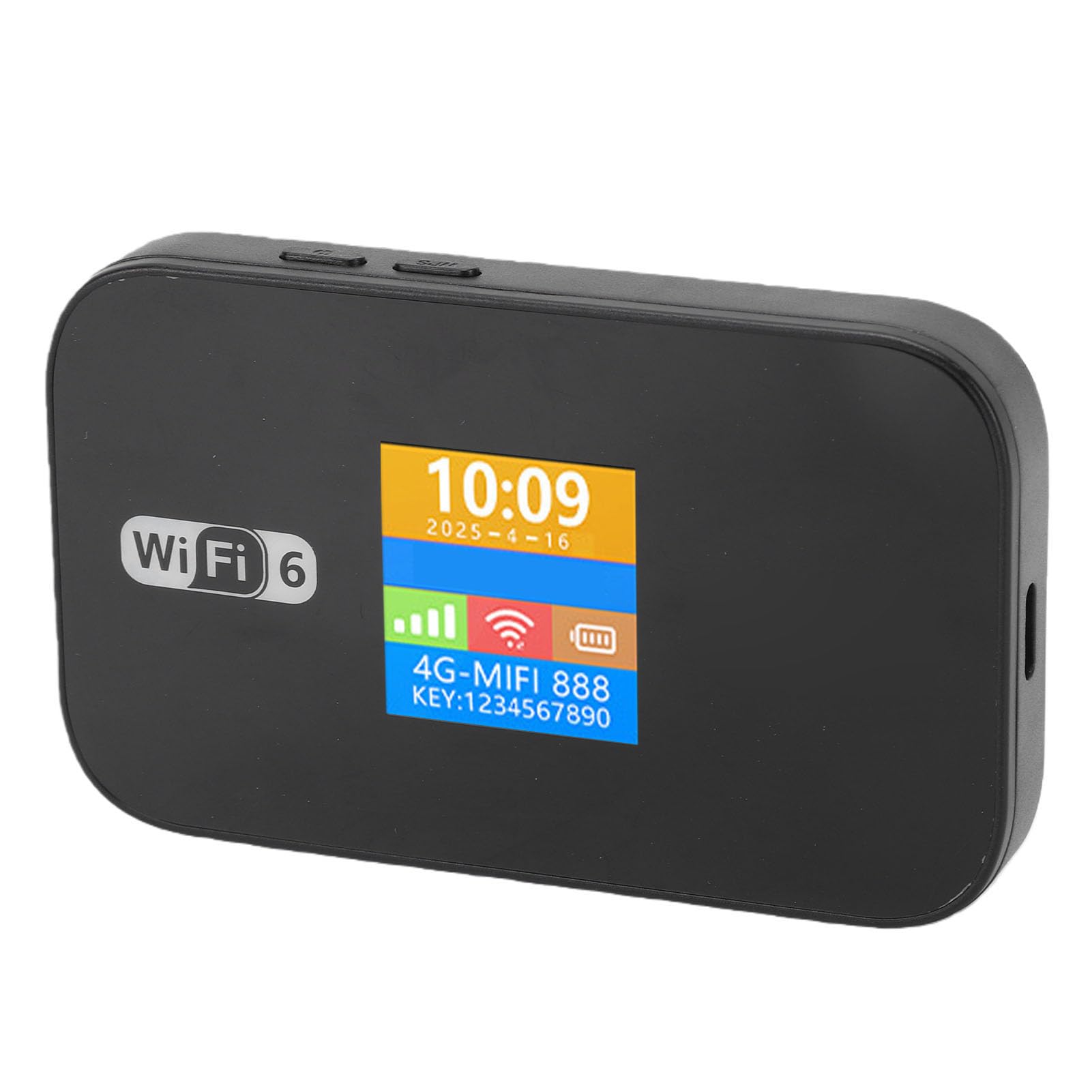
Image: The GOWENIC Mobile Hotspot with its screen illuminated, showing the current time, date, 4G signal strength, WiFi signal, battery level, network name (SSID), and WiFi password (KEY).
5.2. Understanding the Display Screen
The circular LED screen provides real-time status updates:
- Убакыт жана дата: Учурдагы убакыт жана күн.
- Сигнал күчү: Indicates the strength of the 4G network signal.
- WiFi абалы: Shows if WiFi is active and the number of connected devices.
- Батарея деңгээли: Учурдагы батарея зарядын көрсөтөт.
- Дайындардын колдонулушу: May show current data consumption (check device settings for detailed usage).
- SSID and KEY: The WiFi network name and password for connecting devices.
5.3. Data Roaming
The device supports data roaming. Ensure your SIM card plan includes roaming services if you intend to use the hotspot internationally. Data roaming settings can typically be managed through the device's web interface (if available) or your mobile carrier's services.
5.4. SMS and USSD Functions
The hotspot supports SMS (Short Message Service) and USSD (Unstructured Supplementary Service Data) functions. Note that USSD functionality typically requires the device to be operating in 3G mode only.
6. Техникалык шарттар
| Өзгөчөлүк | Деталь |
|---|---|
| Модель аты | GOWENIC3lzmseu0a8 |
| Network Band (4G FDD) | B1, B3, B5, B7, B8, B20 |
| Network Band (4G TDD) | B38, B40, B41 |
| WiFi стандарты | 802.11b/g/n (WiFi 6 supported) |
| Зымсыз жыштык | 2.4GHz / 5.8GHz (Dual Band) |
| Камтылган батарея | Литий-ион 3000 мАч |
| Максималдуу туташкан түзмөктөр | 32 |
| Маалымат роуминги | Колдоого алынган |
| SMS and USSD Function | Supported (USSD requires 3G mode only) |
| Дисплей тили | Chinese, English, Russian, French, Spanish |
| Экранды көрсөтүү | Time and Data Usage |
| Материал | ABS |
7. Кыйынчылыктарды
If you encounter issues with your GOWENIC Mobile Hotspot, please refer to the following common solutions:
- Сигнал жок же алсыз сигнал:
- Сиздин SIM картаңыз туура салынганын жана иштетилгенин текшериңиз.
- Тармакты жакшыраак каптаган аймакка жылыңыз.
- Restart the hotspot device.
- WiFiга туташа албай жатат:
- Verify the WiFi password (KEY) entered on your connecting device matches the one displayed on the hotspot screen.
- Ensure the hotspot is powered on and WiFi is active.
- Restart both the hotspot and the device you are trying to connect.
- Туташкан түзмөктөрдүн максималдуу санына (32) жеткенин текшериңиз.
- Жай Интернет ылдамдыгы:
- Check your network signal strength on the hotspot's display.
- Туташкан түзмөктөрдүн санын азайтыңыз.
- Ensure your data plan has sufficient high-speed data remaining.
- Move closer to the hotspot device.
- Батарея заряддалбай жатат:
- Ensure the USB cable is securely connected to both the hotspot and the power source.
- Башка USB кабелин же кубат адаптерин колдонуп көрүңүз.
- Батарея туура салынганын текшериңиз.
8. Техникалык тейлөө
- Тазалоо: Аппаратты тазалоо үчүн жумшак, кургак чүпүрөктү колдонуңуз. Суюк тазалагычтардан же абразивдүү материалдардан алыс болуңуз.
- Батареяга кам көрүү:
- Батареяны экстремалдуу температурага тийгизүүдөн сактаңыз.
- Батареяны тешип же бөлбөңүз.
- If storing the device for an extended period, charge the battery to about 50% to prolong its lifespan.
- Сактагыч: Аппаратты күн тийбеген жана нымдуулуктан алыс салкын, кургак жерде сактаңыз.
9. Кепилдик жана колдоо
The GOWENIC 4G LTE WiFi 6 Mobile Hotspot comes with a manufacturer warranty for 90 days from the date of purchase. Please retain your proof of purchase for warranty claims.
For technical support or warranty inquiries, please refer to the contact information provided with your purchase documentation or visit the official GOWENIC support webсайт.