
Introduction
Thank you for choosing the iScooter DX5 Electric Scooter. This manual provides essential information for the safe assembly, operation, maintenance, and troubleshooting of your scooter. Please read it thoroughly before your first ride to ensure optimal performance and safety.
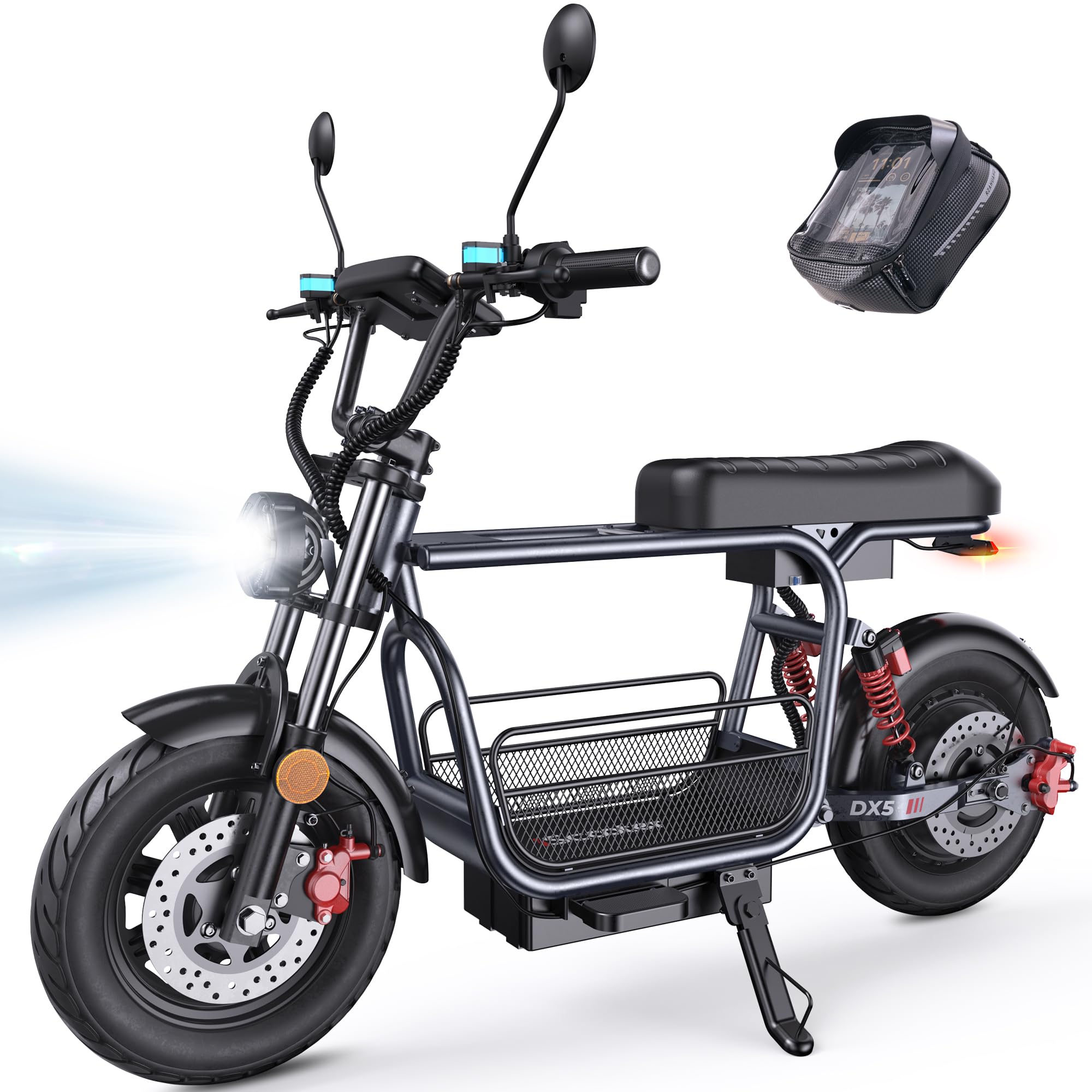
Figure 1: iScooter DX5 Electric Scooter with key features highlighted.
Коопсуздук маалыматы
Always prioritize safety when operating your electric scooter. Failure to follow safety guidelines can result in serious injury or damage to the product.
- Ар дайым туулга жана тиешелүү коопсуздук шайманын кийиңиз.
- Нымдуу шарттарда же тайгак беттерде жүрбөңүз.
- Жергиликтүү жол мыйзамдарын жана эрежелерин сактаңыз.
- Ар бир колдонуудан мурун, жол жүрүү алдында текшерүү жүргүзүп, тормоздорду, дөңгөлөктөрдү жана бардык туташууларды текшериңиз.
- 16 жашка чейинки балдарга скутерди башкарууга уруксат бербеңиз.
- Башка унаалардан жана жөө жүргүнчүлөрдөн коопсуз аралыкты сактаңыз.
Орнотуу жана чогултуу
Your iScooter DX5 comes partially assembled. Follow these steps to complete the setup.
1. Кутудан чыгаруу жана Компонентти идентификациялоо
Таңгактан бардык компоненттерди этияттык менен алып салыңыз. Бардык тетиктердин таңгактоо тизмесине ылайык бар экенин текшериңиз.

Figure 2: All components of the iScooter DX5 Electric Scooter laid out for assembly.
2. Видеону чогултуу боюнча колдонмо
For a detailed visual guide on assembling your iScooter DX5, please watch the official installation video below.
Video 1: Official installation guide for the iScooter DX5 Electric Scooter with Seat.
3. Key Assembly Steps
Refer to the video for detailed instructions. Key steps include:
- Рулду орнотуу: Secure the handlebars to the stem using the provided tools.
- Күзгү тиркемеси: Арткы жагын орнотууview mirrors on both sides of the handlebars.
- Headlight Mounting: Attach the front LED headlight to the designated position.
- Алдыңкы дөңгөлөк жыйнагы: Carefully install the front wheel, ensuring the brake rotor aligns correctly with the caliper.
- Fender орнотуу: Secure the front and rear fenders.
- Footrest and Seat: Attach the footrests and ensure the seat is securely fastened.
- Сактоочу аксессуарлар: Install the removable storage basket and scooter bag as desired.

Figure 3: Detachable front basket for convenient storage.

Figure 4: Scooter bag for carrying small essentials.
Иштөө нускамалары
1. Powering On/Off and NFC Unlocking
To power on your scooter, ensure the battery disconnect switch is in the 'ON' position. The DX5 features NFC unlocking for convenience and security. Simply tap your NFC card to the designated area on the display to unlock and activate the scooter.
2. Ылдамдык режимдери
The iScooter DX5 offers four adjustable speed modes to suit various riding conditions:
- Gear 1: 15 миль/саат (Оңой баштоо, энергияны үнөмдөө режими)
- Gear 2: 21 миль/саат (Шаардык жумушка баруу, туруктуу ылдамдык)
- Gear 3: 28 миль/саат (Тең салмактуу кубаттуулук, тезирээк жүрүү)
- Gear 4: 35 миль/саат (Турбо спринт, толук кубаттуулукта)

Figure 5: Four speed modes for versatile riding.
3. Акылдуу дисплей жана башкаруу элементтери
Monitor your ride with the full-color 9-inch LCD screen, which displays speed, battery level, and system alerts. The handlebars feature intuitive controls:
- Бурулуш сигнал баскычы: Quick toggle for safe left/right turns.
- Фараны которгуч: Control front light with a single press.
- Мүйүз баскычы: Instant alert to pedestrians or traffic.
- 'S' Gear Button: Easily shift between 4 speed modes.
- NFC кулпусун ачуу: Tap to unlock for fast, secure, keyless operation.

Figure 6: Handlebar controls and LCD display.
4. Тормоздоо системасы
The scooter is equipped with dual hydraulic disc brakes for reliable stopping power. The system also includes a power cut-off when braking for added safety.

Figure 7: Dual hydraulic disc brakes for instant control.
5. Жарыктандыруу системасы
For enhanced visibility and safety, especially during night rides, the DX5 features:
- Bright LED headlights.
- Integrated turn signals.
- Brake lights on the taillight.

Figure 8: Advanced lighting system for safe rides.
6. Уурулукка каршы сигнализация
The DX5 includes a built-in anti-theft alarm system for added security. Refer to the display for system alerts.
Техникалык тейлөө
Үзгүлтүксүз техникалык тейлөө сиздин iScooter DX5 учагынын узак мөөнөттүү жана коопсуз иштешин камсыз кылат.
1. Батареяны заряддоо
The scooter features a high-capacity 48V 15.6Ah (748.8Wh) lithium battery. Charge time is approximately 6-8 hours. Always use the provided charger.

9-сүрөт: Батареянын мүнөздөмөлөрү жана кубаттоо жөнүндө маалымат.
2. Дөңгөлөктөргө кам көрүү
The DX5 is equipped with durable 15" x 3.0" vacuum pneumatic e-motorcycle tires. Regularly check tire pressure and inspect for wear or damage.

Figure 10: Rugged 15-inch tires for grip and stability.
3. Асма системасы
The advanced dual suspension system (front hydraulic and rear air spring) provides a comfortable ride. Periodically inspect the suspension components for proper function.

Figure 11: Advanced dual suspension system.
4. Жалпы тазалоо
Скутериңизди жарнама менен үзгүлтүксүз тазалаңызamp кездеме. Жогорку басымдагы суу агымдарын түздөн-түз электрдик тетиктерге колдонуудан алыс болуңуз.
Проблемаларды чечүү
If you encounter any issues with your iScooter DX5, please refer to the following basic troubleshooting steps:
- Скутер күйбөй жатат: Check the battery disconnect switch is in the 'ON' position. Ensure the battery is charged.
- Loss of power during ride: Check battery level. Ensure all electrical connections are secure.
- Тормоз жооп бербейт: Inspect brake levers and calipers for any obstructions or damage.
- адаттан тыш үндөр: Айдоону токтоосуз токтотуңуз жана скутерди бош бөлүктөрүн же бузулууларын текшериңиз.
Татаал маселелер үчүн кардарларды колдоо бөлүмүнө кайрылыңыз.
Техникалык шарттар
Below are the key specifications for the iScooter DX5 Electric Scooter:
| Өзгөчөлүк | Спецификация |
|---|---|
| Модель аты | DX5 |
| Мотор | 1500W (Peak) / 1000W (Rated) Brushless Motor |
| Батарея | 48V 15.6Ah (748.8Wh) литий батареясы |
| Максималдуу ылдамдык | 35 миль/саат (56 км/саат) |
| Макс диапазон | 38-45 миль |
| Шиналар | 15" x 3.0" Vacuum Pneumatic E-Motorcycle Tires |
| Тормоздор | Кош гидравликалык диск тормоздору |
| Токтотуу | Front Hydraulic Suspension & Rear Air Spring Suspension |
| Максималдуу жүктөө сыйымдуулугу | 330 фунт |
| Продукциянын өлчөмдөрү | 58.27"L x 26.8"W x 55.1"H |
| Элемент Салмагы | 100 фунт |
| Суу каршылык | IPX4 |

Figure 12: iScooter DX5 dimensions.
Кепилдик
iScooter offers a limited warranty. We provide a 360-day or 180-day warranty on different parts. Please refer to your purchase documentation for specific warranty terms and conditions.
Кардарларды колдоо
For any inquiries, technical assistance, or warranty claims, please contact iScooter customer support:
- Call Center: +1 (855) 696-2888
- Түз баарлашуу/Электрондук почта: support@iscooterglobal.com

Figure 13: iScooter Customer Support.