1. Киришүү
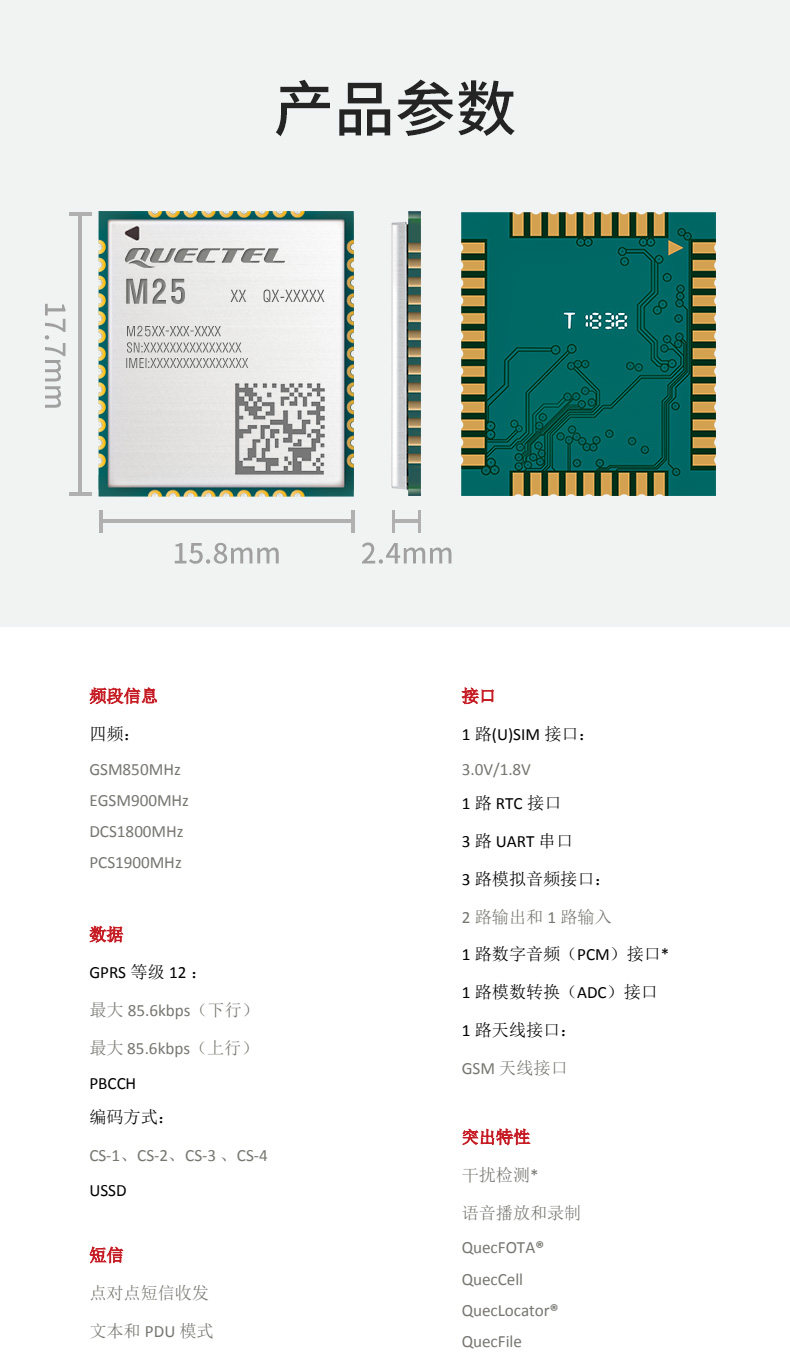
The Quectel M25 M25MA-04-STD is a compact and reliable GSM/GPRS module designed for various M2M (Machine-to-Machine) applications. This module provides robust cellular communication capabilities, making it suitable for a wide range of embedded systems requiring voice, SMS, and data transmission over GSM/GPRS networks. It is 100% new and original, offering compatibility with the M65 module.
2. Коопсуздук маалыматы
- Always handle the module with care to prevent electrostatic discharge (ESD) damage. Use appropriate ESD protection measures.
- туура электр менен камсыз кылуу voltage and current as specified in the technical documentation to avoid damage to the module or connected components.
- Модулду экстремалдык температурага, нымдуулукка же коррозиялуу чөйрөгө тийгизбеңиз.
- Professional installation is recommended for integration into complex systems.
- Модулду суудан жана башка суюктуктардан алыс кармаңыз.
3. Продукт бүтүп калдыview
The Quectel M25 is a high-performance GSM/GPRS module that offers a comprehensive set of features for wireless communication. Its compact design and robust functionality make it an ideal choice for applications such as remote monitoring, telematics, smart metering, and security systems.
Негизги өзгөчөлүктөрү
- Quad-band GSM/GPRS connectivity.
- GPRS Class 12 for efficient data transmission.
- Support for voice, SMS, and data services.
- Multiple interfaces including (U)SIM, RTC, UART, analog I/O, PCM, ADC, and antenna interfaces.
- Integrated features like interference suppression, voice broadcast and recording, QuecFOTA, QuecCell, QuecLocator, and QuecFile.
Визуалдык шилтеме

Продукт көргөзмөсү видео
4. Техникалык шарттар
| Атрибут | Нарк |
|---|---|
| Модель номери | M25MA-04-STD M25 |
| Шарт | New Original |
| Origin | Материк Кытай |
| Ылдамдык | GSM |
| Жогорку коркунучтуу химиялык | Жок |
| Өлчөмдөрү (L x W x Y) | 17.7мм x 15.8мм x 2.4мм |
| Жыштык тилкелери | GSM850MHz, EGSM900MHz, DCS1800MHz, PCS1900MHz (Quad-band) |
| GPRS Class | 12-класс |
| Max Downlink Data Rate | 85.6 kbps |
| Max Uplink Data Rate | 85.6 kbps |
| Coding Schemes | CS-1, CS-2, CS-3, CS-4 |
| Interfaces | (U)SIM, RTC, UART (3-way), Analog I/O (2-way in, 1-way out), PCM, ADC, Antenna (GSM) |
| Өзгөчөлүктөрү | Interference suppression, Voice broadcast/recording, QuecFOTA, QuecCell, QuecLocator, QuecFile |
5. Орнотуу
Integrating the Quectel M25 module requires careful attention to hardware connections and software configuration. This section provides general guidelines; always refer to the official Quectel M25 hardware design guide and AT command manual for detailed instructions.
5.1 Аппараттык туташуу
- Электр камсыздоо: Белгиленген көлөмдө модулду туруктуу кубат булагына туташтырыңызtage range. Ensure adequate current capacity, especially during peak transmission.
- (U)SIM Card: Insert a valid and activated (U)SIM card into the designated SIM card holder.
- Антенна: Connect a suitable GSM antenna to the module's antenna interface. Ensure the antenna is correctly matched for the operating frequency bands.
- UART туташуу: Connect the module's UART pins to your host microcontroller or development board for serial communication.
- Башка интерфейстер: Depending on your application, connect other interfaces such as RTC, analog I/O, or PCM as required.
5.2 Программанын конфигурациясы
After hardware setup, the module needs to be configured via AT commands. This typically involves:
- Initializing the module.
- Checking SIM card status.
- Registering with the GSM network.
- Configuring GPRS settings (APN, username, password).
- Setting up voice, SMS, or data connections as needed.
Refer to the Quectel M25 AT Command Manual for a complete list of commands and their usage.
6. Иштөө нускамалары
Once the module is set up and configured, its operation will largely depend on the application it is integrated into. Below are general operational aspects:
6.1 Негизги операция
- Күйгүзүү: Apply power to the module. The network status indicator LED (if available on your development board) should show activity.
- Network Registration: The module will attempt to register with the cellular network. This can take a few seconds to a minute. Successful registration is usually indicated by a specific LED pattern (e.g., slow blinking).
- Байланыш: Use AT commands via the UART interface to initiate voice calls, send/receive SMS messages, or establish GPRS data connections.
6.2 GPRS Data Connection
To use GPRS for data transmission:
- Ensure the module is registered to the network.
- Activate the GPRS context using appropriate AT commands (e.g.,
AT+CGACT). - Establish a TCP/IP or UDP connection to your desired server using AT commands (e.g.,
AT+QIOPEN). - Send and receive data over the established connection.
7. Техникалык тейлөө
The Quectel M25 module is designed for long-term reliability with minimal maintenance. However, following these guidelines can help ensure optimal performance and longevity:
- Тазалыкты сактоо: Ensure the module and its connectors are free from dust and debris. Use a soft, dry brush or compressed air if necessary.
- Экологиялык көзөмөл: Operate the module within its specified temperature and humidity ranges. Avoid direct sunlight or excessive heat.
- Программалык камсыздоонун жаңыртуулары: Quectelди мезгил-мезгили менен текшерип туруңуз website for firmware updates. Firmware updates can improve performance, add features, or fix bugs. Use the QuecFOTA feature if supported by your application.
- Туташуу бүтүндүгү: Regularly inspect antenna and power connections for secure fit and absence of damage.
8. Кыйынчылыктарды
If you encounter issues with your Quectel M25 module, consider the following troubleshooting steps:
8.1 No Network Registration
- SIM картаны текшерүү: Ensure the SIM card is correctly inserted, activated, and has sufficient credit/data.
- Антеннаны текшерүү: Verify the antenna is securely connected and suitable for GSM frequencies. Ensure it is placed in an area with good signal coverage.
- Электр камсыздоо: Confirm the power supply is stable and provides adequate voltage жана ток.
- AT буйруктары: Use AT commands like
AT+CPIN?(SIM status),AT+CREG?(network registration status), andAT+CSQ(signal quality) to diagnose the issue.
8.2 Data Connection Issues
- GPRS Activation: Ensure GPRS is activated on your SIM card and the module is configured with the correct APN settings.
- Сигнал күчү: Check signal quality (
AT+CSQ). Low signal strength can lead to unreliable data connections. - Server Connectivity: Verify that the target server is reachable and correctly configured.
8.3 Module Not Responding to AT Commands
- UART туташуу: Check the serial connection (TX/RX lines, baud rate, parity, stop bits) between the module and your host.
- Power Cycle: Try power cycling the module.
- Reset Pin: If available, use the hardware reset pin to reset the module.
9. Колдонуучунун кеңештери
Re'ден колдонуучунун конкреттүү кеңештери болгон жокviews or Q&A for this product. General tips for working with cellular modules include:
- Always consult the latest official documentation (datasheet, hardware design guide, AT command manual) from Quectel for the most accurate and up-to-date information.
- When developing, start with basic AT commands to ensure fundamental communication (SIM detection, network registration) before moving to complex applications.
- Consider using a dedicated development board for initial testing and prototyping to simplify connections and power management.
10. Кепилдик жана колдоо
For warranty information and technical support, please contact the seller, HiTech Wireless Module And Accessories Store, or refer to the official Quectel webпродукт документтер жана колдоо ресурстар үчүн сайт.
Сатуучу маалымат:
- Store Name: HiTech Wireless Module And Accessories Store
- Seller Positive Rate: 96.6%
- Дүкөндүн рейтинги: 4.8
- Opened: June 28, 2020


