1. Киришүү
The LOFREE TOUCH Mechanical Keyboard is a versatile input device designed for enhanced typing experience and personalization. It features triple-mode connectivity, hot-swappable switches, and compatibility with multiple operating systems. This manual provides essential information for setting up, operating, and maintaining your keyboard.

Figure 1: LOFREE TOUCH 68-key Mechanical Keyboard
2. Пакеттин мазмуну
Сураныч, төмөнкү нерселер үчүн кутучаны белгилеңиз:
- LOFREE TOUCH Keyboard (68-key or 100-key) x 1
- Колдонуучунун колдонмосу x 1
- Кепилдик картасы x 1
- 2.4G Wireless Receiver x 1
- AAA Battery x 3 (pre-installed or included separately)
- C түрүндөгү кабель x 1
- Accessory Box x 1
- Баскыч капкагын тарткыч x 1
- Holder x 1 (for figurines/extra keycaps)

Figure 2: Battery compartment and 2.4G receiver storage
3. Орнотуу
3.1. Күйгүзүү жана батареяны орнотуу
- Баскычтоптун астыңкы жагындагы батарея бөлүкчөсүн табыңыз.
- Туура полярдуулукту камсыз кылуу менен 3 AAA батарейкасын салыңыз.
- The keyboard can also be powered via the Type-C cable for wired mode and charging (if rechargeable batteries are used).
3.2. Баскычтопту туташтыруу
The LOFREE TOUCH keyboard supports three connection modes: Bluetooth 5.0, 2.4G Wireless, and Wired (Type-C).

Сүрөт 3: Байланыш параметрлери
3.2.1. 2.4G зымсыз туташуу
- Locate the 2.4G wireless receiver, usually stored in the battery compartment or a dedicated slot on the keyboard.
- 2.4G кабыл алгычын компьютериңиздеги жеткиликтүү USB портуна сайыңыз.
- Slide the mode switch on the keyboard to the '2.4G' position. The keyboard should connect automatically.
3.2.2. Bluetooth 5.0 туташуу
- Slide the mode switch on the keyboard to the 'BT' position.
- On your device (computer, tablet, phone), go to Bluetooth settings and enable Bluetooth.
- The keyboard can store up to 3 Bluetooth device pairings. To pair with a new device, press and hold Fn + 1, Fn + 2, or Fn + 3 until the indicator light flashes, indicating pairing mode.
- Select "LOFREE TOUCH" from the list of available Bluetooth devices on your device.
- Once paired, the indicator light will stop flashing. You can switch between paired devices by pressing Fn + 1, Fn + 2, or Fn + 3.
3.2.3. Wired (Type-C) Connection
- Connect one end of the provided Type-C cable to the keyboard's Type-C port.
- Кабелдин экинчи учун компьютериңиздеги жеткиликтүү USB портуна туташтырыңыз.
- The keyboard will automatically switch to wired mode. This mode also charges the batteries if they are rechargeable.
4. Баскычтопту иштетүү
4.1. Көп системалуу шайкештик
The LOFREE TOUCH keyboard is compatible with Windows, macOS/iOS, and Android operating systems. It features dedicated media keys for both Mac and Windows layouts.
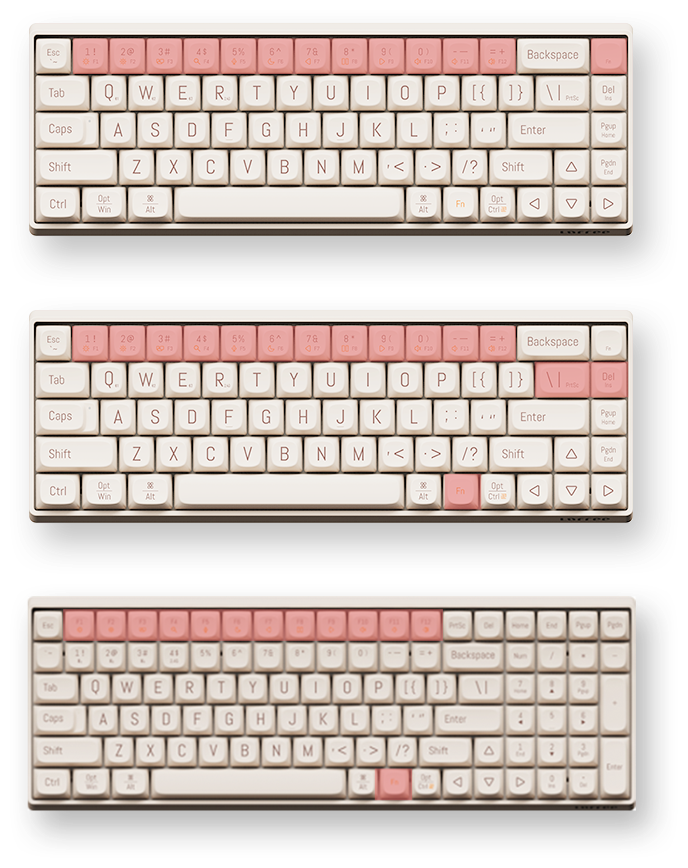
Figure 4: Mac and Windows Layouts
4.1.1. Switching Layouts
To switch between Mac and Windows functional key layouts, press Fn + N (Mac үчүн) же fn+m (for Windows).
4.2. Function Keys (Fn Combinations)
The keyboard utilizes an Fn key for accessing secondary functions printed on the keycaps. Common functions include:
- Fn + F1-F12: Media controls (play/pause, volume, mute, etc.), screen brightness, search, task switch, etc. (functions may vary slightly between 68-key and 100-key models).
- Fn + 1/2/3: Жупташтырылган Bluetooth түзмөктөрүнүн ортосунда которуштуруу.
- Fn + Q/W/E: (Specific to some models) Switch between 2.4G and Bluetooth modes or specific Bluetooth channels.
4.3. N-Key оодарылып кетүү (NKRO)
The LOFREE TOUCH keyboard supports N-Key Rollover (NKRO), ensuring that every key press is registered, even when multiple keys are pressed simultaneously. This is beneficial for fast typists and gamers.
5. Техникалык тейлөө
5.1. Ыкчам алмаштыруучу которгучтар
The keyboard features hot-swappable sockets, allowing you to change mechanical switches without soldering. It is compatible with standard 3-pin and 5-pin mechanical switches.
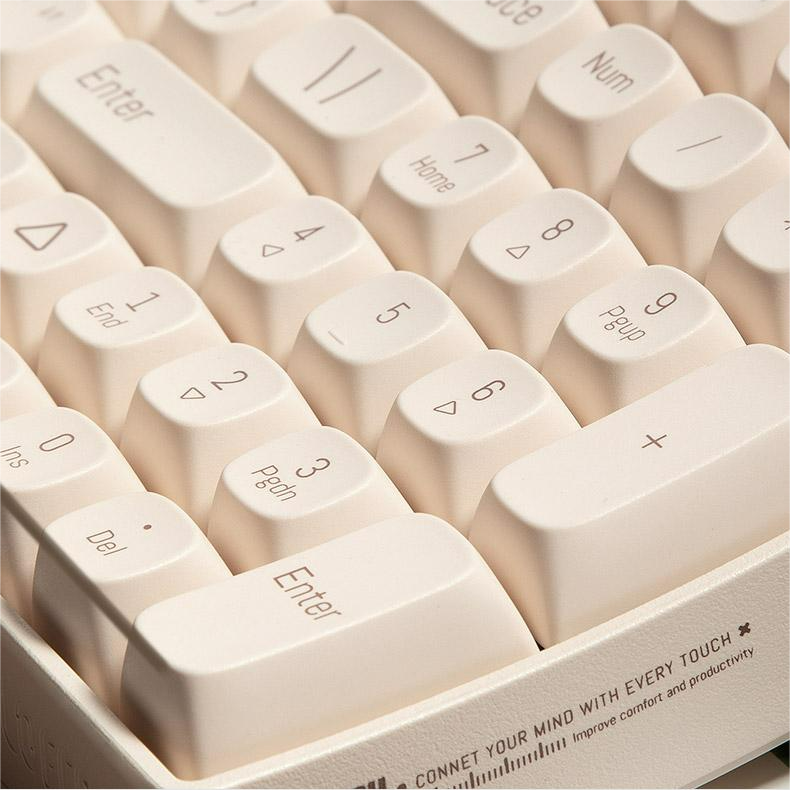
Figure 5: Hot-swappable switches with keycap and switch pullers
5.1.1. Коммутаторлорду алмаштыруу
- Using the provided keycap puller, gently remove the desired keycap.
- Using a switch puller (often included in the accessory box), carefully grip the switch and pull it straight up to remove it from the PCB.
- Align the pins of the new switch with the holes on the PCB and press it firmly until it clicks into place. Ensure the pins are not bent.
- Баскыч капкагын алмаштырыңыз.
5.2. Keycaps
The keyboard comes with durable Dye-Sub PBT keycaps, which are resistant to shine and wear over time. You can customize your keyboard with various PBT keycap sets available from LOFREE.
5.3. Тазалоо
- Баскыч капкактарынын ортосундагы чаңды жана калдыктарды тазалоо үчүн жумшак щетка же кысылган абаны колдонуңуз.
- For deeper cleaning, remove the keycaps using the keycap puller and clean them with a mild soap solution and a soft cloth. Ensure they are completely dry before reattaching.
- Wipe the keyboard surface with a damp, мамыксыз кездеме. Катуу химиялык заттардан алыс болуңуз.
6. Техникалык шарттар
6.1. Жалпы спецификациялар
- Бренд: ЛОФРИ
- Операция стили: Механикалык
- Которгучтар: Gateron G Pro (Red), Linear, Pre-lubed
- Switches Hot Swap: Yes (Standard 3-pin and 5-pin compatible)
- Клавиатура материалы: Боёк менен сабдалган PBT
- Интерфейс түрү: USB (Type-C)
- Байланыш: Bluetooth 5.0, 2.4G зымсыз, Type-C зымдуу
- Колдонмо: Иш такта, ноутбук, планшет
- Тил: Англисче
- Күч: 3 x AAA Батарея
- Батареянын иштөө мөөнөтү: Approximately 30 days of typing
- Операциялык системалар: Windows, macOS/iOS, Android
- N-Key Rollover (NKRO): Ооба
- Эргономика: 9° Curved Shape for reduced finger fatigue
6.2. 68-Key Model (OE902)
- Keyboard Standard: 68 ачкыч
- Өлчөмдөрү: 310 x 109 x 51.5 мм
- Баскычтоп Салмагы: 720г
6.3. 100-Key Model (OE903)
- Keyboard Standard: 100 ачкыч
- Өлчөмдөрү: 367 x 129 x 54.5 мм
- Баскычтоп Салмагы: 1010г

Figure 6: 68-key vs. 100-key models
7. Кыйынчылыктарды
| Көйгөй | Мүмкүн себеп | Чечим |
|---|---|---|
| Баскычтоп жооп бербей жатат | Low battery, incorrect connection mode, Bluetooth not paired, 2.4G receiver not plugged in. | Check/replace batteries. Ensure mode switch is set correctly (BT, 2.4G, or Wired). Re-pair Bluetooth or re-insert 2.4G receiver. Try wired connection. |
| Ачкычтар катталбайт | Туура эмес өчүргүч, клавиатуранын астындагы калдыктар. | Remove keycap and clean. If hot-swappable, try replacing the switch. |
| Bluetooth байланышы туруксуз | Interference, distance from device, low keyboard battery. | Move closer to the device. Ensure no other devices are causing interference. Check battery level. Re-pair the Bluetooth connection. |
| Keyboard not recognized by OS | Driver issue, OS compatibility. | Ensure OS is supported. Try a different USB port or cable. Restart computer. |
8. Колдонуучунун кеңештери
- Personalize Your Keyboard: Алдын алаtage of the hot-swappable switches and PBT keycaps to customize the feel and look of your keyboard. Experiment with different switch types for a unique typing experience.
- Maximize Connectivity: Utilize the triple-mode connectivity to seamlessly switch between your desktop, laptop, and tablet. Remember to pair your devices to different Bluetooth channels (Fn+1, Fn+2, Fn+3) for quick switching.
- Эргономикалык комфорт: The 9° curved shape is designed for comfort. Ensure proper wrist posture to further enhance your typing experience and reduce strain.
- Decorative Holder: Use the included holder plate to display your favorite figurines, extra keycaps, or LOFREE's IP mascot, LONELY, adding a personal touch to your workspace.
9. Кепилдик жана колдоо
Your LOFREE TOUCH Mechanical Keyboard comes with a manufacturer's warranty. Please refer to the included Warranty Card for details regarding warranty coverage, terms, and conditions. For technical support, product inquiries, or service requests, please visit the official LOFREE webсайтка же кардарларды тейлөөгө кайрылыңыз.
10. Продукцияны көрсөтүүчү видео
Video: Demonstration of the LOFREE TOUCH keyboard in use, showcasing typing and design elements.


