1. Киришүү
The OBDSTAR ISCAN BRP(Can-am) is a portable, intelligent diagnostic tablet specifically designed for BRP (Bombardier Recreational Products) vehicles, including motorcycles, snowmobiles, ATVs, and UTVs. This device offers professional diagnostic capabilities, built on an RK3128 quad-core processor and featuring a 5.0-inch capacitive touch screen for an intuitive user experience.
Продукт өзгөчөлүктөр:
- First fault guidance, help data, technical bulletins, and diagnostic socket information for accurate and efficient diagnosis.
- Diversified data flow display modes (text, waveform, instrument diagram) for easy fault analysis.
- Comprehensive functions including automatic scanning, automatic VIN recognition, control module programming and coding, ECU setting, instrument coding, tire pressure monitoring system (TPMS) functions, maintenance light reset, CO adjustment, idle speed adjustment, A/F value reset, ABS control unit setting, EOL mode, transmission memory reset, and clearing computer memory.
- Supports multiple languages: English, Spanish, Portuguese, French, German, Italian, Polish, Russian, Turkish, Indonesian, Farsi, Thai, Vietnamese.
2. Пакеттин мазмуну
Төмөндө көрсөтүлгөн бардык буюмдар таңгагыңызда бар экенин текшериңиз. Эгерде кандайдыр бир буюмдар жок болсо же бузулуп калса, сатуучуга кайрылыңыз.

- 1pc x OBDSTAR ISCAN Main Tablet
- 1pc x M001 Main Cable
- 1pc x BRP Cable (M043)
- 1pc x Charger (12V2A)
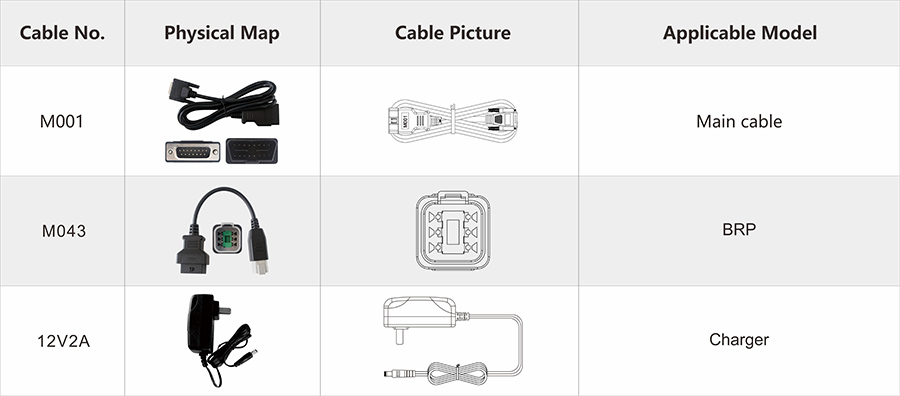
| Кабель № | Physical Map | Кабель сүрөтү | Колдонулуучу модель |
|---|---|---|---|
| M001 |  |  | Негизги кабель |
| M043 |  | | BRP |
| 12V2A |  | | Заряддагыч |
3. Продукт бүтүп калдыview
The ISCAN BRP device is designed for durability and ease of use, featuring a robust casing and a clear touch screen interface.


4. Орнотуу
Follow these steps to set up your OBDSTAR ISCAN BRP device for diagnostic operations:
- Аппаратты заряддоо: Before first use, ensure the ISCAN tablet is fully charged using the provided 12V2A charger. Connect the charger to the device's power input port and then to a suitable power outlet.
- Connect Main Cable: Connect the M001 main cable to the diagnostic port on the ISCAN tablet.
- Connect BRP Cable: Attach the M043 BRP cable to the M001 main cable.
- Унаага туташуу: Locate the diagnostic port on your BRP vehicle (motorcycle, snowmobile, ATV, or UTV). Connect the M043 BRP cable to the vehicle's diagnostic port.
- Күйгүзүү: Press and hold the power button on the ISCAN tablet to turn it on. The device will boot into the Android operating system.
- Баштапкы конфигурация: Follow any on-screen prompts for initial setup, such as language selection and Wi-Fi connection. Connecting to Wi-Fi is crucial for software updates.
5. Иштөө нускамалары
The ISCAN BRP operates on an Android 5.1.1 system, offering a user-friendly interface for various diagnostic tasks.
Негизги навигация:
- The main menu displays icons for different functions: IMMO (Immobilizer), MOTO Diag (Motorcycle Diagnosis), Personal Center, Marine Diag, ODO Meter (Odometer Adjustment), and Upgrade.
- Tap on an icon to enter the corresponding function module.
- Use the back button or home button (if available on-screen) to navigate through menus.
Диагностикалык функциялар:
Once connected to a vehicle and within the 'MOTO Diag' or 'Marine Diag' module, you can perform the following operations:
- Автоматтык сканерлөө: The device can automatically scan for available systems and identify the vehicle's VIN.
- Кодду окуу: Read Diagnostic Trouble Codes (DTCs) from the vehicle's Electronic Control Units (ECUs).
- Кодду тазалоо: Clear DTCs after repairs have been made.
- Data Flow: View real-time data streams from various sensors and components. This data can be displayed in text, waveform diagrams, or instrument diagrams for easy analysis.
- Action Test: Компоненттердин иштешин текшерүү үчүн алардын активдүү сыноолорун жүргүзүңүз.
- Setting & Coding: Access advanced functions such as control module programming and coding, ECU setting, instrument coding, and ABS control unit setting.
- Атайын функциялар: Utilize specific functions like Tire Pressure Monitoring System (TPMS) operations, maintenance light reset, CO adjustment, idle speed adjustment, A/F value reset, EOL (End Of Line) mode, transmission memory reset, and clearing computer memory.
Программалык камсыздоо жаңыртуулары:
The device supports one-click software upgrades via Wi-Fi. Ensure your device is connected to a stable internet connection and navigate to the 'Upgrade' module to check for and install the latest software versions.
Алыстан жардам:
The ISCAN BRP includes a one-click remote function, allowing OBDSTAR technical staff to provide remote assistance if needed.
6. Техникалык тейлөө
Proper maintenance ensures the longevity and optimal performance of your ISCAN BRP device.
- Тазалоо: Аппаратты тазалоо үчүн жумшак, кургак чүпүрөктү колдонуңуз. өжөр кир үчүн, бир аз гamp cloth with mild soap can be used, ensuring no liquid enters the ports. Do not use abrasive cleaners or solvents.
- Сактагыч: Store the device in a cool, dry place, away from direct sunlight, extreme temperatures, and high humidity. Keep it in its original packaging or a protective case when not in use.
- Программалык камсыздоо жаңыртуулары: Regularly check for and install software updates to ensure you have the latest features, vehicle coverage, and bug fixes. Connect the device to Wi-Fi and use the 'Upgrade' function.
- Кабельге кам көрүү: Handle diagnostic cables with care. Avoid bending them sharply or pulling them by the cable itself. Store cables neatly to prevent tangling and damage.
- Батареяга кам көрүү: If the device has an internal battery, avoid fully discharging it for extended periods. Charge it periodically even when not in active use to maintain battery health.
7. Кыйынчылыктарды
This section addresses common issues you might encounter with your ISCAN BRP device.
Түзмөк күйбөй жатат:
- Батареяны текшерүү: Ensure the device's battery is charged. Connect the charger and wait a few minutes before attempting to power on again.
- Заряддагычты текшерүү: Verify that the charger is properly connected to a working power outlet and to the device.
Унаа менен туташуу көйгөйлөрү:
- Кабелдик байланыштар: Ensure all diagnostic cables (M001 and M043) are securely connected to the device and the vehicle's diagnostic port.
- Унаа от алдыруу: Make sure the vehicle's ignition is in the 'ON' position (engine off) or as required by the diagnostic procedure.
- Correct Cable: Confirm you are using the correct diagnostic cable (M043 for BRP) for your specific vehicle model.
Software Update Failures:
- Wi-Fi туташуусу: Ensure the device has a strong and stable Wi-Fi connection during updates.
- Сактоо мейкиндиги: Check if there is sufficient storage space on the device for the update files.
- Түзмөктү кайра иштетүү: If an update fails, restart the device and try the update process again.
Экран жооп бербейт:
- Түзмөктү кайра иштетүү: Perform a hard reset by holding the power button until the device turns off, then power it back on.
If you encounter persistent issues that cannot be resolved with these steps, please utilize the one-click remote function for technical assistance or contact your product vendor.
8. Техникалык шарттар
| Өзгөчөлүк | Спецификация |
|---|---|
| Бренд аты | OBDSTAR |
| Модель номери | HKSP540 |
| Аппараттык версия | iScan for BRP |
| программа нускасын | iScan for BRP |
| Операция системасы | Android 5.1.1 |
| Процессор | RK3128 Quad-core |
| Дисплей | 5.0 дюймдук сыйымдуулугу сенсордук экран |
| Тtage | 12V |
| Электрондук | Ооба |
| Батареялар камтылган | Ооба |
| Материал | ПЛАСТИК |
| Элементтин узундугу | 33см |
| Item Width | 23см |
| Элементтин бийиктиги | 11см |
| Элемент Салмагы | 1.2кг |
| Сертификация | CE |
| Тышкы тестирлөөнүн сертификаты | ce |
| Жогорку коркунучтуу химиялык | Жок |
| Колдонуу | Телекоммуникация эмес |
| Origin | Материк Кытай |
9. Кепилдик жана колдоо
The OBDSTAR ISCAN BRP device is manufactured by OBDSTAR. For specific warranty terms and conditions, please refer to the documentation provided with your purchase or contact your original vendor.
For technical support, software updates, or any operational queries, please visit the official OBDSTAR website or contact their customer service. The device also features a one-click remote assistance function, allowing OBDSTAR technical staff to provide direct support.


