Introduction
The Melnor 3060 Digital Water Timer Plus is designed to automate your watering schedule, providing convenience and efficient water management for your lawn or garden. This timer allows you to set precise watering times and durations, ensuring your plants receive the right amount of water without constant manual intervention. It features an easy-to-read LCD menu for programming and supports multiple independent watering cycles.
This manual provides detailed instructions for setting up, operating, and maintaining your Melnor 3060 Digital Water Timer Plus. Please read it thoroughly before use to ensure optimal performance and longevity of your device.
Негизги өзгөчөлүктөрү
- Автоматташтырылган сугаруу: Set and forget, program to automatically start and shut off.
- Жөнөкөй программалоо: Features an intuitive LCD menu for straightforward setup.
- Ар тараптуу шайкештик: Works effectively with low-pressure drip systems and soaker hoses.
- Ийкемдүү график: Program up to 6 independently programmable cycles, allowing watering while away or at night.
- Кол менен иштөө: Includes an on/off function to use like a standard faucet.
- Additional Outlet: Equipped with a second manual outlet for convenient watering.
Коопсуздук маалыматы
ЭСКЕРТҮҮ: Бул продукт Калифорния штатында ракты пайда кылуучу стирол, анын ичинде химиялык заттардын таасири астында калат. Көбүрөөк маалымат алуу үчүн, барыңыз www.P65Warnings.ca.gov.
For outdoor use only. Do not use this timer indoors or for purposes other than watering.
Жайгашуу
1. Батареяны орнотуңуз
The Melnor 3060 Digital Water Timer Plus requires two (2) AA batteries (not included) for operation. Ensure batteries are inserted with correct polarity.
- Таймердин артындагы батарея бөлүкчөсүн табыңыз.
- Батарея уясынын капкагын ачыңыз.
- Insert two fresh AA alkaline batteries, matching the (+) and (-) terminals correctly.
- Securely close the battery compartment cover to prevent water intrusion.
2. Attach to Faucet
Connect the timer to a standard outdoor hose faucet.
- Крандын жабылганын текшериңиз.
- Thread the timer's inlet connector onto the faucet. Hand-tighten only to prevent damage.
- Attach your garden hose or watering system to the timer's outlet.
- Slowly turn on the faucet completely. The timer is designed to operate with full water pressure.
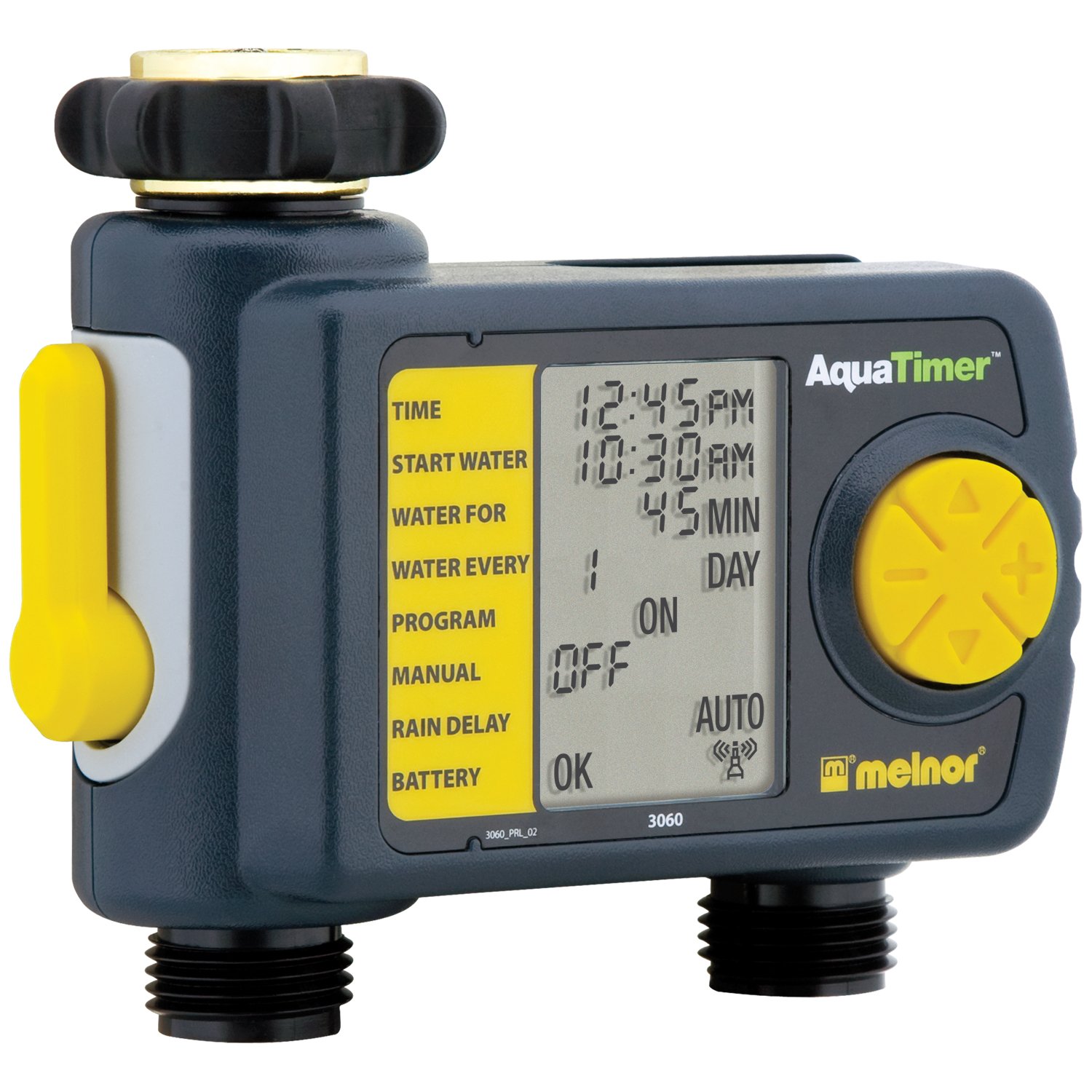
Image: The Melnor 3060 Digital Water Timer Plus, showing its connection points for a faucet and a garden hose.
Иштөө нускамалары
The Melnor 3060 features an LCD display and several buttons for programming. Refer to the on-screen prompts for guidance.
1. Учурдагы убакытты коюңуз
- басыңыз СААТТЫ КОЮ баскычы.
- колдонуу + жана - саатты жана мүнөттү тууралоо үчүн баскычтар.
- Басыңыз OK or СААТТЫ КОЮ ырастоо үчүн дагы.
2. Program Watering Schedule
The timer allows for up to six independent watering cycles per day. You can also choose from five preset programs.
- басыңыз ПРОГРАММА программалоо режимине кирүү үчүн баскыч.
- колдонуу + жана - buttons to select a program number (1-6) or a preset option.
- Басыңыз OK тандооңузду ырастоо үчүн.
- Follow the on-screen prompts to set the:
- Баштоо убактысы: When watering begins.
- Узактыгы: How long watering will last.
- Жыштыгы: How often watering occurs (e.g., every day, every other day, specific days of the week).
- Repeat for additional watering cycles as needed.
- Once all programs are set, ensure the timer is in АВТО автоматтык түрдө иштөө үчүн режим.
3. Кол менен сугаруу
Программаланган графигиңизге таасир этпестен кол менен сугаруу үчүн:
- басыңыз КҮЙГҮЗҮҮ/ӨЧҮРҮҮ баскычы.
- The water will begin to flow.
- Кол менен сугарууну токтотуу үчүн баскычын басыңыз КҮЙГҮЗҮҮ/ӨЧҮРҮҮ button again. The timer will return to its programmed schedule.
4. Using the Second Manual Outlet
The timer includes a second, un-timed manual outlet. This outlet functions like a standard faucet and is not controlled by the timer's programming. Simply attach a hose and open the valve on the timer to use it.
Техникалык тейлөө
- Батареяны алмаштыруу: Replace batteries annually or when the low battery indicator appears on the LCD. Always use fresh AA alkaline batteries.
- Кыштоо: To prevent damage from freezing, remove the timer from the faucet before the first frost. Store it indoors in a dry, protected area.
- Тазалоо: Periodically check the inlet screen for debris and clean if necessary to maintain proper water flow.
Проблемаларды чечүү
| Көйгөй | Мүмкүн себеп | Чечим |
|---|---|---|
| Таймер сугарбайт. |
|
|
| Байланыштардан суу агып жатат. |
|
|
| Дисплей бош же күңүрт. |
|
|
Техникалык шарттар
- Модель номери: 3060 (also referred to as 3100 in some documentation)
- Кубат булагы: 2 x AA щелочтуу батарейкалар (киргизилген эмес)
- Продукциянын өлчөмдөрү: 4.5 x 5.2 x 4.5 дюйм
- Элемент Салмагы: 12.8 унция
- Өндүрүүчү: Мелнор
- Сугаруу циклдери: Up to 6 independently programmable cycles
- Алдын ала коюлган программалар: 5
Кепилдик маалымат
The Melnor 3060 Digital Water Timer Plus comes with a Эки жылдык Чектелген Кепилдик. This warranty covers defects in materials and workmanship under normal use. For specific terms and conditions, or to make a warranty claim, please refer to the warranty card included with your product or contact Melnor customer service.
Кардарларды колдоо
If you have any questions, require assistance with setup or programming, or encounter any issues not covered in this manual, please contact Melnor Customer Service. Contact information can typically be found on the product packaging or on the official Melnor webсайт.


