1. Киришүү
Бул колдонмо үчүн комплекстүү нускамалар камтылган Koss SB40 Computer Headset with Microphone. Designed for clear communication and immersive audio, this headset is suitable for various computer applications, including gaming and voice calls. Please read this manual thoroughly to ensure proper setup, operation, and maintenance of your device.
2. Коопсуздук маалыматы
To prevent damage to the headset or personal injury, please observe the following safety guidelines:
- Гарнитураны экстремалдык температурага, нымдуулукка же тике күн нуруна тийгизүүдөн сактаңыз.
- Do not disassemble or attempt to repair the headset yourself. Refer all servicing to qualified personnel.
- Keep the headset away from water or other liquids.
- Adjust volume to a comfortable level to prevent hearing damage during prolonged use.
3. Пакеттин мазмуну
Пакетте бардык буюмдар бар экенин текшериңиз:
- Koss SB40 Computer Headset with Microphone
- Колдонуучунун Колдонмосу (бул документ)

1-сүрөт: Фронт view of the Koss SB40 Computer Headset, showing the over-ear design and attached microphone boom.
4. Орнотуу
4.1 Гарнитураны туташтыруу
The Koss SB40 headset features a dual-entry cable design with two 3.5mm plugs for separate audio and microphone connections:
- табыңыз 3.5 мм TRS сайгыч (Tip-Ring-Sleeve) for headphone audio. Insert this plug into your computer's headphone jack (typically marked with a headphone icon or green color).
- табыңыз 3.5 мм TS сайгыч (Tip-Sleeve) for the microphone. Insert this plug into your computer's microphone input jack (typically marked with a microphone icon or pink color).

2-сүрөт: The Koss SB40 headset showing its dual 3.5mm audio and microphone plugs for connection to a computer.
4.2 Microphone Configuration (Windows PC)
For optimal microphone performance on a Windows PC, especially with Realtek audio drivers, consider adjusting the following settings:
- After connecting the headset, the Realtek audio manager may automatically open. If not, access it through your system tray or Control Panel.
- дегенге өтүңүз Микрофон өтмөк.
- Иштетүү Noise Bastırma to reduce background noise.
- Иштетүү Акустикалык жаңырыкты жокко чыгаруу to prevent echoes during calls.
- тууралаңыз Микрофонду жогорулатуу. Click the microphone icon next to the volume slider and increase the boost to +10дБ for clearer voice pickup.
- Additionally, configure microphone settings within your communication applications (e.g., Steam, Zoom, Skype) for push-to-talk or specific mute options.
5. Иштөө нускамалары
5.1 Аудио ойнотуу
The SB40 headset delivers a frequency response of 20 to 20 kHz, an impedance of 120 ohms, and a sensitivity of 96 dB SPL, ensuring clear and dynamic sound reproduction. Adjust the audio volume using your computer's system volume controls or within individual applications.
5.2 Микрофонду колдонуу
The integrated noise-cancelling microphone is designed to minimize ambient background noise, focusing on your voice for clear communication. Position the microphone boom approximately 1-2 inches from your mouth for optimal voice pickup.
5.3 Comfort and Fit
The headset features large, closed leatherette earcups that comfortably surround the ear, providing maximum sound isolation and reducing external noise. The adjustable headband ensures a secure and comfortable fit for extended periods of use.
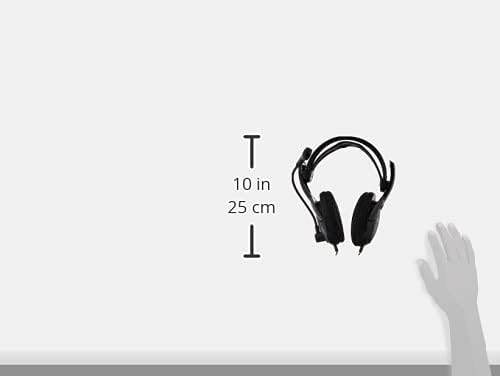
3-сүрөт: Side view of the Koss SB40 headset illustrating its dimensions, which contribute to its lightweight and comfortable design.
6. Техникалык тейлөө
To maintain the performance and longevity of your Koss SB40 headset:
- Clean the earcups and headband with a soft, dry cloth. Do not use harsh chemicals or abrasive cleaners.
- Store the headset in a clean, dry place when not in use.
- Avoid pulling on the cables excessively to prevent internal damage.
7. Кыйынчылыктарды
7.1 Аудио чыгышы жок
- Ensure the 3.5mm TRS audio plug is fully inserted into the correct headphone jack on your computer.
- Check your computer's volume settings and ensure they are not muted or set too low.
- Verify that the correct audio output device is selected in your operating system's sound settings.
7.2 Микрофон иштебейт
- Confirm the 3.5mm TS microphone plug is fully inserted into the correct microphone input jack.
- Check your computer's microphone settings and ensure the microphone is not muted and input levels are adequate. Refer to Section 4.2 for detailed PC microphone configuration.
- Verify that the correct microphone input device is selected in your operating system's sound settings and within your communication applications.
7.3 Бурмаланган аудио
- Reduce the volume level on your computer or application.
- Аудио булагы жакшы сапатта экенин текшериңиз.
- The headset is designed for low total harmonic distortion (less than 0.2%), so persistent distortion may indicate an issue with the audio source or connection.
8. Техникалык шарттар
| Өзгөчөлүк | Спецификация |
| Frequency Response | 20 Гц - 20 кГц |
| Импеданс | 120 Ом |
| Сезимталдуулук | 96 дБ SPL |
| Толук гармоникалык бурмалоо | 0.2% дан аз |
| Байланыш | Wired (Dual 3.5mm plugs: TS for mic, TRS for headphone) |
| Микрофон | Ызы-чууну жокко чыгаруу |
| Кулак жайгаштыруу | Ашыкча кулак |
| Материал | Plastic, Leatherette earcups |
| Түс | Кара |
| Продукциянын өлчөмдөрү | 4 x 7.06 x 9.19 дюйм |
| Элемент Салмагы | 0.023 унция (болжол менен 0.66 грамм) |
9. Продукт бүтүп калдыview Video
Көрүү үчүнview of the Koss SB40 Computer Headset, please watch the following video:
Видео 1: Расмий продукт көргөзмөсүasing the key features and design of the Koss SB40 Computer Headset with Microphone.
10. Кепилдик маалыматы
The Koss SB40 Computer Headset is covered under the Koss Stereophones Limited Lifetime Warranty. For detailed information regarding warranty terms, conditions, and claims, please refer to the official Koss webсайтына кириңиз же Koss кардарларды колдоо кызматына кайрылыңыз.
11. Колдоо
If you require further assistance, have questions, or encounter issues not covered in this manual, please contact Koss customer support through their official webсайты же продуктунун таңгагында берилген байланыш маалыматы.


