Introduction
Сатып алганыңыз үчүн рахматasing the GPX C3960 Personal CD/MP3 Player. This manual provides detailed instructions for the proper setup, operation, and maintenance of your device. Please read this manual thoroughly before use and retain it for future reference.
Пакеттин мазмуну
Пакетте бардык буюмдар бар экенин текшериңиз:
- GPX C3960 Personal CD/MP3 Player
- Стерео кулакчындар
- Колдонуучунун Колдонмосу (бул документ)
Продукт бүттүview
Familiarize yourself with the components and features of your GPX C3960 player.
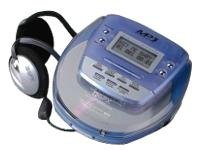
Image: The GPX C3960 Personal CD/MP3 Player, shown in a translucent blue casing, with a pair of silver over-ear headphones connected. The player features a small LCD screen and control buttons on its top surface.
Негизги өзгөчөлүктөрү:
- CD-R/RW and MP3 disc playback compatibility
- Anti-skip protection: 45 seconds for audio CDs, 120 seconds for MP3 CDs
- Dynamic Bass Boost (DBB) for enhanced audio output
- 24-track programmable memory
- Low battery alert indicator
- 2 АА батарейкасы менен иштейт
Жайгашуу
1. Батареяны орнотуу
- Ойноткучтун астыңкы жагында батарея бөлүмүн табыңыз.
- Батарея бөлүгүнүн капкагын жылдырыңыз.
- Бөлүмдүн ичинде көрсөтүлгөндөй, туура полярдуулукту (+ жана -) камсыз кылып, эки (2) AA батарейкасын салыңыз.
- Батарея уясынын капкагын бекем жабыңыз.
- Эскертүү: Replace batteries when the low battery indicator appears on the display or when playback performance degrades.
2. Наушниктерди туташтыруу
- Plug the stereo earbuds or your preferred headphones into the ТЕЛЕФОНДОР jack located on the side of the player.
Иштөө нускамалары
1. Күйгүзүү / Өчүрүү
- Күйгүзүү үчүн, басыңыз PLAY/PAUSE (►/‖‖) баскычы.
- Өчүрүү үчүн, басыңыз STOP (■) button twice, or wait for the auto-power off feature to activate after a period of inactivity.
2. Loading a CD/MP3 Disc
- басыңыз АЧУУ button to open the disc compartment lid.
- Carefully place a CD or MP3 disc onto the center spindle with the label side facing up.
- Дискти ордунан чыккыча акырын басыңыз.
- Close the disc compartment lid firmly until it latches.
3. Негизги ойнотуу
- Ойнотуу/тындыруу: Басыңыз PLAY/PAUSE (►/‖‖) ойнотууну баштоо же тындыруу үчүн.
- Токтотуу: Басыңыз STOP (■) ойнотууну токтотуу үчүн.
- Тректерди өткөрүп жиберүү: Басыңыз АЛДЫГА ӨТКӨРҮҮ (►►) or АРТКА СӨРҮҮ (◄◄) to move to the next or previous track.
- Издөө: Басып кармап туруңуз АЛДЫГА ӨТКӨРҮҮ (►►) or АРТКА СӨРҮҮ (◄◄) during playback to fast-forward or rewind within a track.
4. Үндү башкаруу
- тууралаңыз VOLUME dial located on the side of the player to increase or decrease the audio output level.
5. Dynamic Bass Boost (DBB)
- басыңыз DBB button to activate or deactivate the dynamic bass boost feature, which enhances low-frequency sounds.
6. Anti-Skip Protection
The GPX C3960 features electronic anti-skip protection to prevent audio interruptions during movement. This provides approximately 45 seconds of protection for standard audio CDs and 120 seconds for MP3 CDs.
7. Programming Tracks
- With the player stopped, press the ПРОГ button. The program indicator will flash.
- колдонуу АЛДЫГА ӨТКӨРҮҮ (►►) or АРТКА СӨРҮҮ (◄◄) каалаган тректи тандоо үчүн баскычтар.
- Басыңыз ПРОГ again to add the selected track to the program memory.
- Repeat steps 2 and 3 for up to 24 tracks.
- Басыңыз PLAY/PAUSE (►/‖‖) to start playback of the programmed sequence.
- To clear the program, open the disc compartment or press STOP (■) эки жолу.
Техникалык тейлөө
Агрегатты тазалоо
- Ойноткучтун сыртын жумшак, бир аз нымдуу аарчы менен сүртүңүзamp кездеме. Абразивдүү тазалагычтарды же эриткичтерди колдонбоңуз.
- Never open the disc compartment while the player is operating.
- Keep the lens clean. If the lens becomes dirty, use a soft camera lens brush to gently remove dust.
Батареяга кам көрүү
- Агып кетүүнүн алдын алуу үчүн бирдик узак убакыт бою колдонулбай турган болсо, батарейкаларды алып салыңыз.
- Эски жана жаңы батарейкаларды же ар кандай типтеги батареяларды аралаштырбаңыз.
Диск менен иштөө
- Манжа издерин жана чийилип калбаш үчүн дисктерди четинен кармаңыз.
- Дисктерди колдонбогон учурларда сактаңыз.
- Дисктерди ортосунан сыртка карай сүртүп, жумшак, түксүз чүпүрөк менен тазалаңыз.
Проблемаларды чечүү
| Көйгөй | Мүмкүн себеп | Чечим |
|---|---|---|
| Күч жок | Батареялар өлүп калган же туура эмес салынган. | Туура полярдуулукту камсыз кылуу менен батарейкаларды жаңысына алмаштырыңыз. |
| Disc not playing / "NO DISC" error | Disc is dirty, scratched, or inserted incorrectly. | Clean the disc. Reinsert the disc with the label side up. Try a different disc. |
| Үн өткөзүп же бурмаланган | Disc is dirty, scratched, or player is subjected to excessive vibration. | Clean the disc. Ensure the player is on a stable surface or reduce movement. |
| Наушниктен үн жок | Headphones not properly connected or volume too low. | Ensure headphones are fully plugged in. Increase volume. Test with different headphones. |
Техникалык шарттар
- Бренд: GPX
- Модел: C3960
- Колдоого алынган медиа: CD, CD-R, CD-RW, MP3-CD
- Өткөрүп жиберүүгө каршы коргоо: 45 seconds (CD), 120 seconds (MP3-CD)
- Кубат булагы: 2 x AA батарейкалар
- Өзгөчө өзгөчөлүгү: Portable
- Элемент Салмагы: Болжол менен 726 г
- Өлчөмдөрү: Approximately 40.64 x 38.1 x 30.48 cm (Package Dimensions)
Кепилдик жана колдоо
For warranty information or technical support, please refer to the documentation included with your purchase or visit the official GPX webсайт. Кепилдик дооматтар үчүн сатып алганыңыздын далилин сактаңыз.


