Introduction
This manual provides comprehensive instructions for the setup, operation, and maintenance of your VTech t2451 2.4 GHz Analog Cordless Phone with Answering System and Caller ID. Please read this manual thoroughly before using your new phone system to ensure proper functionality and to take full advantagанын өзгөчөлүктөрүнүн д.
Key features of your VTech t2451 include:
- 2.4 GHz analog reception for clear communication.
- Digital answering system with 3 mailboxes and 15 minutes of recording time.
- 50 name/number phonebook directory for easy contact management.
- 99 name/number Caller ID history to review кабыл алынбаган чалуулар.
- Headset compatibility (2.5 mm jack) for hands-free operation.
- Hold function, page/handset locator, and selectable ring tones.
- Wall-mountable design for flexible placement.
Жайгашуу
Follow these steps to set up your VTech t2451 cordless phone system.
- Пакеттен чыгаруу: Carefully remove all components from the packaging. Ensure you have the cordless handset, base unit, AC power adapter, telephone line cord, and battery pack.
- Батарея орнотуу: Open the battery compartment on the back of the cordless handset. Connect the battery pack connector to the jack inside the compartment, ensuring correct polarity. Place the battery pack into the compartment and close the cover.
- Негизги блокту туташтыруу:
- Connect one end of the telephone line cord to the TEL LINE jack on the base unit and the other end to a telephone wall jack.
- Connect the small end of the AC power adapter to the DC IN 9V jack on the base unit. Plug the large end of the AC power adapter into a standard electrical outlet.
- Телефонду заряддоо: Place the cordless handset in the base unit's charging cradle. The charge indicator on the handset should illuminate, indicating that the battery is charging. Allow the handset to charge for at least 12 hours before initial use.
- Дубалга орнотуу (кошумча): The base unit is designed to be wall-mountable. Refer to the included wall-mount bracket and instructions for secure installation.
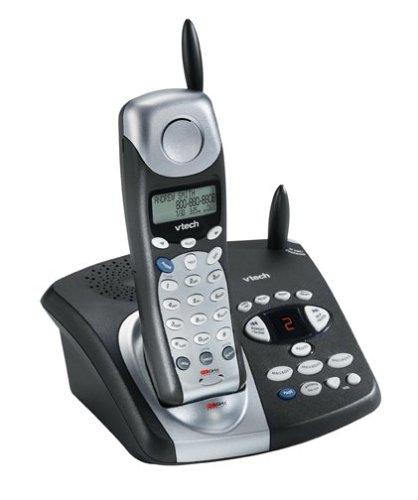
Image: The VTech t2451 cordless phone system, showing the black base unit with the silver and black handset docked in its charging cradle. The base unit features an integrated digital answering system with controls and a display.
Иштөө нускамалары
Чалууларды кабыл алуу жана кабыл алуу
- Чалуу үчүн: басыңыз СҮЙЛӨШҮҮ button, wait for a dial tone, then dial the phone number.
- Чакырууну кабыл алуу үчүн: Телефон шыңгыраганда, басыңыз СҮЙЛӨШҮҮ button or any key on the keypad (Any Key Answer).
- Чалууну аяктоо үчүн: басыңыз END button or place the handset back in the base unit.
- кармап туруу функциясы: Чалуу учурунда, басыңыз БЕРҮҮ button to place the call on hold. Press СҮЙЛӨШҮҮ кайра чалууну улантуу үчүн.
Санариптик жооп берүү тутуму
Your phone system includes a digital answering system with 3 mailboxes and 15 minutes of recording time.
- Ойнотулган билдирүүлөр: басыңыз ОЙНОО button on the base unit to listen to new messages.
- Чыгуучу билдирүүнү жаздыруу (OGM): Follow the voice prompts to record a personalized outgoing message.
- Mailbox Management: The system supports up to 3 distinct mailboxes. Refer to the detailed instructions in the full user guide for setting up and accessing individual mailboxes.
Чалуучунун ID жана телефон китепчеси
- Чалуучунун ID: When subscribed to Caller ID service, the handset display will show the caller's name and number. Press the CID кайра баскычынview the 99-name/number Caller ID history.
- Телефон китепчесинин каталогу: Store up to 50 names and numbers in the phonebook. Use the navigation buttons to scroll through entries and the МЕНЮ/ТАНДОО button to add or edit entries.
Башка функциялар
- Page/Handset Locator: басыңыз БЕТ button on the base unit to locate a misplaced handset.
- Ringer Tones: Customize your phone's ringer by selecting from various available tones. Refer to the handset settings menu.
- Headset Use: Connect a 2.5 mm compatible headset to the headset jack on the side of the handset for hands-free communication.
Техникалык тейлөө
Proper care ensures the longevity of your VTech t2451 phone system.
- Тазалоо: Телефонду жана анын негизги бөлүгүн жумшак, d менен тазалаңызamp кездеме. Катуу химиялык заттарды же абразивдүү тазалагычтарды колдонбоңуз.
- Батареяга кам көрүү:
- Always return the handset to the base unit when not in use to ensure it remains charged.
- Эгер телефон көпкө чейин колдонулбаса, батарейканы телефондон чыгарып алыңыз.
- Replace the battery when its performance significantly degrades. Use only the specified replacement battery pack.
- Экологиялык шарттар: Телефонду өтө жогорку температурага, түз күн нуруна же нымдуулукка дуушар кылбаңыз.
Проблемаларды чечүү
If you experience issues with your VTech t2451, try these common troubleshooting steps.
| Көйгөй | Чечим |
|---|---|
| Терүү үнү жок. |
|
| Начар кабыл алуу же статикалык. |
|
| Телефон заряддалбайт. |
|
| Автожооп берүүчү система билдирүүлөрдү жазбайт. |
|
Техникалык шарттар
| Өзгөчөлүк | Деталь |
|---|---|
| Бренд | VTech |
| Модель номери | T2451 |
| Телефон түрү | Зымсыз |
| Жыштык | 2.4 GHz Analog |
| Жооп берүү системасынын түрү | Санарип |
| Жаздыруу мүмкүнчүлүгү | 15 мүнөт |
| Mailboxes | 3 |
| Телефон китепчесинин каталогу | 50 ат/сан |
| Чалуучунун ID эстутуму | 99 ат/сан |
| Гарнитура шайкештиги | 2.5 мм уяча |
| Power Source | Электр зымдары |
| Продукциянын өлчөмдөрү | 7.1 x 8.5 x 5.1 дюйм |
| Элемент Салмагы | 2.19 фунт |
| Өндүрүүчү | Vtech |
Кепилдик жана колдоо
For warranty information, please refer to the warranty card included with your product packaging or visit the official VTech website. VTech provides customer support for product inquiries, technical assistance, and service. Contact information can typically be found on the VTech webсайтында же буюмдун баштапкы документтеринде.
Өндүрүүчү: VTech


