Introduction
This manual provides essential instructions for the safe and effective use of your Kyocera TK-25 Microfine Ceramic Toner Cartridge. This toner is designed for use with Kyocera FS-1200 series printers. Please read this manual thoroughly before installation and operation to ensure optimal performance and safety.
Коопсуздук маалыматы
Always observe the following safety precautions when handling toner cartridges:
- ЭСКЕРТҮҮ: KEEP OUT OF REACH OF CHILDREN. USE ONLY AS DIRECTED.
- Avoid direct contact with toner powder. If contact occurs, follow the first aid instructions below.
- Колдонулган тонер картридждерин өрттөбөңүз.
- Store toner in a cool, dry place, away from direct sunlight and extreme temperatures.
Биринчи жардам көрсөтүү чаралары:
- КӨЗ: Immediately flush with water for 15 minutes.
- ТЕРИ: Самын жана суу менен жуу.
- КАРАЖАТ: Врач менен кеңешиңиз.
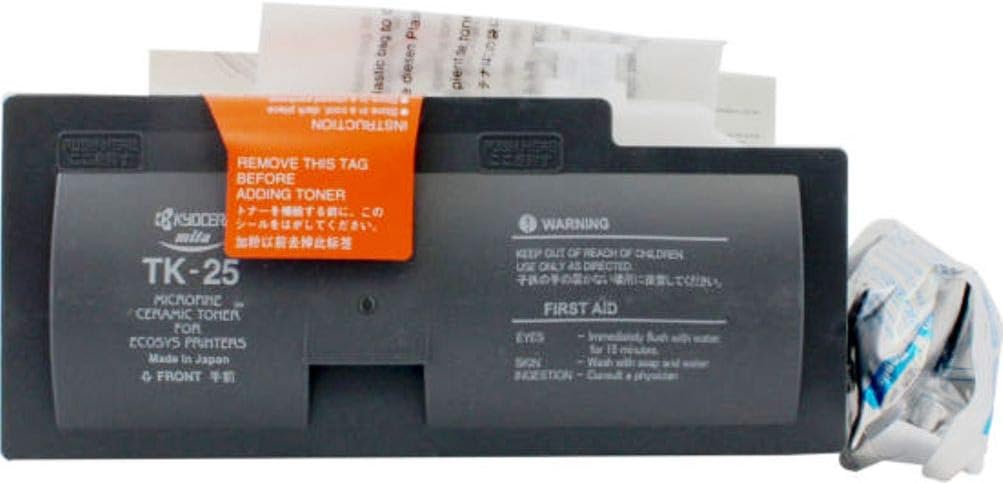
Орнотуу жана орнотуу
Follow these steps to correctly install the Kyocera TK-25 toner cartridge into your compatible Kyocera FS-1200 series printer.
- Unpack the Toner Cartridge: Carefully remove the new TK-25 toner cartridge from its packaging. Ensure you have the correct model for your printer.
- Картриджди даярдаңыз: Locate the orange instruction tag on the toner cartridge (as shown in Image 1). Gently pull and remove this tag before proceeding with installation. This tag seals the toner port.
- Принтердин капкагын ачуу: Open the front cover or toner access door of your Kyocera FS-1200 series printer. Refer to your printer's specific manual for exact location if unsure.
- Эски картриджди алып салуу (эгер бар болсо): If replacing an empty cartridge, carefully pull out the old toner cartridge from its slot. Place it in a sealed bag for proper disposal.
- Жаңы картридж салыңыз: Align the new TK-25 toner cartridge with the guide rails inside the printer. Push the cartridge firmly until it clicks into place. Do not force it.
- Принтердин капкагын жабуу: Close the front cover or toner access door of the printer. The printer will typically perform a short initialization cycle.
- Сыноо барагын басып чыгаруу: After installation, it is recommended to print a test page to confirm proper installation and toner distribution.

Иштөө нускамалары
Once installed, the Kyocera TK-25 toner cartridge operates automatically in conjunction with your Kyocera FS-1200 series printer. The printer's internal system manages toner distribution and usage. No manual operation of the toner cartridge itself is required after installation.
Monitor your printer's display or software for toner level indicators. Replace the cartridge when the printer indicates a low toner warning or print quality degrades significantly.
Техникалык тейлөө
The Kyocera TK-25 toner cartridge is a sealed unit and requires no user maintenance. Do not attempt to refill the cartridge or disassemble it, as this can lead to toner spills, damage to the printer, and void any warranties.
- Сактагыч: Store unused cartridges in their original packaging in a cool, dry environment, away from direct sunlight and extreme temperatures (as indicated on the packaging, e.g., 40°C/104°F maximum).
- Жоюу: Dispose of empty toner cartridges according to local environmental regulations. Many manufacturers and retailers offer recycling programs for used cartridges.
Проблемаларды чечүү
If you encounter issues after installing your Kyocera TK-25 toner cartridge, consider the following:
- "Тонер аз" же "Тонерди алмаштыруу" билдирүүсү: Ensure the new cartridge is correctly seated. If the message persists, the printer may not have registered the new cartridge. Try removing and reinserting it, or restarting the printer.
- Poor Print Quality (Faded, Streaky Prints): This could indicate an improperly installed cartridge, a faulty cartridge, or other printer issues. Check installation first. If the problem persists, consult your printer's manual or Kyocera support.
- Toner Spills: If toner spills, use a damp cloth to wipe it up. Do not use a vacuum cleaner not specifically designed for toner, as toner particles are very fine and can damage regular vacuum filters or cause electrical hazards.
- Cartridge Not Fitting: Double-check that you have the correct TK-25 model for your Kyocera FS-1200 series printer. Do not force the cartridge.
Техникалык шарттар
| Атрибут | Деталь |
|---|---|
| Бренд | KYOCERA |
| Модел | TK-25 |
| Түс | Кара |
| Элемент Салмагы | 0.5 килограмм |
| Шайкеш түзмөктөр | Kyocera FS-1200 Series Printers |
| Түшүм | Approximately 5,000 pages (based on 5% coverage) |
Кепилдик жана колдоо
For specific warranty information regarding your Kyocera TK-25 toner cartridge, please refer to the documentation included with your purchase or visit the official Kyocera website. For technical support or further assistance, contact Kyocera customer service directly.
Using non-genuine toner cartridges or attempting to modify the cartridge may void your printer's warranty.


