Introduction
Сатып алганыңыз үчүн рахматasing the Nyko AirFlo EX Controller for PlayStation 2. This controller is designed to enhance your gaming experience with its unique airflow feature, providing comfort during extended gameplay sessions. Please read this manual thoroughly before use to ensure proper setup and operation.
Пакеттин мазмуну
- Nyko AirFlo EX Controller for PlayStation 2
- Колдонуучунун Колдонмосу (бул документ)
Контроллердин өзгөчөлүктөрү
The Nyko AirFlo EX Controller integrates several features for an optimized gaming experience:
- AirFlo Cooling System: An integrated fan provides airflow to help keep hands dry and comfortable during intense gaming.
- Эргономикалык дизайн: Shaped for comfortable grip and extended play.
- Standard PlayStation 2 Controls: Includes directional pad, action buttons (Triangle, Circle, Cross, Square), L1/R1/L2/R2 shoulder buttons, START, SELECT, and analog sticks (L3/R3 functionality).
- Дирилдөө боюнча пикир: Supports in-game vibration effects for enhanced immersion.
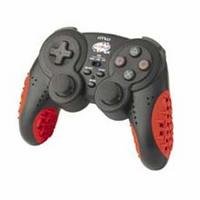
Image: Nyko AirFlo EX Controller for PlayStation 2. This image displays the front view of the controller, highlighting its button layout and ergonomic shape.
Жайгашуу
- Connect to PlayStation 2: Locate an available controller port on your PlayStation 2 console.
- Туташтыргычты киргизүү: Firmly insert the controller's connector cable into the chosen port. Ensure it is fully seated.
- Күйгүзүү консолу: Turn on your PlayStation 2 console. The controller should be automatically recognized.
- Сыноо функциясы: Navigate the PlayStation 2 menu or start a game to confirm all buttons and analog sticks are responsive.
Иштөө нускамалары
The Nyko AirFlo EX Controller operates similarly to standard PlayStation 2 controllers, with the added AirFlo feature.
- Негизги башкаруу элементтери: Use the directional pad or left analog stick for movement, and the action buttons (Triangle, Circle, Cross, Square) for in-game actions.
- Аналогдук таякчанын функциялары: Pressing the analog sticks down activates L3 and R3 functions, if supported by the game.
- AirFlo Fan Activation: The AirFlo fan is typically activated by a switch or button on the controller itself. Refer to the controller's physical layout for the exact location of the fan control. Toggle this control to turn the fan on or off.
- Дирилдөө боюнча пикир: Vibration effects will automatically engage during gameplay when supported by the software.
Техникалык тейлөө
- Тазалоо: Контроллердин бетин тазалоо үчүн жумшак, кургак чүпүрөктү колдонуңуз. Өжөр кир үчүн, бир азamp кездемени колдонсо болот, бул тешиктерге ным кирбешин камсыздайт. Катуу химиялык заттарды же абразивдүү тазалоочу каражаттарды колдонбоңуз.
- Сактагыч: Контроллерди салкын, кургак жерде, күндүн түз тийген нурунан жана өтө жогорку температурадан алыс сактаңыз. Бузулуп калбашы үчүн, кабелди контроллерге бекем ороп албаңыз.
- Тамчылардан качуу: Контроллерди тамчылардан жана таасирлерден коргоңуз, бул ички компоненттерге зыян келтириши мүмкүн.
Проблемаларды чечүү
| Көйгөй | Мүмкүн чечим |
|---|---|
| Контроллер жооп бербей жатат. |
|
| AirFlo fan not working. |
|
| Buttons or analog sticks are unresponsive or stiff. |
|
Техникалык шарттар
- Модел: AirFlo EX
- Шайкештик: PlayStation 2
- Элемент Салмагы: 9.6 унция (болжол менен 272 грамм)
- Пакеттин өлчөмдөрү: 6 x 4.8 x 2.7 дюйм (болжол менен 15.2 x 12.2 x 6.9 см)
- Байланыш: Зымдуу
- Өзгөчөлүктөр: Integrated AirFlo cooling fan
Кепилдик жана колдоо
For warranty information, technical support, or service inquiries regarding your Nyko AirFlo EX Controller, please contact Nyko customer support directly. Details can typically be found on the official Nyko webсайт же продукт таңгак.
Nyko Official Webсайт: www.nyko.com (Эскертүү: Бул толтургуч URL. Please refer to your product packaging or official Nyko documentation for the most current support information.)


