1. Киришүү
This manual provides comprehensive instructions for the safe and efficient operation, setup, and maintenance of your BenQ PB7200 DLP Video Projector. Please read this manual thoroughly before using the projector and retain it for future reference.
2. Продукт бүтүп калдыview
The BenQ PB7200 is a high-performance DLP video projector designed for various applications, offering clear and vibrant image projection.
Негизги өзгөчөлүктөрү
- 1,024 x 768 native resolution for sharp images.
- 2,200 ANSI lumens of brightness for clear viewар кандай жарык шарттарында.
- 2000:1 contrast ratio for distinct dark and light areas.
- Includes a remote control with a laser pointer and wireless mouse functionality.
- Compatible with both PC and Mac systems.
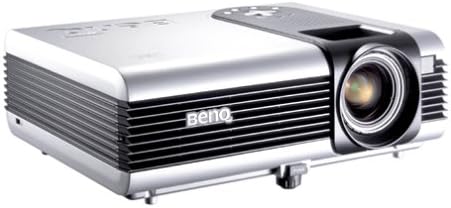
2.1-сүрөт: бурчтуу view of the BenQ PB7200 DLP Video Projector, showcasing its silver casing, ventilation grilles on the side, and the prominent lens assembly on the front right.
3. Орнотуу колдонмосу
3.1 Пакеттен чыгаруу
Carefully remove the projector and all accessories from the packaging. Verify that all components are present according to the packing list. Retain the original packaging for future transport or storage.
3.2 Орнотуу
Position the projector on a stable, flat surface. Ensure adequate ventilation around the unit to prevent overheating. The distance from the screen will determine the image size. Adjust the projector's height and angle to achieve the desired projection area.
3.3 Байланыштар
Connect your video source (e.g., computer, DVD player) to the appropriate input port on the projector. The BenQ PB7200 supports various connectivity options, including Display Port. Connect the power cord to the projector and then to a grounded electrical outlet.
4. Иштөө нускамалары
4.1 Күйгүзүү/өчүрүү
To power on the projector, press the power button on the control panel or the remote control. The power indicator light will illuminate. To power off, press the power button again. Allow the projector to cool down completely before unplugging it.
4.2 Сүрөттү тууралоо
- Фокус шакеги: Rotate the lens focus ring to sharpen the projected image.
- Чоңойтуу рычагы: Adjust the zoom lever to change the size of the projected image without moving the projector.
- Негизги ташты оңдоо: Use the keystone correction function (usually via remote or menu) to correct trapezoidal distortion if the projector is not perfectly perpendicular to the screen.
4.3 Булакты тандоо
Press the "Source" button on the projector's control panel or remote control to cycle through available input sources (e.g., PC, Video). Select the input corresponding to your connected device.
4.4 Алыстан башкаруу функциялары
The remote control allows for convenient operation from a distance. It includes buttons for power, source selection, menu navigation, volume control, and a laser pointer for presentations. Refer to the remote control diagram (not provided in this document) for specific button layouts.
5. Техникалык тейлөө
5.1 Лamp Алмаштыруу
Проектор лamp чектүү өмүрү бар. Качан лamp life is nearing its end, a warning message may appear. To replace the lamp, ensure the projector is powered off and cooled down. Follow the specific instructions in the full service manual for safe lamp module replacement. Use only genuine BenQ replacement lamps (Manufacturer Part #: 60.J5016.CB1) to ensure optimal performance and safety.
5.2 Тазалоо
- Проектор Casing: с сүртүңүзasing жумшак, кургак чүпүрөк менен. Абразивдүү тазалагычтарды же эриткичтерди колдонбоңуз.
- Проекциялык линза: Линзаны линза тазалоочу чүпүрөк же линза кагазы менен акырын тазалаңыз. Линзанын бетине манжаларыңыз менен тийбеңиз.
- Аба чыпкалары: Regularly check and clean the air filters to maintain proper ventilation and prevent dust buildup. Refer to the full service manual for filter access and cleaning procedures.
6. Кыйынчылыктарды
This section addresses common issues you might encounter with your BenQ PB7200 projector. For more complex problems, contact BenQ customer support.
- Экранда сүрөт жок:
- Проектор күйгүзүлгөнүн жана кубат индикатору күйүп турганын текшериңиз.
- Verify that the video source is properly connected and powered on.
- Проектордо туура киргизүү булагы тандалганын текшериңиз.
- lamp is functioning; if not, it may need replacement.
- Сүрөт бүдөмүк:
- Проектор объективиндеги фокус шакегин тууралаңыз.
- Проекциянын бети жалпак жана проектор туруктуу болушун камсыз кылыңыз.
- Сүрөт бурмаланган (трапеция формасы):
- Adjust the keystone correction feature in the projector's menu or via the remote control.
- Reposition the projector to be as perpendicular to the screen as possible.
- Projector Overheating:
- Ensure ventilation vents are not blocked.
- Clean the air filters if they are dusty.
- Operate the projector in an environment with adequate airflow.
7. Техникалык шарттар
| Өзгөчөлүк | Спецификация |
|---|---|
| Native Resolution | 1024 x 768 |
| Жарыктык | 2,200 ANSI люмени |
| Контраст катышы | 2000:1 |
| Байланыш технологиясы | Дисплей порту |
| Сунушталган Колдонуулар | Үй кинотеатры |
| Өзгөчө өзгөчөлүк | интегралдык баяндамачылар |
| Элемент Салмагы | 8.86 фунт |
| Пакеттин өлчөмдөрү | 12.99 x 10.67 x 8.46 дюйм |
| Модель номери | PB7200 |
| Өндүрүүчү | BenQ |
| Дата биринчи жеткиликтүү | 17-ноябрь, 2003-жыл |
8. Кепилдик жана колдоо
8.1 Кепилдик маалыматы
The BenQ PB7200 DLP Video Projector is covered by a 3 жылдык чектелген кепилдик сатып алынган күндөн тартып. Бул кепилдик нормалдуу колдонуудагы материалдардагы жана жасалгадагы кемчиликтерди камтыйт. Кепилдик дооматтары үчүн сатып алганыңыздын далилин сактап коюңуз.
8.2 Кардарларды колдоо
For technical assistance, warranty service, or further inquiries, please visit the official BenQ support website or contact their customer service department. You can find more information and support resources on the BenQ Store on Amazon or the official BenQ webсайт.


