Introduction
This manual provides essential information for the safe and efficient operation of your Royal Machines HT500X 5-Sheet Cross-Cut Shredder. Please read these instructions carefully before using the shredder and retain them for future reference. The HT500X is designed for personal and home office use, offering enhanced security by shredding documents into small cross-cut particles.
Маанилүү коопсуздук нускамалары
- Бардык нускамаларды окуңуз: Familiarize yourself with the shredder's functions and safety warnings before operation.
- Балдардан жана үй жаныбарларынан алыс кармаңыз: This shredder is not a toy. Keep hands, hair, and loose clothing away from the paper entry slot.
- Колдонулбаган учурда электр розеткасынан ажыратыңыз: Always unplug the shredder before moving, cleaning, or emptying the wastebasket.
- Avoid aerosols: Do not use aerosol products near the shredder, as they may cause fire.
- Тийиштүү кубат булагы: Connect the shredder to a properly grounded power outlet with the correct voltagе этикеткада көрсөтүлгөндөй.
- Ашыкча жүктөөгө болбойт: Adhere to the maximum sheet capacity to prevent jams and motor damage.
- No wet or sticky materials: Do not shred wet, sticky, or adhesive-backed materials, as they can damage the cutting blades.
- Кредиттик картаны майдалоо: Only shred one credit card at a time through the designated slot, if available.
Жайгашуу
- Таңылганын ачуу: Бардык компоненттерди таңгактан кылдаттык менен алып салыңыз.
- Position the wastebasket: Place the mesh wastebasket on a flat, stable surface.
- Attach shredder head: Carefully place the shredder head onto the rim of the wastebasket, ensuring it sits securely.
- Кубатты туташтыруу: Plug the power cord into a standard electrical outlet. The shredder is now ready for use.
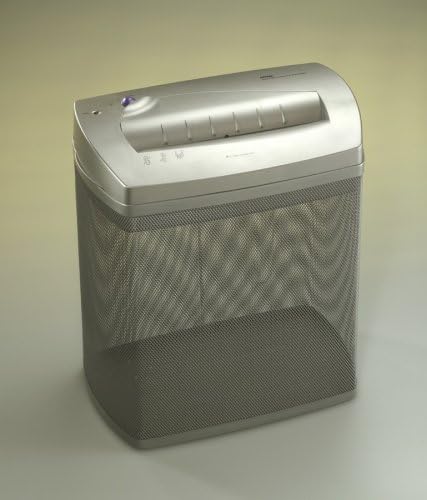
An image showing the Royal Machines HT500X cross-cut shredder. It features a silver-grey shredder head placed on top of a matching mesh wastebasket. The paper entry slot is visible on the top, along with control indicators.
Иштөө нускамалары
Күйгүзүү/өчүрүү
The HT500X features an Auto Start/Stop function. There is typically a switch or button to select between OFF, AUTO, and REVERSE modes. Set the switch to 'AUTO' for normal operation.
Документтерди майдалоо
- Ensure the shredder is in 'AUTO' mode.
- Insert up to 5 sheets of paper (8.5" x 11", 20 lb bond) into the paper entry slot. The shredder will automatically start and stop once the paper has passed through.
- For optimal performance, feed paper straight into the slot.
Shredding Credit Cards
The HT500X is designed to shred credit cards. Insert one credit card at a time into the center of the paper entry slot. The shredder will process the card and stop automatically.
Кайтарым функциясы
In case of a paper jam or to clear an overload, switch the shredder to 'REVERSE' mode. This will reverse the cutting blades, allowing you to pull out the jammed paper. Once cleared, switch back to 'AUTO' or 'OFF'.
Техникалык тейлөө
Таштанды себетти бошотуу
Regularly check and empty the mesh wastebasket to prevent paper jams and ensure continuous operation. Always unplug the shredder before lifting the shredder head to empty the basket.
Тазалоо
Wipe the exterior of the shredder with a soft, dry cloth. Do not use abrasive cleaners or solvents. For the cutting blades, occasional oiling is recommended to maintain performance and extend the life of the shredder. Use shredder oil specifically designed for paper shredders.
Oiling the Shredder
Apply a thin line of shredder oil across the paper entry slot. Run a few sheets of paper through the shredder to distribute the oil evenly. This should be done after every few hours of operation or when you notice a decrease in performance.
Проблемаларды чечүү
- Shredder does not start:
- Электр шнурунун иштеген розеткага бекем сайылганын текшериңиз.
- Check if the shredder head is correctly seated on the wastebasket.
- Которгучтун "AUTO" абалында экенин текшериңиз.
- Кагаз тыгылышы:
- Switch to 'REVERSE' mode to attempt to clear the jam.
- If the jam persists, unplug the shredder and carefully remove the paper manually.
- Avoid exceeding the maximum sheet capacity.
- Shredder stops during operation (overheating):
- The shredder has a thermal overload protection feature. If it overheats, it will automatically shut off.
- Unplug the shredder and allow it to cool down for at least 20-30 minutes before resuming operation.
- Shredder is noisy or slow:
- The wastebasket may be full. Empty it.
- The cutting blades may need oiling. Refer to the 'Oiling the Shredder' section.
Техникалык шарттар
| Бренд | Royal |
| Модель номери | HT500 |
| Кесүү түрү | Кайчылаш кесүү |
| Барактын сыйымдуулугу | 5 барак (20 фунттук кагаз) |
| Размер | 1/8" x 1" (approximate) |
| Paper Entry Slot Width | 9 дюйм |
| Өзгөчө өзгөчөлүк | Автоматтык баштоо/Токтоо |
| Таштанды себеттин сыйымдуулугу | 18.5 liters (approximate) |
| Продукциянын өлчөмдөрү | 7.25 x 13 x 14.5 дюйм |
| Элемент Салмагы | 9.6 фунт |
Кепилдик маалымат
Royal products are manufactured to high-quality standards. For specific warranty details, including coverage period and terms, please refer to the warranty card included with your product or visit the official Royal webсайт. Сатып алуу квитанциясын кепилдик дооматтары үчүн сатып алуунун далили катары сактаңыз.
Кардарларды колдоо
If you encounter any issues not covered in this manual or require further assistance, please contact Royal customer support. Contact information can typically be found on the Royal website or on the product packaging. When contacting support, please have your model number (HT500) and purchase information ready.


