1. Киришүү
This manual provides essential information for the proper use, installation, and maintenance of your Phoenix Gold ARX.805 Stereo Interconnect RCA Cables. These cables are designed to provide high-quality audio signal transfer between compatible audio components.
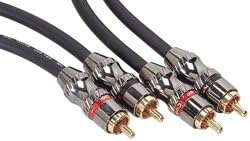
Figure 1: Phoenix Gold ARX.805 Stereo Interconnect RCA Cables. These cables feature gold-plated connectors for optimal signal transfer and durability.
2. Продукциянын өзгөчөлүктөрү
- Stereo Interconnect RCA Cable: Designed for stereo audio signal transmission.
- True Balanced-Directional Design: Engineered for optimal signal flow and noise rejection.
- 1.5 ft. (0.5 meters) Length: Suitable for short-distance audio connections.
- Platinum Level Construction: Indicates a high standard of material quality and manufacturing.
- Алтын жалатылган туташтыргычтар: Ensures corrosion resistance and improved conductivity.
3. Орнотуу жана туташуу
The Phoenix Gold ARX.805 cables are designed for straightforward connection between audio components. Follow these steps for proper setup:
- Портторду аныктоо: Locate the RCA audio output ports on your source device (e.g., CD Player, Turntable, Audio Receiver) and the RCA audio input ports on your receiving device (e.g., Amplifier, Stereo System, Home Theater System). RCA ports are typically color-coded: red for the right channel and white (or black) for the left channel.
- Өчүрүү түзмөктөрү: Ensure both the source and receiving audio devices are powered off before making any connections. This prevents potential damage to the equipment or the cables.
- Туташуу булагы: Insert the RCA connectors from one end of the Phoenix Gold ARX.805 cable into the corresponding output ports of your source device. Match the red connector to the red port (right channel) and the white/black connector to the white/black port (left channel).
- Connect Receiving Device: Insert the RCA connectors from the other end of the cable into the corresponding input ports of your receiving device. Again, ensure the red connector goes into the red port and the white/black connector into the white/black port.
- Коопсуз байланыштар: Gently push the connectors firmly into place to ensure a secure and stable connection. Avoid excessive force.
- Түзмөктөрдү күйгүзүү: Once all connections are secure, you may power on your audio components.
Шайкеш түзмөктөр: These cables are compatible with a wide range of audio equipment, including but not limited to: CD Players, Stereo Systems, Keyboard Amplifiers, Drum Machines, DJ Equipment, Audio Receivers, Equalizers, Headphone Ampжашоочулар, Amplifiers, Home Theater Systems, Turntables, Tape Decks, Microphone Amplifiers, and Guitar Ampаман калгандар.
4. Иштөө нускамалары
Once the Phoenix Gold ARX.805 cables are correctly connected between your audio components, their operation is passive. The cables facilitate the transfer of audio signals. Ensure your audio source is playing and your receiving device is set to the correct input for the connected source. Adjust volume levels on your amplifier or receiver as needed.
5. Техникалык тейлөө
To ensure the longevity and optimal performance of your Phoenix Gold ARX.805 cables, follow these maintenance guidelines:
- Этияттык менен мамиле кылуу: Avoid sharp bends, kinks, or excessive pulling on the cables, especially near the connectors.
- Тазалыкты сактоо: Periodically wipe the cables and connectors with a soft, dry, lint-free cloth to remove dust and grime. Do not use harsh chemicals or abrasive cleaners.
- Туура сактоо: When not in use, coil the cables loosely and store them in a cool, dry place away from direct sunlight and extreme temperatures.
- Коннекторлорду текшерүү: Occasionally check the gold-plated connectors for any signs of corrosion or damage. Ensure they remain clean and free of debris.
6. Кыйынчылыктарды
If you experience issues with audio signal transfer, consider the following troubleshooting steps:
- No Audio or Intermittent Sound:
- Ensure all RCA connectors are fully seated and secure in their respective ports on both the source and receiving devices.
- Түзмөгүңүздө туура киргизүү булагы тандалганын текшериңиз ampкөтөргүч же кабыл алгыч.
- Check the volume levels on all connected audio components.
- Test the cables with another set of audio components if available, to rule out issues with the cables themselves.
- Ызы-чуу же ызы-чуу:
- Ensure all components are properly grounded.
- Бош байланыштарды текшериңиз.
- Move the audio cables away from power cables or other sources of electromagnetic interference.
- Бурмаланган аудио:
- Verify that the input levels on your receiving device are not overdriven.
- Ensure the cables are not damaged (e.g., visible kinks or cuts).
7. Техникалык шарттар
| Атрибут | Деталь |
|---|---|
| Бренд | Финикс Голд |
| Модель номери | ARX.805 |
| Туташтыргыч түрү | RCAдан RCAга |
| Кабель түрү | Композит |
| Узундук | 1.5 фут (0.5 метр) |
| Түс | Gold (connectors) |
| Connector Gender | Эркек |
| Продукциянын өлчөмдөрү | 18 x 8.5 x 8.8 inches (packaging dimensions, approximate) |
| Элемент Салмагы | 6.4 унция |
| UPC | 083713054478 |
| Ички/тышкы колдонуу | Ички, сырткы |
8. Кепилдик жана колдоо
For specific warranty information regarding your Phoenix Gold ARX.805 Stereo Interconnect RCA Cables, please refer to the documentation included with your purchase or visit the official Phoenix Gold website. General product support and frequently asked questions may also be available through their online resources.
For technical assistance or inquiries, please contact Phoenix Gold customer support directly. Contact details are typically available on the manufacturer's official webсайт.


