Introduction
This manual provides essential instructions for the safe and efficient operation of your NEC VT670 Value LCD Video Projector. Please read this manual thoroughly before using the projector and keep it for future reference. The NEC VT670 is designed for clear image projection with a native resolution of 1024 x 768 and a brightness of up to 2,100 ANSI lumens.
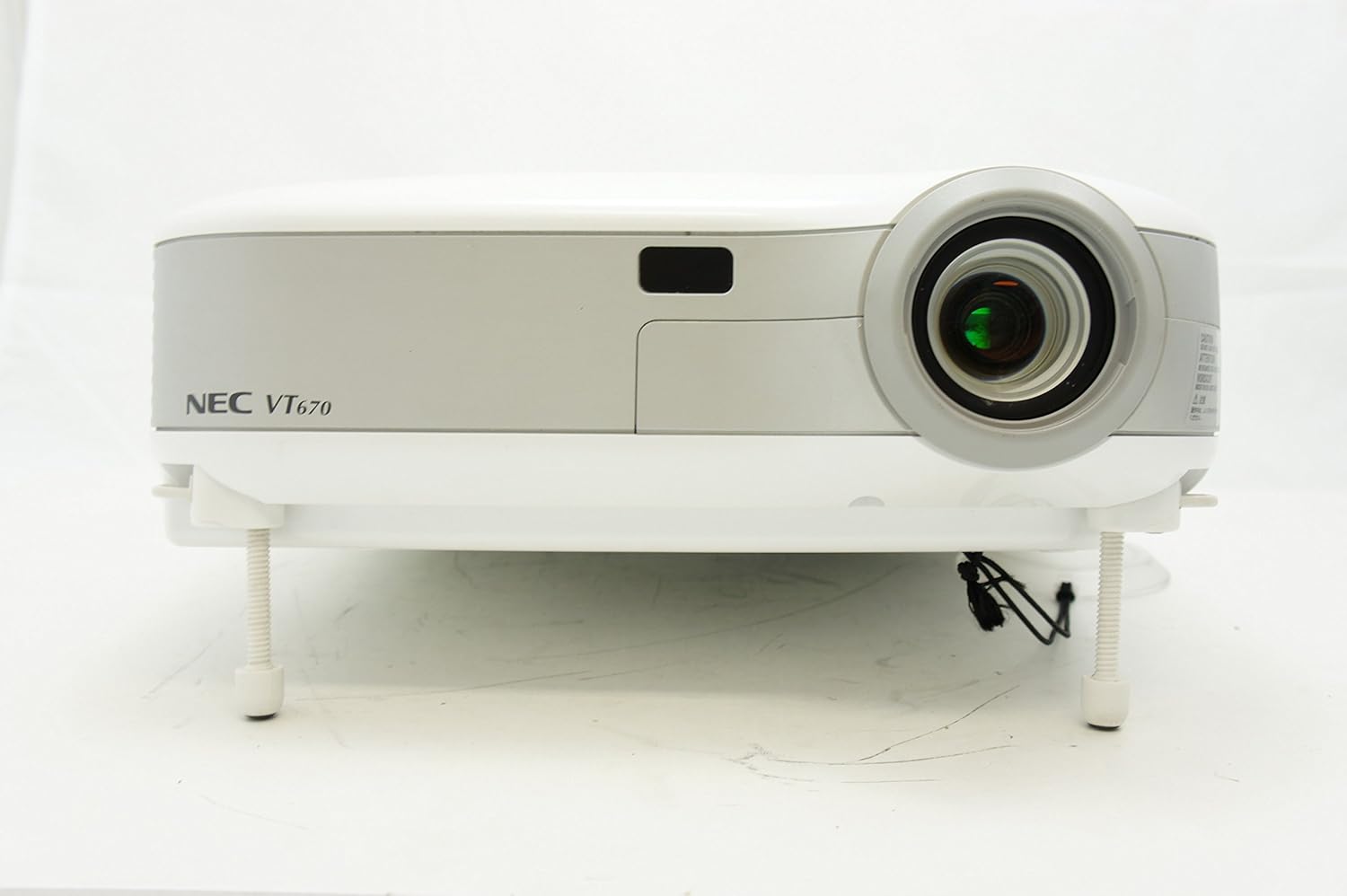
1-сүрөт: Фронт view of the NEC VT670 projector, showing the lens and front panel.
Жайгашуу
Follow these steps to set up your NEC VT670 projector:
- Жайгашкан жери: Position the projector on a stable, flat surface or mount it according to the instructions for your specific mounting solution. Ensure adequate ventilation around the unit. The projector is designed for tabletop mounting.
- Кубат туташуу: Connect the power cord to the projector's power inlet and then to a grounded electrical outlet.
- Булак байланышы: Connect your video source (e.g., computer, DVD player) to the appropriate input port on the projector. The VT670 supports VGA (D-Sub), S-Video, and composite video inputs. Use the color-coded connections for ease of setup.
- Кабелдик байланыштар: Ensure all necessary cables, such as the VGA cable for computer input, are securely connected to both the projector and the source device.
- Аудио туташуусу: If your source provides audio, connect it to the projector's audio input ports. The projector features built-in speakers.
- Баштапкы күйгүзүү: Проектордун же пульттун кубат баскычын басып, аппаратты күйгүзүңүз.

2-сүрөт: Rear panel of the NEC VT670 projector, illustrating various input and output ports including VGA, S-Video, and audio connections.

3-сүрөт: Example of a VGA cable (left) and a power cable (right) used for connecting the projector.
Иштөө нускамалары
This section details the basic operation of your projector.
Күйгүзүү/өчүрүү
- Күйгүзүү үчүн, басыңыз КҮЧ баскычын бир жолу. Кубат индикатору күйөт.
- Өчүрүү үчүн, басыңыз КҮЧ button twice. The projector will enter a cooling cycle before shutting down completely.
Киргизүү булагын тандоо
- колдонуу INPUT or dedicated source buttons (e.g., КОМПЬЮТЕР 1, ВИДЕО) башкаруу панелиндеги же пульттагы жеткиликтүү киргизүү булактарын карап чыгуу үчүн.

4-сүрөт: Top control panel of the NEC VT670 projector, showing power, input selection, and navigation buttons.
Фокус жана масштабды тууралоо
- тууралаңыз ФОКУС ring on the lens until the image is sharp and clear.
- колдонуу ZOOM lever on the lens to adjust the image size to fit your screen.
Меню Багыттоо
- басыңыз МЕНЮ button to access the on-screen display (OSD) menu.
- жебе баскычтарын колдонуңуз (UP, ылдый, СОЛ, ТУУРА) меню параметрлери аркылуу өтүү үчүн.
- Басыңыз ENTER or ТАНДОО тандоону ырастоо үчүн.
- Басыңыз ЧЫГУУ or МЕНЮ кайра экрандын менюсун жабуу үчүн.
Техникалык тейлөө
Үзгүлтүксүз тейлөө оптималдуу иштешин камсыз кылат жана проекторуңуздун иштөө мөөнөтүн узартат.
Lamp Алмаштыруу
Проектор лamp чектелген өмүрү бар. Качан лamp indicator lights up or the image becomes dim, the lamp алмаштыруу керек болушу мүмкүн. Толук маалымат алуу үчүн толук тейлөө колдонмосун караңызamp replacement procedures. Always allow the projector to cool down completely before attempting lamp алмаштыруу.
Аба чыпкасын тазалоо
Dust accumulation on the air filter can reduce cooling efficiency and affect projector performance. Clean the air filter regularly (e.g., every 100 hours of operation) by removing it and gently brushing off dust or using a vacuum cleaner. Replace the filter if it is damaged.
Линзаны тазалоо
Проектордун линзасын оптикалык беттер үчүн атайын жасалган жумшак, түксүз чүпүрөк менен акырын сүртүңүз. Абразивдүү тазалагычтарды же ашыкча күч колдонбоңуз.
Проблемаларды чечүү
Бул бөлүмдө сиз кабылышы мүмкүн болгон жалпы маселелерди чечүү жолдору каралган.
| Көйгөй | Мүмкүн себеп | Чечим |
|---|---|---|
| Сүрөт көрсөтүлгөн жок |
|
|
| Сүрөт бүдөмүк |
|
|
| Үн жок |
|
|
Техникалык шарттар
Key technical specifications for the NEC VT670 Value LCD Video Projector:
- Модель аты: VT670
- Дисплей түрү: LCD
- Түпкү резолюция: 1024 x 768 (XGA)
- Максималдуу жарыктык: 2,100 ANSI люмени
- Контраст катышы: 400:1
- Байланыш технологиясы: VGA (D-Sub), S-Video, Composite Video
- Аппараттык байланыш: D-Sub, VGA
- Сүрөттүн максималдуу өлчөмү: 300 дюйм
- Форма фактору: Portable
- Монтаж түрү: Столдун үстү
- Контроллердин түрү: Control Button
- Элемент Салмагы: 9.2 фунт
- Кошумча өзгөчөлүктөр: Камтылган динамиктер
- Колдоого алынган сигналдар: PC, NTSC, PAL, SECAM, HDTV
Кепилдик маалымат
The NEC VT670 Value LCD Video Projector comes with a 2 жылдык кепилдик. This warranty covers defects in materials and workmanship under normal use. For specific terms and conditions, please refer to the warranty card included with your product or contact NEC customer support.
Колдоо
For further assistance, technical support, or service inquiries regarding your NEC VT670 projector, please visit the official NEC website or contact their customer service department. Keep your product model number (VT670) and serial number ready when contacting support.
Онлайн ресурстар: www.nec.com


