1. Киришүү
This manual provides essential information for the proper setup, operation, and maintenance of your Crown D-75A D Series Power Amplifier. The D-75A is a robust and reliable power amplifier, widely recognized for its performance in various professional audio environments, including laboratories, touring setups, public facilities, recording studios, and home audio systems. It delivers up to 110 watts into 8 ohms of power.
2. Коопсуздук маалыматы
Сураныч, иштетүүдөн мурун бардык коопсуздук нускамаларын окуп, түшүнүңүз ampкөтөргүч. Бул колдонмону келечектеги маалымат үчүн сактаңыз.
- Кубат булагы: туташтыруу amplifier only to the type of power source indicated on the unit. Ensure the AC line has a standard three-wire grounded connector.
- Вентиляция: Эч кандай желдетүүчү тешиктерди жаап албаңыз. Ашыкча ысып кетүүнүн алдын алуу үчүн аппараттын айланасында адекваттуу аба агымын камсыз кылыңыз.
- Нымдуулук: ачыкка чыгарбагыла amplifier to rain or moisture. Do not place objects filled with liquids, such as vases, on the apparatus.
- Тейлөө: Бул продуктту өзүңүз тейлөөгө аракет кылбаңыз. Бардык тейлөөнү квалификациялуу тейлөө кызматкерлерине тапшырыңыз.
- Тазалоо: Тазалоодон мурун түзмөктү розеткадан сууруп алыңыз. Тазалоо үчүн кургак чүпүрөктү колдонуңуз.
3. Продукт бүтүп калдыview
The Crown D-75A D Series Power Amplifier is designed for high-fidelity audio amplification. Its AB+B class circuitry ensures maximum efficiency with minimal crossover distortion.
Негизги өзгөчөлүктөрү:
- Balanced three-pin Neutrik combination XLR and 1/4" phone jack for each channel.
- Four-terminal barrier block (two per channel) for speaker connections.
- Stereo headphone jack for monitoring.
- AC line with a standard three-wire grounded connector.
- Powerful AB+B class circuitry for efficient operation.
Алдыңкы панелдин башкаруу элементтери жана көрсөткүчтөрү:
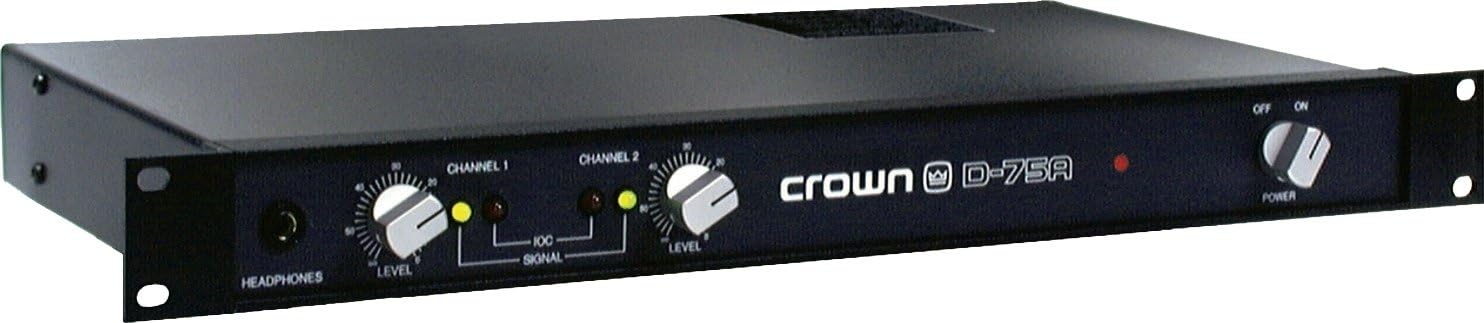
Figure 3.1: Crown D-75A Front Panel. This image displays the front panel of the Crown D-75A D Series Power Amplifier. From left to right, it features a headphone jack, a 'LEVEL' control knob for Channel 1, a 'SIGNAL' indicator light for Channel 1, a 'LEVEL' control knob for Channel 2, a 'SIGNAL' indicator light for Channel 2, the 'crown D-75A' logo, a red power indicator light, and a 'POWER' switch with 'OFF' and 'ON' positions.
4. Орнотуу
Follow these steps to properly set up your Crown D-75A ampөмүр берүүчү:
- Жайгашкан жери: жайгаштырыңыз amplifier in a location with adequate ventilation, away from direct sunlight, heat sources, and moisture. Ensure it is placed on a stable surface.
- Киргизүү байланыштары: Аудио булагын туташтырыңыз (мисалы, миксер, алдын алаampкөтөргүч) чейин amplifier's input jacks. The D-75A features balanced three-pin Neutrik combination XLR and 1/4" phone jacks for each channel. Use appropriate cables for your source.
- Чыгуу туташуулары: Connect your speakers to the four-terminal barrier block outputs on the rear of the amplifier. Ensure correct polarity (+ to + and - to -) for each channel.
- Кубат туташуу: камсыз кылуу amplifier's power switch is in the 'OFF' position. Connect the AC power cord to a grounded electrical outlet. The amplifier requires a standard three-wire grounded connection.
- Initial Level Settings: Before powering on, set both Channel 1 and Channel 2 'LEVEL' control knobs to their minimum (fully counter-clockwise) position.
5. Иштөө нускамалары
Бир жолу amplifier is set up, follow these steps for operation:
- Күйгүзүү: Flip the 'POWER' switch to the 'ON' position. The red power indicator light on the front panel will illuminate.
- Деңгээлдерди тууралоо: Start playing audio from your source. Slowly turn the 'LEVEL' control knobs clockwise for Channel 1 and Channel 2 until the desired volume is achieved.
- Сигнал көрсөткүчтөрү: Observe the 'SIGNAL' indicator lights for each channel. These lights illuminate when an audio signal is present. If the lights are consistently bright or clipping, reduce the input level from your source or the amplifier's level controls to prevent distortion.
- Наушник мониторинги: For private listening or monitoring, plug stereo headphones into the 'HEADPHONES' jack. The headphone output level is typically controlled by the main level controls.
- Өчүрүү: When finished, turn the 'LEVEL' control knobs to their minimum position, then flip the 'POWER' switch to 'OFF'.
6. Техникалык тейлөө
Үзгүлтүксүз техникалык тейлөө сиздин узак мөөнөттүү иштешиңизди жана оптималдуу иштешин камсыз кылат ampөмүрлүү.
- Тазалоо: Сырткы бетин мезгил-мезгили менен тазалап туруңуз amplifier with a soft, dry cloth. Do not use liquid cleaners or solvents. Ensure ventilation grilles are free from dust and debris.
- Вентиляция: Regularly check that the amplifier's ventilation openings are not obstructed. Proper airflow is crucial to prevent overheating.
- Байланыштары: Occasionally inspect all input and output connections for secure fit and signs of wear. Loose connections can lead to signal loss or intermittent performance.
- Сактагыч: сакталган болсо amplifier for an extended period, ensure it is kept in a dry, dust-free environment within its operating temperature range.
7. Кыйынчылыктарды
This section addresses common issues you might encounter with your Crown D-75A ampөмүрлүү.
| Көйгөй | Мүмкүн себеп | Чечим |
|---|---|---|
| No power, power indicator off | Power cord disconnected; no power from outlet; faulty power switch. | Check power cord connection; test outlet with another device; if problem persists, seek professional service. |
| Үн чыгышы жок | Input cables disconnected; speaker cables disconnected or incorrect polarity; amplifier level controls set too low; source device not playing. | Verify all cable connections; ensure speaker polarity is correct; increase amplifier level controls; check audio source. |
| Бурмаланган үн | Киргизүү сигналы өтө жогору; amplifier overloaded; faulty cables or speakers. | Reduce input level from source; lower amplifier level controls; inspect cables and speakers for damage. |
| Ашыкча ысып кетүү | Бөгөттөлгөн желдетүү; ашыкча жүк. | Ensure clear airflow around the unit; reduce output level or check speaker impedance. |
If these troubleshooting steps do not resolve the issue, please contact qualified service personnel.
8. Техникалык шарттар
The following are the technical specifications for the Crown D-75A D Series Power Ampөмүр берүүчү:
- Чыгуу Wattage: 110 Watts (into 8 ohms)
- Продукциянын өлчөмдөрү: 21.5 x 12.5 x 3 дюйм
- Элемент Салмагы: 10.9 фунт
- Модель номери: GD75A
- ASIN: B0002L8XLU
- Бренд: Crown
- Өндүрүүчү: Crown Audio
- Түсү: Боз
- Шайкеш түзмөктөр: A wide range of professional audio equipment
- Биринчи жеткиликтүү болгон күнү: 6-сентябрь, 2007-жыл
9. Кепилдик жана колдоо
For warranty information and technical support, please refer to the official Crown Audio website or contact your authorized Crown dealer. Keep your purchase receipt as proof of purchase for any warranty claims.


