Introduction
The Clarity 600 Wake Assure Alarm Clock is designed to provide a reliable and effective wake-up experience, especially for deep sleepers or individuals with hearing difficulties. It combines a super loud audible alarm with a powerful vibrating bed shaker and a visual alarm indicator to ensure you wake up on time. This manual provides detailed instructions for setting up, operating, and maintaining your alarm clock.
Продукт бүттүview
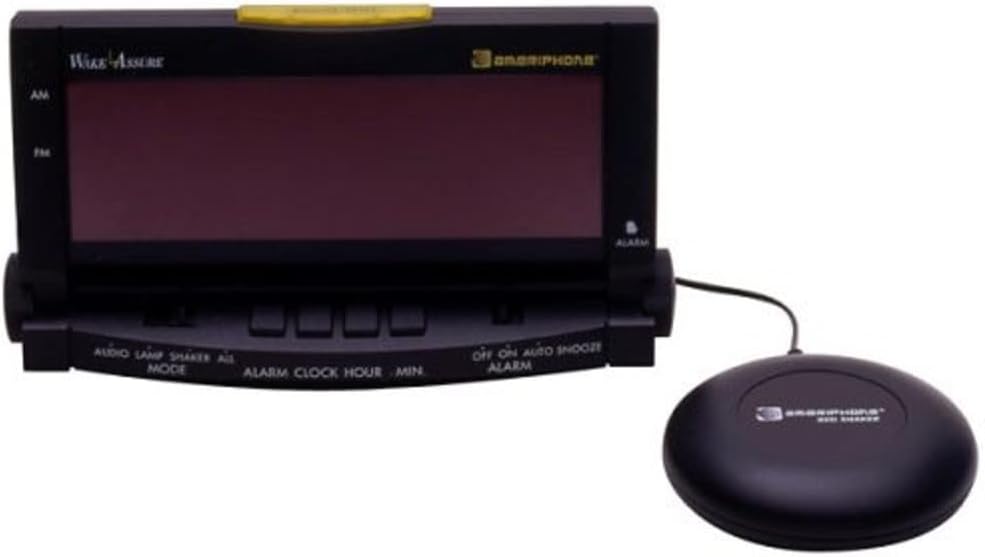
Image: The Clarity 600 Wake Assure Alarm Clock, a black digital alarm clock with a large display, shown with its connected black bed shaker unit.
Негизги өзгөчөлүктөрү:
- Super-bright 1.8" LCD display for clear time visibility.
- Super loud 85+ decibel alarm to ensure audible notification.
- Included bed shaker provides powerful vibration to wake deep sleepers.
- Visual alarm indicator for an additional wake-up cue.
- Snooze button for temporary alarm pause.
- Includes port for optional Lamp Flasher accessory (sold separately).
Жайгашуу
1. Агрегатты кубаттоо:
Connect the provided AC adapter to the DC IN port on the back of the alarm clock and plug it into a standard wall outlet. For battery backup, insert 3 AAA batteries (not included) into the battery compartment. This will maintain time settings during a power outage, though the alarm function may be limited without AC power.
2. Connecting the Bed Shaker:
Plug the bed shaker's cable into the designated shaker port on the back of the alarm clock. Place the bed shaker under your pillow or mattress for optimal vibration. The shaker often has adjustable intensity settings (Low, Medium, High) on its side.
3. Убакытты коюу:
- Press and hold the 'TIME SET' button (or similar, refer to specific button labels on your unit).
- Use the 'HOUR' and 'MIN' buttons to adjust the current time.
- Press 'TIME SET' again to confirm.
- Some models may have a 12/24H button to switch between 12-hour and 24-hour formats.
4. Adjusting Display Brightness (Dimmer):
Locate the 'DIMMER' button (or 'DIM') on the top or back of the unit. Press it repeatedly to cycle through different brightness levels for the LCD display, from low to high, to suit your preference.
Иштеп жатат
1. Ойготкучту орнотуу:
The Clarity 600 typically supports two independent alarms (AL1, AL2).
- Press and hold the 'ALARM 1 SET' button (or 'AL1'). The alarm time will begin to flash.
- Use the 'HOUR' and 'MIN' buttons to set your desired alarm time.
- Press 'ALARM 1 SET' again to confirm the alarm time.
- Repeat for 'ALARM 2 SET' (or 'AL2') if desired.
2. Selecting Alarm Mode:
On the back of the unit, locate the switch or buttons for 'SOUND', 'VIBRATION', or 'BOTH'. Select your preferred wake-up method. The alarm volume can also be adjusted from low to high using dedicated controls.
3. Тындыруу функциясы:
When the alarm sounds, press the large 'SNOOZE' button on top of the unit to temporarily silence the alarm. The alarm will sound again after approximately 5-9 minutes (check specific model details). Repeatedly pressing snooze may be possible.
4. Ойготкучту өчүрүү:
To turn off the alarm completely, press the 'ALARM OFF' button (or the corresponding AL1/AL2 button once, depending on the model). Ensure the alarm indicator on the display is no longer active.
5. USB заряддоо порту:
The alarm clock may include a USB port on the back for charging small electronic devices. Refer to the product specifications for output capabilities.
Техникалык тейлөө
Тазалоо:
Wipe the alarm clock and bed shaker with a soft, dry cloth. Do not use abrasive cleaners or solvents. Keep the unit dry and away from excessive moisture.
Батареяны алмаштыруу:
If using battery backup, replace the 3 AAA batteries annually or when the display shows signs of dimming during a power outage. Жаңы батареяларды салууда туура полярдуулукту камсыз кылыңыз.
Проблемаларды чечүү
| Көйгөй | Чечим |
|---|---|
| Сигнализация үн чыгарбайт/дирилдебейт. | Check if the alarm is set correctly and activated. Ensure the alarm mode (sound, vibrate, or both) is selected. Verify AC power connection and battery backup. |
| Дисплей өтө жарык/күңүрт. | Use the 'DIMMER' button to adjust the display brightness to your preferred level. |
| Убакыт/Ойготкуч жөндөөлөрү баштапкы абалга келтирилди. | Ensure AC power is consistently supplied. Check and replace battery backup if necessary. |
| Төшөк чайкагыч титиребейт. | Verify the bed shaker is securely plugged into the alarm clock. Check the shaker's intensity switch (if available) and ensure the alarm mode is set to 'VIBRATION' or 'BOTH'. |
| Snooze/Alarm Off confusion. | Familiarize yourself with the specific button presses for snooze (single press) versus turning the alarm off completely (often a different button or a longer press). |
Техникалык шарттар

Image: The Clarity 600 Wake Assure Alarm Clock with its dimensions (12.3"W x 3.5"H) clearly indicated.
- Бренд: Ачыктык
- Модел: 600
- Түсү: Кара
- Дисплей түрү: Digital, 1.8-Inch LCD
- Өзгөчө өзгөчөлүгү: Alarm, Snooze, Bed Shaker, Visual Alarm Indicator
- Продукциянын өлчөмдөрү: 12.3"W x 3.5"H
- Кубат булагы: Electrical (AC Adapter), Battery Powered (3 AAA batteries for backup, not included)
- Монтаж түрү: Стол үстү
- Элемент Салмагы: 2.5 фунт
- Материал: Пластик
- Иштөө режими: Электрдик
Кепилдик
This product comes with a Limited Warranty. Please refer to the manufacturer's official webсайтта же продуктунун таңгагында көрсөтүлгөн кепилдик шарттары жана эрежелери менен таанышыңыз.
Колдоо
For further assistance, technical support, or to inquire about optional accessories like the Lamp Flasher, please visit the official Clarity webсайтка же кардарларды тейлөө бөлүмүнө кайрылыңыз. Байланыш маалыматы, адатта, продуктунун таңгагында же өндүрүүчүнүн дарегинде тапса болот webсайт.


