Introduction
This manual provides essential information for the safe and efficient operation of your Behringer XENYX QX1002USB mixer. Please read it thoroughly before using the device to ensure proper setup, optimal performance, and to prevent damage.

Сүрөт 1: Алдыңкы view of the Behringer XENYX QX1002USB mixer, showcasing its various input channels, faders, and control knobs.
Коопсуздук нускамалары
- Электр камсыздоо: Аппарат менен кошо берилген кубат адаптерин гана колдонуңуз. Voltage сиздин жергиликтүү электр камсыздооңузга дал келет.
- Суу жана ным: Do not expose this appliance to rain or moisture. Do not place objects filled with liquids on the appliance.
- Вентиляция: Адекваттуу вентиляцияны камсыз кылыңыз. Вентиляция тешиктерин жаап албаңыз.
- Жылуулук: Радиаторлор, жылуулук регистрлери, мештер же башка аппараттар (анын ичинде) сыяктуу жылуулук булактарынын жанына койбоңуз ampкөтөргүчтөр) жылуулукту пайда кылуучу.
- Тазалоо: Кургак чүпүрөк менен гана тазалаңыз.
- Тейлөө: Бардык тейлөөлөрдү квалификациялуу тейлөө кызматкерлерине тапшырыңыз. Бул продуктуну өзүңүз тейлөөгө аракет кылбаңыз.
Жайгашуу
1. Пакеттен чыгаруу жана жайгаштыруу
Carefully unpack the mixer and inspect it for any signs of damage. Place the mixer on a stable, flat surface, ensuring sufficient space for ventilation around the unit.
2. Power Connection
Connect the supplied power adapter to the "AC POWER IN" socket on the rear panel of the mixer. Plug the other end into a suitable power outlet. Ensure the mixer's power switch is in the OFF position before connecting to power.

Figure 2: Rear panel of the Behringer XENYX QX1002USB mixer, showing the AC power input, USB interface, and other connections.
3. Аудио байланыштары
- Микрофон кириштери: Connect microphones to the XLR inputs (MIC) on the mono channels. These inputs feature XENYX mic preamps.
- Line Inputs: Connect line-level sources (e.g., keyboards, CD players) to the 1/4" balanced/unbalanced inputs on the mono or stereo channels.
- Негизги жыйынтыктар: Негизги динамиктерди туташтыруу же amplifier to the MAIN OUT (XLR or TRS) connectors.
- Башкаруу бөлмөсү/Телефондор: Connect studio monitors to the CONTROL ROOM OUT and headphones to the PHONES jack for monitoring.
- USB интерфейси: Connect the mixer to your computer via the USB port for audio recording and playback.
Иштөө нускамалары
This section details the primary controls and their functions for mixing audio.
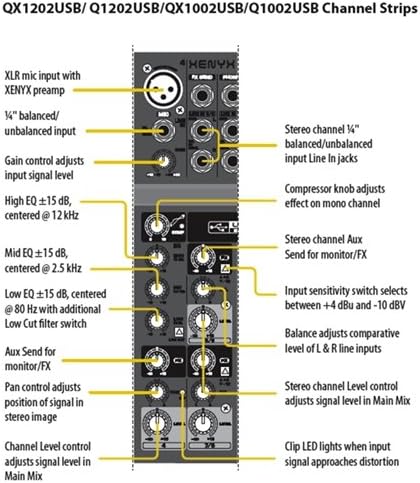
Figure 3: Detailed diagram illustrating the controls of a channel strip on the Behringer XENYX QX1002USB mixer, including gain, EQ, and auxiliary sends.
1. Channel Controls (Mono Channels)
- УТУШ: Adjusts the input sensitivity for the microphone or line input. Set this so the "CLIP" LED flashes only occasionally.
- КОМПРЕССОР: (On mono channels) Adjusts the amount of compression applied to the input signal.
- EQ (жогорку, орто, төмөн): Three-band equalizer to shape the tone of the input signal. HIGH affects treble, MID affects midrange, and LOW affects bass frequencies.
- FX: Sends a portion of the channel signal to the internal KLARK TEKNIK Multi-FX processor.
- ПАН: Adjusts the position of the channel signal in the stereo image (left to right).
- ДЕҢГЭЭЛ: Controls the overall output level of the channel to the main mix.
2. Stereo Channels
- КИРГИЗҮҮ СЕЗГИЛИКТИ КӨТКӨРҮҮЧҮ: Selects between +4 dBu and -10 dBV for optimal input level.
- БАЛАНС: Adjusts the comparative level of the left and right line inputs.
- ДЕҢГЭЭЛ: Controls the overall output level of the stereo channel to the main mix.
3. Main Section Controls
- FX ЖӨНӨТҮҮ: Controls the overall level of the signal sent to the internal effects processor.
- FX TO MAIN: Adjusts the amount of the processed effect signal that is mixed into the main output.
- НЕГИЗГИ АРАЛАШТЫРУУЧУ ФАЙДЕР: Негизги стерео микстин жалпы чыгаруу деңгээлин көзөмөлдөйт.
- PHONES/CONTROL ROOM: Adjusts the output level for headphones and control room monitors.
- USB/2-TRACK TO MAIN/PHONES: Routes the USB/2-Track input to the main mix or headphones/control room.
4. KLARK TEKNIK Multi-FX Processor
The integrated KLARK TEKNIK Multi-FX processor offers a variety of effects. Use the PROGRAM knob to select an effect and the TAP/ENTER button to confirm. The FX level is controlled by the FX knob on each channel and the FX TO MAIN knob in the main section.
Техникалык тейлөө
1. Тазалоо
Regularly clean the mixer with a soft, dry, lint-free cloth. Do not use liquid cleaners, solvents, or abrasive materials, as these can damage the finish and internal components.
2. Сактоо
Колдонулбаган учурда, миксерди салкын, кургак жерде, күндүн түз нурунан жана өтө жогорку температурадан алыс сактаңыз. Ташуу учурунда тиешелүү коргоочу каражаттарды колдонуңузasing.
3. Микропрограмманы жаңыртуу
Check the official Behringer website periodically for any available firmware updates for your QX1002USB mixer. Follow the instructions provided by Behringer for any update procedures.
Проблемаларды чечүү
- Үн чыгышы жок:
- Ensure the mixer is powered on and all cables are securely connected.
- Check the MAIN MIX fader and individual channel LEVEL knobs are raised.
- Verify that your speakers/amplifier are powered on and connected correctly.
- Check the PHONES/CONTROL ROOM knob if monitoring through headphones/monitors.
- Бурмаланган үн:
- Reduce the GAIN on the input channels if the CLIP LED is constantly lit.
- Lower the MAIN MIX fader or the input level to your speakers/ampөмүрлүү.
- Бардык кабелдердин жакшы абалда экенин жана туура туташтырылганын текшериңиз.
- Ум же ызы-чуу:
- Жерге туташтыруу циклдерин текшериңиз. Бардык аудио жабдууларды бир эле кубат булагына туташтырып көрүңүз.
- Бардык кабелдер корголгонун жана жакшы абалда экенин текшериңиз.
- Аудио кабелдерин электр кабелдеринен алыс кармаңыз.
- USB аудио көйгөйлөрү:
- Ensure the correct USB audio driver is installed on your computer (if required by Behringer).
- Verify the QX1002USB is selected as the input/output device in your computer's sound settings and DAW.
- Check the USB/2-TRACK TO MAIN/PHONES switch.
Техникалык шарттар
| Өзгөчөлүк | Деталь |
|---|---|
| Модел | XENYX QX1002USB |
| Бренд | Берингер |
| Каналдардын саны | 10 Inputs (2 Mono, 4 Stereo) |
| Mic Preamps | 2 x XENYX Mic Preamps |
| Компрессорлор | 2 x Studio-grade compressors (on mono channels) |
| EQ | 3-band "British" EQs |
| Multi-FX процессору | KLARK TEKNIK FX processor with 100 presets |
| USB / аудио интерфейси | Built-in stereo USB/Audio Interface |
| Зымсыз опция | "Wireless-ready" for Behringer ULM digital wireless system |
| Output Connector Type | XLR, TRS |
| Элемент Салмагы | Болжол менен 8 фунт (3.6 кг) |
| Продукциянын өлчөмдөрү | 14.8 x 10.91 x 6.14 дюйм (37.6 x 27.7 x 15.6 см) |
| Power Source | Электр зымдары |
Note: Specifications are subject to change without notice. For the most current information, please refer to the official Behringer webсайт.
Кепилдик жана колдоо
Кепилдиктин толук маалыматын, продуктуну каттоону жана техникалык колдоону расмий Behringer сайтына кириңиз webсайтында www.behringer.com. You can find FAQs, driver downloads, and contact information for customer service there.
Behringer provides a limited warranty for its products. Please retain your proof of purchase for warranty claims.


