Introduction
This manual provides essential instructions for the setup, operation, and maintenance of your Oregon Scientific DS6628 ThinCam 1.3MP Digital Flash Camera. Please read this manual thoroughly before using your camera to ensure proper function and longevity.
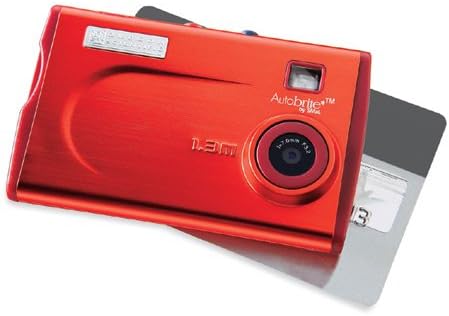
1-сүрөт: The Oregon Scientific DS6628 ThinCam 1.3MP Digital Flash Camera, showcasing its compact red design with the lens, flash, and "Autobrite" branding visible. A memory card is partially inserted on the right side.
Пакеттин мазмуну
Пакетиңизде бардык буюмдар бар экенин текшериңиз:
- DS6628 Digital Camera
- Flash Attachment
- Software CD (for driver installation and image management)
- USB кабели
- Ташуу кутусу
The camera features a built-in Li-polymer battery.
Жайгашуу
1. Батареяны заряддоо
The DS6628 ThinCam features a built-in Li-polymer battery. To charge the camera, connect it to your computer using the provided USB cable. The camera will charge automatically when connected to a powered USB port. A full charge provides power for up to 500 images.
2. Программаларды жана драйверлерди орнотуу
Before connecting the camera to your computer for the first time, install the included software and drivers from the provided CD. This ensures proper recognition and functionality on both PC and Mac operating systems. Follow the on-screen instructions during installation.
3. Эстутум картасын салуу (милдеттүү эмес)
The camera has 16MB of internal memory, sufficient for approximately 21 high-resolution or 91 low-resolution pictures. For expanded storage, the camera supports SD and MMC cards.
- Камеранын капталындагы эстутум картасынын уячасын табыңыз.
- Insert a compatible SD or MMC card into the slot until it clicks into place. Ensure the card is inserted in the correct orientation.
- To remove the card, gently push it inward until it springs out.
Камераны иштетүү
1. Күйгүзүү / Өчүрүү
Locate the power button, typically on the top or side of the camera. Press and hold it for a few seconds to power the camera on or off.
2. Сүрөткө тартуу
The DS6628 ThinCam captures images at 1.3-megapixel resolution (1288 x 962 pixels).
- Камера күйгүзүлгөнүн текшериңиз.
- Point the camera at your subject. The camera features a pop-up/focus-free lens pad and an optical viewкадрларыңызды кадрга түшүрүү үчүн издөөчү.
- Press the shutter button firmly to capture an image.
3. Flash колдонуу
The camera includes a detachable flash module. Attach the flash module to the designated port on the camera when additional lighting is required. The flash operates in automatic mode.
4. Сүрөттөрдү компьютерге өткөрүү
After installing the necessary software and drivers, connect the camera to your computer using the USB cable. The computer should recognize the camera as a removable storage device. You can then transfer images directly or use the included software for management.
Техникалык тейлөө
Батареяга кам көрүү
- Биринчи жолу колдонуудан мурун батарейканы толук кубаттаңыз.
- Батареянын иштөө мөөнөтүн узартуу үчүн бат-баттан батареяны толугу менен түгөтпөңүз.
- If the camera will not be used for an extended period, charge it partially (around 50%) before storing.
- Store the camera in a cool, dry place.
Тазалоо
- Камеранын корпусун тазалоо үчүн жумшак, түксүз чүпүрөктү колдонуңуз.
- For the lens, use a specialized lens cleaning cloth and solution. Avoid harsh chemicals.
- Ensure the flash module contacts are clean and free of debris.
Проблемаларды чечүү
| Көйгөй | Мүмкүн болгон себеп / Чечим |
|---|---|
| Камера күйбөйт. | Battery may be depleted. Connect the camera to a computer via USB to charge. |
| Сүрөттөрдү компьютерге өткөрүп берүү мүмкүн эмес. |
|
| Poor image quality (washed out, out of focus). |
|
| Battery does not hold charge for long. |
|
Техникалык шарттар
| Өзгөчөлүк | Деталь |
|---|---|
| Бренд | OREGON SCIENTIFIC |
| Модель аты | DS6628 ThinCam |
| Натыйжалуу дагы эле чечим | 1.3 MP (1288 x 962 pixels) |
| Ички эс тутум | 16 MB (approx. 21 high-res / 91 low-res images) |
| Эстутум картасын колдоо | SD, MMC |
| Линзанын түрү | Pop-up, focus-free lens |
| Оптикалык масштаб | 1x |
| Image Stabilization | Санарип |
| Viewтапкыч | Оптикалык |
| Flash | Detachable module, Automatic modes |
| Батарея түрү | Built-in Li-polymer, rechargeable via USB |
| Батареянын иштөө мөөнөтү | Up to 500 images per charge |
| Байланыш | USB |
| Шайкештик | PC жана Mac |
| Түс | Кызыл |
| Өлчөмдөрү (болжол менен) | 2.1 дюйм (H) x 3.4 дюйм (W) x 0.3 дюйм (D) |
Кепилдик жана колдоо
For warranty information and technical support, please refer to the documentation included with your purchase or visit the official Oregon Scientific webсайт. Кепилдик дооматтар үчүн сатып алганыңыздын далилин сактаңыз.


