1. Киришүү
Сатып алганыңыз үчүн рахматasing the GPX BCD2004 Boombox. This portable audio system features a top-loading CD player and an AM/FM tuner, designed for versatile audio playback. This manual provides essential information for setting up, operating, and maintaining your device to ensure optimal performance and longevity.
2. Коопсуздук маалыматы
- Көрсөтмөлөрдү окуу: Carefully read all operating instructions before using the unit.
- Көрсөтмөлөрдү сактоо: Бул колдонмону келечекте маалымат алуу үчүн сактаңыз.
- Суу жана ным: Do not expose this appliance to dripping or splashing water. Do not place objects filled with liquids, such as vases, on the appliance.
- Вентиляция: Туура желдетүүнү камсыз кылыңыз. Эч кандай желдетүүчү тешиктерди жаап албаңыз.
- Жылуулук: Радиаторлор, жылуулук регистрлери, мештер же башка аппараттар (анын ичинде) сыяктуу жылуулук булактарынын жанына койбоңуз ampкөтөргүчтөр) жылуулукту пайда кылуучу.
- Кубат булактары: Use only the power source indicated on the appliance.
- Батареялар: Follow battery safety guidelines. Do not mix old and new batteries, or different types of batteries. Remove batteries if the unit is not used for extended periods.
- Тейлөө: Бардык тейлөөлөрдү квалификациялуу тейлөө кызматкерлерине тапшырыңыз.
3. Пакеттин мазмуну
Сураныч, сиздин пакетиңизде төмөнкү заттар бар экенин текшериңиз:
- GPX BCD2004 Boombox Unit
- AC Power Cord
- User Manual
4. Башкаруу элементтери жана функциялары бүттүview
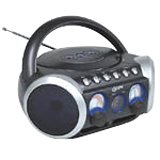
1-сүрөт: Фронт view of the GPX BCD2004 Boombox. This image shows the overall design of the boombox, including the speaker grilles and the general layout of the front panel.
Familiarize yourself with the main controls and features of your boombox:
- CD бөлүмү: Top-loading bay for inserting CDs.
- Функция которуу: Selects between CD, AM, FM, and OFF modes.
- Үндү көзөмөлдөө: Rotary dial to adjust the audio output level.
- Тюнинг терүү: Rotary dial for selecting AM or FM radio frequencies.
- Ойнотуу/тындыруу баскычы: Starts or temporarily stops CD playback.
- Токтотуу баскычы: CD ойнотууну токтотот.
- Өткөрүп жиберүү/Издөө баскычтары (◀◀ / ▶▶): Skips to the previous/next track or searches within a track.
- Программа баскычы: Used to program a sequence of tracks for CD playback.
- Кайталоо баскычы: Repeats the current track or the entire CD.
- AM/FM Antenna: Telescopic antenna for FM reception, internal antenna for AM.
- AC кубаттуулугун киргизүү: Jack for connecting the AC power cord.
- Батарея бөлүмү: Located on the bottom or rear for 'C' batteries.
- Fold-down Carrying Handle: Жөнөкөй көчүрүү үчүн.
5. Орнотуу
5.1 Агрегатты кубаттоо
Your GPX BCD2004 Boombox can be powered by either AC power or batteries.
AC кубаттуулугун иштетүү
- Ensure the Function Switch is in the OFF position.
- Insert the small end of the AC power cord into the AC power input jack on the back of the unit.
- AC кубат шнурунун экинчи учун стандарттуу AC розеткасына (120V ~ 60Hz) сайыңыз.
Батарея кубаттуулугу менен иштөө
For portable use, the boombox requires 8 'C' size batteries (not included).
- Ensure the Function Switch is in the OFF position.
- Open the battery compartment cover located on the bottom or rear of the unit.
- Insert 8 'C' size batteries, observing the correct polarity (+ and -) as indicated inside the compartment.
- Батарея уясынын капкагын бекем жабыңыз.
- Эскертүү: Батарея кубаты менен иштеп жатканда, AC кубат шнурун түзмөктөн ажыратыңыз.
6. Operating the CD Player
The GPX BCD2004 is compatible with standard audio CDs, CD-R, and CD-RW discs.
6.1 Loading a CD
- Lift the CD compartment door located on the top of the unit.
- Place a CD onto the center spindle with the label side facing up.
- Gently close the CD compartment door until it clicks shut.
6.2 Негизги CD ойнотуу
- Функцияны которуштурууну CD абалына коюңуз.
- The CD player will begin to read the disc. The track number will typically display.
- Press the PLAY/PAUSE (▶/██) button to start playback.
- Adjust the Volume Control to your desired listening level.
- To pause playback, press the PLAY/PAUSE (▶/██) button. Press it again to resume.
- To stop playback, press the STOP (■) button.
6.3 Skipping and Searching Tracks
- Өткөрүп жиберүү: During playback, press the SKIP/SEARCH FORWARD (▶▶) button to go to the next track. Press the SKIP/SEARCH BACKWARD (◀◀) button to go to the beginning of the current track, or press it twice to go to the previous track.
- Search Within Track: During playback, press and hold the SKIP/SEARCH FORWARD (▶▶) or SKIP/SEARCH BACKWARD (◀◀) button to fast forward or rewind through the current track. Release the button to resume normal playback.
6.4 Program Play
Белгилүү бир тартипте ойнотуу үчүн 16га чейин тректи программалай аласыз.
- In STOP mode, press the PROGRAM button. The program indicator will flash.
- Use the SKIP/SEARCH buttons (◀◀ / ▶▶) to select your desired first track.
- Press the PROGRAM button again to confirm the selection.
- Repeat steps 2 and 3 to add up to 16 tracks to your program list.
- After programming all desired tracks, press the PLAY/PAUSE (▶/██) button to start programmed playback.
- To clear the program, press the STOP (■) button twice.
6.5 Repeat Play
During CD playback, press the REPEAT button:
- үчүн бир жолу басыңыз 1 кайталаъыз (repeats the current track).
- Press twice for Repeat All (repeats the entire CD or programmed tracks).
- Press a third time to cancel repeat function.
7. Operating the AM/FM Radio
7.1 Tuning to Radio Stations
- Set the Function Switch to either the AM or FM position.
- Adjust the Tuning Dial to select your desired radio station.
- Adjust the Volume Control to your desired listening level.
7.2 Improving Radio Reception
- FM Reception: Extend the telescopic antenna fully and adjust its position for the best reception.
- AM Reception: The unit has a built-in AM antenna. Rotate the entire boombox for optimal AM reception.
8. Техникалык тейлөө
8.1 Агрегатты тазалоо
- Агрегаттын сыртын жумшак менен сүртүңүз, гamp кездеме. Абразивдүү тазалагычтарды же эриткичтерди колдонбоңуз.
- CD линзасы үчүн атайын CD линзасын тазалоочу дискти же оптикалык линзалар үчүн атайын иштелип чыккан жумшак, мамыксыз чүпүрөктү колдонуңуз.
8.2 Батареяга кам көрүү
- Агып кетүүнүн алдын алуу үчүн бирдик узак убакыт бою колдонулбай турган болсо, батарейкаларды алып салыңыз.
- Колдонулган батарейкаларды жергиликтүү эрежелерге ылайык таштаңыз.
9. Кыйынчылыктарды
If you experience issues with your boombox, please refer to the following common problems and solutions:
| Көйгөй | Мүмкүн себеп | Чечим |
|---|---|---|
| Күч жок | AC cord not connected; Batteries dead or incorrectly inserted; Function switch OFF. | Check AC cord connection; Replace batteries or check polarity; Set Function switch to CD, AM, or FM. |
| CD ойнобой жатат | CD inserted incorrectly; CD dirty or scratched; CD compartment door open; Function switch not on CD. | Insert CD with label side up; Clean or replace CD; Close CD door securely; Set Function switch to CD. |
| Радио кабыл алуу начар | Antenna not extended/adjusted; Weak signal. | Extend and adjust FM antenna; Rotate unit for AM reception; Try a different location. |
| Үн жок же үнү төмөн | Volume too low; Unit in pause mode. | Increase volume; Press Play/Pause button to resume playback. |
10. Техникалык шарттар
- Модел: BCD2004
- Бренд: GPX
- CD шайкештиги: CD, CD-R, CD-RW
- Радио тюнер: AM/FM
- Кубат булагы: AC 120V ~ 60Hz or 8 x 'C' Batteries (not included)
- Баяндамачылар: 2 Full-range speakers
- Өлчөмдөрү (болжол менен): 33.02 x 27.94 x 17.02 см (L x W x Y)
- Салмагы (болжол менен): 2.18 кг
- Өзгөчөлүктөрү: 16-track programming, Repeat play, Song skip/search, Fold-down carrying handle
11. Кепилдик жана колдоо
This GPX BCD2004 Boombox comes with a 90 күндүк кепилдик баштапкы сатып алынган күндөн тартып. Бул кепилдик нормалдуу колдонуудагы материалдардагы жана жасалгадагы кемчиликтерди камтыйт.
For warranty service or technical support, please refer to the contact information provided with your purchase documentation or visit the official GPX website. Please have your model number (BCD2004) and proof of purchase ready when contacting support.


