Introduction
This manual provides essential instructions for setting up, operating, maintaining, and troubleshooting your Olympus SP-350 8MP Digital Camera. Please read this manual thoroughly to ensure proper use and to maximize the camera's capabilities.
The Olympus SP-350 is an 8.0-megapixel digital camera equipped with a 3x optical zoom lens, designed for capturing high-quality images. It features a 2.5-inch LCD for viewing and playback, and offers both automatic and full manual control settings. The camera supports various shooting modes and can be expanded with conversion lenses and external flashes.

Figure 1: Olympus SP-350 Digital Camera. This image shows the front view of the black Olympus SP-350 digital camera with its lens extended, highlighting its compact design.
Жайгашуу
1. Батареяны орнотуу
The Olympus SP-350 can be powered by one CR-V3 battery or two AA-size batteries. Ensure batteries are inserted with correct polarity.
- Open the battery compartment cover, typically located on the bottom or side of the camera.
- Insert the CR-V3 battery or two AA-size batteries according to the polarity indicators (+/-).
- Батарея уясынын капкагын бекем жабыңыз.
2. Эстутум картасын орнотуу
The camera uses xD-Picture Cards for image storage, with a maximum supported size of 2 GB.
- Эстутум картасынын уячасын, адатта, батарея бөлүмүнүн жанына жайгаштырыңыз.
- Insert the xD-Picture Card into the slot until it clicks into place. Ensure the card is oriented correctly.
- Эстутум картасынын уячасынын капкагын жабыңыз.
3. Баштапкы күйгүзүү
After installing batteries and a memory card, press the power button to turn on the camera. Follow any on-screen prompts for initial setup, such as setting the date and time.
Камераны иштетүү
1. Негизги атуу режимдери
The camera offers Automatic, Program, and Scene shooting modes, along with 27 creative scene options.
- Автоматтык режим: The camera automatically adjusts settings for optimal exposure.
- Программа режими: Allows some manual control over settings while the camera maintains proper exposure.
- Сахна режимдери: Select from various preset scenes (e.g., landscape, portrait, night scene) for specific shooting conditions.
2. Чоңойтуу функциясы
The SP-350 features a 3x optical zoom and a 5x digital zoom.
- Use the zoom lever/buttons to adjust the focal length. Optical zoom provides higher quality without pixelation.
- Digital zoom extends the magnification but may reduce image quality.
3. Фокусту башкаруу
The camera uses Contrast Detection autofocus and supports both autofocus and manual focus modes.
- Автофокус (AF): The camera automatically focuses on the subject. Half-press the shutter button to engage AF.
- Кол менен Фокус (MF): Allows you to manually adjust the focus for precise control. Refer to the on-screen display for focus indicators.
4. Flash колдонуу
The camera has an automatic flash mode and supports external flashes via a hot shoe.
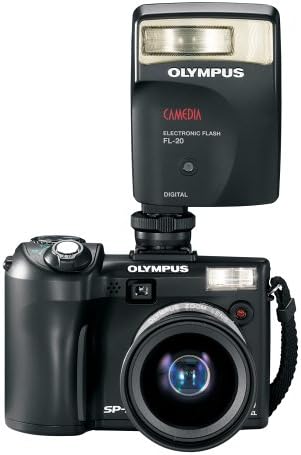
Figure 2: Olympus SP-350 Digital Camera with an attached external flash. This image illustrates how an external flash unit can be mounted on the camera's hot shoe for enhanced lighting.
- Камтылган Flash: Operates in automatic mode, firing when lighting conditions require it.
- External Flash: For more advanced lighting control, attach a compatible external flash unit to the camera's hot shoe.
5. Кино режими
Record videos with audio in QuickTime Movie Mode (MOV format) at 480p resolution.
- Select Movie Mode from the shooting mode dial.
- Press the shutter button to start and stop recording.
6. Сүрөттү ойнотуу
Use the 2.5-inch LCD screen to review тартылган сүрөттөр жана видеолор.
- Press the playback button to enter playback mode.
- Use the directional pad to navigate through images and videos.
7. Байланыш
Connect the camera to a computer or PictBridge-enabled printer using the multi-connector for USB and AV.
- USB туташуу: Transfer images and videos to a computer using the provided USB cable.
- PictBridge: Print photos directly from the camera to a compatible printer without a computer.
Техникалык тейлөө
1. Тазалоо
- Камеранын корпусун тазалоо үчүн жумшак, түксүз чүпүрөктү колдонуңуз.
- Объектив жана ЖК экран үчүн атайын линзаны тазалоо чүпүрөктү жана эритмени колдонуңуз. Катуу химиялык заттардан алыс болуңуз.
- Keep the battery and memory card contacts clean and dry.
2. Сактоо
- Камераны салкын, кургак жерде күндүн тике тийген нурунан жана экстремалдык температурадан алыс сактаңыз.
- Камера агып кетпеши үчүн узак убакыт бою колдонулбай турган болсо, батареяларды алып салыңыз.
- Use a camera bag or case to protect the camera from dust and physical damage.
Проблемаларды чечүү
- Камера күйбөйт: Ensure batteries are correctly inserted and charged. Try new batteries.
- Сүрөттөр бүдөмүк же фокустан тышкары: Check focus mode settings. Ensure sufficient lighting. Clean the lens.
- Жарк этпейт: Verify flash mode settings. Ensure external flash is properly attached and powered.
- Slow startup or shot-to-shot time: Ensure a high-speed xD-Picture Card is used.
- Эстутум картасынын катасы: Reinsert the memory card. Try a different, compatible xD-Picture Card. Ensure the card is not full or locked.
- ЖК экран бош: Check if the camera is powered on. Adjust brightness settings if available.
Техникалык шарттар
| Өзгөчөлүк | Спецификация |
|---|---|
| Модель аты | Olympus SP-350 |
| Натыйжалуу дагы эле чечим | 8 депутат |
| Оптикалык масштаб | 3x |
| Digital Zoom | 5x |
| Screen Size | 2.5 дюйм |
| Фото сенсор технологиясы | CMOS |
| Image Stabilization | Санариптик, оптикалык |
| Колдоого алынган File Формат | RAW, JPEG |
| Flash эс тутум түрү | xD Picture Card, Internal |
| Флэш эс тутумдун максималдуу өлчөмү | 2 ГБ |
| Байланыш технологиясы | USB |
| Аппараттык интерфейс | PictBridge, USB |
| Атуу режимдери | Automatic, Program, Scene |
| Кино режими | Yes (480p, MOV) |
| Автофокус технологиясы | Контрастты аныктоо |
| Фокус түрү | Autofocus & Manual |
| Батарея түрү | CR-V3 or 2x AA-size |
| Элемент Салмагы | 0.54 фунт |
| Түс | Кара |
Кутуда эмне бар
The standard package for the Olympus SP-350 Digital Camera includes:
- Olympus SP-350 Digital Camera
- Боо
- Multi-connector for USB and AV
- CR-V3 Battery
- Basic Instruction Manual (this document)
- Quick Start Guide
- Кепилдик картасы
- CD ROM: Olympus Master Software, and advanced manual
Кепилдик жана колдоо
For warranty information and technical support, please refer to the warranty card included in your product package or visit the official Olympus support webсайт. Сатып алуу квитанциясын кепилдик дооматтары үчүн сатып алуунун далили катары сактаңыз.


