Introduction
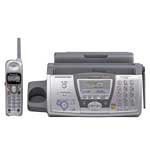
This manual provides instructions for the Panasonic KX-FPG376, a multifunction device combining a plain paper fax, a 2.4GHz digital cordless phone, and a digital answering system. This unit is designed to serve as a comprehensive communication center for home or office use.
Жайгашуу
Follow these steps for initial setup of your Panasonic KX-FPG376 unit.
- Пакеттен чыгаруу: Бардык компоненттерди таңгактан этияттык менен алып салыңыз. Бардык бөлүктөр бар экенин текшериңиз.
- Кубат туташуу: Connect the AC adapter to the unit and then plug it into a standard electrical outlet.
- Телефон байланышы: Connect one end of the telephone line cord to the LINE jack on the unit and the other end to your telephone wall jack.
- Кагаз жүктөө: Open the paper tray and load plain paper. Ensure the paper is aligned correctly.
- Film Installation: Install the thermal transfer film roll according to the instructions provided in the film packaging. Ensure it is seated correctly for proper fax reception.
- Cordless Handset Battery Installation and Charging: Insert the rechargeable batteries into the cordless handset. Place the handset on the base unit to charge for at least 7 hours before initial use.
Иштөө нускамалары
This section details the primary functions of your KX-FPG376 unit.
Факс функциялары
- Факс жөнөтүү: Place the document face down in the automatic document feeder. Dial the recipient's fax number and press the 'Fax/Start' button.
- Receiving a Fax: The unit will automatically receive faxes. If the unit runs out of paper, incoming faxes will be stored in memory for later printing (out-of-paper reception).
- Документтерди көчүрүү: Place the document face down in the automatic document feeder. Press the 'Copy' button to make a copy.
Cordless Phone Functions
- Чакыруу: Pick up the cordless handset, dial the number, and press the 'Talk' button.
- Чалууга жооп берүү: When the phone rings, press the 'Talk' button on the cordless handset.
- Динамик: During a call, press the 'Speakerphone' button on the handset to activate the speakerphone function.
- Чалуучунун ID: The Caller ID information will be displayed on both the base unit and the cordless handset screen (requires subscription to Caller ID service from your local telephone company).
Санариптик жооп берүү тутуму
- Recording Messages: The answering system will automatically record incoming messages when activated. The system has an 18-minute total recording time.
- Checking Messages: Press the 'Play' button on the base unit or access messages via the cordless handset.
- Mailboxes: The system supports two mailboxes for organizing messages.
Техникалык тейлөө
Regular maintenance ensures optimal performance of your unit.
- Тасманы алмаштыруу: The thermal transfer film requires replacement after approximately 50 pages of incoming faxes. It is crucial to use genuine Panasonic replacement film. The unit contains a sensor that may prevent non-Panasonic film from functioning correctly.
- Кагаз жүктөө: Always ensure the paper tray has sufficient plain paper. Use standard 8.5 x 11 inch paper.
- Тазалоо: Periodically clean the exterior of the unit with a soft, dry cloth. Avoid using abrasive cleaners or solvents. Clean the document feeder rollers and scanner glass if print quality degrades.
Проблемаларды чечүү
Бул бөлүм сиз кабылышы мүмкүн болгон жалпы көйгөйлөрдү карайт.
- Document Feeder Jams: If documents jam during faxing or copying, ensure only one page is loaded at a time and that the paper guides are adjusted correctly. Remove any jammed paper carefully to avoid tearing.
- Incoming Faxes Not Printing: Check if the thermal transfer film needs replacement. Verify that genuine Panasonic film is installed. Ensure there is paper in the paper tray.
- Cordless Handset Not Working: Ensure the handset batteries are fully charged. Place the handset on the base unit for several hours. Check that the AC adapter is securely plugged into the base unit and the power outlet.
- Терүү үнү жок: Verify that the telephone line cord is securely connected to both the unit's LINE jack and the wall jack. Test the wall jack with another phone if possible.
- Автожооп берүүчү система жаздырбай жатат: Check if the answering system is turned on. Ensure there is available recording time.
Техникалык шарттар
| Өзгөчөлүк | Спецификация |
|---|---|
| Модель аты | KX-FPG376 |
| Бренд | Panasonic |
| Сканер түрү | Документ |
| Байланыш технологиясы | Ethernet |
| Резолюция | 600 dpi |
| Ватtage | 5.8 ватт |
| Түс тереңдиги | 1 bpp |
| Стандарттык барак сыйымдуулугу | 250 барак |
| Оптикалык сенсор технологиясы | КМШ |
| Медиа түрү | Кагаз |
| Туташуу түрү | Ethernet |
| Кагаз өлчөмү | 8.5 x 11 дюйм |
| Жарык булагы түрү | LED |
| UPC | 037988809615 |
Кепилдик жана колдоо
For information regarding product warranty, technical support, or service, please refer to the warranty card included with your product or visit the official Panasonic support webсайт. Сиз да зыярат кылсаңыз болот Amazonдагы Panasonic дүкөнү кошумча продукт маалымат үчүн.