1. Киришүү
Сатып алганыңыз үчүн рахматasing the Pentax Optio W10 Digital Camera. This manual provides essential information for the safe and effective use of your camera. The Optio W10 is a compact 6.0-megapixel digital camera featuring a 3x optical zoom lens, designed for capturing high-quality still images and video. Its robust design makes it suitable for various environments.
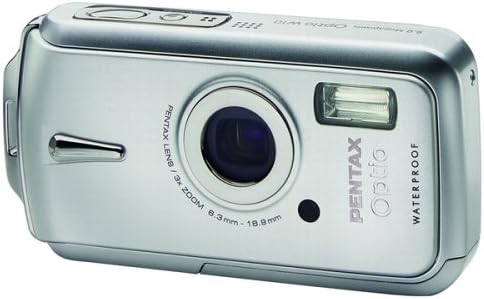
Сүрөт 1.1: Алдыңкы view of the Pentax Optio W10 Digital Camera, showcasing the lens, flash, and branding.
2. Коопсуздук маалыматы
Please read and understand all safety precautions before using the camera. Failure to do so may result in injury or damage to the product.
- Камераны ажыратууга же өзгөртүүгө аракет кылбаңыз.
- Keep the camera away from extreme temperatures, direct sunlight, and high humidity.
- Ensure all compartment covers (battery, memory card) are securely closed and locked before exposing the camera to water or dust.
- Use only the specified battery type (Lithium-ion DL-I8) and charger.
- Балдар жетпеген жерде сактаңыз.
3. Пакеттин мазмуну
Камера пакетиңизде бардык элементтер бар экенин текшериңиз:
- Pentax Optio W10 Digital Camera
- Lithium-ion Battery DL-I8
- Батарея заряддагыч
- AC Power Cord
- USB кабели (компьютерге туташуу үчүн)
- Боо
- Программалык камсыздоо CD-ROM
- Көрсөтмө (бул документ)
4. Орнотуу
4.1. Батареяны орнотуу
- Камеранын ылдый жагындагы батарея/эстутум картасы бөлүгүнүн капкагын табыңыз.
- Slide the lock switch to the 'OPEN' position and open the cover.
- Insert the Lithium-ion battery DL-I8 into the compartment, ensuring the correct orientation as indicated inside the compartment.
- Close the cover and slide the lock switch to the 'LOCK' position until it clicks securely.

4.1-сүрөт: Төмөнкү view of the camera, illustrating the battery and SD card compartment with the lock switch.
4.2. Эстутум картасын орнотуу
The Pentax Optio W10 uses SD memory cards.
- Open the battery/memory card compartment cover as described in Section 4.1.
- Insert the SD memory card into the designated slot with the label facing the correct direction, pushing gently until it clicks into place.
- Close the cover and slide the lock switch to the 'LOCK' position.
4.3. Баштапкы күйгүзүү жана дата/убакыт жөндөө
- басыңыз КҮЙГҮЗҮҮ/ӨЧҮРҮҮ баскыч камеранын үстү жагында жайгашкан.
- Upon first power-on, the camera will prompt you to set the date and time. Use the directional buttons on the back of the camera to navigate and the OK ырастоо үчүн баскыч.
- Баштапкы орнотууну аяктоо үчүн экрандагы нускамаларды аткарыңыз.

4.2-сүрөт: Жогорку view of the camera, highlighting the ON/OFF button and 6.0 Megapixels branding.
5. Камераны иштетүү
5.1. Негизги сүрөт
To take a still picture:
- баскычын басып камераны күйгүзүңүз КҮЙГҮЗҮҮ/ӨЧҮРҮҮ баскычы.
- 2.5 дюймдук LCD мониторду колдонуп, сүрөтүңүздү кадрга алыңыз.
- Фокустоо үчүн жапкычты жарым ылдый басыңыз. Фокуска жеткенде фокус алкагы жашыл түскө айланат.
- Press the shutter button all the way down to capture the image.

5.1-сүрөт: Арткы view камеранын LCD экранын жана навигация жана жөндөөлөр үчүн ар кандай башкаруу баскычтарын көрсөтөт.
5.2. Атуу режимдери
The Optio W10 offers various shooting modes accessible via the РЕЖИМ button. Refer to the on-screen menu for specific options such as Program Auto, Scene Modes, and Movie Mode.
5.3. Видео жаздыруу
Видео жаздыруу үчүн:
- Switch to Movie Mode using the РЕЖИМ баскычы.
- Press the shutter button to start recording. The camera can capture QuickTime motion JPEG videos at 640 x 480 resolution at 30 frames per second.
- Жазууну токтотуу үчүн жапкычты кайра басыңыз.
5.4. Ойнотуу
үчүн view тартылган сүрөттөр жана видеолор:
- басыңыз Ойнотуу баскыч (адатта үч бурчтук сүрөтчөсү менен көрсөтүлөт).
- Use the directional buttons to scroll through your photos and videos.
- басыңыз OK баскычына view видеону көрүү же сүрөттү чоңойтуу.
5.5. Компьютерге туташуу
Сүрөттөрдү жана видеолорду компьютерге өткөрүп берүү үчүн:
- Камера өчүрүлгөнүн текшериңиз.
- Камераны компьютериңизге берилген USB кабели аркылуу туташтырыңыз.
- Turn on the camera. It should be recognized as a removable disk or a PTP device.
- Кирүү жана өткөрүп берүү үчүн компьютериңиздин операциялык тутумунун көрсөтмөлөрүн аткарыңыз files.
6. Техникалык тейлөө
6.1. Тазалоо
- Камеранын корпусу: Жумшак, кургак чүпүрөк менен сүртүңүз. өжөр кир үчүн, бир аз d колдонууamp чүпүрөк, анан кылдат кургатуу.
- Объектив: Use a lens brush or a soft, clean lens cloth. Avoid touching the lens surface with your fingers.
- ЖК монитор: Жумшак, кургак чүпүрөк менен акырын сүртүңүз. Экранды катуу басуудан алыс болуңуз.
- Суу өткөрбөйт: Regularly inspect the rubber seals around the battery/memory card compartment for dirt, sand, or damage. Clean gently with a soft cloth. Do not use sharp objects.
6.2. Сактоо
When not in use for extended periods, store the camera in a cool, dry, and well-ventilated place. Remove the battery to prevent leakage. Avoid storing in areas with high humidity or extreme temperature fluctuations.
7. Кыйынчылыктарды
If you encounter issues with your Pentax Optio W10, refer to the following common solutions:
| Көйгөй | Мүмкүн болгон себеп / Чечим |
|---|---|
| Камера күйгүзүлбөйт | Battery is depleted or incorrectly inserted. Recharge the battery or reinsert it correctly. |
| Сүрөткө тартуу мүмкүн эмес | Memory card is full, locked, or not inserted. Delete unnecessary files, unlock the card, or insert it correctly. |
| Сүрөттөр бүдөмүк | Lens is dirty, camera shake, or incorrect focus. Clean the lens, hold the camera steady, or ensure proper focus. |
| Water inside compartment | Compartment cover not securely closed or seal is damaged. Ensure cover is locked. If seal is damaged, contact service. |
For further assistance, please refer to the official Pentax support webсайтка же кардарларды тейлөөгө кайрылыңыз.
8. Техникалык шарттар
Key technical specifications for the Pentax Optio W10 Digital Camera:
- Натыйжалуу дагы эле чечим: 6.0 мегапиксел
- Фото сенсор технологиясы: CCD (1/2.5 дюйм)
- Оптикалык масштаб: 3x
- Digital Zoom: 4x
- Максималдуу фокус узундугу: 114 мм
- Минималдуу фокус узундугу: 38 мм
- LCD экрандын өлчөмү: 2.5 дюйм
- Сүрөттү турукташтыруу: Санариптик, оптикалык
- Видеонун чечилиши: 640 x 480, 30/15 fps (QuickTime Motion JPEG)
- Колдоого алынган File Формат: JPEG (Still Images), MJPEG (Video)
- Сактоочу медиа: SD/MMC card, Internal Memory
- Батарея түрү: Lithium-ion (DL-I8)
- Өзгөчө өзгөчөлүгү: Waterproof (Note: Ensure all seals are properly closed before water exposure)
- Минималдуу жабуунун ылдамдыгы: 4 секунд
- Максималдуу жабуунун ылдамдыгы: 1/2000 секунд
- ISO диапазону: Авто, 64, 100, 200, 400, 800
- Элемент Салмагы: 5.6 унция
- Модель номери: 19033
9. Кепилдик жана колдоо
For information regarding warranty coverage, service, or technical support for your Pentax Optio W10 camera, please refer to the warranty card included with your product or visit the official Pentax webсайт. Кепилдик дооматтар үчүн сатып алганыңыздын далилин сактаңыз.
Онлайн колдоо: Ricoh Imaging Global Support (Pentax is a brand of Ricoh Imaging)


