1. Киришүү
The Behringer T1951 Ultra-Gain Vacuum Tube Stereo 4-band Parametric Equalizer is a professional audio processing unit designed to provide precise tonal shaping and enhancement for various audio applications. Featuring a 12AX7A-based Ultra Tube circuit, it offers warm, musical equalization with four parametric bands per channel, allowing for detailed frequency attenuation and boosting. Its parallel architecture minimizes phase-shifting problems, ensuring high-fidelity audio reproduction.
This manual provides essential information for the safe and efficient operation of your T1951 equalizer, including setup, operation, maintenance, and troubleshooting.
2. Маанилүү коопсуздук нускамалары
- Бул нускамаларды окуңуз.
- Бул көрсөтмөлөрдү сактаңыз.
- Бардык эскертүүлөргө кулак сал.
- Бардык нускамаларды аткарыңыз.
- Бул аппаратты суунун жанында колдонбоңуз.
- Кургак чүпүрөк менен гана тазалаңыз.
- Эч кандай вентиляция тешиктерин жаап албаңыз. Өндүрүүчүнүн көрсөтмөлөрүнө ылайык орнотуу.
- Радиаторлор, жылуулук регистрлери, мештер же башка аппараттар (анын ичинде) сыяктуу жылуулук булактарынын жанына орнотпоңуз ampкөтөргүчтөр) жылуулукту пайда кылуучу.
- Поляризацияланган же жерге туташтыруучу сайгычтын коопсуздук максатын жокко чыгарбаңыз. Поляризацияланган сайгычтын эки бычагы бар, бири экинчисинен кенен. Жерге туташтыруучу түрдөгү сайгычтын эки бычак жана үчүнчү жерге туташтыруучу тиштери бар. Кең бычак же үчүнчү тиш сиздин коопсуздугуңуз үчүн берилген. Эгерде берилген сайгыч розеткага туура келбесе, эскирген розеткаңызды алмаштыруу үчүн электрикке кайрылыңыз.
- Электр шнурунун басылып кетүүсүнөн же кысып калуудан сактаңыз, айрыкча сайгычтарга, розеткаларга жана алар аппараттан чыга турган жерине.
- Өндүрүүчү тарабынан көрсөтүлгөн тиркемелерди/аксессуарларды гана колдонуңуз.
- Өндүрүүчү белгилеген же аппарат менен бирге сатылган араба, стенд, штатив, кронштейн же үстөл менен гана колдонуңуз. Араба колдонулганда, оодарылып кетүүдөн жаракат албаш үчүн арабаны/аппаратты айкалыштырууда этият болуңуз.
- Бул аппаратты чагылгандуу бороондордо же узак убакыт бою колдонбогондо электр розеткасынан ажыратыңыз.
- Бардык тейлөөлөрдү квалификациялуу тейлөө кызматкерлерине тапшырыңыз. Аппарат кандайдыр бир зыянга учураганда, мисалы, кубат берүүчү шнур же сайгыч бузулганда, суюктук төгүлгөндө же аппараттын ичине нерселер түшкөндө, аппарат жамгырга же нымдуулукка дуушар болгондо, нормалдуу иштебей калганда тейлөө талап кылынат. , же түшүрүлгөн.
3. Орнотуу жана байланыштар
The T1951 is designed for integration into various audio setups, including studio recording, live sound, and broadcast environments. Ensure all connections are secure before powering on the unit.
3.1 Стойкага орнотуу
The T1951 is a standard 19-inch rack-mountable unit. Ensure adequate ventilation around the unit when installing it in a rack. Leave at least one rack space above and below the unit if possible, especially if other heat-generating equipment is present.

Figure 3.1: The Behringer T1951 equalizer integrated into a professional audio rack setup.
3.2 Аудио байланыштар
The T1951 features balanced XLR and 1/4" TRS connectors for both audio input and output, ensuring compatibility with professional audio equipment. Connect your audio source (e.g., mixer, preamplifier) to the T1951's inputs and the T1951's outputs to your next device in the signal chain (e.g., ampкөтөргүч, жаздыруу интерфейси).
- Киргизүүлөр: Use XLR or 1/4" TRS cables to connect your audio source to the T1951's INPUT L and R jacks.
- Чыгуулары: Use XLR or 1/4" TRS cables to connect the T1951's OUTPUT L and R jacks to your amplifier, recording device, or other destination.
3.3 Кубат туташтыруу
Connect the supplied IEC power cable to the rear panel of the T1951 and then to a suitable AC power outlet. Ensure the voltage matches the unit's requirements (100-240V AC, 50/60 Hz, auto-sensing).
4. Иштөө нускамалары
The T1951 offers comprehensive control over your audio's frequency spectrum. Familiarize yourself with the front panel controls to achieve optimal results.
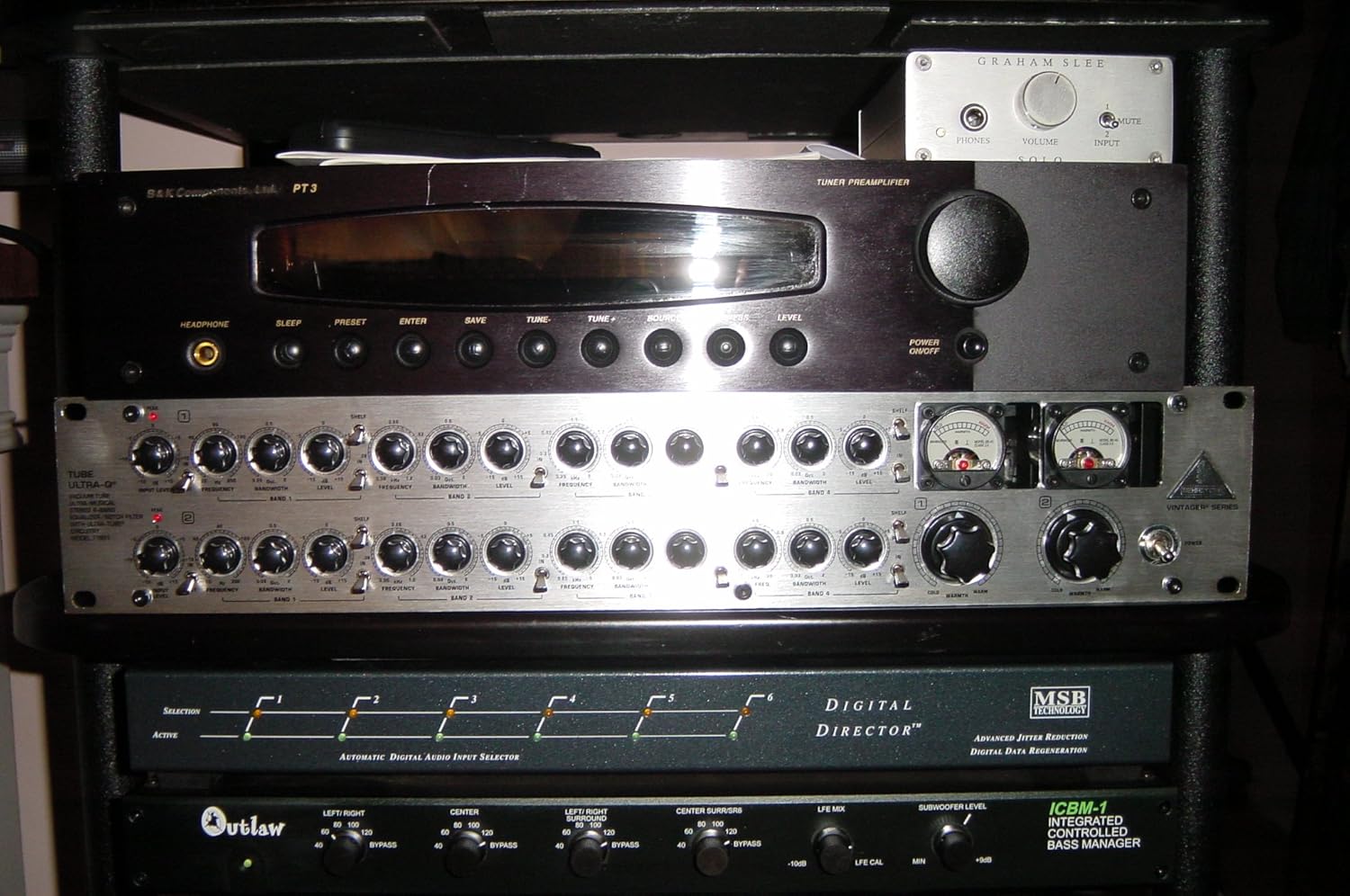
Figure 4.1: Front panel controls of the Behringer T1951.
4.1 Алдыңкы панелдин башкаруу элементтериview
- Киргизүү/чыгаруу деңгээлин башкаруу элементтери: Adjust the overall signal level entering and exiting the unit.
- VU метрлер: Provide visual indication of the output signal level. Aim for levels that do not consistently peak into the red.
- Parametric EQ Bands (1-4): Each band features controls for:
- Жыштыгы: Selects the center frequency of the band.
- Деңгээл: Boosts or cuts the selected frequency.
- Bandwidth (Q): Adjusts the width of the frequency band affected. A higher Q value means a narrower, more precise band.
- Shelf/Peak Switches: For the lo- and hi-frequency bands, these switches allow you to select between a shelving filter (affecting all frequencies above/below the set point) or a peak filter (affecting a specific band).
- Киргизүү/чыгаруу которгучу: Engages or bypasses the equalization for each channel.
- Жогорку LED: Illuminates when the signal level is too high, indicating potential clipping.
- Warmth Control: Adjusts the amount of tube saturation for added harmonic richness.
4.2 Негизги операция
- Күйгүзүү: Ensure all connections are made, then power on the T1951.
- Деңгээлдерди коюңуз: Start with input and output levels at unity gain (0 dB) or a neutral position. Adjust as needed to achieve optimal signal-to-noise ratio without clipping.
- Engage EQ: Press the "In/Out" switch for the channels you wish to equalize.
- Жыштыктарды тууралоо: For each band, select the desired frequency using the "Frequency" knob.
- Apply Boost/Cut: Use the "Level" knob to boost or cut the selected frequency.
- Shape Bandwidth: Adjust the "Bandwidth (Q)" knob to make the equalization effect wider or narrower.
- Utilize Warmth: Experiment with the "Warmth" control to add tube character to your sound.
5. Техникалык тейлөө
The Behringer T1951 is designed for reliable operation. Regular, simple maintenance will help ensure its longevity.
- Тазалоо: Disconnect the unit from power before cleaning. Use a soft, dry cloth to wipe down the exterior. Do not use liquid cleaners or solvents.
- Вентиляция: Ensure that the ventilation openings are not blocked. Proper airflow is crucial for preventing overheating, especially for tube-based equipment.
- Түтүктү алмаштыруу: The 12AX7A vacuum tubes have a finite lifespan. If you notice a degradation in sound quality (e.g., reduced warmth, increased noise), the tubes may need replacement. This should be performed by qualified service personnel.
- Сактагыч: If storing the unit for an extended period, keep it in a dry, temperature-controlled environment, away from direct sunlight and extreme temperatures.
6. Кыйынчылыктарды
This section addresses common issues you might encounter with your T1951 equalizer.
| Көйгөй | Мүмкүн себеп | Чечим |
|---|---|---|
| Үн чыгышы жок |
|
|
| Distorted sound / Peak LED constantly on |
|
|
| Үн же ызы-чуу |
|
|
7. Техникалык шарттар
The following specifications are based on the manufacturer's data for the Behringer T1951.

Figure 7.1: Detailed technical specifications for the Behringer T1951.
7.1 Аудио киргизүү
- Туташтыргычтар: XLR and 1/4" TRS
- Түрү: RF чыпкаланган, серво-баланстуу киргизүү сtage
- Импеданс: 50 кОм балансталган, 25 кОм тең салмактуу эмес
- Макс. киргизүү деңгээли: +21 dBu тең салмактуу жана тең салмаксыз
- CMRR: typ. 40 dB, >55 dB @ 1 kHz
7.2 Аудио чыгаруу
- Туташтыргычтар: XLR and 1/4" TRS
- Түрү: electronically servo-balanced output stage
- Импеданс: 60 Ohm balanced, 30 Ohm unbalanced
- Макс. чыгаруу деңгээли: +21 dBu, +20 dBm balanced and unbalanced
7.3 Системанын спецификациялары
- өткөрүү жөндөмдүүлүгү: 18 Гц менен 30 кГц, +/- 3 дБ
- Сигнал-ызы-чуу катышы: >100 дБ, салмаксыз, 22 Гц 22 кГц
- THD: 0.002 % тип. @ +4 дБу, 1 кГц, бирдиктүү пайда
- IMD: 0.01 % typ. SMPTE
7.4 Фильтр бөлүмү
- Түрү: state-variable parametric filter
- Деңгээл: variable (-15 dB to +15 dB)
- Жыштыгы:
- Band 1: 20 Hz to 300 Hz
- Band 2: 60 Hz to 1.2 kHz
- Band 3: 250 Hz to 5 kHz
- Band 4: 1 kHz to 20 kHz
- өткөрүү жөндөмдүүлүгү: variable (0.03 to 2 octaves)
7.5 Function Switches/Indicators
- Аудио кириш/чыгыш: relay-controlled hard-wire bypass
- Shelf/Peak: switches outer bands from shelving to parametric
- Кирүү/Чыгуу: activates each filter bank
- Жогорку LED: LED indicator of input overload
- Жылуулук: variable (+10 dB to +60 dB)
7.6 Электр энергиясы
- Mains томtages:
- USA/Canada: 120 V~, 60 Hz
- U.K./Australia: 240 V~, 50 Hz
- Europe: 230 V~, 50 Hz
- General Export Model: 100 - 120 V~, 200 - 240 V~, 50 - 60 Hz
- Энергияны керектөө: 35 ватт максимум
- Страховка: 100 - 120 V~: T 1 A H; 200 - 240 V~: T 500 mA H
- Электр байланышы: стандарттуу IEC идиш
7.7 Физикалык
- Өлчөмү (H x W x D): 3 1/2" (89.5 мм) x 19" (482.6 мм) x 8 1/2" (217 мм)
- Таза салмагы: болжол менен 8 кг
- Жеткирүү салмагы: болжол менен 10 кг
8. Кепилдик жана колдоо
Behringer products are built to high standards and undergo rigorous quality control. For detailed warranty information, please refer to the warranty card included with your product or visit the official Behringer webсайт.
For technical support, service, or spare parts, please contact your authorized Behringer dealer or distributor. You can also find support resources, FAQs, and contact information on the official Behringer webсайт: www.behringer.com
When contacting support, please have your product model (T1951) and serial number ready.


